
ERP Implementation Plan: 10 Key Phases & Best Practices
75% of ERP implementations fail to meet original goals. 74% exceed budget. (Source: McKinsey, Panorama Consulting). The reason isn’t the ERP system; it’s the gap between deployment methodology and post-go-live adoption execution.
Enterprise Resource Planning (ERP) software is one of the most complex software systems within an enterprise organization but also one of the most valuable. Successful ERP deployments bring together a suite of integrated applications that allow organizations to streamline and automate processes, providing a single source of truth across the business. A well-executed ERP implementation plan ensures these benefits are realized.
However, the Enterprise Resource Planning implementation process is fraught with potential pitfalls, including poor data migration and a lack of training for end-users. According to a study by Panorama Consulting Solutions, 74% of ERP implementations exceed their budget, and 61% exceed their planned duration. Additionally, only 26% of respondents reported that their ERP systems delivered at least 50% of the expected benefits. Successfully implementing ERP systems, therefore, requires alignment, rigorous planning, and cross-functional collaboration.
We provide an overview of how organizations can apply a clear methodology to the ERP implementation planning process to mitigate the major risks associated with large-scale software implementations successfully. We will delve into the intricacies of ERP systems, enterprise resource planning, and ERP solutions, offering insights into best practices for ERP business processes, ERP applications, and ERP planning.
By understanding the nuances of ERP implementation, organizations can achieve seamless software adoption, fostering digital transformation and enhancing technology adoption across the enterprise.
What is ERP?
Enterprise Resource Planning (ERP) is a type of software that organizations use to manage and integrate essential parts of their businesses. An ERP software application can incorporate planning, purchasing inventory, sales, marketing, finance, human resources, and more.
The primary purpose of ERP systems is to provide a centralized platform for all business processes, thereby enhancing efficiency and decision-making. By consolidating data from various departments into a single ERP solution, organizations can eliminate data silos, reduce manual data entry, and streamline business workflows.
Key features of ERP applications include:
- Integration: ERP systems integrate various business processes into a cohesive system.
- Automation: Automates routine tasks, reducing the need for manual input and minimizing errors.
- Data Analysis: Provides powerful tools for data analysis, enabling better business insights and informed decision-making.
- Scalability: Can scale with the growth of an organization, accommodating increased workloads and additional users.
The adoption of enterprise resource planning software has been steadily increasing. According to a report by Fortune Business Insights, the global Enterprise Resource Planning (ERP) software market size is projected to grow from $81.15 billion in 2024 to $238.79 billion by 2032, exhibiting a CAGR of 14.4% during the forecast period. This growth underscores the importance of ERP planning and ERP implementation in modern businesses.
Digital adoption of ERP systems is crucial for achieving a successful ERP implementation plan. Ensuring that all employees are proficient with the new technology adoption can significantly improve the overall efficiency and return on investment for the ERP system.
What are ERP Systems?
ERP systems are comprehensive software platforms that manage and integrate an organization’s core business processes. Within a unified system, these systems encompass various functions, such as finance, human resources, supply chain management, manufacturing, services, procurement, and others.
The primary objective of ERP systems is to provide a centralized repository of information that all departments can access and utilize. This integration ensures that data flows seamlessly across the organization, eliminating silos and enhancing overall efficiency. The key components of ERP systems include:
- Finance Management: Tracks financial data and processes, including accounts payable, accounts receivable, general ledger, budgeting, and forecasting.
- Human Resources Management: Manages employee data, payroll, recruitment, training, and performance evaluations.
- Supply Chain Management: Oversees the flow of goods and services, including procurement, production, and logistics.
- Manufacturing: Supports production planning, scheduling, and quality control.
- Customer Relationship Management (CRM): Manages customer data, sales, marketing campaigns, and customer service.
Adopting ERP systems can significantly benefit an organization, including improved operational efficiency, better decision-making, and enhanced collaboration. According to a study, 95% of businesses reported improvements in their processes after implementing ERP systems, with 93% saying their ERP implementation improved collaboration within their departments.
Furthermore, ERP systems play a crucial role in digital transformation by enabling organizations to leverage data analytics, automation, and advanced technologies. Implementing an ERP system is a significant step in an organization’s digital adoption journey, facilitating the seamless adoption of new technologies and business practices.
ERP systems are vital for modern businesses, providing a comprehensive and integrated approach to managing enterprise-wide processes. Organizations can achieve greater efficiency, scalability, and market competitiveness by investing in an ERP solution. Effective ERP planning and ERP implementation plans are essential to maximizing the benefits of enterprise resource planning software.
Through a well-structured ERP program, organizations can ensure that their ERP software application meets their unique business needs and supports their long-term goals.
What is an ERP Implementation?
An ERP system brings together discrete systems and information from across a business. This could be anything from staff availability via HR records to customer data in the CRM.
ERP software implementation describes the end-to-end process of gathering business requirements, selecting the right ERP solution, configuring the integrations, migrating legacy data, and deploying the new ERP system. This comprehensive approach ensures that all business aspects are integrated and streamlined.
Alongside ensuring the technical aspects of the system are implemented correctly, the ERP implementation process also focuses on successful change management. This involves considering user needs at each stage and ensuring all users are trained to use the system. Effective digital adoption strategies are crucial here, as they help facilitate the smooth technology adoption necessary for a successful implementation.
However, once the system is live, the implementation doesn’t end. As with all software platforms, ERP systems require regular updates and maintenance to perform at peak performance. Continuous ERP planning and ERP program management are essential to address evolving business needs and technological advancements.
Organizations that follow best practices for ERP implementations can achieve up to a 20% reduction in implementation time and a reduction in operational costs. This highlights the importance of meticulous ERP planning and strategic ERP software application deployment.
ERP implementation is a multifaceted process beyond mere software deployment. It encompasses thorough planning, seamless software adoption, and ongoing maintenance to support the organization’s long-term digital transformation goals. Organizations can achieve significant efficiencies and competitive advantages by investing in a robust ERP business solution and focusing on user-centric enterprise resource planning.
What is the ERP Implementation Process?
Implementing an ERP system is a significant undertaking that should be approached methodically. While the specifics of an ERP implementation may vary from one organization to another, the process generally follows ten essential stages. These stages form the core of the ERP implementation life cycle and are crucial for the project’s success.
The duration of each stage can vary based on the organization’s pace and priorities. Still, an ERP implementation can typically take anywhere from six months to a year from initial ERP planning to a fully operational ERP solution.
Following a structured ERP implementation process and focusing on digital adoption, organizations can seamlessly transition to their new ERP business solution, driving digital transformation and enhancing overall efficiency.
Why is an ERP Implementation Plan Important?
In an enterprise, multiple business functions are making decisions that affect the organization at any given point. ERP systems help manage all the business units and functions from a centralized location. An ERP solution is a repository of information and serves as a single source of truth for the organization. It simplifies the decision-making process for departmental managers, enabling them to trust the data to make crucial business calls.
Here are five reasons why an ERP implementation plan is essential for your organization:
- Seamless Collaboration: Different departments often use different systems, increasing the chance of duplicate information. However, if an ERP system is implemented, it eliminates the probability of duplication and provides centralized information throughout the organization. No department has to wait for another to receive data, reducing dependency, increasing transparency, and promoting collaboration. This is a crucial benefit of enterprise resource planning systems.
- Enhanced Employee Performance: Employees are hired to perform their tasks, but to ensure process compliance and data integrity, they are often burdened with admin tasks. This impacts their performance as most of their time goes into tedious admin tasks, affecting their morale. The right ERP solution can automate repetitive tasks, enabling employees to accomplish their tasks quickly and improving overall performance. This highlights the importance of effective ERP planning and software adoption.
- Improved Tracking Capacity: ERP systems are crucial for many industries, especially retail and supply chains. These industries must manage resources, transport finished goods, and handle demand until it reaches customers. Having a bird’s-eye view of the organization helps leaders identify problems beforehand and tackle them before they become roadblocks. Modern ERP systems come with active tracking systems, eliminating speculation and providing current status to relevant stakeholders. This functionality is a core aspect of enterprise resource planning software.
- Detailed Analytics: Since ERP is a central database, it also has reporting capabilities. It records every user action, helping business leaders make informed decisions. Without an ERP, creating reports might take days or weeks. Real-time monitoring and historical reports from ERP systems provide valuable insights, from finance to inventory management, enhancing the organization’s understanding and decision-making. This is why ERP implementations are critical for digital transformation.
- Boost ROI: Organizations implementing ERP for the first time might consider it a significant expense. However, they will find value in their ERP investments once they are past the initial phase. ERP systems integrate all critical applications within an organization. Instead of juggling multiple applications for information, employees can access the ERP system as a single source of truth. This improves ROI by reducing training time, saving time, and providing better visibility. Successful ERP implementations showcase real ERP implementation examples where companies see substantial financial benefits.
The global ERP software market was valued at USD 71.41 billion in 2023 and is projected to grow to USD 238.79 billion by 2032, with a compound annual growth rate (CAGR) of 14.4% (Fortune Business Insights). This demonstrates the value of investing in robust enterprise resource planning software and focusing on effective digital adoption strategies to drive digital transformation and enhance technology adoption.
A well-planned ERP implementation is vital for modern businesses. By centralizing information, improving employee performance, enhancing tracking capacity, providing detailed analytics, and boosting ROI, an ERP system becomes an indispensable tool for organizational success.
ERP Implementation Failure Rate
According to McKinsey, 75% of all ERP projects fail to meet their goals, with 74% taking longer than expected. An ERP project is not just a technical change but a cultural one. ERP failures can disrupt the whole organization, and, in some cases, the results could be catastrophic.
A famous failed ERP implementation example came in 2019 when vehicle management company LeasePlan abandoned its migration to an SAP-based ERP system after numerous project delays and change management challenges. This caused the business to write off $100 million in project costs and start again from scratch. The project’s catastrophic failure was attributed to poor planning, which caused the company to develop software that would ” not be fit for purpose in the emerging digital world in which [it] operated.”
A survey conducted by Deloitte identified ten barriers to ERP implementation. The major causes of concern are resistance to change, inadequate sponsorship, unrealistic expectations, and poor project management. These factors highlight the importance of meticulous ERP planning and effective change management strategies.
It’s fair to say that the importance of a clearly defined plan in the ERP implementation process cannot be understated. The scale of most ERP implementations means that even minute misalignments can cascade into huge headaches, ultimately risking the project’s success. Organizations must create a plan to overcome these barriers and streamline their ERP implementation process.
ERP systems and enterprise resource planning software are designed to bring coherence and efficiency to business processes. Still, without a structured ERP program and robust ERP planning, the risks of failure increase significantly. Organizations must focus on digital adoption, manage resistance to change, and set realistic expectations to ensure success.
Understanding the high failure rate of ERP implementations emphasizes the need for comprehensive ERP planning, addressing cultural changes, and implementing strong project management practices. Businesses can mitigate risks and achieve successful ERP implementations by learning from past failures and focusing on effective software and technology adoption.
In a survey conducted by Deloitte, it was identified that there are 10 barriers to ERP implementation. Out of all these barriers, the major cause of concern is resistance to change, inadequate sponsorship, unrealistic expectations, and poor project management.
It’s fair to say that the importance of a clearly defined plan in the ERP implementation process can not be understated. The scale of most ERP implementations means that even minute misalignments can cascade into huge headaches, ultimately risking the success of the project.
Organizations must create a plan to overcome these barriers and streamline their ERP implementation process.
Bonus resource: 9 High-Profile ERP Implementation Failures
10 Key Phases in a Successful ERP Implementation Plan
A typical ERP implementation plan can be divided into ten key phases that cover the entire ERP software application lifecycle, from concept to deployment and support of the live system and its users.
Rigorously following these ERP implementation steps will ensure that your ERP implementation has the best chance of success.
1. Discovery
The discovery phase is an extensive research process that gathers information on an organization’s current systems and processes to detail the problem landscape before any ERP solutions are decided upon. This phase provides a solid foundation for the entire ERP implementation process by developing a shared understanding of what a successful implementation will look like.
The discovery phase includes developing technical specifications to inform the selection of an ERP system and whether this would be best delivered on-premise or using cloud infrastructure. The Discovery team comprises senior stakeholders, project managers, technical leads, external consultants, and representatives from across multiple departments. The team should represent everyone involved in developing or using the system.
2. Analysis
After the information has been gathered during the discovery phase, a detailed analysis will be conducted to determine the business case for implementing an ERP. Typically, the outcome of this is a detailed business case that outlines project objectives and how these will be achieved through the ERP implementation plan. Developing a business case allows an organization to evaluate the benefits, risks, and costs of the ERP implementation process.
3. Planning
Implementing ERP software is probably one of the biggest digital transformation programs a business will undertake. It’s, therefore, vital that an ERP implementation plan is created to document the resources required, timelines for implementation, and how the change will be managed.
a. Resources: As part of the ERP implementation plan, you will need to select the implementation team that will be responsible for delivering the project. This team will comprise both technical and non-technical members who will be involved in developing the software and providing feedback on its viability. It’s extremely important to include stakeholders from across the organization in the implementation team, as you will need to involve software end-users in the design, development, and testing phases to ensure the final solution is fit for purpose.
b. Change Management Plan: Your change management plan will document the tasks required to successfully move from your current fragmented systems to the new ERP system. This will include tasks and milestones around data migration, QA and testing, budget forecasting as the project progresses, and end-user training once the new system is live. Alongside outlining the implementation roadmap, milestones, and tasks, your change management plan should also include guidelines around general communication, how urgent issues should be escalated, and how progress will be tracked.
c. Budget Forecasting: As with other large-scale software projects, it can be easy to go over budget when implementing a new ERP system. You must budget realistically and anticipate that some roadblocks may occur during the implementation process. It’s therefore advisable to set aside a reasonable amount of contingency in your budget from the outset to cover unexpected costs and delays. This contingency can be reviewed throughout the implementation process to ensure sufficient and adjusted upwards or downwards to reflect project progress.
4. Design
The design phase of the ERP implementation process takes the discovery and planning phases results to develop a detailed functional design that outlines how the ERP will enable new workflows and processes from an end user’s perspective. A key output of the design phase includes process maps, which visually describe the flow of work the system will allow and how the end-user will experience the ERP system.
This can be coupled with UX/UI wireframes to show how content and functionality will appear within the software. Again, getting feedback from end-users at this stage is vital, as any confusion over how they interact with or use the software may impact its successful implementation.
5. Development
Once the system and design requirements have been validated, it’s then time for the development phase to begin. Developers will configure the chosen ERP software to match functional requirements, process flows, and wireframes. Typically, this involves a high level of customization to meet an organization’s exact requirements.
Alongside writing new software, it’s essential that developers also write clear documentation throughout the development process. This ensures that no knowledge is lost after the development phase and that future changes to the ERP system can be made with a full understanding of how the system was initially developed.
6. Migration
During the migration phase, the implementation team will start planning the data migration from legacy systems into the centralized ERP system. This can be incredibly complex, as legacy systems store data in different formats and database types.
To ensure a successful migration from these older systems, the implementation team will need to develop clear protocols for handling incomplete or missing data and ensure that erroneous data is cleaned up or removed before migration.
7. Testing
Depending on the development processes used, technical testing of the system will occur throughout the development process either with each new deployment of the system or at key specified intervals.
The QA or testing team will check each part of the new ERP system for bugs and data integrity, alongside running user testing to ensure that end users are satisfied with the software. User testing is a good way to begin the training process and ensure the ERP system will succeed after launch.
8. Training
A successful ERP training program will make it easier for existing employees to adapt to the new system and should be considered a key phase in the ERP implementation process. Alongside training employees to use the new system, organizations should also consider how they can help employees adapt to more comprehensive business process changes. As one of the benefits of ERP systems is improved efficiency, organizations should also consider how they will retrain and redeploy employees whose workloads will be reduced by a successful ERP implementation.
Traditionally, training includes onboarding materials and peer support, webinars and live classes, e-learning platforms, written documentation, and newer and more effective means of training, such as a Digital Adoption Platform. It’s important to offer a range of engaging training materials to cater to different learning styles and skill levels.
9. Deployment
As ERP systems can range in scale, the process of “going” live may alter based on available resources.
a. All at once
An all-at-once, or major release, involves a mass switchover to the new system all at once. This typically happens on the same day and requires full alignment across the entire organization.
b. Phased
A phased approach packages up the transition into discrete modules or units aligned around departments or business functions. It takes longer, but it allows each part of the system to be tested as it goes live. That is why Processing management software and other production-critical rollouts almost always start on the plant floor before finance and procurement are connected.
c. Parallel
In a parallel deployment, the legacy and new systems are run side by side to ensure that the new system is fully functional before the old one is depreciated. This reduces the risk of data loss; however, it is more expensive as resources are required to run and operate both systems.
10. Support
Once the ERP system is live, it will require long-term support and maintenance to remain fully operational throughout its lifespan. This will include fixing bugs and performance issues, fine-tuning data flow, and introducing new data sources. After a new system is deployed, organizations should also evaluate its success against the original business case by analyzing the return on investment, efficiency savings, and staff satisfaction with the new system.
Main Costs in an ERP Implementation
The largest cost in an ERP implementation is undoubtedly tied to the underlying cost of the software and hardware. This includes:
- Software licenses
- Cloud or on-premise infrastructure and networking
Alongside the technology costs, you will also need to factor in personnel costs for the duration of the project:
- Software development and integration team
- Consultants and system architects
- Testing & QA professionals
- Training professionals and platforms
- Project managers
After the initial implementation is finished, you will also have ongoing costs to maintain and support the new system:
- Ongoing software licensing fees
- Support staff for hardware maintenance
- Software developers to handle bugs and ongoing system maintenance
Before you start the implementation planning process, it’s extremely important to draw up a realistic budget that encompasses all of the costs above. This will help align stakeholders and ensure that everyone understands the scope and scale of the project.
Alongside drawing up a rigorous budget, it is also important to forecast the positive financial impact the new ERP system will have on the business, such as reduced operational costs or improved efficiency.
ERP Implementation Best Practices
Implementing enterprise resource planning (ERP) systems can be arduous, but organizations can take several steps to ensure that new systems are implemented successfully. Here are some ERP implementation best practices to follow:
i. Get executive buy-in
Successful ERP implementation requires cross-functional collaboration and reallocating budget and resources throughout the implementation process. Getting executive buy-in ensures senior stakeholders understand the long-term benefits and how this will impact top-level business goals such as revenue and profitability. Successful buy-in ensures executives are fully committed to seeing the project through, from planning to long-term support.
ii. Focus on business outcomes over technology
The primary focus of most technology projects is on the technology, not the wider impact, which leads to decisions being made through the lens of technology alone. This can result in the bigger picture being missed and misalignment between the technical solution and what an organization wants to achieve. Instead of looking at technology alone, companies should focus on the business outcome they are trying to achieve and make decisions through the lens of their ultimate goals, not software.
iii. Clearly define system requirements
One of the cornerstones of success in ERP system integration is ensuring that system requirements are fully understood and documented before a line of code is written. This is why the discovery and planning phases are so important, as they provide a rigorous process for gathering stakeholder input from across the organization on feature requests, current pain points, and potential future gains.
iv. Select the right team members
To ensure your system requirements are fully fleshed out, selecting a diverse cross-functional team that is representative of all departments across your organization is important. Alongside having varied input from various roles, it’s also extremely important to have capable project managers and project leads to ensure key milestones are met and that the project continues to progress according to schedule.
v. Devise a change management plan
Complex changes across an organization can result in disconnected employees and poor productivity as people struggle with new systems they don’t understand. That’s why it’s vital to have a robust change management plan that incorporates training, streamlined communication, and clear business rules.
Apty enables organizations to make large-scale changes while onboarding a new ERP system or migrating to a new system without forcing hundreds or thousands of employees to sit through cumbersome and ineffective training sessions.
Apty allows you to give your team the content they need, when they need it, through custom on-screen guidance. Additionally, Apty ties back to positively influence your business outcomes and shows you your true adoption rate, which is critical when rolling out large enterprise software, such as Oracle Cloud, NetSuite, ServiceNow, or other enterprise ERPs.
vi. Set a realistic timeline and budget
While it’s important for ERP implementation plans to progress at pace, budgets and timelines need to be realistic and reflect the unknown nature of some parts of the implementation process. Estimates for timescales should include contingencies at each stage that can be utilized, and budgets should include at least a 25% contingency for unexpected costs.
vii. Clean data before migration
It’s important to make sure the formatting of the data in a new ERP system is correct before importing data from your existing system. Cleaning legacy data before migration should ensure existing tables and databases are correctly formatted before they are imported into the new system, along with removing redundant data that provides little value.
viii. Test system before deployment
Testing your ERP system before deployment is important to ensure that it is fit for purpose and can replace your legacy systems. This will include unit testing for each part of the system, integration testing to ensure that these parts work together, and system testing to ensure that the system operates as expected. Alongside technical testing, it’s also important to develop a full UAT (user acceptance testing) plan that allows actual end-users to test the ERP system before it is fully implemented.
ix. Invest in employee training and adoption
According to recent surveys regarding ERP budget calculations, 65% of companies require additional modifications to improve efficiency and usability. It’s, therefore, extremely important to determine a sufficient training and adoption budget upfront to support users in transitioning to the new system.
Selecting the right training platform is vital, and at Apty, we are proud to help organizations achieve 80% savings in software support and training costs and 300% faster adoption of new software.
Implementing these ERP best practices ensures that your enterprise resource planning systems are successfully integrated and adopted within your organization, driving digital transformation and enhancing overall technology adoption.
Apty’s Role in Successful ERP Adoption
Integrating Digital Adoption Platforms (DAPs) like Apty into ERP implementation strategies represents a significant shift in how enterprises approach user adoption. Apty streamlines and simplifies the user experience, addressing one of the most important hurdles in ERP projects: the steep learning curve associated with new systems.
A. Bridging the User Adoption Gap
DAPs act as a bridge between complex ERP functionalities and user capabilities. They offer real-time, contextual guidance within the application, making it easier for users to understand and navigate the ERP system. This in-app assistance is tailored to the user’s role and tasks, ensuring relevance and efficiency, which is crucial for effective ERP adoption.
B. Enhancing User Engagement and Competency
DAPs are designed to boost user engagement through interactive walkthroughs, tooltips, and task lists that guide users step-by-step through processes. This hands-on approach accelerates the learning process, leading to quicker and more effective user competency in utilizing the ERP system. Enhancing user engagement is a key component of ERP implementation best practices.
C. Customized Learning Experiences
DAPs offer the flexibility to create customized learning experiences that match the specific needs of different user groups within an organization. This personalization is crucial in catering to the diverse roles and responsibilities that interact with the ERP system, ensuring that each user receives relevant and efficient training. This approach supports enterprise resource planning and digital transformation efforts.
D. Reducing Resistance to Change
Change resistance is a common challenge in ERP implementations. DAPs mitigate this by providing a supportive and intuitive learning environment. This approach eases users’ transition, reduces anxiety and resistance, and fosters a positive attitude towards the new system. Effective change management is essential for successful ERP planning and software adoption.
E. Analytics and Feedback for Continuous Improvement
DAPs come equipped with analytics capabilities, allowing organizations to track user performance and identify areas where users struggle. This feedback is invaluable for continuously improving the ERP system and the training materials, ensuring that the system evolves in line with user needs and preferences. Continuous improvement is a cornerstone of ERP implementation best practices.
F. Aligning with Organizational Goals
Effective DAP implementation aligns closely with organizational goals and objectives. By improving user adoption rates, organizations can maximize the ROI of their ERP investment, ensuring that the system contributes significantly to operational efficiency and business growth. This alignment is essential for achieving the desired outcomes from enterprise resource planning systems and technology adoption.
FAQs
1. What is the ERP implementation lifecycle?
The ERP implementation lifecycle is the process for planning, creating, testing, and deploying a new ERP system. It can also refer to the ERP implementation steps and timescales involved in successfully implementing the system.
2. How long does an ERP implementation take?
The length of time it takes to run the ERP implementation process is highly dependent on the state of existing systems, the size and scale of an organization, the number of required integrations, and available resources to complete the implementation. An ERP implementation process can take anywhere from a few months to several years, with the majority of projects ranging from six months to a year.
3. When should a company implement an ERP system?
An organization should implement an ERP system when they are facing significant challenges with the use of different software systems across the business. Disconnected systems typically create issues including inaccurate reporting, departmental silos, inefficient processes, and poor customer experience. All of these will have a material impact on revenue and profitability and are clear signals that an organization requires an ERP system.
4. How can you avoid ERP implementation delays?
Organizations can avoid ERP implementation delays by developing a clear ERP implementation plan that outlines the resources, processes, and decisions at each stage of the ERP implementation process. This should be reviewed regularly throughout the project duration to ensure key milestones are being achieved on time, with clear escalation procedures for revolving blockers.
As enterprises grow, so do their operations. Enterprise resource planning (ERP) becomes critical for organizations prioritizing responsiveness, relevance, and consistency. While ERP systems streamline operations, implementation can present unexpected hurdles.
In 2024, the Birmingham City Council had to shell out an additional £1 million on emergency manual bookkeeping after their £38 million accounting system failed.

This case is an example of how poor ERP implementation can cost months or years of effort and money. Without a clear strategy, businesses risk costly disruptions and operational inefficiencies.
Investing in structured implementation and leveraging digital adoption platforms (DAPs) can significantly improve success. This article breaks down the key steps and best practices to ensure your ERP software implementation delivers real value.
What is ERP Implementation?
ERP implementation is the process of unifying and managing core business functions like finance, HR, supply chain, and sales to ensure cohesive functioning. It replaces fragmented systems and silos with a single integrated platform
What are the Benefits of ERP implementation?
- Centralization of business processes
- Automation to reduce errors and improve speed
- Real-time data for better decision-making
Read more on: 7 ERP Implementation Examples Every Enterprise Should Look Into
Why ERP Implementation Matters
ERP system implementation improves data visibility, reduces errors, and facilitates better decision-making. ERP offers a roadmap to smoother, more efficient operations.
Here’s why it matters for your business:
Improving Operational Efficiency
ERP systems streamline routine operations by simplifying processes and eliminating staff errors. This can boost overall productivity.
For example, after deploying an ERP system, 74% of companies boosted productivity and efficiency.
Enhancing Data Visibility and Accuracy
Poor quality data can have unmistakable consequences in business. Gartner found that businesses lose an average of $15 million per year because of poor data.
ERP systems prevent the use of stale data by providing real-time insights from centralized networks. They improve decision making regarding optimal resource allocation, sales forecasts, and cycle times, among others.
Supporting Scalability and Growth
ERP systems scale with your business needs, integrating various functions into a unified platform to streamline operations, enhance efficiency, and adapt to changing market demands.
For instance, when fast-casual restaurant chain Sweetgreen faced challenges with scalability due to rapid growth, it implemented Oracle’s Cloud ERP and Coupa. The ERP system led to a 67% decrease in data load times, a 5-minute reduction in journal entry completion time, and a 30% reduction in manual IT controls.
Strengthening Compliance and Risk Management
ERP tools improve regulatory compliance with built-in monitoring and reporting capabilities. They enhance data security in a closed environment, making it easier for organizations to protect key company information from potential threats.
Boosting Collaboration and Communication
ERP systems encourage different departments to interact, resulting in improved team collaboration. It combines various functions into one interface to facilitate smooth communication.
In fact, Panorama Consulting Group has found that breaking silos is among the top three benefits of ERP system implementation.
Organizational Benefits of ERP Implementation
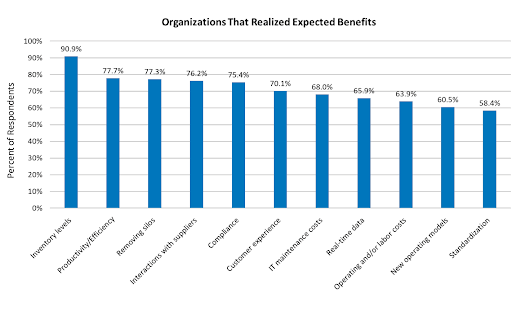 Source
What is the ERP System Implementation Process?
ERP software implementation is a multi-stage process that requires careful planning, collaboration, and execution. To achieve this, companies must follow a structured ERP implementation process that ensures seamless integration, system testing, and user adoption.
The process entails the following steps:
Step #1: Assess Business Needs
Before selecting an ERP system, organizations must evaluate their current workflows, identify inefficiencies, and define clear objectives. This involves:
- Mapping existing processes to uncover inefficiencies
- Identifying pain points such as manual data entry errors or siloed information
- Aligning ERP capabilities with business goals (e.g., better financial reporting)
This ensures that the ERP implementation plan is built around actual business needs rather than just software capabilities.
Step #2: Select the Right ERP Solution
Choosing the right ERP system depends on scalability, industry-specific features, and integration capabilities. Key factors to consider include:
- Cloud vs. On-premise ERP: Cloud solutions offer flexibility, while on-premise ERP provides greater control.
- Customization vs. Out-of-the-Box Features: Too many customizations can slow down enterprise resource planning implementation and increase costs.
- Integration: Compatibility with existing tools like current CRM, HR, or finance software. With the right integrations and software, you can create documents from ERP data, such as catalogs, price lists, or technical sheets.
A well-chosen system minimizes friction and accelerates business transformation.
Step #3: Build an ERP Implementation Team
A successful ERP implementation requires a cross-functional team that brings together technical expertise, human resources, and business insights. A successful ERP rollout requires:
- IT specialists to ensure technical feasibility and system integration.
- Department heads to represent user needs and process improvements.
- Project managers to ERP implementation timelines and resource allocation.
Leveraging a DAP like Apty can ensure that employees receive structured guidance, reducing resistance, accelerating adoption, and improving productivity by up to 20%.
Step #4: Develop a Comprehensive Implementation Plan
A well-structured enterprise resource planning ensures timely execution and efficient resource allocation. This includes:
- Project timeline with realistic milestones
- Budget estimation to avoid cost overruns
- Risk mitigation strategies to handle unforeseen issues
Without a detailed ERP implementation checklist, the process often faces delays, scope creep, and resistance from employees unprepared for the transition.
Step #5: Migrate Data and Integrate Systems
One of the main challenges of ERP implementation is moving data from legacy systems without errors during the transition. Key steps include:
- Data Cleansing: Removing duplicate or outdated records
- Data Mapping: Aligning fields between old and new systems
- Integration Testing: Ensuring the ERP software syncs with other business tools
Failure to do so can result in operational disruptions and poor decision-making due to inconsistent or missing data.
Step #6: Customize and Configure the ERP System
While ERP customization may be necessary, excessive modifications can lead to higher costs and complexity. Organizations should:
- Prioritize standard features over custom development.
- Ensure user-friendly configurations for ease of adoption.
- Test configurations in a sandbox environment before deployment.
Leveraging smart tools ensures efficiency without overcomplicating workflows.
Step #7: Develop a User Onboarding and Training Strategy
User adoption is critical for ERP implementation success. A structured training program should include:
- Workshops and webinars for hands-on learning and development
- Role-based training tailored to different departments
- In-app guidance to assist users in real time
Traditional methods like manual sessions are often ineffective, which is why many organizations turn to DAPs. Apty’s in-app guidance can help employees learn on the go, reducing IT support queries by up to 15%.
Step #8: Pilot Test and Collect Feedback
A phased rollout allows businesses to identify issues before full-scale ERP implementation. This involves:
- Testing with a small group of users
- Collecting real-time feedback
- Refining workflows based on user insights
DAPs like Apty can improve adoption with contextual tooltips to help organizations track how employees interact with the ERP system.
Step #9: Deploy the ERP System and Manage Change
The final rollout requires:
- Company-wide implementation of the ERP system
- Change management strategies to minimize resistance
- Ongoing support and system monitoring
Apty assists with change management by offering contextual guidance, in-product support, and analytics to smooth the transition.
Step #10: Monitor Adoption and Measure Success
To maximize ERP implementation ROI, businesses must track key adoption metrics, including:
- User engagement rates
- Time taken to complete critical workflows
- Reduction in errors and manual rework
Advanced data monitoring features like those provided by Apty offer real-time insights into user engagement and compliance, helping businesses optimize adoption.
Step #11: Create an End-User Support Strategy
Even after deployment, ongoing end-user training and support is crucial. Organizations should:
- Establish help desks for troubleshooting
- Create knowledge bases with FAQs and guides
- Implement real-time assistance tools
Here, Apty’s self-help support feature enables employees to find answers quickly without needing IT intervention.
Step #12: Evaluate, Optimize, and Scale
ERP systems require continuous improvement to adapt to evolving business requirements. Best practices include:
- Regular system audits to identify inefficiencies
- User feedback loops for process improvements
- Expansion of ERP functionalities as the company grows
Apty PULSE, with its centralized dashboard and real-time analytics, lets organizations visualize user journeys, identify bottlenecks, and implement targeted optimizations to refine ERP implementation processes.
Read more on: 8 Tips to Maximizing ROI of ERP Implementation: Strategies for Reducing Operating Costs
Challenges With ERP Implementation
Several challenges lead to failed ERP implementation. Addressing these challenges effectively is key to maximizing the value of an ERP system:
Low User Adoption
Unfamiliarity with ERP implementation and insufficient guidance cause employees to oppose software implementation. Employees struggle to use the system effectively when onboarding is not provided properly.
Providing step-by-step walkthroughs and real-time assistance with the help of tools like Apty can significantly improve adoption.
Complex ERP Workflows
The complexity of ERP software workflows often results in inefficiencies and user errors. Navigating between different functions without clear direction can slow down processes and create bottlenecks.
Businesses that introduce automation and contextual prompts within their ERP system reduce friction and improve usability.
Data Migration Errors
Transferring data from legacy systems is one of the biggest hurdles in ERP implementation. Data inconsistencies and missing records can cause disruptions, leading to financial and operational risks.
Organizations using real-time validation tools during data migration ensure accuracy and prevent delays.
Insufficient Training
Traditional training methods rarely align with how employees use an ERP system. Many businesses now embed role-based training and real-time support within the ERP interface, ensuring users get help precisely when they need it.
Mary Kay, a global direct-selling beauty brand, used Apty for personalized digital onboarding and training in 15 languages across 24 countries.
Also Read: How to Overcome Employee Pushback
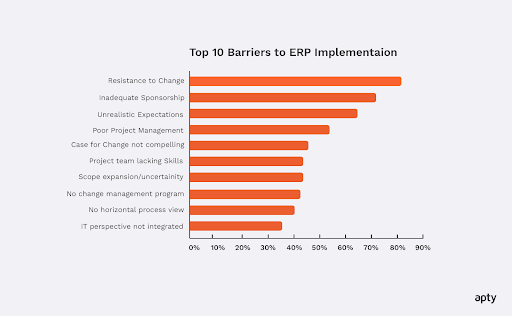 Source
Best Practices for ERP Implementation
While these challenges are common, businesses can overcome them with the right approach. Following these proven best practices helps ensure a smooth ERP implementation:
Define Clear Business Goals
Without well-defined objectives, the ERP implementation process can lose direction, resulting in delays and inefficiencies. Reports show that up to 75% of all ERP projects fail to meet their objectives.
To avoid this, businesses must start by mapping out key pain points such as improving inventory accuracy or reducing manual data entry. This will ensure the system aligns with their actual needs.
Invest in Training and Onboarding
ERP adoption often struggles due to inefficient employee training and onboarding.
Traditional onboarding methods rarely provide hands-on learning. Organizations that integrate in-app guidance, interactive walkthroughs, contextual support, and role-based training see faster adoption and fewer support requests.
Ensure Data Accuracy and Standardization
When data quality deteriorates it leads to incorrect reports as well as system violations and problems with important choices. Organizations can employ real-time validation technologies for the pre-validation of data to detect errors before operational damage occurs.
Practice Phased Implementation
Rolling out an ERP system all at once increases the risk of disruptions, user confusion, and operational slowdowns. A phased approach, where the system is introduced department by department or in specific functional areas, allows for gradual adaptation and better issue resolution.
ERP Implementation Case Study
To see how these best practices come to life, let’s review a case study of an ERP implementation.
Mattel, a global toy company, faced challenges with Workday HCM implementation, including inconsistent processes and a surge in support tickets. Employees struggled with navigating the system, impacting onboarding and HR tasks.
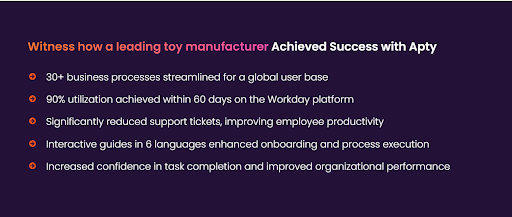
To address this, Mattel integrated interactive in-app guides and real-time support within Workday, helping employees complete tasks independently. This approach led to 90% system utilization within 60 days, reduced support tickets, and improved process efficiency.
Optimizing 30+ business processes in multiple languages helped Mattel boost global adoption and ensure seamless onboarding.
As shown by Mattel’s success, integrating the right tools is crucial for maximizing an ERP system’s benefits.
Drive Successful ERP Implementation With Apty
Even the best ERP platforms fall short without user adoption. Apty accelerates onboarding, supports change management, and provides real-time insights.
With Apty, you get:
- Contextual in-app guidance
- Behavior analytics
- Faster time-to-value
Book a demo today and maximize your ERP ROI.
The strategic integration of Enterprise Resource Planning (ERP) systems transcends a mere technological upgrade; it represents a vital step toward comprehensive business transformation. Achieving success in ERP implementation hinges not only on the selection of the right technology but also on mastering the art of seamless integration and adoption across an organization, underscored by choosing appropriate ERP implementation strategies.
Deploying an ERP system can significantly enhance a company’s operations, with reports indicating improvements in operational efficiency by up to 95%. Moreover, such implementations can lead to a reduction in operating and administrative expenses by over 20%. However, the path to success is challenging. According to G2, approximately 50% of ERP installations fail on their first attempt, and 64% of ERP projects exceed their budget. Further, 30% of these installations take longer than expected, potentially leading to substantial financial losses and operational disruptions.
The global ERP software industry is poised for rapid growth, estimated to reach $78.4 billion by 2026, with a market value of $49.5 billion projected by 2025.
Digital Adoption Platforms (DAPs) have emerged as game-changers in this domain. By enhancing user experience and adoption rates through contextual, in-app, personalized guidance, DAPs critically influence the success of ERP implementations. They effectively tackle one of the primary challenges in ERP projects: the complexity of user adoption. Notably, 78% of companies with successful ERP implementations attribute their success to effective change management and comprehensive employee training programs, reflecting a substantial positive impact on organizational efficiency post-ERP system implementation. The role of DAPs in simplifying and streamlining this process is indispensable.
With this foundational understanding, let’s delve into the strategies that can be employed to implement an ERP system successfully in your organization.
ERP Implementation Stages
Implementing an ERP system involves six main stages that are usually carried out over several months or even years. This process should start before you finalize your decision on which product to purchase, and it should continue even after the initial deployment of your chosen system.
These stages are crucial in ensuring a successful ERP rollout, and understanding each phase is vital for any organization embarking on this journey.
1. Project Planning and Preparation
- Objective Setting: The process begins with defining clear objectives and scope for the ERP implementation. This includes understanding the business processes that the ERP will impact and setting measurable goals.
- Resource Allocation: Assigning a software development company to the project, along with internal stakeholders and external consultants, is crucial.
- Timeline Establishment: Develop a realistic timeline for the project, factoring in all stages of implementation.
2. Requirements Analysis and ERP Selection
- Needs Assessment: Conduct a thorough analysis of business needs, involving inputs from various departments to ensure the ERP solution aligns with organizational goals.
- Vendor Selection: Evaluate ERP vendors based on the organization’s requirements, budget, and compatibility with existing systems.
- Software Customization Needs: Identify any specific customizations or integrations needed in the ERP software to meet unique business processes.
3. Design and Development
- System Design: Develop a blueprint for configuring and customizing the ERP system.
- Data Preparation: Prepare the data for migration, including cleaning, mapping, and validation.
- Customization and Integration: Begin customizing the ERP software and integrating it with other systems as necessary.
4. Testing and Training
- System Testing: Rigorously test the ERP system to ensure it functions as expected. This includes unit testing, system testing, and user acceptance testing.
- Training Programs: Develop and implement comprehensive training programs for users tailored to different roles within the organization.
- Feedback Incorporation: Use feedback from the testing phase to make necessary adjustments.
5. Deployment and Go-Live
- Implementation Strategy: Decide on a deployment strategy, whether a big-bang approach or a phased rollout.
- Go-Live Support: Provide extensive support to users during the initial go-live period to address any immediate challenges.
- Performance Monitoring: Monitor the system’s performance closely post-go-live to ensure stability and efficiency.
6. Post-Implementation Review and Support
- Evaluation: Conduct a post-implementation review to assess the project’s success against initial objectives.
- Continuous Improvement: Implement a plan for ongoing improvements and updates to the ERP system.
- Long-term Support Structure: Establish a long-term support structure for users to ensure the ERP system continues to meet the organization’s evolving needs.
ERP Implementation Strategies
After laying out the critical stages of ERP implementation, it’s essential to focus on strategies to make the process more efficient and effective. The following strategies are instrumental in navigating the complexities of ERP implementation and ensuring its success.
1. Stakeholder Engagement and Communication
- Early Involvement: Involve key stakeholders from the outset to ensure alignment with business goals and to address any resistance to change.
- Regular Communication: Maintain clear and continuous communication throughout the project lifecycle to keep all parties informed and engaged.
2. Customization vs. Standardization
- Balance Customization: While customization can align the ERP system with business processes, over-customization can increase costs and complexity.
- Leverage Standardization: Standardize processes wherever possible to fully utilize the ERP system’s native functionalities.
3. Data Management
- Data Clean-Up: Prioritize cleaning and organizing data before migration to avoid data integrity issues.
- Data Migration Strategy: Develop a comprehensive data migration strategy that includes mapping, testing, and validation.
4. Change Management
- Change Management Plan: Develop a robust change management plan to address the human aspect of ERP implementation, including training, support, and managing resistance.
- Organizational Readiness: Assess and prepare the organization for change to minimize disruption and ensure a smoother transition.
5. Effective Project Management
- Strong Leadership: Ensure strong project leadership and governance to steer the project in the right direction and make timely decisions.
- Project Monitoring: Implement rigorous project monitoring and control mechanisms to keep the project on track and within budget.
6. User Training and Support
- Comprehensive Training: Offer comprehensive training programs tailored to different user groups’ needs.
- Ongoing Support: Provide continuous support post-implementation, including helpdesks, user manuals, and online resources.
7. Testing and Quality Assurance
- Thorough Testing: Conduct thorough testing at various stages of the implementation, including unit testing, system integration testing, and user acceptance testing.
- Feedback Loop: Create a feedback loop to continuously improve the system based on user input and testing results.
8. Phased Rollout
- Pilot Testing: Consider starting with a pilot implementation to test the system in a controlled environment.
- Phased Approach: Implement the system in phases to manage risks and learn from each phase before full-scale implementation.
9. Post-Implementation Review
- Performance Metrics: Establish clear performance metrics to evaluate the success of the ERP implementation.
- Lessons Learned: Conduct a post-implementation review to gather lessons learned and apply them to future projects or system enhancements.
These strategies offer a comprehensive approach to ERP implementation, addressing the technical, organizational, and human factors contributing to such projects’ success or failure. By adhering to these strategies, organizations can significantly increase their chances of a successful ERP implementation.
Here are some noteworthy mentions of well-known ERP implementation strategies:
- Big Bang: This approach involves a single, major cutover to the new ERP system, where all users move to the new system on a specific go-live date. It’s like flipping a switch; the organization switches from the old system to the new one simultaneously. While this method can be faster and less expensive, it also carries higher risk due to the sudden change.
- Phased Rollout: In this approach, the implementation is done in stages or phases. This could be by module, business unit, location, or other logical segments. The phased rollout helps manage the complexity and risk by breaking the implementation into more manageable parts, allowing lessons learned in earlier phases to inform later ones.
- Parallel Adoption: This strategy involves running the new ERP system concurrently with the old one for a period. Users operate both systems simultaneously until the organization is confident that the new system functions correctly. This approach reduces risk but can be resource intensive as it requires maintaining two systems simultaneously.
- Hybrid: A hybrid approach combines elements of the other methodologies. For instance, an organization might use a phased approach in some areas of its operations and a big-bang approach in others. This allows for flexibility and customization of the implementation strategy to fit the specific needs and risks of different parts of the organization. For example, introducing desk booking software can support a hybrid implementation by giving employees flexibility while ensuring efficient workspace management.
The selection of an ERP implementation methodology depends on various factors, including the organization’s size, the complexity of the business processes, resource availability, risk tolerance, and the criticality of the ERP system to daily operations. Each method has pros and cons, and the choice often involves a trade-off between risk, cost, and disruption to the business.
How DAPs Facilitate Seamless User Adoption of ERPs
Integrating Digital Adoption Platforms (DAPs) into ERP implementation strategies marks a pivotal shift in how enterprises approach user adoption. DAPs streamline and simplify the user experience, addressing one of the most significant hurdles in ERP projects: the steep learning curve associated with new systems.
A. Bridging the User Adoption Gap
DAPs serve as a bridge between complex ERP functionalities and user capabilities. They provide real-time, contextual guidance within the application, making it easier for users to understand and navigate the ERP system. This in-app assistance is tailored to the user’s role and tasks, ensuring relevance and efficiency.
B. Enhancing User Engagement and Competency
DAPs are designed to enhance user engagement through interactive walkthroughs, tooltips, and task lists that guide users step-by-step through processes. This hands-on approach accelerates the learning process, leading to quicker and more effective user competency in utilizing the ERP system.
C. Customized Learning Experiences
DAPs offer the flexibility to create customized learning experiences that match the specific needs of different user groups within an organization. This personalization is crucial in catering to the diverse roles and responsibilities that interact with the ERP system, ensuring that each user receives relevant and efficient training.
D. Reducing Resistance to Change
Change resistance is a common challenge in ERP implementations. DAPs mitigate this by providing a supportive and intuitive learning environment. This approach eases users’ transition, reduces anxiety and resistance, and fosters a more positive attitude towards the new system.
E. Analytics and Feedback for Continuous Improvement
DAPs come equipped with analytics capabilities, allowing organizations to track user performance and identify areas where users struggle. This feedback is invaluable for continuously improving the ERP system and the training materials, ensuring that the system evolves in line with user needs and preferences.
F. Aligning with Organizational Goals
Effective DAP implementation aligns closely with organizational goals and objectives. By improving user adoption rates, organizations can maximize the ROI of their ERP investment, ensuring that the system contributes significantly to operational efficiency and business growth.
| Use Case | KPIs Measured | Challenges | ROI Impact | Apty Feature |
| Financial Management | Cash Flow, Profit Margin, Debt Ratio, Days Sales Outstanding | Financial errors, Late payments, Compliance issues | Improved Financial Health | Real-time Dashboards, Automation |
| Inventory Management | Inventory Turnover Rate, Stockouts, Order Accuracy, Lead Time | Data inaccuracies, Overstock/Understock, Inefficiency | Cost Savings, Reduced Stockouts | In-App Guidance, Task Lists |
| Human Resources | Time to Hire, Employee Satisfaction, Turnover Rate, Training Completion | Talent retention issues, Compliance violations, Poor Onboarding | Enhanced Productivity, Talent Retention | Interactive Walkthroughs, Analytics |
| Sales and CRM | Conversion Rate, Sales Growth, Customer Lifetime Value, Sales Cycle Length | Missed opportunities, Data silos, Inefficient Sales Process | Revenue Growth, Improved Customer Relations | User Segmentation, Notifications |
| Manufacturing | OEE, Defect Rate, On-time Delivery, Downtime | Production delays, Quality issues, Resource underutilization | Increased Efficiency, Reduced Downtime | Workflow Builder |
Learn More: ERP Implementation Checklist: Planning for an Enterprise Implementation
As organizations navigate complexities, the strategic importance of calculating and enhancing the ROI of ERP implementation comes into sharp focus. With the ERP software market expected to reach $62.36 billion by 2028, growing at an annual rate of 4.78% from 2023 to 2028, understanding the return on this significant investment is more crucial than ever for companies investing in ERP systems. We highlight how optimizing ERP systems to impact the bottom line, especially by reducing operational costs.
The concept of ERP ROI goes beyond mere financial calculations. It encompasses a broader spectrum of operational and strategic benefits that ERP systems offer. The impacts are far-reaching, from streamlined processes to improved data accuracy and decision-making. However, the challenge lies in quantifying these benefits and understanding how they translate into tangible returns. This is where metrics like ERP ROI analysis and tools like ERP ROI calculators become indispensable for businesses seeking to justify their ERP investments.
Moreover, the evolving business technology demands a more nuanced approach to implementing and leveraging ERP systems. Whether it’s through reducing cycle times, enhancing resource allocation, or improving inventory management, the ROI of ERP implementation can be a game-changer for businesses. It’s not just about implementing technology but about doing it in a way that aligns with the organization’s strategic goals and operational needs. Let’s explore how businesses can achieve an optimal ROI from their ERP systems, focusing on strategies that reduce operating costs while enhancing overall efficiency and productivity.
Understanding the ROI of an ERP System
The ROI of ERP implementation includes both financial returns and indirect benefits enhancing organizational efficiency and effectiveness. The average spend per employee in the ERP Software market is projected to be $14.19, underlining companies’ substantial investment in these systems. Understanding this ROI is crucial to gauge the success and viability of ERP investments.
ERP ROI analysis comprehensively evaluates how the system affects various aspects of the business. This encompasses evaluating improvements in process efficiency, data accuracy, decision-making capabilities, and overall organizational agility. These improvements often lead to cost reductions and enhanced revenue opportunities, directly impacting the bottom line. Businesses often use ERP ROI calculators to accurately measure these benefits, which provide a more quantitative understanding of the system’s impact.
However, an ERP system’s influence extends beyond quantifiable metrics. Its strategic value in aligning organizational processes with business objectives is significant. It enables businesses to adapt swiftly to market changes and customer demands, which, while challenging to quantify, are crucial for long-term business success. This strategic alignment is fundamental in ensuring that the ERP system serves current operational needs and positions the company for future growth and adaptation.
Learn More: ERP Implementation Checklist: Planning for an Enterprise Implementation
Calculating ERP ROI
Calculating the ROI of an ERP implementation is essential in evaluating its effectiveness and justifying the investment. This includes assessing immediate financial returns and the broader impact on operations and efficiency. Notably, the average ROI for an ERP project is 52%, meaning for every $1 invested in an ERP system, there’s an average return of $1.52. The calculation process involves identifying all costs, quantifying benefits, considering both short-term and long-term gains, and utilizing ERP ROI calculators for a comprehensive analysis.
Firstly, it’s essential to identify all associated costs of the ERP system. This includes the upfront costs like software purchase and hardware acquisition and ongoing expenses such as maintenance, support, and training. These figures form the investment baseline against which returns will be measured.
Secondly, the ERP system’s benefits must be quantified. This can be challenging, as benefits often extend beyond direct financial savings. Improved process efficiencies, time savings, error reductions, and better decision-making capabilities are some areas where ERP systems add value. Quantifying these benefits in monetary terms requires a thorough understanding of operational processes and how they translate into cost savings or revenue generation.
Additionally, businesses should consider both short-term and long-term benefits. While some advantages, like improved workflow efficiency, may be immediate, others, such as increased customer satisfaction or market share growth, may take longer to materialize but are equally important for the overall ROI calculation.
The formula for ERP ROI is typically calculated as follows:
ERP ROI=(Total Benefits – Total CostsTotal Costs)×100ERP ROI=(Total CostsTotal Benefits – Total Costs)×100
Finally, businesses can utilize ERP ROI calculators, which factor in these various costs and benefits to provide a more comprehensive ROI figure. These tools often include options to input specific data relevant to the business, allowing for a tailored and accurate ROI assessment.
Following these steps, businesses can gain a clear and objective view of the ROI of their ERP implementation, enabling them to make informed decisions about future investments in their ERP systems.
Delve More: ERP Adoption – 5 Lethal Mistakes to Avoid in the Post-Pandemic World
Determining the Benefits of ERP
ERP implementation offers benefits beyond financial gains. Reinforcing these advantages, 93% of organizations report their ERP projects as successful, indicating a high rate of positive outcomes from these investments. This high success rate highlights the substantial impact of ERP systems on a business’s operational and strategic performance. Understanding these benefits is crucial for any organization considering or evaluating an ERP system.
Operational Efficiency: One of the primary advantages of an ERP system is the remarkable improvement in operational efficiency. ERP systems reduce manual labor and minimize errors by automating and streamlining business processes. This efficiency is not just in terms of time saved but also in the optimal use of resources, leading to significant cost savings.
Improved Decision-Making: ERP systems provide a unified, real-time view of business data, enabling better decision-making. With accurate and timely data, management can make informed decisions, foresee business trends, and strategize effectively. This improved decision-making capability can lead to better business outcomes and increased profitability.
Enhanced Data Accuracy and Reporting: ERP systems consolidate data from various business functions, ensuring consistency and accuracy. Data reliability enhances reporting quality, which is vital for compliance, forecasting, and strategic planning.
Cost Reduction: A direct benefit of ERP implementation is cost reduction. Businesses can significantly lower their operating costs by optimizing operations and improving efficiency. This includes reductions in inventory, procurement, and even HR-related expenses.
Increased Customer Satisfaction: ERP systems can significantly enhance customer satisfaction by streamlining processes like order fulfillment, inventory management, and customer service. A satisfied customer base often translates into repeat business and positive word-of-mouth, which are invaluable for any business.
Scalability and Growth: ERP systems are designed to grow with your business. They provide the scalability needed to accommodate growth, whether in terms of increased transaction volumes, new business processes, or geographic expansion.
Competitive Advantage: An efficient ERP system can be a significant differentiator in today’s competitive world. It enables businesses to respond quickly to market changes, manage operations effectively, and maintain a competitive edge.
Let’s explore tips to increase the ROI of an ERP system, focusing on how strategic planning, system selection, implementation, and continuous improvement can contribute to maximizing ROI.
Read More: ERP Implementation Plan: 10 Key Phases & Best Practices
8 Tips to Increase the ROI of an ERP System
Strategic Planning and Goal Setting
- Aligning the ERP system with business objectives is critical. Clearly defined goals help measure the ERP implementation’s success and contribution to the organization’s strategic vision.
- Setting measurable and realistic goals for the ERP system ensures that every functionality and process aims to achieve specific outcomes.
Choosing the Right ERP Solution
- Selecting an ERP solution that aligns with the business’s unique needs is vital. The right system should fit the current business processes and be scalable for future growth.
- When choosing an ERP system, consider factors like industry-specific features, user-friendliness, and integration capabilities.
Effective Implementation and Integration
- A well-planned and executed implementation is key to maximizing ROI. This includes careful planning, resource allocation, and stakeholder engagement throughout the implementation process.
- Ensuring seamless integration with existing systems and processes reduces disruptions and enhances system effectiveness.
- To drive successful ERP adoption, tools like Apty streamline onboarding and enable process automation, reducing manual errors and boosting operational agility.
User Training and Support
- Comprehensive training for end-users is essential to ensure they are comfortable and proficient with the new system. This increases user adoption and maximizes the ERP system’s potential.
- Continuous support and access to help resources post-implementation help in resolving issues quickly and maintaining system efficiency.
- Traditional training often fails to deliver long-term value. Apty transforms onboarding into an interactive learning journey with personalized walkthroughs and continuous employee training software embedded into ERP workflows.
- See how a Fortune 500 telecom company accelerated ERP adoption with Apty.
Data Management and Quality Control
- Accurate and consistent data is the foundation of any ERP system. Implementing standards for data entry and ongoing quality checks can significantly improve information reliability.
- Regular audits and data cleansing activities ensure the ERP system continues to provide valuable and accurate insights.
Continuous Improvement and Adaptation
- Regular assessment of the ERP system’s performance helps identify improvement areas. Being receptive to user feedback and adapting to changing business needs keeps the system relevant and effective.
- Staying updated with the latest ERP trends and technologies can provide further optimization and ROI enhancement opportunities.
Measuring and Analyzing Performance Post-Implementation
- Utilizing built-in analytics tools and performance metrics allows continuous monitoring of how the ERP system contributes to business goals.
- Regularly reviewing these metrics and making data-driven decisions can lead to ongoing improvements in the ERP system’s performance and ROI.
Using Digital Adoption Platforms (DAPs)
Integrating Digital Adoption Platforms (DAPs) with ERP systems significantly advances how businesses optimize their software investments. DAPs play a crucial role in enhancing the effectiveness and usability of ERP systems, addressing several key challenges that organizations often face post-implementation.
User Experience Enhancement: DAPs are designed to simplify complex ERP interfaces, making them more intuitive and user-friendly. This enhancement in user experience is crucial, especially when dealing with sophisticated ERP software that can often overwhelm users. By providing a more accessible interface, DAPs help reduce the learning curve and increase overall user satisfaction.
On-Demand Training and Support: One of the standout features of DAPs is their ability to offer real-time, context-sensitive guidance. This on-the-fly support can be a game-changer, particularly for new users or when rolling out new features within the ERP system. Instead of relying on traditional, often time-consuming training methods, DAPs provide immediate assistance within the application, leading to a more efficient learning process.
Maximizing ERP Utilization: A common issue with ERP implementations is the underutilization of the system’s capabilities. DAPs help bridge this gap by guiding users through the full range of functionalities, ensuring that the ERP system is used to its fullest potential. This improves operational efficiency and ensures that the organization gets the maximum return on its ERP investment.
Analytics and Feedback for Continuous Improvement: Many DAPs have analytics tools that track user interactions with the ERP system. This data is invaluable in understanding how the system is used, identifying areas where users struggle, and providing insights into potential improvements or additional training needs.
Reducing Resistance to Change: Implementing a new ERP system or upgrading an existing one can often be met with resistance from users accustomed to a particular way of working. DAPs can ease this transition by providing a supportive and interactive environment, helping users to adapt to the new system more comfortably and efficiently.
Cost-Effective Training and Support: Traditional training programs can be costly and logistically challenging. DAPs offer a more cost-effective solution by reducing the need for extensive in-person training sessions. This cuts down on training costs and minimizes disruption to daily operations.
Apty is more than a training tool—it’s an AI-powered, outcome-focused digital adoption platform that enables real-time software guidance, performance optimization, and measurable ROI improvements across enterprise systems.
Read More: Navigating ERP Adoption Complexities: The Transformative Power of Digital Adoption Platforms
Role of Apty in ERP systems
The journey to maximizing the ROI of an ERP system is multifaceted, encompassing strategic planning, careful selection, effective implementation, and ongoing management and adaptation. With about 64% of companies planning to implement ERP within the next three years, the significance of these systems in the business landscape continues to grow. Each of the eight tips outlined offers a pathway to enhance the efficiency and effectiveness of ERP systems, directly contributing to an improved bottom line.
Organizations can significantly enhance their operational efficiency by aligning ERP systems with business objectives, selecting the right solutions, executing well-planned implementations, and ensuring continuous user support and data quality. Furthermore, adopting Digital Adoption Platforms (DAPs) like Apty catalyzes ERP utilization, offering an innovative approach to user training, system adoption, and continuous improvement.
Apty’s platform also includes productivity tracking and software guidance features that help organizations identify adoption gaps, optimize user flows, and improve process performance over time.
Ultimately, the effective utilization of an ERP system is a continuous process that requires regular assessment and adaptation. By staying attuned to the evolving business needs and technology trends, organizations can ensure their ERP systems meet current requirements and are geared for future challenges and opportunities.
This comprehensive ERP implementation and management approach, underpinned by a clear understanding of its ROI, is instrumental in achieving long-term business success and sustainability.
FAQs
ERP Implementation Checklist: Planning for an Enterprise Implementation
ERP plays a vital role in any organization. Implementing ERP Software can be a challenging and cumbersome task. So, it becomes crucial for Enterprises to be aware of the implementation process before they begin working on it.
Let’s get to the point straight. A survey by Ultraconsultants found that,
As seen above, it is evident that Enterprises need a proper ERP Implementation plan. Your ERP investment is at risk without the right ERP implementation plan. So, to avert risk, we have prepared an ERP implementation checklist that can help you ensure a successful ERP implementation.
The Ultimate ERP implementation checklist for Enterprises:
Every ERP implementation varies depending on the company’s requirements and size. In this blog, we will be discussing some of the typical phases and checklists involved in the ERP implementation
Before you start your implementation process, you need to prep on planning certain vital aspects involved, and they are listed below:
1. Deliverables:
Before the implementation process, it is essential to identify, name, and describe the software you are implementing and the total cost required.
2. Timeline for each category:
Next, we need to finalize a start and finish date. If there are no specific dates, then go with an estimated date.
3. Pre-implementation preparation:
Analyse the implementation plan and prepare for any needs during the process so that no other work is interrupted.
4. Eliminate unnecessary items:
Removing the processes not involved in the implementation stage is necessary to put the implementation on the right track.
5. Expected outcomes:
To have clear insights and achieve business goals, it is important to establish the right expectations and how the new software should be used.
6. Potential implementation challenges:
This implementation stage is anything that needs to be fixed or adjusted after your new software is deployed.
7. Finalize training methods:
At last, it’s essential to decide the training methods that will be used by the organization to deliver the program.
The Key Drivers:
Once you start the process, the major challenge you might encounter would be change resistance.
Resistance to newERP implementation is normal among employees since it will raise many questions regarding upgrading assets and how the change will help them.
So, before implementing ERP within an organization, we must create a change management plan to make the transition easier and smoother for the employees. Not carrying out this stage of ERP implementation can result in an ERP failure and cost a lot to the Enterprise.
Below are some of the important checks needed in implementing the Change management plan:
A. Employee driving plan –
Before setting goals for your employees, motivating them for the change is important. You need to provide in-depth information about how the ERP implementation can help them excel in their job and its impact on the organization.
B. Set clear goals –
Once the employees are clear about the implementation plan, you need to set clear metrics and goals to track the progress and identify whether the implementation will help the organization achieve the desired business goals.
C. Communicate it properly –
Establish proper communication channels and feedback loop to maximize productivity with the new ERP implementation. This can help to eliminate confusion, achieve goals on time and make sure that the flow of information is transparent.
D. Involve employees in the decision-making process –
ERP systems will be used by the employees and must be part of your decision-making process. There needs to be a team that regularly meets with employees to analyze and discuss the change management process. This can help employees overcome inhibitions and feel connected with the process, helping the organization get their buy-in.
Onboarding and Training Plan:
Once the change management plan is devised, it goes to the training phase, which is crucial as it defines how well the employees will use the new changes and features to the fullest.
Onboarding and training new hires can be a hefty task for any organization and involve a lot of time and resources. It is also necessary to keep the new hires engaged and make the onboarding transitions as smooth as possible. Therefore, businesses need to plan their training and onboarding correctly to make the best of it.
You can leverage a digital adoption platform To overcome these challenges and ensure the fullest use of ERP. A DAP like Apty can help you in successful onboarding and training users with the help of its interactive software walkthroughs. Apty boosts employee performance and productivity and increases engagement rate. (More on this later!)
Post-implementation:
Post the ERP implementation, create a feedback mechanism to regularly improve the ERP system to make the most out of your investments.
After the go-live period, the implementation team must analyze all the feedback from different departments. It will help them to identify the most common roadblocks and devise a strategy to eliminate them.
Once everything is set, you need to keep testing the product and look for changes that need to be implemented to get the best performance and productivity from the employees.
Role of Digital Adoption Platform:
ERP adoption and implementation sometimes have advantages; as with any product, there are a few pitfalls too. The challenges you might encounter are onboarding and training, user adoption, and change resistance. To overcome such challenges, businesses use Digital Adoption Platforms (DAP) for successful ERP adoption.
Companies can keep their employees engaged throughout the process and provide help at the right moment of need with the help of Enterprise grade DAP like Apty. Apty can seamlessly integrate into your existing ERP system. Apty makes your employee onboarding and training process smooth using in-app software walkthroughs.
Apty’s on-screen guidance can help employees complete their tasks quickly and accurately. The data validation feature ensures data integrity and process compliance. Apty’s robust analytics allows you to identify where your employees get stuck, and you can create customized walkthroughs to help employees overcome those pain points.
9 High-Profile ERP Implementation Failures (& How to Avoid Them)
An ERP implementation can make or break an organization.
On one hand, a properly implemented ERP system can reduce operational and administration costs by over 20% and improve business processes 95% of the time.
On the other hand, up to 50% of ERP implementations fail the first time around, 64% of ERP projects go over budget, and 30% take longer than expected, often resulting in the loss of millions of dollars and disruption to business operations.
While ERP implementations can be complex, there are usually a few main reasons they fail so often.
And that brings us to the million-dollar question-
Why do ERP Implementations Fail?
The ERP Implementation fails because of internal resistance, misaligned expectations, poor process implementation, incompetent stakeholders, unaccounted supporting tools, and vaguely drafted training and digital adoption programs.
The chaos that is generated from an ERP implementation is unreal and it is important to explore the common reasons for failure. In this guide, we will go through the reasons and nine high-profile examples so that you can avoid a failed ERP implementation.
11 Reasons for the Failure of ERP Implementation
There are many different reasons why an ERP implementation may fail, but there are a handful of common causes.
- Failure to confirm system requirements
- Failure to secure adequate funding
- Failure to set realistic implementation timelines
- Failure to choose a project leader
- Failure to capacity plan
- Failure to focus on business outcomes over technology
- Failure to choose the right implementation partner
- Failure to cleanse data
- Failure to test implementations prior to rollout
- Failure to invest in change management
- Failure to invest in employee training
i. Failure to confirm system requirements
Your system requirements are the most important component of a successful ERP implementation. Before you even start selecting your ERP software, you need to know what your current and future business requirements are.
Interview department managers to get a thorough understanding and list of requirements. Then you can start to match requirements to ERP features and find the best fit.
ii. Failure to secure adequate funding
ERP implementations are expensive, but failure to budget and secure adequate funding before starting will result in a failed implementation. When estimating your budget, always add a further 25% for contingency costs.
The initial cost of the ERP software is your starting point. But during and after implementation, you’ll have to budget for:
- Hardware, networks, and other infrastructure costs
- Custom modifications to the software
- Incremental payroll costs
- Consultant contractor costs
- Ongoing support and maintenance
Without accounting for these costs, your ERP implementation will fail.
iii. Failure to set realistic implementation timelines
ERP implementations are usually complex, so you need to allow enough time when planning your project timelines. Hershey’s fell victim to this mistake when they tried to squeeze a complex ERP implementation project into an unreasonably short timeline.
It made a further mistake when it cutover to the new ERP system during its peak Halloween trading season – a surefire recipe for disaster.
If you don’t allow yourself time to implement, test, and cut over to your new ERP system, the chances of failure are much higher.
iv. Failure to choose a project leader
It’s imperative that you choose a strong, experienced, and detail-oriented project leader for your ERP implementation. Without substantial knowledge of ERP systems, your implementation is at a significant disadvantage.
The ideal project leader requires excellent organizational skills, plus the ability to familiarize themselves with day-to-day operations and build solid relationships with internal and external stakeholders.
v. Failure to capacity plan
Many ERP implementations fail because companies fail to plan and resource their project teams adequately. ERP implementations can take months or even years to complete depending on the size of the project. And businesses need to be prepared to assign their best people to the core project team for at least 50% of their time.
You’ll need to plan capacity accordingly as core team members will need to cross-train other employees to fulfill their “normal” tasks, and you might have to hire full-time, part-time, or temporary workers to backfill.
vi. Failure to focus on business outcomes over technology
The ERP system is only one part of your project. You also need to focus on your business processes. Make sure you dedicate time and resources to mapping your current and desired workflows so that you maximize the ERP implementation.
Former Gartner SAP analyst Derek Prior told Computer Weekly that a common theme among ERP implementation failures is that businesses don’t match the implementation with the business case.
“They don’t have the right level of business engagement,” he said. “They don’t have the right people to measure business outcomes, and the business case is put on a shelf and never looked at again.”
Instead of asking:
“How can we use [ERP application] to achieve [business outcomes such as increased sales or efficiency]?”
You need to ask:
“How can we achieve [business outcomes such as increased sales or efficiency]?”
vii. Failure to choose the right implementation partner
It’s equally important to choose the right implementation partner as it is ERP software.
Make sure your implementation partner has relevant real-life ERP experience, ideally as an end-user. You can usually configure ERP software to different industry solutions, so ensure your partner has relevant industry experience.
viii. Failure to cleanse data
Preparing and cleansing data is another crucial part of an ERP implementation. It’s not as straightforward as it might appear, as data has to be cleansed and verified in its existing state before migrating the required information to the new system. It can be a time-consuming activity, but failure to get it right will cause your new system to fail.
ix. Failure to test implementations prior to rollout
Inadequate testing is another major cause of ERP implementation failures. Testing needs to pass various stages, from a single test of every critical business process to volume tests and a mock go-live cutover.
x. Failure to invest in change management
It’s often the organizations that fail to build a change management team and see change management as merely an end-user training exercise that encounters implementation project failures.
ERP change management not only involves business process changes but the whole culture of an organization. When end users aren’t engaged, process changes aren’t communicated clearly, and expectations haven’t been set, ERP implementations usually fail.
xi. Failure to invest in employee training
An essential part of any ERP implementation is that all employees get the required training. If you don’t train users properly, they become a drain on the smaller post-implementation support team resolving critical issues. And as more employees become disgruntled, the adoption of the new system fails.
Bonus resources:
Ensuring a successful ERP implementation is challenging, as 55% to 75% of all ERP projects fail. It is important to understand how some of the major ERP projects failed to avoid the mistakes of the past.
The consequences of a failed ERP software rollout can be severe, with organizations losing revenue and facing shareholder lawsuits. Below, we’ve collated nine infamous failed ERP implementations from over the years so that you can learn from their mistakes.
9 High-Profile Examples of Failed ERP Implementations
- Nike – $100M revenue loss
- Hewlett Packard – $160M
- Hershey’s – 19% drop in profits
- Target Canada – Pulled out of Canadian market
- Lidl – Dropped the project after 3 years
- Oriola Finland – Damaged Reputation
- Avon – Sales reps quit
- Select Comfort – $83M in lost sales
- Air Force – Spent $1.03B over 7 years
1. Nike – $100M revenue loss
Overview:
Nike spent $400 million updating their ERP and supply chain system in 2001. But instead of helping them match their supply to demand and shortening their manufacturing cycle, the supply chain software failed, and they ended up ordering low-selling sneakers in place of high-demand ones.
Failure:
Nike implemented and launched a new demand-planning solution without adequate testing before they went live.
Cost:
Nike spent around $400 million on its ERP failure. Plus, they lost $100 million in revenue, their stock price fell 20%, and they received a myriad of class-action lawsuits. Nike had to invest another 5 years and millions of dollars more to overcome the problem and get the software working correctly.
2. Hewlett Packard – $160M in backlog orders and lost revenue
Overview:
Hewlett Packard moved all of their North American divisions into a single centralized ERP system.
Failure:
The company experienced a cumulation of minor issues during their ERP implementation rollout. Eventually, they had too many small disasters at once and were unable to cope with the situation.
Cost:
Hewlett Packard’s failed ERP implementation cost them $160 million in backlog orders and lost revenue – that’s five times more than the estimated initial project cost in 2004.
3. Hershey’s – 19% drop in profits
Overview:
Hershey’s much-publicized SAP ERP, CRM, and supply chain implementation failure occurred in 1999 following a series of mishaps.
Failure:
Hershey’s made two critical mistakes in their ERP implementation. First, it tried to squeeze a complex ERP implementation project into an unrealistic timeline. And second, it timed its cutover during the busy Halloween season before its employees had been adequately trained on the new system.
Cost:
Hersey’s could not process $100 million worth of Kiss and Jolly Rancher orders, even though it had most of the inventory in stock. Consequently, it suffered a 19% drop in profit, a 12% drop in sales, and lost market credibility.
4. Target Canada – pulled out of Canadian market
Overview:
When Target launched in Canada in 2013, it planned to bypass any potential legacy data migration problems by entering only new information into its SAP ERP system.
But when it was cutover, the supply chain collapsed.
The problem was that Target used inexperienced employees to enter data into the system manually. Unfortunately, they had no idea whether the information from vendors and manufacturers was correct or not, plus they were working to tight deadlines.
Subsequent investigations found that only about 30% of the data in the system was correct as it was riddled with errors from simple typos to incorrect inventory counts and currency.
Failure:
Target failed in three crucial areas – it set unrealistic goals, didn’t leave time for testing, and neglected to train employees properly.
Cost:
In early 2016, Target announced that it would pull out of the Canadian market after plunging its supply chain into chaos and losing millions of dollars.
5. Lidl – dropped the project after 3 years
Overview:
Discount supermarket chain Lidl implemented an SAP Retail ERP system to replace its in-house developed legacy merchandise management system. Multiple interfaces and modules and a decentralized server structure made running and maintaining the legacy system increasingly challenging.
The initial deployment of the new electronic management and information system took place at Lidl Austrian stores in May 2015. The company intended to deploy the system to 10,000 other stores and over 140 logistics centers.
Failure:
Lidl failed to confirm system requirements and secure adequate funding to complete its SAP ERP implementation.
Cost:
Three years after going live with the new ERP system, Lidl decided to drop the €500m project because it could not achieve its strategic goals without spending even more money to make it work.
6. Oriola Finland – health risks and a damaged reputation
Overview:
Oriola is one of Finland’s largest pharmaceutical suppliers and relies heavily on its supply chain. The company delivers thousands of medications to pharmacists around the country, including insulin, cancer medications, and antipsychotics.
Oriola Finland switched to its new ERP system in September 2017, and the supply chain broke immediately, meaning pharmacists all over Finland struggled to source and order life-saving medications.
To make matters worse, Oriola remained quiet on the subject, so nobody knew what was happening. Eventually, they managed to resolve the issues and process the backlog of orders.
Failure:
When going live with a new ERP system, always plan for the worst-case scenario. Oriola did not have a change management plan, so its vendors, suppliers, and customers didn’t know they were changing their supply chain system and remained in the dark about the issues.
Cost:
The ERP implementation issues failed the project which cost Oriola millions of Euros and damaged their reputation. In this case, the disruption to the supply chain not only affected sales revenue but also put people’s health at risk.
7. Avon – sales reps quit
Overview:
In 2013, after four years of planning, development, and employee testing in the company’s Canadian regions, Avon’s $125 million ERP/CRM/eCommerce project failed.
The door-to-door makeup giant reported that the technology had created extra work for its sales reps instead of streamlining their daily activities.
Failure:
Avon failed to align the ERP software to its business processes and test the implementation. Plus, it did not invest in change management and employee training prior to rollout.
Cost:
As a result, more than a third of Avon’s independent sales reps in the affected region quit.
Avon CEO Sheri McCoy told analysts at the time,
“While the pilot technology platform [in Canada] worked well, the degree of impact or change in the daily processes to the [Avon] Representative was significant.”
8. Select Comfort – $83M in lost sales
Overview:
Mattress company Select Comfort went live with their new ERP system in October 2015.
A few weeks later, the CEO reported that the ERP implementation had caused minimal disruptions to the supply chain. But, in reality, that’s not what happened.
Insiders reported that investors pressured the ERP project leader to go live sooner rather than later or cancel the project altogether because of spiraling implementation costs.
They chose to launch even though they weren’t ready – customers experienced delivery delays, while the company had above-average return rates and canceled orders.
Failure:
Every ERP implementation project needs a strong leader who can communicate with shareholders, allocate adequate resources, and set realistic timelines.
Cost:
Select Comfort lost $83 million in sales, and share earnings were $21 million lower than expected.
9. Air Force – spent $1.03B over seven years
Overview:
In November 2012, the U.S. Air Force announced it was pulling the plug on a huge ERP implementation project meant to integrate hundreds of disparate financial systems into a single system.
The project ran for over seven years, was already significantly over budget, and required a further $1.1 billion just to finish the project. So the Air Force decided it was better to bail out as they had only gained minor system improvements.
Failure:
Make sure you understand the size and scope of your project at the beginning, secure adequate funding, and set realistic timelines.
Cost:
The U.S. Air Force spent $1.03 billion over seven years.
Prevent ERP Implementation Failures
ERP implementations are notoriously complicated and stressful. But with proper planning and vision, you can execute a successful project.
To reduce the risk of failure, ensure you:
- Confirm the system requirements
- Secure adequate funding
- Choose a proven project leader
- Set realistic project timelines
- Plan resource capacity to get the core team in place
- Focus on business outcomes over technology
- Invest in change management throughout the organization
- Choose the right implementation partner
- Cleanse your existing data before migration
- Test implementation scenarios prior to rollout
- Train employees before cutover