
 Source
 Source
Apty helps employers analyze user behavior and understand where they get stuck. You can create customized software walkthrough content to help your users overcome their challenges. Apty helps employees master the Microsoft application with a solution-centric approach.
Oracle’s Human Capital Management (HCM) system turns fragmented HR chaos into one powerful system, automating tasks, unifying data, and giving leaders real-time insights to drive smarter decisions.
What makes Oracle HCM stand out isn’t just the technology—it’s the adaptability, extensibility, and ability to serve as a single, reliable source for all HR data.
But here’s the catch: even the best system is only as good as its setup. Implementing an HR platform isn’t a routine task. It’s the moment that determines success. And nowhere is this truer than with Oracle.
If you’re ready to swap HR headaches for a system that truly works for your people and processes, you’re in the right place. This is your insider’s guide to Oracle HCM implementation. Let’s get started!
What Is Oracle HCM Implementation?
Oracle HCM implementation configures and launches the platform to fit your organization’s unique needs. It consistently ranks as a top choice among HR platforms, and for good reason.
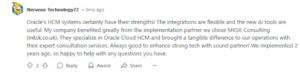
From recruitment and onboarding to payroll, performance management, and workforce analytics, Oracle HCM brings everything HR teams need into one powerful system.
For growing businesses, Oracle HCM implementation is critical.
As teams expand, manual processes break down, data gets scattered, and decision-making slows. A successful HCM implementation creates one unified system that scales with your business, automates key processes, and provides real-time insights to help leaders make smarter, faster decisions.
9 Practical Steps to Oracle HCM Implementation
Oracle HCM can transform how you manage HR, but a successful rollout takes more than just turning it on. Follow these steps to get it right from day one.
Step #1: Conduct a Thorough Needs Assessment
Successful Oracle HCM implementation starts with understanding your real HR needs, the pain points today and the workforce goals for tomorrow. Skip this step, and you risk an overbuilt, misaligned system that frustrates users and drives up costs.
The fix? Work with HR, payroll, IT, and managers to map what’s broken and what needs to evolve. From there, it’s all about mapping those insights directly to Oracle HCM’s features and configuring processes, modules, and workflows that make sense for your business.
For example, if onboarding is manual and slow, simply replicating that process in Oracle HCM wastes the chance to automate, streamline, and improve the employee experience.
Step #2: Align HCM Strategy With Business Objectives
Before configuring a single screen in Oracle HCM, step back. What’s your company trying to achieve? Are you expanding into new markets? Cutting costs? Trying to improve retention or engagement?
If aggressive hiring is a priority, your HCM workflows need to keep up. Without faster approvals, automated onboarding, and clear visibility into hiring pipelines, HR becomes a bottleneck instead of a growth driver.
The bottom line: Oracle HCM works best when built to serve larger business goals, not just HR’s immediate needs. Starting with clear business goals ensures every process, metric, and module supports your company’s most important outcomes.
Step #3: Determine Job Structures Within Your Company
Establishing clear and consistent job structures is critical before configuring Oracle HCM. This means defining job roles, hierarchies, and reporting lines across every department.
Why is this so important? Your job architecture directly impacts payroll, performance management, approvals, reporting, and workforce planning. Poorly defined structures lead to inaccurate reporting, workflow failures, and broken role-based access controls.
For example, data migration becomes far more complex if teams use inconsistent job titles or unclear reporting lines. Even after going live, HR teams may struggle with permission issues or approval chains that don’t match your org chart.
Taking the time to audit, standardize, and align job structures before you configure Oracle HCM streamlines implementation and future-proofs your HR processes, making them easier to scale as your organization grows.
Step #4: Prioritize Data Accuracy and Seamless Migration
Picture this: a company migrates from a customized on-prem HR system to Oracle HCM but skips data cleansing to stay on schedule.
After going live, they find hundreds of misclassified job titles, broken approval workflows, and compensation reports they can’t trust. Fixing it takes months, draining HR’s time and leadership’s confidence. This is why data migration is crucial.
Legacy data is often messy, with inconsistencies, duplicates, and outdated records lurking beneath the surface. Successful migrations start with data cleansing and mapping, ensuring clean, well-structured data flows into Oracle HCM.
Running parallel payrolls and reconciling records after migration helps catch any lingering errors before they snowball.
Step #5: Invest in User Training and Change Management
Successful Oracle HCM adoption hinges on what the system can do and how well your people can use it. Traditional training methods, like manuals and classroom sessions, often fall short when applied to a system as robust as Oracle HCM.
That’s where Apty comes in.
A platform like Apty provides real-time, in-app guidance tailored to each role, walking users through tasks step-by-step right inside Oracle HCM. This reduces training time, boosts confidence, and helps users adopt new processes faster, all while minimizing dependence on IT and support teams.
To maximize adoption, businesses should also design role-based training programs, ensuring every user learns only the tools, processes, and workflows relevant to their role, such as payroll processing, talent management, or employee self-service.
Step 6: Consider Integrations
Integrating Oracle HCM with your enterprise resource planning (ERP), payroll, tax engines, and even recruitment platforms ensures workforce data flows seamlessly across systems. This eliminates manual workarounds, reduces errors, and gives leaders a complete view of workforce costs, performance, and planning.
The integrations that matter most go far beyond basic payroll feeds. For example, connecting Oracle HCM to your ERP system (like Oracle ERP or SAP) ties workforce costs directly into budgeting and project staffing.
Linking to global tax engines ensures payroll tax compliance across different jurisdictions. Integration with identity and access management (IAM) platforms keeps access secure and ensures employees only see what they need, based on their role.
Failing to map these critical integration points upfront can create data silos, inconsistent reporting, and operational headaches. To avoid this, businesses must audit their technology stack early, identify where Oracle HCM fits, and design integrations that support today’s workflows and tomorrow’s growth.
Step #7: Use a Phased Implementation Approach
Suppose a global retailer is rolling out Oracle HCM across global teams without a pilot phase.
Within days, payroll errors, missing employee records, and unfamiliar workflows overwhelm HR teams, leading to delayed paychecks, frustrated employees, and emergency fixes that derail business as usual. This kind of chaos is exactly why seasoned implementation experts recommend a phased rollout instead of a ‘big bang’ launch.
Start with a pilot deployment in one location, department, or business unit. This smaller-scale go-live helps teams validate system configurations, test critical workflows like payroll and performance reviews, and gather real user feedback before expanding further.
Phased rollouts also reduce risk and give HR and IT time to refine training, address gaps, and optimize data flows between Oracle HCM and other systems. Companies that follow this approach consistently report faster adoption, fewer disruptions, and stronger user confidence when the system goes enterprise-wide.
Step #8: Ongoing Monitoring and Optimization
Going live isn’t the finish line, it’s the starting point for continuous improvement. The primary task is to track system usage and user behavior. For example, if data shows employees abandoning performance review workflows halfway through, that’s a red flag for confusing processes or unclear instructions.
Similarly, if payroll teams revert to spreadsheets to handle calculations outside the system, that signals configuration gaps that need addressing.
Gather feedback from HR teams, managers, and employees alongside system data. A digital adoption platform (DAP) like Apty doesn’t just provide training. It tracks how users interact with Oracle HCM, highlights drop-off points, and enables in-app contextual guidance to help users when and where they need it most.
So, if many managers struggle with completing compensation reviews, Apty can trigger step-by-step walkthroughs tailored specifically to that process.
Based on real-world usage data provided by Apty PULSE, regular system reviews also help HR and IT teams adapt configurations, refine workflows, and add new features as business priorities shift.
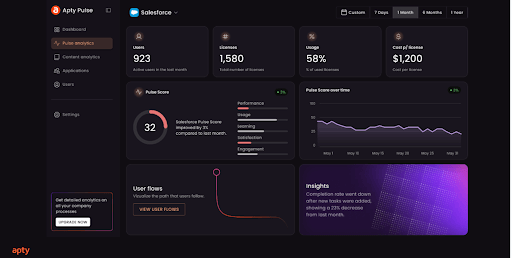
Step #9: Establish Strong Post-Implementation Support
Strong post-implementation support is essential to ensuring Oracle HCM continues to deliver value as your business evolves. This starts with a dedicated HR technology team responsible for system governance, regular updates, and fast issue resolution.
Ongoing feedback loops help surface usability challenges and changing process needs. With Apty, companies can further track how employees interact with Oracle HCM, identify friction points, and deliver real-time validations and end-user support through a centralized knowledge base.
Challenges in Oracle HCM Implementation
For organizations rolling out Oracle HCM, the implementation phase brings its fair share of hurdles. Here are seven key Oracle HCM challenges to watch for:
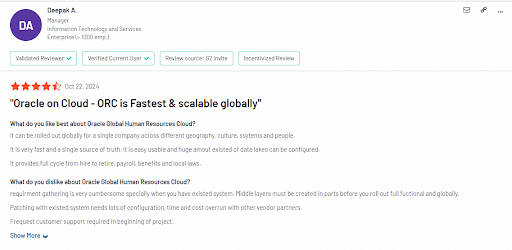
Data Migration
A modern HCM platform acts as the central nervous system for your entire HR function. It houses everything from employee compensation and benefits to leave balances, training records, performance data, and more.
Data migration is, without question, one of the most complex and high-risk phases of any Oracle HCM implementation. Poorly structured data, inconsistent formatting, and mismatched fields can trigger errors, break processes, and lead to unreliable reporting.
Pro Tip: To get it right, organizations should invest in three critical areas: partnering with an experienced Oracle implementation expert, thoroughly cleansing and standardizing data before migration even begins, and building an internal team capable of maintaining and optimizing the system post-go-live.
Employee Onboarding and Training
One of the most overlooked challenges in Oracle HCM implementation is ensuring that every user can confidently navigate and use the system once it’s live.
Oracle HCM’s flexibility and breadth are strengths, but they also mean a steep learning curve, especially for organizations transitioning from more straightforward tools to manual processes.
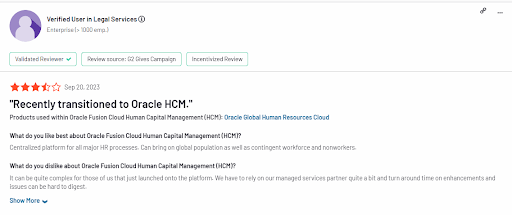
Traditional training methods, like one-time workshops or static manuals, rarely provide lasting value. Employees forget what they learned, processes evolve, and system updates introduce new functionality.
Without effective onboarding and ongoing training, companies risk low adoption, user frustration, costly data entry errors, and underutilisation of the platform’s full capabilities. This ultimately weakens the entire implementation’s return on investment (ROI).
Pro Tip: Use Apty’s DAP to deliver real-time guidance, automate training, and reinforce key workflows, ensuring employees quickly adapt to Oracle HCM and use it effectively.
End-User Support
With a platform as robust and wide-reaching as Oracle HCM, employees and HR administrators will inevitably encounter questions, confusion, and occasional system issues.
The challenge? Relying solely on Oracle’s standard support can quickly become frustrating.
Routine usability questions, configuration hiccups, and minor but persistent bugs rarely get the attention they deserve. In many cases, response times can be slow unless an issue qualifies as Severity 1 or 2, and lower-priority requests are often deprioritized or left unresolved for extended periods.
Give your team the tools to solve issues on their own, so they’re not stuck waiting on support. A strong internal strategy keeps things moving and frustration low.
Pro Tip: Pair your Oracle HCM implementation with a platform like Apty to give employees and HR teams instant, in-app guidance, multi-language support, and self-service help, reducing support tickets and keeping work moving without the wait.
Change Management and Communication
Without clear communication and a well-structured change management strategy, companies risk confusion, resistance, and disengagement, all of which can stall adoption.
This is especially true with a system as comprehensive as Oracle HCM, which touches everything from payroll and performance reviews to self-service benefits and time tracking.
Effective change management also goes beyond kick-off emails and town halls. It requires ongoing reinforcement, real-time support, and a clear roadmap that helps employees understand not just the initial rollout but the long-term evolution of the platform.
Pro Tip: Keep employees informed and confident by embedding change announcements, contextual tooltips, and interactive walkthroughs directly into Oracle HCM with Apty.
Apty + Oracle HCM: Smarter Adoption, Stronger Results
Oracle HCM implementation challenges can be complex, especially when adapting employees to new processes, workflows, and interfaces. Apty can be your post-implementation partner to navigate change, identify friction points, and deliver in-app guidance exactly when users need it.
It empowers your HR teams, payroll staff, and employees to navigate Oracle HCM confidently from day one. This reduces errors, shortens training time, and proactively fixes process gaps.
And the result? Higher adoption rates, more accurate data, and a stronger return on your Oracle HCM investment.
Book a demo to find out how leading companies use Apty to unlock the full potential of Oracle HCM.
FAQs
-
What is Oracle HCM implementation?
Oracle HCM implementation is the process of setting up and deploying Oracle’s Human Capital Management (HCM) Cloud application to manage HR processes such as recruitment, payroll, performance management, and employee records. This involves configuring the system, migrating data, testing, and training users to ensure the solution meets the organization’s HR needs.
-
What are the steps for Oracle implementation?
Oracle HCM implementation involves key steps:
- Project planning: Assign roles, select offerings, and define foundational settings.
- Enterprise and workforce structures: Set up legal entities, business units, jobs, and departments.
- Person and employment records: Configure person types, name formats, and assignment statuses.
- Data migration: Use Oracle’s batch data loader and validate data accuracy.
- Security and approvals: Configure role-based access and approval workflows.
- Testing: Conduct functional, integration, and UAT testing with real-time user feedback.
- Training and go-live: Equip users, launch the system, and provide post-go-live support.
Using Apty’s DAP during and after go-live accelerates adoption, reduces errors, and ensures a smooth transition.
As enterprises grow, so do their operations. Enterprise resource planning (ERP) becomes critical for organizations prioritizing responsiveness, relevance, and consistency. While ERP systems streamline operations, implementation can present unexpected hurdles.
In 2024, the Birmingham City Council had to shell out an additional £1 million on emergency manual bookkeeping after their £38 million accounting system failed.

This case is an example of how poor ERP implementation can cost months or years of effort and money. Without a clear strategy, businesses risk costly disruptions and operational inefficiencies.
Investing in structured implementation and leveraging digital adoption platforms (DAPs) can significantly improve success. This article breaks down the key steps and best practices to ensure your ERP software implementation delivers real value.
What is ERP Implementation?
ERP implementation is the process of unifying and managing core business functions like finance, HR, supply chain, and sales to ensure cohesive functioning. It replaces fragmented systems and silos with a single integrated platform
What are the Benefits of ERP implementation?
- Centralization of business processes
- Automation to reduce errors and improve speed
- Real-time data for better decision-making
Read more on: 7 ERP Implementation Examples Every Enterprise Should Look Into
Why ERP Implementation Matters
ERP system implementation improves data visibility, reduces errors, and facilitates better decision-making. ERP offers a roadmap to smoother, more efficient operations.
Here’s why it matters for your business:
Improving Operational Efficiency
ERP systems streamline routine operations by simplifying processes and eliminating staff errors. This can boost overall productivity.
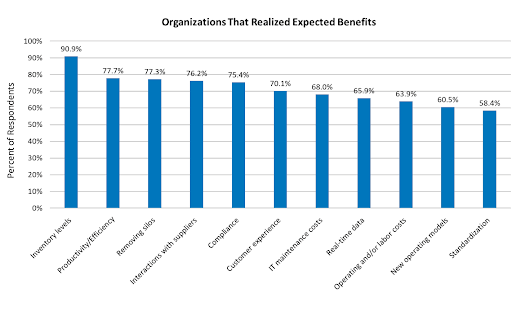
For example, after deploying an ERP system, 74% of companies boosted productivity and efficiency.
Enhancing Data Visibility and Accuracy
Poor quality data can have unmistakable consequences in business. Gartner found that businesses lose an average of $15 million per year because of poor data.
ERP systems prevent the use of stale data by providing real-time insights from centralized networks. They improve decision making regarding optimal resource allocation, sales forecasts, and cycle times, among others.
Supporting Scalability and Growth
ERP systems scale with your business needs, integrating various functions into a unified platform to streamline operations, enhance efficiency, and adapt to changing market demands.
For instance, when fast-casual restaurant chain Sweetgreen faced challenges with scalability due to rapid growth, it implemented Oracle’s Cloud ERP and Coupa. The ERP system led to a 67% decrease in data load times, a 5-minute reduction in journal entry completion time, and a 30% reduction in manual IT controls.
Strengthening Compliance and Risk Management
ERP tools improve regulatory compliance with built-in monitoring and reporting capabilities. They enhance data security in a closed environment, making it easier for organizations to protect key company information from potential threats.
Boosting Collaboration and Communication
ERP systems encourage different departments to interact, resulting in improved team collaboration. It combines various functions into one interface to facilitate smooth communication.
In fact, Panorama Consulting Group has found that breaking silos is among the top three benefits of ERP system implementation.
Organizational Benefits of ERP Implementation
What is the ERP System Implementation Process?
ERP software implementation is a multi-stage process that requires careful planning, collaboration, and execution. To achieve this, companies must follow a structured ERP implementation process that ensures seamless integration, system testing, and user adoption.
The process entails the following steps:
Step #1: Assess Business Needs
Before selecting an ERP system, organizations must evaluate their current workflows, identify inefficiencies, and define clear objectives. This involves:
- Mapping existing processes to uncover inefficiencies
- Identifying pain points such as manual data entry errors or siloed information
- Aligning ERP capabilities with business goals (e.g., better financial reporting)
This ensures that the ERP implementation plan is built around actual business needs rather than just software capabilities.
Step #2: Select the Right ERP Solution
Choosing the right ERP system depends on scalability, industry-specific features, and integration capabilities. Key factors to consider include:
- Cloud vs. On-premise ERP: Cloud solutions offer flexibility, while on-premise ERP provides greater control.
- Customization vs. Out-of-the-Box Features: Too many customizations can slow down enterprise resource planning implementation and increase costs.
- Integration: Compatibility with existing tools like current CRM, HR, or finance software. With the right integrations and software, you can create documents from ERP data, such as catalogs, price lists, or technical sheets.
A well-chosen system minimizes friction and accelerates business transformation.
Step #3: Build an ERP Implementation Team
A successful ERP implementation requires a cross-functional team that brings together technical expertise, human resources, and business insights. A successful ERP rollout requires:
- IT specialists to ensure technical feasibility and system integration.
- Department heads to represent user needs and process improvements.
- Project managers to ERP implementation timelines and resource allocation.
Leveraging a DAP like Apty can ensure that employees receive structured guidance, reducing resistance, accelerating adoption, and improving productivity by up to 20%.
Step #4: Develop a Comprehensive Implementation Plan
A well-structured enterprise resource planning ensures timely execution and efficient resource allocation. This includes:
- Project timeline with realistic milestones
- Budget estimation to avoid cost overruns
- Risk mitigation strategies to handle unforeseen issues
Without a detailed ERP implementation checklist, the process often faces delays, scope creep, and resistance from employees unprepared for the transition.
Step #5: Migrate Data and Integrate Systems
One of the main challenges of ERP implementation is moving data from legacy systems without errors during the transition. Key steps include:
- Data Cleansing: Removing duplicate or outdated records
- Data Mapping: Aligning fields between old and new systems
- Integration Testing: Ensuring the ERP software syncs with other business tools
Failure to do so can result in operational disruptions and poor decision-making due to inconsistent or missing data.
Step #6: Customize and Configure the ERP System
While ERP customization may be necessary, excessive modifications can lead to higher costs and complexity. Organizations should:
- Prioritize standard features over custom development.
- Ensure user-friendly configurations for ease of adoption.
- Test configurations in a sandbox environment before deployment.
Leveraging smart tools ensures efficiency without overcomplicating workflows.
Step #7: Develop a User Onboarding and Training Strategy
User adoption is critical for ERP implementation success. A structured training program should include:
- Workshops and webinars for hands-on learning and development
- Role-based training tailored to different departments
- In-app guidance to assist users in real time
Traditional methods like manual sessions are often ineffective, which is why many organizations turn to DAPs. Apty’s in-app guidance can help employees learn on the go, reducing IT support queries by up to 15%.
Step #8: Pilot Test and Collect Feedback
A phased rollout allows businesses to identify issues before full-scale ERP implementation. This involves:
- Testing with a small group of users
- Collecting real-time feedback
- Refining workflows based on user insights
DAPs like Apty can improve adoption with contextual tooltips to help organizations track how employees interact with the ERP system.
Step #9: Deploy the ERP System and Manage Change
The final rollout requires:
- Company-wide implementation of the ERP system
- Change management strategies to minimize resistance
- Ongoing support and system monitoring
Apty assists with change management by offering contextual guidance, in-product support, and analytics to smooth the transition.
Step #10: Monitor Adoption and Measure Success
To maximize ERP implementation ROI, businesses must track key adoption metrics, including:
- User engagement rates
- Time taken to complete critical workflows
- Reduction in errors and manual rework
Advanced data monitoring features like those provided by Apty offer real-time insights into user engagement and compliance, helping businesses optimize adoption.
Step #11: Create an End-User Support Strategy
Even after deployment, ongoing end-user training and support is crucial. Organizations should:
- Establish help desks for troubleshooting
- Create knowledge bases with FAQs and guides
- Implement real-time assistance tools
Here, Apty’s self-help support feature enables employees to find answers quickly without needing IT intervention.
Step #12: Evaluate, Optimize, and Scale
ERP systems require continuous improvement to adapt to evolving business requirements. Best practices include:
- Regular system audits to identify inefficiencies
- User feedback loops for process improvements
- Expansion of ERP functionalities as the company grows
Apty PULSE, with its centralized dashboard and real-time analytics, lets organizations visualize user journeys, identify bottlenecks, and implement targeted optimizations to refine ERP implementation processes.
Read more on: 8 Tips to Maximizing ROI of ERP Implementation: Strategies for Reducing Operating Costs
Challenges With ERP Implementation
Several challenges lead to failed ERP implementation. Addressing these challenges effectively is key to maximizing the value of an ERP system:
Low User Adoption
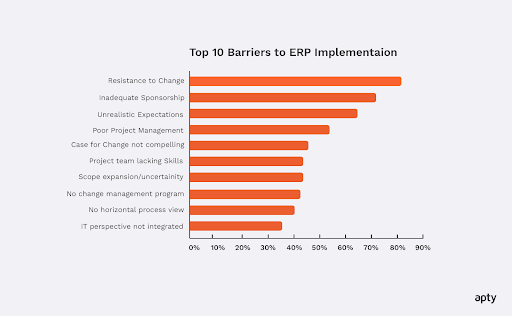
Unfamiliarity with ERP implementation and insufficient guidance cause employees to oppose software implementation. Employees struggle to use the system effectively when onboarding is not provided properly.
Providing step-by-step walkthroughs and real-time assistance with the help of tools like Apty can significantly improve adoption.
Complex ERP Workflows
The complexity of ERP software workflows often results in inefficiencies and user errors. Navigating between different functions without clear direction can slow down processes and create bottlenecks.
Businesses that introduce automation and contextual prompts within their ERP system reduce friction and improve usability.
Data Migration Errors
Transferring data from legacy systems is one of the biggest hurdles in ERP implementation. Data inconsistencies and missing records can cause disruptions, leading to financial and operational risks.
Organizations using real-time validation tools during data migration ensure accuracy and prevent delays.
Insufficient Training
Traditional training methods rarely align with how employees use an ERP system. Many businesses now embed role-based training and real-time support within the ERP interface, ensuring users get help precisely when they need it.
Mary Kay, a global direct-selling beauty brand, used Apty for personalized digital onboarding and training in 15 languages across 24 countries.
Also Read: How to Overcome Employee Pushback
Best Practices for ERP Implementation
While these challenges are common, businesses can overcome them with the right approach. Following these proven best practices helps ensure a smooth ERP implementation:
Define Clear Business Goals
Without well-defined objectives, the ERP implementation process can lose direction, resulting in delays and inefficiencies. Reports show that up to 75% of all ERP projects fail to meet their objectives.
To avoid this, businesses must start by mapping out key pain points such as improving inventory accuracy or reducing manual data entry. This will ensure the system aligns with their actual needs.
Invest in Training and Onboarding
ERP adoption often struggles due to inefficient employee training and onboarding.
Traditional onboarding methods rarely provide hands-on learning. Organizations that integrate in-app guidance, interactive walkthroughs, contextual support, and role-based training see faster adoption and fewer support requests.
Ensure Data Accuracy and Standardization
When data quality deteriorates it leads to incorrect reports as well as system violations and problems with important choices. Organizations can employ real-time validation technologies for the pre-validation of data to detect errors before operational damage occurs.
Practice Phased Implementation
Rolling out an ERP system all at once increases the risk of disruptions, user confusion, and operational slowdowns. A phased approach, where the system is introduced department by department or in specific functional areas, allows for gradual adaptation and better issue resolution.
ERP Implementation Case Study
To see how these best practices come to life, let’s review a case study of an ERP implementation.
Mattel, a global toy company, faced challenges with Workday HCM implementation, including inconsistent processes and a surge in support tickets. Employees struggled with navigating the system, impacting onboarding and HR tasks.
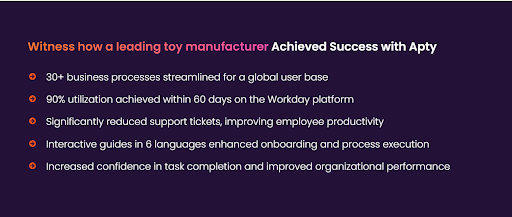
To address this, Mattel integrated interactive in-app guides and real-time support within Workday, helping employees complete tasks independently. This approach led to 90% system utilization within 60 days, reduced support tickets, and improved process efficiency.
Optimizing 30+ business processes in multiple languages helped Mattel boost global adoption and ensure seamless onboarding.
As shown by Mattel’s success, integrating the right tools is crucial for maximizing an ERP system’s benefits.
Drive Successful ERP Implementation With Apty
Even the best ERP platforms fall short without user adoption. Apty accelerates onboarding, supports change management, and provides real-time insights.
With Apty, you get:
- Contextual in-app guidance
- Behavior analytics
- Faster time-to-value
Book a demo today and maximize your ERP ROI.
After months of planning, your company finally launched a digital transformation initiative. Excitement was at an all-time high.
But as weeks pass, that excitement fades. Productivity dips, teams revert to old habits, and frustration builds. Instead of driving efficiency, the new system creates confusion and resistance.
Then it hits you: successful transformation must go beyond rolling out new technology. It’s important to ensure change management strategies are in place to drive adoption, minimize resistance, and create lasting impact.
Without a structured approach, even the best-planned changes can fail. Employees struggle when they aren’t adequately prepared, supported, or motivated to embrace new ways of working. Effective change management ensures smooth transitions, keeps teams aligned, and helps organizations fully integrate innovations into daily operations.
In this blog post, we’ll break down what makes change management successful, its types, common pitfalls to avoid, and how to implement a strategy that sticks.
What Is a Change Management Strategy?
A change management strategy is a structured plan organizations use to implement changes effectively while ensuring limited disruption to ongoing operations and processes. It also involves fostering engagement with these new initiatives.
These strategies serve as roadmaps that feature key elements such as detailed planning, strategic resource allocation, clear stakeholder communication, and continual progress monitoring.
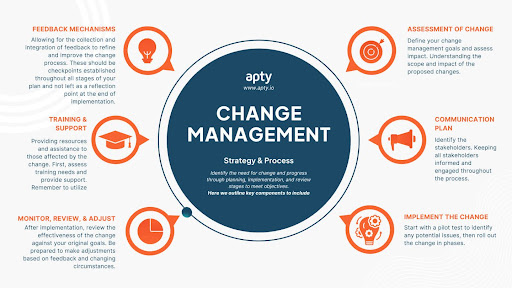
Essentially, a change management strategy is created to close the gap between where an organization is presently and the ideal version of itself in the future. A good strategy combines both the technical and human aspects of change.
The technical aspects of change include the structural and process-based parts such as implementing new systems or tools, and redesigning processes. The human aspects are related to communication, transparency, leadership support and employee mindset shifts.
A transformation can be just the new systems or processes, but a successful transformation has to make sure people understand, accept, and are actively involved in the change journey.
Why Organizational Change Management Strategies are Important
Let’s explore the importance and benefits change management strategies bring to an organization.
Minimized Resistance
A well-structured change management strategy helps combat employee resistance to change with proper communication. It addresses concerns proactively, provides clear communication channels, and shows the leadership’s commitment to employee support.
If employees understand the reasons behind the changes and see how they benefit the organization and themselves individually, they will respond better. This allows them to be active participants in the change rather than just observers or, even worse, resistors.
Reduced Operational Disruptions
Operational disruptions make transformation painful, but an effective change strategy considers potential disruptions and proactively aims to minimize them. This allows critical business functions to flow uninterrupted while new processes are implemented, tested, and refined in the background.
Enhanced Employee Engagement
When organizations prioritize employee involvement in change management strategies, they create opportunities for active participation throughout the transformation process. This engagement leads to higher buy-in, better adoption rates, and greater long-term sustainability of the change. Employees who feel heard and have their concerns addressed become key contributors, helping to champion the change and drive adoption across the organization.
Improved ROI on New Technologies
With effective change management strategies, organizations will be able to extract maximum value from new systems and technologies. Higher adoption, training, and support for employees will reduce the time needed to realize the value of their investments.
Better Competitive Advantage
Organizations with effective change management strategies have a clear edge over their competitors. The ability to quickly and efficiently adapt to shifts in the market, customer demands, or new technology gives them a competitive advantage. These strategies help businesses stay agile and responsive, making it easier to pivot when needed.
More importantly, they drive innovation, enabling organizations to lead change rather than just keep up with it.
Types of Change Management Strategies
When it comes to navigating change, there’s no one-size-fits-all approach. Different strategies work better for different organizations depending on their goals and challenges.
Let’s explore various types of change management strategies.
Developmental Change
This directly focuses on improving an organization’s processes and methods. Its remit is to take what works and make improvements to boost performance and efficiency.
Some examples include:
- Upgrading existing software systems to newer versions
- Improving employee onboarding to reduce strain on senior staff
- Updating help center articles to target common customer requests
Transitional Change
It involves moving a system from its current state to a newer, clearly defined future state. With developmental change, there is a focus on gradual improvements to existing processes. Transitional changes, on the other hand, involve replacing an old system with a new one. This requires a more structured and measured approach.
Some examples include:
- Introducing new products or services
- Shifting to remote work
- Using a new marketing strategy
Transformational Change
This marks a fundamental shift in how an organization operates, involving significant strategic, core value, operational, and often cultural updates. It is a disruptive shift that aims to take the organization in a completely new direction or to a new level of performance.
Some examples include:
- Business model pivots. e.g. non-profit to for-profit
- Mergers or acquisitions
- Overhauling operations to focus on new core values, like sustainability
9 Key Change Management Strategies
Change can be tough, but the right change management strategies make all the difference. Here are nine key strategies that can help organizations navigate change management trends and transitions smoothly.
1. Strategically Assess Organizational Readiness
Before implementing any change strategy, organizations have to honestly and thoroughly evaluate their readiness for transformation. This comprises comprehensive assessments to identify potential resistance points, the organization’s capacity, and areas requiring additional support.
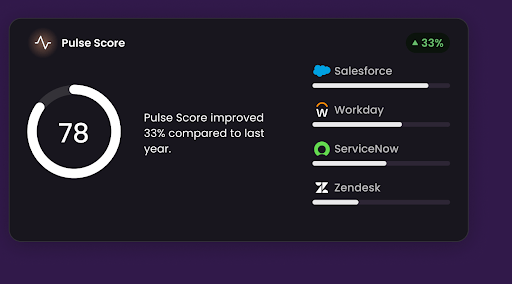
Digital adoption platforms such as Apty offer a readiness assessment dashboard that provides valuable insights into key user behavior and system usage patterns. The data helps organizations make data-driven decisions.
2. Establish a Clear Vision and Well-Defined Goals
“I want to succeed and make a positive impact” is something many people say, but it’s often unclear what that actually looks like. Leaders must communicate a vision that shows how the change aligns with organizational objectives and how it benefits the company and its employees. This vision must come with specific and measurable goals that provide clear directions and allow for progress tracking toward achieving them. Tools like an AI business plan generator can also support leaders by structuring strategies, setting milestones, and aligning business goals with organizational change efforts.
For example, instead of saying, “We’re switching CRM systems to boost our sales process”, a well communicated version would be: “We’re working with a new CRM system that will automate repetitive tasks, provide customer insights and streamline communication. We expect this to allow our sales team to close deals 30% faster and improve customer satisfaction.”
For a vision to ensure alignment, a leader must:
- Make it relatable: Show the connection between the vision and employees’ daily work. Show how it simplifies tasks or creates new opportunities.
- Define measurable goals: Establish clear KPIs such as “increase customer retention by 20% in 6 months.”
- Use storytelling tactics: Share success stories or even a moving “before-and-after” picture.
A vision is more than a statement for people to read, it is a north star to direct people consistently. Leaders have to put it front and center when possible. Company meetings, internal communications, and performance reviews all have to be aligned with the vision to boost momentum.
3. Develop a Phased and Structured Change Roadmap
Break the transformation journey into simple phases like a roadmap. Each phase should have clear milestones and success metrics to help organizations track their progress. A phased approach allows employees to prepare and adjust accordingly through the change stages.
Change management action items for this strategy include:
- Detailed timelines for each phase
- Specific deliverables and outcomes
- Clear responsibilities and accountability
- Measurable KPIs for progress tracking
For example, a change management roadmap could look like:
Phase 1: Planning and Alignment
- Define change objectives and expected impact
- Identify key stakeholders and sponsors
- Develop a communication and training plan
Phase 2: Implementation and Execution
- Begin pilot programs and initial rollouts
- Collect employee feedback and adjust strategy
- Provide in-depth training and support
Phase 3: Optimization and Reinforcement
- Monitor adoption rates and identify bottlenecks
- Adjust processes based on data-driven insights
- Embed changes into company culture
4. Leverage Key Stakeholders and Change Champions
A “change champion” is a team member selected to help facilitate change. These individuals serve as advocates and facilitators to help change move smoothly.
They drive adoption within their teams, provide feedback on implementation challenges, support their teammates through the transition process, and help showcase benefits of the new systems.
To leverage change champions:
- Identify these influential employees within different teams
- Provide them with training and resources to effectively guide colleagues
- Recognize and reward these change champions to reinforce their importance
Stakeholders are just as important for effective change management strategies. Keeping them in the loop to actively support and reinforce the reasons and benefits of the changes is vital.
Using Apty’s insights and analytics, leaders can accurately assess resource needs, track usage, and adjust strategies, ensuring resources are optimally allocated and stakeholders are engaged with relevant, data-driven feedback throughout the change process.
5. Implement a Scalable Employee Training Strategy
It is not enough to just show the new system or processes in place.
Create effective training programs to ensure employees properly adapt and embrace these new systems and processes. Using platforms with innovative solutions to boost employee training, support, and adoption is a great way to handle this.
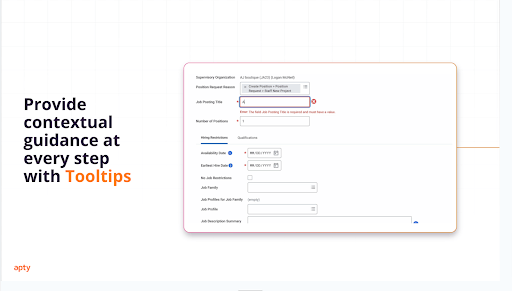
Apty’s in-app guidance and self-help support features extensively provide this functionality. It integrates with any software application, and the conversational UI enables AI-powered guidance. An integrated knowledge base makes searching across applications easier and boosts change management adoption.
6. Build a Transparent and Effective Communication Plan
Clear, consistent communication is vital for the change process.
Organizations should develop multi-channel communication strategies for regular progress updates and to address concerns and questions quickly and effectively. These communication strategies should also celebrate project milestones and successes.
More importantly, there should be a two-way dialogue between leadership and employees to facilitate effective communication of issues and concerns.
7. Adopt a Pilot-First Approach for Change Validation
A pilot-first approach is a test run of the new system or process. A small-scale implementation assesses the feasibility of the project before a complete rollout. Testing the changes with a smaller group also helps identify and address potential issues early.
Additionally, this approach helps:
- Gather valuable user feedback
- Refine processes and workflows for maximum value
- Validate new approaches
- Build confidence and raise anticipation for complete change rollout
8. Continuously Monitor, Analyze, and Optimize Adoption
After the changes are successfully implemented, review their effectiveness against your original goals. Analytics are important to track progress and identify any areas needing additional support or further improvements. Adoption rates, user engagement, and system usage trends are chief among the metrics to track at this stage.
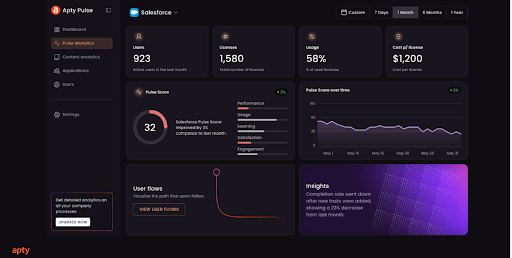
Be prepared to make adjustments based on feedback and changing circumstances. Continuous improvement should be a key component of your strategy. It is best to use a data collecting platform such as Apty’s analytics to identify and resolve adoption roadblocks and help you optimize your changes as best as you can.
9. Ensure Long-Term Success With Ongoing Support and Feedback
Another key part of strategies for change management is ensuring long-term success with regular support and feedback loops.
Implementing continuous training to improve the systems, help desks for anyone with questions and real-time user support all work to improve the chances of long-term change success. This needs to be an ongoing process to ensure that change strategies stay as effective as possible.
With Apty’s Advanced Change Insights, you get a deep understanding of user challenges, engagement metrics and more. These help leadership make informed decisions, optimize software adoption, and improve change management efforts.
Why Do Change Management Strategies Fail?
Change management strategies are essential, but they don’t always succeed. Let’s take a closer look at why these strategies fail.
Lack of Leadership Support
Change strategies often fail because there is a lack of visible and active leadership support. Ineffective leadership derails success, and a failure from the management to champion and lead the change will definitely crash the project’s success rate.
Leadership has to be at the head of any change strategy, making sure concerns are addressed swiftly, and necessary resources are allocated. They must ensure feedback is addressed and employees understand the importance of the change, showing their commitment through actions, not just words.
Poor Communication Organization-wide
Communication is the backbone of any project. Some communication can be ineffective, including inconsistent messaging, lack of two-way dialogue, and failure to address concerns openly.
Fixing these common communication issues will increase chances of success exponentially.
For instance, a leading bank faced significant challenges during a global acquisition due to ineffective communication strategies. Leveraging Apty’s platform streamlined their communication processes, ensuring consistent messaging across all departments. This approach not only minimized resistance but also facilitated a smoother transition during the acquisition, saving them $1 million.
Insufficient Employee Training
Resistance is another key factor that negatively impacts the success of change strategies. Organizations have to make sure training is accessible and role-specific to extract maximum value.
Support resources have to be readily available to reduce frustration and increase adoption rates. Lack of adequate training means employees will struggle with the new processes or systems in place. Structured training will make the transition as smooth as possible.
A prominent airline company encountered difficulties with software adoption among its staff, leading to operational inefficiencies. Implementing Apty’s digital adoption solutions helped them develop structured training programs with in-app guidance and self-service support. This initiative resulted in improved employee proficiency and a more seamless transition.
Strategic Misalignment and Weak Planning
Planning involves leveraging the team’s strengths and working to alleviate its weaknesses. If there is poor planning and no correlation between the business objectives and the changes implemented, the transition is doomed from the start.
Avoiding key issues such as unclear objectives and success metrics, unrealistic timelines, and lack of coordination between departments will make the transition a world of good.
Absence of a Clear and Shared Vision
it’s essential for leaders to clearly articulate and share the ultimate vision and outcomes expected from the change. Employees need to clearly see and understand the future the change aims to create. Without a compelling vision, their motivation to embrace and apply the change in their daily work may fade.
A clear, shared vision acts as a north star, guiding and motivating everyone involved toward successful adaptation and implementation.
Also Read: Top 6 Change Management Best Practices
Seamlessly Execute Your Change Management Strategy With Apty
To make change less scary and easier, partner with Apty to execute your change management strategy.
Apty is an AI-powered digital adoption platform, you can use it to identify bottlenecks and provide targeted solutions. This reduces content creation time and accelerates user proficiency.
Tools like in-app guidance, real-time analytics, contextual help, self-service support, and automated change communication help optimize transition efficiency. Boasting a 70% success rate, Apty drives change forward, delivering a 6X return on digital investments and reducing time to implement organizational changes by 95%.
Ready to see how it works? Book a demo today.
FAQs
1. What is a change management strategy?
A change management strategy is a structured plan that helps organizations implement changes smoothly with minimal disruption. It ensures employees understand, accept, and adopt new processes, technologies, or systems while staying engaged and productive.
2. What are the five components of a change management strategy?
The five key components of a change management strategy are:
- Clear Vision and Goals: Defining the purpose and expected outcomes of the change
- Leadership and Stakeholder Support: Involving key decision-makers and change champions
- Effective Communication: Keeping employees informed and addressing concerns
- Employee Training and Support: Providing resources to help teams adapt
- Monitoring and Continuous Improvement: Tracking progress and making necessary adjustments
3. What are common steps of the change management process?
The typical steps in the change management process include:
- Assess Readiness: Evaluate the organization’s ability to handle change
- Define Objectives and Create a Plan: Set clear goals and develop a structured roadmap
- Communicate the Change: Inform stakeholders and employees about the upcoming changes
- Train and Support Employees: Provide the necessary tools, training, and guidance
- Implement the Change: Roll out changes in phases and monitor the transition
- Track Progress and Adjust: Collect feedback, analyze adoption, and refine strategies as needed
- Reinforce and Sustain Change: Ensure long-term success through ongoing support and optimization
Oracle HCM has the power to engage and manage your global workforce. However, it can slow down business operations and impact overall productivity without effective onboarding, training, and adoption.
Oracle provides comprehensive HCM solutions that are flexible, intelligent, and effective to meet current and future business requirements. You can reap its most exclusive benefits only if the implementation is successful. However, implementing and effectively utilizing Oracle HCM needs a careful and well-thought-out plan.
Before you jump into the plan, get an overview of what kind of difficulties you might encounter. Let’s understand the top challenges that can slow down the software implementation process,
Oracle HCM Cloud Implementation Challenges
Oracle HCM implementation challenges come in two phases.
Phase 1 (Technical & Logical): This phase involves challenges like data migration, conversion, and integration.
Phase 2 (User standpoint): This phase is about User acceptance, satisfaction, and adoption.
Challenges that can occur in phase 1 let’s say you are migrating & Integrating SAP and Oracle data,
- Migration needs to be done on time before the Go-Live. Otherwise, there won’t be any data in your Oracle system, and it won’t be aligned with SAP.
- Both integration and migration have to fit into your project plan, budget, and timeline.
- Data is often not considered a challenge, but it must be at the top of your mind throughout.
- Cloud is effective and easy, but it creates a different complexity when it comes to integrating other solutions.
- Knowledge about the 2 data models is required: You must understand how to extract the data from SAP HCM and translate it into Oracle language and vice-versa to successfully leverage both systems going forward.
Fasten Yourself! This is just for phase 1.
For Phase 2:
The following are some common challenges that companies face while implementing Oracle HCM,
1. Lack of employee training plan
While implementing Oracle HCM Cloud, several leaders’ most significant challenge is planning the employee training program.
Effective training is the first step to your successful HCM implementation goal. Every organization has its way of training its employees but identifying the right, and most effective training method is the biggest challenge.
Oracle HCM has immense capabilities which complicate the training process. Companies, however, don’t want each employee to learn all the features. Instead, they want their employees to master the features that help them complete their respective jobs effectively.
Here comes the challenge.
- How do you train employees based on their use case?
- Which training method is the most cost-effective way?
- How to quickly onboard all Oracle users?
- Is your training method scalable?
Ask yourself and find answers to all training-related questions before starting the program. There are several tools available in the market which can serve the purpose. Tools that can help Organizations to leverage Oracle HCM to the fullest potential.
Pro tip: Digital Adoption Platform provides end-to-end Oracle HCM implementation, right from onboarding and training to the adoption of Oracle HCM.
2. Resistance to change
This can be the most common challenge Oracle HCM Cloud implementation projects face. It’s difficult to convince employees about the upcoming changes that may take place. Several reasons can cause resistance to change for both employer and employees. Some of the main reasons are as follows,
- Fear of failure. New change can be a disaster, as employees may not be able to adapt to the new system.
- Loss of control. Changes can make employees feel that they have lost control over their territory.
- Excess uncertainty. The lack of a straightforward approach and process can create uncertainty and increase resistance.
It is essential to create a plan for change management and make your employees understand how the change can benefit the entire organization. Provide the workforce with complete information about the change and how to implement it as a team.
3. Feature Release requires Re-Training
Oracle HCM Cloud has frequent feature releases, and these updates are automatically pushed to the entire user base. The Feature release is one of every enterprise’s most common challenges when implementing Oracle HCM.
Wait!
Feature Release is to improve the product, but how is it a challenge?
Yes, the frequent release improves the product but making your employees learn what’s new is the hidden challenge.
Two Cases:
Regular users: These users can quickly get the hang of the new release by using the application frequently. (No training required)
Occasional users: When they log in after a while, they can face challenges completing their tasks. (Need to train them)
You need to Re-train these occasional users. This might sound simple, but it is time-consuming and complex in reality.
A comprehensive plan is essential to avoid these and other common Oracle HCM implementation challenges. Lack of an implementation plan can lead to disruptions in business processes and employees not being able to take full advantage of the new system. An Oracle HCM implementation checklist covering these challenges can help companies ensure successful implementation.
A solution to Oracle HCM implementation challenges:
Digital Adoption Platform like Apty solves Oracle HCM implementation challenges by providing real-time on-screen guidance and data validations to your employees. Apty DAP gives your employees total self-reliance. It allows employees to learn as they interact with Oracle applications, eliminating the need for ineffective classroom training sessions.
Apty’s real-time navigation gives your employees the power to perform far beyond expectations. It solves Oracle training and support costs with the help of interactive software walkthroughs and provides powerful analytics to get the most of your Oracle investment.
Microsoft Dynamics is revolutionizing businesses and enabling Digital Transformation. It provides enhanced employee and customer experience, enables high customizability and scalability, and increases productivity.
The implementation of MS Dynamics, however, requires strategic planning and preparation. Companies have to make sure that their employees are able to use it as intended. This blog will serve as a comprehensive guide for implementing Microsoft Dynamics at your organization.
9-Step Microsoft Dynamics Implementation Process
- Define the “What” and “Why”
- Assign a Team
- Identify Key Metrics
- Ensure In-depth Process Review
- Create a Proper Plan
- Maintain Clean Data
- Test the System
- Rollout and Evaluate
- Train the Employees
1. Define the “What” and “Why”
The project teams must understand the company’s vision, mission, and roadmap. Having a clear understanding will help the team address the challenges that might come during implementation and have a smooth deployment.
Relevant Read: Common Microsoft Dynamics Implementation Challenges
Once they define why different departments within the organization need MS Dynamics and what features they will need to carry out their day-to-day activities, the company can establish the expected business outcomes from the project.
It will help them strategize various functional aspects of the business and prioritize those which can create an immediate impact on the company’s bottom line.
A business needs to plan its present requirements and future expectations from the system. Understanding these aspects will also help project teams and Dynamics consultants to plan the way forward.
With the latest features and functionalities, Dynamics is becoming a great prospect for growing organizations. Although, the vast amount of customization available has made things a little more complicated for companies. The custom functionality is only available through a standardized extension from the Microsoft store. So, this must be taken into consideration while migrating from the existing system.
If all these factors are considered while planning, businesses can increase user adoption and expedite the change management process.
2. Assign a Team
There’s a common misconception that only the IT teams and the teams directly involved with the project have to deal with Microsoft Dynamics. An organization needs people who can understand the business side of the implementation too.
For this, they need subject matter experts from all the departments dealing with the business decisions and outcomes since they will be impacted by the Dynamics 365 implementation.
These subject matter experts will be key in determining the success of your D365 implementation as they understand their respective business units well. They can explain the requirements better and elaborate on the effect that the implementation will have on their department.
3. Identify Key Metrics
Now that you have assembled a team, you can proceed with defining OKRs and KPIs. These metrics are entirely different from the objectives of departments or organizational goals. KPIs should be measured at the team level where they own the responsibility of improving a particular aspect of the business.
Quantifying this task will help business leaders check whether the implementation is in line with the organization’s expectations.
Every team has specific KPIs and it is not limited to any set standards. It also varies from business to business. Having well-defined KPIs helps companies prioritize the right use case and allow them to steer the project towards success.
4. Ensure In-depth Process Review
Let the project teams and department heads review the capabilities of the new ERP software. It helps the team understand the features of D365 and get insights on how to use it for the benefit of the organization.
It allows them to identify and understand the skill gaps so they can plan the training program before the company-wide roll-out of Dynamics 365.
It is also relatively easy to identify manual processes in the early stages. The project team can modify these processes by automating them so that the implementation is smooth.
5. Create a Proper Plan
Once the organization knows what its end goal is from the implementation and the KPIs are set for each team, they can go ahead and create a plan.
Since D365 is a complicated application, it is important to focus on the system’s design, architecture, integration, and processes. There are many technical aspects that the company will have to explore during the planning stage that they can leverage for their benefit.
But the Executive Sponsor and Dynamics Consultant must ensure that the team stays focused on the business’ goals and iteratively improve the execution. The human element is often ignored during the implementation stage and only considered during the user adoption phase.
This could lead even a well-deployed solution to failure. User adoption should be an inclusive part of the implementation process. So, design systems and processes that are usable by the people.
Create a user adoption strategy that can address onboarding and training and one that focuses on developing long-term skills to ensure successful usage of Dynamics 365.
6. Maintain Clean Data
The toughest job while implementing any software is to maintain data integrity in the defined process. It becomes even more challenging when a new process is deployed. Making sense of what data is important is necessary. Missing crucial data could have a devastating effect on the company’s operational efficiency.
When D365 goes live, it is important to maintain data integrity where you have to introduce new compliances and regulations.
There are 2 ways you will have to handle data while implementing D365:
- Data Migration: The first step is to start looking at the quality of available data and decide what will be valuable. Discard outdated, irrelevant, and duplicate data during the migration process. Data cleansing is laborious work and needs tons of effort. Then, migrate the clean and accurate data onto the new platform.
- Ensuring Data Integrity: It is also important to receive clean data from users after deploying the ERP. To ensure this, organizations need to create new data compliance policies and regulations. These must be followed by the employees and for that, companies must train employees or use technologies like a Digital Adoption Platform that not only ensure data quality but also process compliance.
7. Test the System
After the workflow and process creation, it is time to test the system and all the workflows on a test group. Straightaway deploying the solution across the organization is a costly affair and rectifying bugs or incorrect flows will be challenging.
Start with a small test group and check the proficiency of the designed system. Understand the users’ reactions to the system and take their feedback. In this period, you can analyze the adoption rates and other parameters like process completion rate and data compliance using tools like Digital Adoption Platforms.
The observation during the testing phase will help the project team create documentation and training content which will come in handy when the actual rollout happens.
8. Rollout and Evaluate
Deploying the complete solution at an organization in one go can increase the chances of failure. The deployment must be handled in phases.
The go-live process can take a month to a quarter and the efficiency of the team is not defined by how fast they execute but by how well the deployed environment works.
The project teams of the respective departments or business units must be prepared to execute the implementation seamlessly. The support team must be ready to answer all the questions posed by the users.
The L&D team should provide training to the users to ensure successful adoption. An organization should also invest in tools like Digital Adoption Platforms that can make the Dynamics 365 implementation successful.
Implementation is an ongoing process as the project team has to continuously improve the process and system add customizations and remove redundancies to achieve efficiency. It can only happen by planning consecutive releases over a long duration to create a refined version of your initial implementation.
9. Train the Employees
Training should be an integral part of the implementation strategy. Create training programs in the early stages of implementation planning and decide the training methods that would be required to enhance the skills of employees.
It is often assumed that training programs are designed to post the implementation phase. However, doing so will delay returns from your D365 investment.
Companies must prepare training programs while strategizing the implementation process.
The designed training program cannot rely on only one single training method. You need several methods that can satisfy different users’ learning patterns. Every employee is different and so is their way of learning. So deploying training methods that can satisfy visual, auditory, reading, and kinesthetic learners is a necessity to make training programs successful.
Relevant Read: Microsoft Dynamics Implementation Challenges
A Digital Adoption Platform allows you to create content that can address visual, reading, and kinesthetic learners’ needs. It can also hold content like PDFs, knowledge base links (reading format), walkthroughs (visual and kinesthetic), and videos (visual and auditory format) in its help deck which sits right on top of Microsoft Dynamics 365.
Apty’s intuitive guidance simplifies Microsoft Dynamics for all your employees. It also acts as a repository of information that allows users to clarify their doubts without even leaving the platform. It reduces pressure on the support and IT teams so they can focus on higher priority issues.
Microsoft implementation isn’t an easy process. Enhanced functionality brings with it added layers of complexity. In many instances, failure to devise robust change management and adoption strategies is why the Microsoft implementation fails to deliver the required results.
Change management involves helping people understand what’s happening, why this happens, and how they can benefit. It is crucial because it allows organizations to adapt to new technology quickly and efficiently.
Without change management, your employees might struggle and fall back into their old ways and will never understand Microsoft’s benefits and true potential. It results in poor returns (negative ROI) and increases costs such as support and training.
You can avoid all these things with a solid change management strategy. Change management and adoption strategies ensure that your employees use the new software as intended and get the most out of it. Without these strategies, Microsoft implementations are likely to fail.
This is all about the “why,” Now, let’s dive into the most crucial factor, the “how.” We have explored and devised the most successful Microsoft adoption and change management strategies.
Relevant Read: An End-to-End Microsoft Dynamics Implementation Guide
Microsoft Change Management and Adoption strategies:
Change management and adoption strategies allow you to communicate the essential details of the Microsoft rollout project to your employees and set the right expectations for the change.
It allows your workforce to learn how to use it, ask questions about how it will work best for them, and how they can optimize their processes with the new system in place. It helps your employees quickly get up to speed on using new features/tools, ensuring they understand how to leverage them.
There are 4 phases involved in the Microsoft change management approach,
- Planning
- Awareness
- Learning and development
- Readiness and adoption
Each phase entails many different things; let’s dig deeper and understand that.
Phase 1: Planning
Before rolling out Microsoft, you must have a comprehensive change management plan. You can witness high reception from your employees if you complete the planning early.
Here comes the challenge. The reception can be negative even. In that case, you must understand the reason for employee resistance and address it before proceeding.
In the planning phase, you must communicate the whole change process and get stakeholders’ buy-in. Also, share factual data and success stories that show the positive changes brought about by rolling out Microsoft.
Phase 2: Awareness
Awareness creates the “buzz” around your new product Microsoft. Communicate the benefits and value of switching to Microsoft for your employees. Also, it’s critical to create a communication strategy to ensure that your end-users get the right message you want them to receive.
Throughout the Microsoft rollout, it’s significant to offer employees a way to ask questions or give feedback. Always be open to feedback and address your end-user queries promptly.
Phase 3: Learning and development
This phase is necessary to onboard, educate and train employees on Microsoft. Effective Microsoft learning and development strategy can help companies shorten their employees’ learning curve. It allows users to adapt to the new working ways at the earliest.
Develop a comprehensive training plan. Your training plan must accommodate – different learning styles, resource constraints, geographic challenges, and use cases. A comprehensive Microsoft training plan can lead to successful deployment and efficient business processes.
Phase 4: Microsoft adoption
Effective training can reduce Microsoft end-user ambiguity and help companies realize a quicker RoI by minimizing the end-user learning curve. Based on the training effectiveness, the timeframe for realizing fullest potential can take 6+ months since Microsoft adoption will not happen overnight.
Have a close watch on the user adoption rate and find ways to optimize and maximize adoption. Leveraging the latest technology like digital adoption platforms can help companies realize value at the earliest.
Apty can provide in-app Microsoft training that keeps your employees engaged and makes them learn quickly and better. Apty provides a seamless learning experience, keeps your employees engaged throughout the Microsoft training process, and ensures successful adoption.
Apty can,
- Improve employee productivity and reduce the burden on the support team
- Provide seamless training with in-app walkthroughs and announcements
- Drive user adoption and ROI of Microsoft investments
Orangetheory Fitness, a global fitness franchise, grappled with the complexities of multi-location financial consolidation and manual inefficiencies. Seeking a unified system, they sought out NetSuite implementation to streamline multi-location management, improve financial visibility, and reduce manual errors.
Many businesses encounter similar challenges that NetSuite can address.
NetSuite provides a scalable solution that adjusts to business requirements while automating repetitive tasks and promoting team collaboration. In fact, a report states that 85.5% of organizations reported that enterprise resource planning (ERP) systems have improved their operational productivity and efficiency.
From planning to execution, successful NetSuite ERP implementation demands a strategic approach. In this blog post, we will outline the key steps and best practices to make Netsuite implementation a success in your organization.
What Is NetSuite Implementation?
Oracle NetSuite is a cloud-based ERP tool. NetSuite implementation refers to the process of setting up, configuring, and customizing NetSuite to meet specific business needs.
The primary objective of implementing NetSuite is to refine business operations through the unification of multiple systems, offering greater customer courting control, making inventory tracking more efficient, and streamlining supply chain management.
For growing businesses, NetSuite implementation is significant as it supports scalability, improves operational efficiency, and provides real-time insights, helping businesses grow more effectively.
NetSuite Implementation Options
When it comes to NetSuite implementation, businesses have three main choices, each with its own advantages and challenges. The choice ultimately depends on factors like company size, budget, operational complexity, and goals.
Self Implementation
Unless your team has significant experience designing, setting up, and deploying complex business applications, self-implementing NetSuite can be challenging. It requires a dedicated in-house team to manage the process end-to-end, demanding considerable resources that may interfere with managing everyday business operations.
Pros
- Complete Control: Your team manages every aspect, allowing for tailored configurations.
- Cost Savings: Avoids expenses associated with external consultants or partners.
Cons
- High Risk of Failure: Between 50% to 75% of ERP implementations fail to meet their objectives due to cost overruns, time delays, or misalignment with business needs.
- Resource Drain: Hiring a dedicated team can strain budgets and require significant time for training.
NetSuite Direct Implementation
NetSuite provides an internal implementation service called NetSuite Direct. This approach will allow you to purchase and implement NetSuite directly from the company. An internal team will help with setup and troubleshooting. It can be suitable for companies that require basic functionality and cookie-cutter solutions without customization.
Pros
- Expertise: More than half of organizations in a recent study stayed within their expected budget, with a median project cost of $450,000. A structured approach like NetSuite Direct can help businesses manage costs effectively.
- Standardization: Ideal for businesses with straightforward requirements, reducing implementation complexity.
Cons
-
- Lack of Flexibility: NetSuite’s team focuses on standard implementations, which may not be suitable for complex business needs.
- Limited Customization: NetSuite Direct may not be suitable for companies that require a high degree of customization.
Partner Implementation
NetSuite implementation partners are third-party contractors who typically offer a deeper level of expertise on the software’s uses. They enable tailored solutions for smooth deployment.
For instance, Apty can ensure employees use NetSuite efficiently, reducing errors, improving data accuracy, and maximizing ERP implementation ROI (return on investment).
Pros
- Customization: Partners tailor the system to meet industry-specific requirements while catering to your needs.
- Ongoing Support: They provide post-implementation assistance, ensuring the system evolves with your business.
Cons
- Increased Cost: Working with a partner might incur higher costs compared to other alternatives.
How Long Does NetSuite ERP Implementation Take?
Oracle NetSuite ERP implementation time can vary depending on your company’s size, complexity, and customization. Below, we outline approximate timelines you can expect:
Small to Medium Organizations
ERP implementations for midsize businesses earning between $100 million and $250 million can require six and a half months on average. The cloud-based nature of NetSuite enables faster deployment by removing the need for comprehensive IT infrastructure establishment.
Medium to Large Organizations
Companies with a revenue between $250 million to $750 million may require 9-12 months for a NetSuite ERP rollout. The level of customization and third-party integrations often dictate the timeline.
Enterprises
For large enterprises with revenues exceeding $25 billion, ERP implementations are more complex, typically taking 12.4 months or longer. Factors such as multi-location rollouts, compliance requirements, and large-scale data migrations extend the timeline.
Factors Affecting NetSuite Implementation
Implementing NetSuite can transform business operations, but several factors influence its success. Understanding these elements is crucial for a smooth transition.
Business Size and Complexity
An organization’s size and complexity directly impact NetSuite implementation. Smaller businesses often deploy faster, while larger enterprises with more applications and integrations may take more time.
A structured approach is essential to prevent inefficiencies and ensure smooth implementation.
Level of Customization Required
NetSuite offers strong out-of-the-box features, but companies that need customization can witness higher costs and delayed implementation.
Balancing standard functions with essential customizations is key. Digital adoption platforms (DAPs) like Apty assist in optimizing workflows without overcomplicating the system, ensuring efficient use of NetSuite’s capabilities.
Quality of Data Migration and Integration
Even the most well-planned NetSuite implementation can derail without clean data and effective integration.
27.5% of ERP projects exceed budgets, with the common reason being the unexpected need for additional technology. Seamless integration with CRM, payroll, and third-party apps demands a structured approach.
Tools that provide real-time data validation and automated process guidance, such as Apty, help minimize errors during this phase.
Expertise of the Implementation Partner
Your choice of an implementation partner can significantly impact project success. Experienced partners bring industry knowledge and technical expertise, managing timelines and minimizing risks effectively.
Leveraging Apty further streamlines user onboarding and system adoption, enhancing post-implementation efficiency.
Budget Allocation and Resource Availability
Underestimating costs or lacking skilled resources can cause project delays.
Industry reports find that 56.1% of project delays are due to resource constraints, making it the number one reason. Implementing a DAP like Apty can enhance user efficiency and reduce the need for extensive support, thereby helping businesses maximize their ROI.
Cost of NetSuite Implementation
Implementing NetSuite involves several cost components that businesses should consider for effective budgeting. There is no ‘one-size-fits-all’ solution. However, based on user guidance, costs can be estimated as outlined below:
Licensing Fees
NetSuite requires a license that can be purchased on a subscription basis. The base license costs about $999 per month, with an extra per-user price. These may vary depending on your company’s unique requirements and size.
Data Migration Expenses
Transferring information from legacy systems to NetSuite is a crucial undertaking.
The costs associated with this data transfer can range from nothing to over $10,000, influenced by elements such as the amount of data, its condition, and the complexity of the migration process.
Implementation Partner Charges
Working alongside an implementation partner guarantees a customized deployment to align with your operational workflows. The costs for implementation can vary between $10,000 and $250,000 depending on your needs.
Customization and Integration Costs
Business requirements often make customization and system integration crucial for compatibility and functionality.
The typical pricing structure for these offerings functions on an hourly rate, with fees varying between $150 and $300 each hour. The total expenses fluctuate based on the extent of customization and integration efforts required.
Training and Support Costs
Effective user training and support expenses can cost up to $15,000. It is often included in the implementation partner’s charges but can also be billed separately. Investing in comprehensive training ensures that your team can utilize NetSuite’s capabilities fully.
Pro Tip: Use the ERP implementation calculator from NetSuite to get an approximate cost for implementation.
7 Steps To Successful NetSuite Implementation
A carefully planned NetSuite implementation entails seven essential steps to help companies achieve successful deployment. Let’s go through these.
Step 1: Evaluate Business Needs and Objectives
Defining clean objectives before implementation helps corporations align NetSuite with their unique desires. To do this, you must:
- Identify core business challenges NetSuite should address (e.g., financial automation, inventory tracking).
- List must-have vs. optional features to prevent unnecessary customizations.
- Determine scalability requirements for future growth.
Step 2: Select an Implementation Partner
Choosing the right partner ensures a smoother deployment with minimal disruptions. Here are some things to keep in mind while making a decision:
- Look for partners with NetSuite expertise and a strong track record in your industry.
- Evaluate their approach to project management and post-implementation support.
- Consider partners who offer training and change management support.
Step 3: Develop a Project Plan and Timeline
A well-defined timeline prevents unexpected delays and ensures a structured rollout. To create one, consider:
- Setting realistic milestones for different phases of the implementation process (e.g., planning, configuration, testing).
- Allocate resources, including IT teams and key stakeholders.
- Include risk management strategies for handling unforeseen challenges.
Step 4: Configure and Customize NetSuite
Balancing configuration and customization ensures NetSuite aligns with business needs without overcomplicating the system. Ideally, you should:
- Start with NetSuite’s out-of-the-box features to avoid excessive modifications.
- Customize only where necessary, ensuring changes enhance efficiency.
- Avoid over-customization, which often leads to higher costs and maintenance challenges.
Step 5: Data Migration and Integration
Ensuring data accuracy before migration prevents system issues post-implementation. It’s important to:
- Audit existing data to remove duplicates and outdated records.
- Plan integrations with existing tools (e.g., HR system or payment platforms via a dedicated NetSuite integration).
- Conduct thorough testing to ensure your data transfers seamlessly.
Step 6: User Training and Onboarding
Effective training plays a key role in gaining employee buy-in and ensuring long-term success.
Provide role-specific training tailored to the unique needs of your users. Apty’s in-app assistance offers step-by-step guidance right when it’s needed most. Additionally, promote continuous learning by using contextual tooltips to reinforce knowledge over time.
Step 7: Go Live and Provide Post-Implementation Support
Launching NetSuite is just the beginning—ongoing support ensures continued success. For continued success, you must:
- Monitor system performance and gather user feedback with analytics from Apty.
- Use Apty’s feedback collection features to identify and resolve adoption challenges.
- Provide ongoing training and documentation for new and existing users. Setting up self-service resources is also essential.
Also Read: 7 ERP Implementation Examples Every Enterprise Should Look Into
Challenges With NetSuite Implementation
NetSuite is a strong ERP system, but its deployment presents a few issues. Addressing these concerns early on facilitates a smoother transition and increases ROI.
Low User Adoption
Unfamiliar workflows and a lack of clear guidance make employees resistant to change.
When N&N Moving Supplies expanded across multiple states, they faced resistance to adopting NetSuite due to employee unfamiliarity. They introduced personalized ERP dashboards on iPads at each location to help employees learn the workflows.
Apty helps here by identifying friction points and providing personalized in-app guidance, making it easier for teams to adapt to NetSuite.
Complex Workflows and Processes
Navigating NetSuite’s modules and custom workflows can overwhelm users. Without intuitive guidance, errors increase, and efficiency drops.
Real-time in-app guidance and contextual tooltips ensure employees receive support exactly when needed, helping them complete tasks with confidence while reducing dependency on external training.
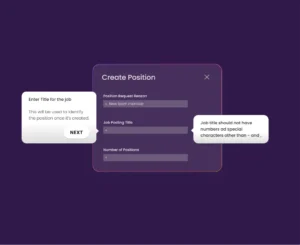
Data Migration Errors
Migrating data into NetSuite can lead to errors, affecting accuracy and compliance. Real-time validation and automated error detection help prevent issues. DAP solutions such as Apty streamline the process by automating data entry with auto-fill forms, ensuring a reliable transition.
Inefficient Training and Onboarding
Many businesses underestimate the learning curve with NetSuite.
For instance, Green Rabbit, once a candy wholesale business, struggled with training as it transitioned to a logistics provider. NetSuite team streamlined onboarding, improving real-time data visibility across warehouses and reducing manual errors.
Implementing such comprehensive training programs enhances user proficiency and streamlines onboarding processes.
Customization Overload
Over-customizing NetSuite increases complexity, costs, and delays. To mitigate such risks, prioritize essential customizations and leverage NetSuite’s standard functionalities wherever possible.
Inadequate Change Management
Resistance to change is one of the leading reasons why ERP implementations fail. If employees are not kept informed about system updates and process changes, engagement drops, and confusion increases.
In-app change announcements ensure employees receive relevant updates directly within NetSuite, keeping teams aligned without relying on emails or other external communications.
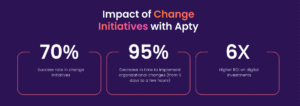
Turn resistance into adoption. Book a Demo today!
Post-Implementation Support
After NetSuite goes live, employees often need ongoing support. Without it, productivity drops, and IT dependency increases.
AI recommendations and real-time guidance within NetSuite ensure continuous assistance, helping teams resolve issues efficiently and stay productive without relying heavily on IT support.
How Apty Can Simplify NetSuite Implementation
For businesses, NetSuite isn’t a simple software upgrade. It is the foundation for sustainable growth. While setup is critical, the real challenge lies in user adoption. Success isn’t just going live but integrating NetSuite into daily operations seamlessly.
A well-executed NetSuite implementation requires clean data, structured processes, and continuous user training. Many companies rush the implementation process, but adoption remains the real differentiator.
This is where Apty ensures businesses thrive. With real-time guidance, workflow automation, and in-app support, Apty ensures teams adapt quickly, minimize errors, and maximize NetSuite’s potential without disrupting daily operations.
Want to see how Apty helps businesses get more from NetSuite? Book a demo today.
FAQs
What is a NetSuite implementation?
NetSuite implementation is the process of setting up, configuring, and customizing Oracle NetSuite, a cloud-based ERP system, to align with a business’s unique requirements. It helps in streamlining operations, improving efficiency, and providing real-time insights. Many businesses also work with NetSuite consulting partners to ensure a smoother and more efficient setup.
What are the 5 stages of ERP implementation?
ERP implementation follows a structured seven-step process:
- Evaluate Business Needs: Define objectives and key challenges.
- Select an Implementation Partner: Choose between self-implementation, NetSuite Direct, or a partner.
- Develop a Project Plan: Set milestones, allocate resources, and manage risks.
- Configure and Customize NetSuite: Tailor the system to business needs.
- Data Migration and Integration: Ensure seamless data transfer and system compatibility.
- User Training and Onboarding: Educate employees for smooth adoption.
- Go Live and Post-Implementation Support: Monitor performance and provide ongoing support.
How long does NetSuite take to implement?
The timeline depends on company size and complexity:
- Small to Medium Businesses: Around 6.5 months
- Medium to Large Businesses: 9 to 12 months
- Enterprises: 12+ months, depending on integrations and data migration
How hard is it to implement NetSuite?
NetSuite implementation can be complex due to data migration, workflow setup, and user adoption challenges. Success depends on a well-planned approach, the right implementation method, and proper training to ensure smooth transition and minimal disruptions.
Around 1776, Adam Smith addressed the value of people in an organization, he highlighted the importance of humans to drive micro and macroeconomy.
Since then, many economists and organizations brought their version of ‘Human Capital’ but over time its importance has increased. Fast-forward to today, we are focusing to make their life easy to boost productivity and efficiency.
Human capital management software is a monolithic application that helps manage, recruit, train and develop employees.
HCM software enables HR leaders to go beyond administration and take a strategic approach that helps them manage talent-hiring and employee engagement. It also empowers them with analytics and automation that contribute to making their workforce better.
5 Pitfalls of Human Capital Management that Apty helps overcome
- Failure to align employees’ goals with business objectives
- Having poor employee experience
- Unwillingness to abandon old HR Processes
- Inability to analyze the state of HCM adoption
- Detached feedback loop
1. Failure to align employees’ goals with business objectives
It is incorrect to assume that HCM is a standalone application that only helps HRs. Modern HCM solutions are integrated with several applications which help all the business leaders define broader goals across the organization.
Every touchpoint of an employee within the HCM application should be meaningful and should contribute to the company’s objective. However, organizations are struggling to measure the impact.
With a Digital Adoption Platform like Apty, businesses can analyze how employees are completing their tasks with the application.
It provides detailed analytics on where the gap in the HR processes is and at what step employees need guidance.
Employees who are not part of the HR and Finance departments use HR applications differently. They rarely use the application and their requirements from the application are different. So, with Apty you can segment the users based on their job profile and analyze how each segment performs.
Based on this analysis, you can align their application-related objectives with the overall business goals.
2. Having poor employee experience
According to PwC, 74% of enterprises are planning to increase spending on HR tech in 2020 to empower their workforce.
Enhancing the employee experience is crucial for companies trying to achieve desired goals. Over 48% of the companies expect to improve the employee experience by investing in the right tools.
HCM and other HR applications are becoming increasingly intuitive and helping organizations attract the right talent and improve the overall experience. However, investing in new HR and HCM applications alone won’t fix the employee experience issues as these applications are still complicated. Implementing them without any assistance could confuse the employees.
A Digital Adoption Platform like Apty guides employees at any point of need and helps them become self-sufficient. It boosts their confidence and helps them accomplish their tasks within the application with no prior training.
It can also be used when a potential talent is interacting with the HR application for the first time to apply for the job. It makes them familiar with the system and makes them worry less about how they enter the information.
This way, the company already provides an incredible experience to a potential hire. When the talent is onboarded as an employee, they already know that the organization will ensure a better onboarding experience and feel a familiarity with the HCM application.
3. Unwillingness to abandon old HR Processes
While most HR leaders are understanding the importance of shifting to modern HCM applications to revamp their processes, a few are still clinging to old processes. This creates internal resistance.
Another problem is poor communication across silos which leads to confusion. To counter these problems, tools like Apty can be used, which help you analyze the efficacy of your old processes. Based on the analysis you can understand whether you need to improve existing processes or if you need new ones.
It also helps the organization break the communication barriers as it is powered with the in-app announcement feature which notifies the employees within the HCM application. Any change in process, training content, or application update can be sent through this application. Organizations can even launch walkthroughs through announcements which helps employees get familiar with the process immediately.
This way, Apty helps the organization easily shift from their comfort zone and embrace the new HR processes.
4. Inability to analyze the state of HCM adoption
An organization needs to analyze the HCM adoption trend. If the adoption of the new HCM system is poor, it could lead to HCM implementation failure.
With a Digital Adoption Platform, organizations can easily measure their adoption rate. There are tons of parameters like engagement rate, average session, avg session duration, and workflow completion rate that a business can analyze.
However, in-depth insights are required to understand the current trends and make sound business decisions. This is where Apty comes in, as HR teams can easily create goals for different user segments and track their progress.
For instance, if you onboarded 100 new employees and they belong to 5 different departments, you can define the tasks that employees from each department have to complete and create the sequence of tasks as goals. Apty’s dashboard shows you the completion trend which shows which user segment is struggling at what step. It also helps you project the probability of completion and would alert you if the adoption is at risk.
It also empowers HCM admins to schedule an alert message with the HCM application to inform the users about the delay and guide them to accomplish their tasks before the set deadline.
Apty is a complete solution when it comes to ensuring a successful HCM adoption as it not only helps users learn software but also enables HR leaders to measure the outcome and adjust the strategy in real-time.
5. Detached feedback loop
Post the HCM implementation, it is important to be open to all kinds of feedback. You can get feedback by regularly conducting meetings, which will help you understand problems that are difficult to track via the HCM application.
Organizations can also conduct a survey that will help them know not only about what the employees feel but also where the problem lies.
The third option is to use a Digital Adoption Platform like Apty which helps you analyze the user, application, and process efficacy. There is only so much that can be discussed in a meeting or can be asked in a survey. Apty makes it easy to analyze how employees are navigating through the application and what problems they are facing.
It will help you improve the training content, onboarding program, and HR processes.
These methods help HR teams mitigate the chances of HCM failure and drive the organization towards success.
Why Apty is the right tool for your HCM implementation?
Apty goes beyond traditional training and onboarding by ensuring successful adoption of the HCM system. The focus is to analyze usage and then create personalized content for each user group that will guide them at each step by reducing post-implementation support costs as employees become self-sufficient.
Apty also has cross-application capabilities, that is it can guide the employees from one application to another. As HCM application is usually integrated with other applications, a tool like Apty becomes the right fit as it guides employees throughout the process irrespective of the application they use and help them accomplish their tasks.
Process compliance is crucial and with Apty’s data validation feature, companies can ensure that the data that their employees enter is always in the correct format. It helps the organization receive clean data which could enable them to gain better clarity of the situation at hand.
The strategic integration of Enterprise Resource Planning (ERP) systems transcends a mere technological upgrade; it represents a vital step toward comprehensive business transformation. Achieving success in ERP implementation hinges not only on the selection of the right technology but also on mastering the art of seamless integration and adoption across an organization, underscored by choosing appropriate ERP implementation strategies.
Deploying an ERP system can significantly enhance a company’s operations, with reports indicating improvements in operational efficiency by up to 95%. Moreover, such implementations can lead to a reduction in operating and administrative expenses by over 20%. However, the path to success is challenging. According to G2, approximately 50% of ERP installations fail on their first attempt, and 64% of ERP projects exceed their budget. Further, 30% of these installations take longer than expected, potentially leading to substantial financial losses and operational disruptions.
The global ERP software industry is poised for rapid growth, estimated to reach $78.4 billion by 2026, with a market value of $49.5 billion projected by 2025.
Digital Adoption Platforms (DAPs) have emerged as game-changers in this domain. By enhancing user experience and adoption rates through contextual, in-app, personalized guidance, DAPs critically influence the success of ERP implementations. They effectively tackle one of the primary challenges in ERP projects: the complexity of user adoption. Notably, 78% of companies with successful ERP implementations attribute their success to effective change management and comprehensive employee training programs, reflecting a substantial positive impact on organizational efficiency post-ERP system implementation. The role of DAPs in simplifying and streamlining this process is indispensable.
With this foundational understanding, let’s delve into the strategies that can be employed to implement an ERP system successfully in your organization.
ERP Implementation Stages
Implementing an ERP system involves six main stages that are usually carried out over several months or even years. This process should start before you finalize your decision on which product to purchase, and it should continue even after the initial deployment of your chosen system.
These stages are crucial in ensuring a successful ERP rollout, and understanding each phase is vital for any organization embarking on this journey.
1. Project Planning and Preparation
- Objective Setting: The process begins with defining clear objectives and scope for the ERP implementation. This includes understanding the business processes that the ERP will impact and setting measurable goals.
- Resource Allocation: Assigning a software development company to the project, along with internal stakeholders and external consultants, is crucial.
- Timeline Establishment: Develop a realistic timeline for the project, factoring in all stages of implementation.
2. Requirements Analysis and ERP Selection
- Needs Assessment: Conduct a thorough analysis of business needs, involving inputs from various departments to ensure the ERP solution aligns with organizational goals.
- Vendor Selection: Evaluate ERP vendors based on the organization’s requirements, budget, and compatibility with existing systems.
- Software Customization Needs: Identify any specific customizations or integrations needed in the ERP software to meet unique business processes.
3. Design and Development
- System Design: Develop a blueprint for configuring and customizing the ERP system.
- Data Preparation: Prepare the data for migration, including cleaning, mapping, and validation.
- Customization and Integration: Begin customizing the ERP software and integrating it with other systems as necessary.
4. Testing and Training
- System Testing: Rigorously test the ERP system to ensure it functions as expected. This includes unit testing, system testing, and user acceptance testing.
- Training Programs: Develop and implement comprehensive training programs for users tailored to different roles within the organization.
- Feedback Incorporation: Use feedback from the testing phase to make necessary adjustments.
5. Deployment and Go-Live
- Implementation Strategy: Decide on a deployment strategy, whether a big-bang approach or a phased rollout.
- Go-Live Support: Provide extensive support to users during the initial go-live period to address any immediate challenges.
- Performance Monitoring: Monitor the system’s performance closely post-go-live to ensure stability and efficiency.
6. Post-Implementation Review and Support
- Evaluation: Conduct a post-implementation review to assess the project’s success against initial objectives.
- Continuous Improvement: Implement a plan for ongoing improvements and updates to the ERP system.
- Long-term Support Structure: Establish a long-term support structure for users to ensure the ERP system continues to meet the organization’s evolving needs.
ERP Implementation Strategies
After laying out the critical stages of ERP implementation, it’s essential to focus on strategies to make the process more efficient and effective. The following strategies are instrumental in navigating the complexities of ERP implementation and ensuring its success.
1. Stakeholder Engagement and Communication
- Early Involvement: Involve key stakeholders from the outset to ensure alignment with business goals and to address any resistance to change.
- Regular Communication: Maintain clear and continuous communication throughout the project lifecycle to keep all parties informed and engaged.
2. Customization vs. Standardization
- Balance Customization: While customization can align the ERP system with business processes, over-customization can increase costs and complexity.
- Leverage Standardization: Standardize processes wherever possible to fully utilize the ERP system’s native functionalities.
3. Data Management
- Data Clean-Up: Prioritize cleaning and organizing data before migration to avoid data integrity issues.
- Data Migration Strategy: Develop a comprehensive data migration strategy that includes mapping, testing, and validation.
4. Change Management
- Change Management Plan: Develop a robust change management plan to address the human aspect of ERP implementation, including training, support, and managing resistance.
- Organizational Readiness: Assess and prepare the organization for change to minimize disruption and ensure a smoother transition.
5. Effective Project Management
- Strong Leadership: Ensure strong project leadership and governance to steer the project in the right direction and make timely decisions.
- Project Monitoring: Implement rigorous project monitoring and control mechanisms to keep the project on track and within budget.
6. User Training and Support
- Comprehensive Training: Offer comprehensive training programs tailored to different user groups’ needs.
- Ongoing Support: Provide continuous support post-implementation, including helpdesks, user manuals, and online resources.
7. Testing and Quality Assurance
- Thorough Testing: Conduct thorough testing at various stages of the implementation, including unit testing, system integration testing, and user acceptance testing.
- Feedback Loop: Create a feedback loop to continuously improve the system based on user input and testing results.
8. Phased Rollout
- Pilot Testing: Consider starting with a pilot implementation to test the system in a controlled environment.
- Phased Approach: Implement the system in phases to manage risks and learn from each phase before full-scale implementation.
9. Post-Implementation Review
- Performance Metrics: Establish clear performance metrics to evaluate the success of the ERP implementation.
- Lessons Learned: Conduct a post-implementation review to gather lessons learned and apply them to future projects or system enhancements.
These strategies offer a comprehensive approach to ERP implementation, addressing the technical, organizational, and human factors contributing to such projects’ success or failure. By adhering to these strategies, organizations can significantly increase their chances of a successful ERP implementation.
Here are some noteworthy mentions of well-known ERP implementation strategies:
- Big Bang: This approach involves a single, major cutover to the new ERP system, where all users move to the new system on a specific go-live date. It’s like flipping a switch; the organization switches from the old system to the new one simultaneously. While this method can be faster and less expensive, it also carries higher risk due to the sudden change.
- Phased Rollout: In this approach, the implementation is done in stages or phases. This could be by module, business unit, location, or other logical segments. The phased rollout helps manage the complexity and risk by breaking the implementation into more manageable parts, allowing lessons learned in earlier phases to inform later ones.
- Parallel Adoption: This strategy involves running the new ERP system concurrently with the old one for a period. Users operate both systems simultaneously until the organization is confident that the new system functions correctly. This approach reduces risk but can be resource intensive as it requires maintaining two systems simultaneously.
- Hybrid: A hybrid approach combines elements of the other methodologies. For instance, an organization might use a phased approach in some areas of its operations and a big-bang approach in others. This allows for flexibility and customization of the implementation strategy to fit the specific needs and risks of different parts of the organization. For example, introducing desk booking software can support a hybrid implementation by giving employees flexibility while ensuring efficient workspace management.
The selection of an ERP implementation methodology depends on various factors, including the organization’s size, the complexity of the business processes, resource availability, risk tolerance, and the criticality of the ERP system to daily operations. Each method has pros and cons, and the choice often involves a trade-off between risk, cost, and disruption to the business.
How DAPs Facilitate Seamless User Adoption of ERPs
Integrating Digital Adoption Platforms (DAPs) into ERP implementation strategies marks a pivotal shift in how enterprises approach user adoption. DAPs streamline and simplify the user experience, addressing one of the most significant hurdles in ERP projects: the steep learning curve associated with new systems.
A. Bridging the User Adoption Gap
DAPs serve as a bridge between complex ERP functionalities and user capabilities. They provide real-time, contextual guidance within the application, making it easier for users to understand and navigate the ERP system. This in-app assistance is tailored to the user’s role and tasks, ensuring relevance and efficiency.
B. Enhancing User Engagement and Competency
DAPs are designed to enhance user engagement through interactive walkthroughs, tooltips, and task lists that guide users step-by-step through processes. This hands-on approach accelerates the learning process, leading to quicker and more effective user competency in utilizing the ERP system.
C. Customized Learning Experiences
DAPs offer the flexibility to create customized learning experiences that match the specific needs of different user groups within an organization. This personalization is crucial in catering to the diverse roles and responsibilities that interact with the ERP system, ensuring that each user receives relevant and efficient training.
D. Reducing Resistance to Change
Change resistance is a common challenge in ERP implementations. DAPs mitigate this by providing a supportive and intuitive learning environment. This approach eases users’ transition, reduces anxiety and resistance, and fosters a more positive attitude towards the new system.
E. Analytics and Feedback for Continuous Improvement
DAPs come equipped with analytics capabilities, allowing organizations to track user performance and identify areas where users struggle. This feedback is invaluable for continuously improving the ERP system and the training materials, ensuring that the system evolves in line with user needs and preferences.
F. Aligning with Organizational Goals
Effective DAP implementation aligns closely with organizational goals and objectives. By improving user adoption rates, organizations can maximize the ROI of their ERP investment, ensuring that the system contributes significantly to operational efficiency and business growth.
| Use Case | KPIs Measured | Challenges | ROI Impact | Apty Feature |
| Financial Management | Cash Flow, Profit Margin, Debt Ratio, Days Sales Outstanding | Financial errors, Late payments, Compliance issues | Improved Financial Health | Real-time Dashboards, Automation |
| Inventory Management | Inventory Turnover Rate, Stockouts, Order Accuracy, Lead Time | Data inaccuracies, Overstock/Understock, Inefficiency | Cost Savings, Reduced Stockouts | In-App Guidance, Task Lists |
| Human Resources | Time to Hire, Employee Satisfaction, Turnover Rate, Training Completion | Talent retention issues, Compliance violations, Poor Onboarding | Enhanced Productivity, Talent Retention | Interactive Walkthroughs, Analytics |
| Sales and CRM | Conversion Rate, Sales Growth, Customer Lifetime Value, Sales Cycle Length | Missed opportunities, Data silos, Inefficient Sales Process | Revenue Growth, Improved Customer Relations | User Segmentation, Notifications |
| Manufacturing | OEE, Defect Rate, On-time Delivery, Downtime | Production delays, Quality issues, Resource underutilization | Increased Efficiency, Reduced Downtime | Workflow Builder |
Learn More: ERP Implementation Checklist: Planning for an Enterprise Implementation
The world of work is undergoing significant changes, with hybrid models and technological advancements posing new challenges for organizations in managing HR, finance, and planning. Workday leads the way, offering a unified cloud platform that enables businesses to adapt quickly.
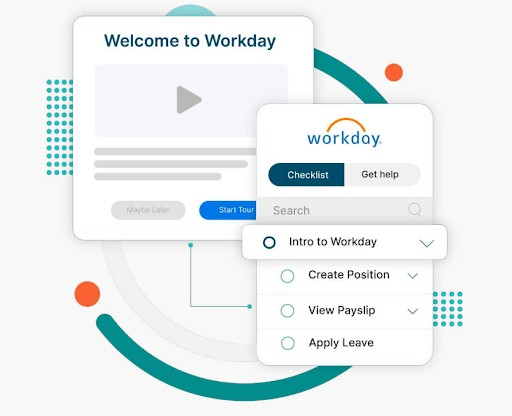
Workday has evolved beyond human capital management (HCM) to include enterprise resource planning (ERP) capabilities, offering modules like global compliance, talent management, payroll, and analytics.
Implementations typically take 6-14 months, averaging 8.2 months, with costs ranging from $300K to $800K and annual memberships up to $40-$160 PEPM (per employee per month).
Faster implementation and adoption lead to quicker return on investment (ROI), higher employee engagement, and lower turnover.
However, a smooth implementation isn’t always guaranteed. Organizations often encounter obstacles that can delay timelines, increase costs, and impact user adoption.
In this Apty video, we talk about how long it takes to implement Workday and how Apty can help you accelerate the process.
Now, let’s explore common Workday implementation challenges and how a digital adoption platform (DAP) can drive seamless adoption.
10 Workday Implementation Challenges
Implementing Workday can drive business transformation, but it comes with significant challenges.
A recent Reddit discussion highlights two key obstacles:
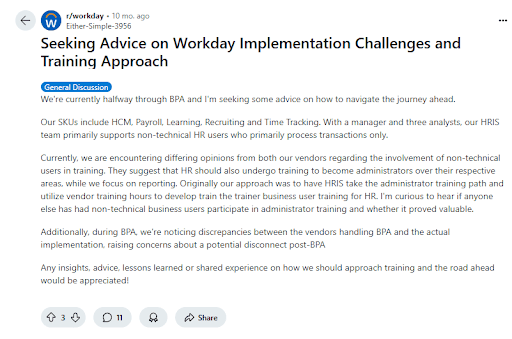
If you’re in the research phase, using an AI reddit search tool can help you quickly surface more of these real-world accounts from the r/workday community without manually scrolling through hundreds of threads. From data migration hurdles to user adoption struggles, organizations struggle with many challenges to ensure a smooth rollout, maximize ROI, and accelerate digital transformation.
Addressing these challenges with a structured strategy is crucial for successful Workday deployment.
Apty’s Workday Adoption Guide explores the top Workday implementation issues that organizations face.
Challenge #1: What Happens When Your Workday Project Has a Poorly Defined Scope?
A poorly defined project scope often leads organizations to underestimate the extent of changes required for a successful Workday adoption. Without a clear scope from the outset, businesses risk clinging to outdated workflows, preventing them from fully optimizing the Workday platform.
Moreover, when projects are loosely defined, confusion arises during execution, leading to misaligned expectations, rework, and timeline disruptions. This lack of clarity results in inefficiencies, higher costs, and delayed implementation.
Here are key factors that influence the definition of project scope:
| Factor | Description | Potential Impact |
|---|---|---|
| Software Updates | Continuous updates with weekly service changes and biannual major releases occurring mid-implementation | Unplanned adjustments, disrupted workflows, and challenges in managing new feature rollouts during the project |
| Unclear Roadmap | Lack of clearly defined project objectives and a comprehensive plan, often due to insufficient stakeholder involvement | Project delays, difficulty in prioritizing tasks, and misaligned project direction |
| Defining Business Requirements | Difficulty in gathering and translating the diverse needs of all stakeholders into clear, approved requirements | Ambiguities in project deliverables, extended decision-making processes, and potential rework if requirements change or are misinterpreted |
| Cost Overruns | Additional costs arising from scope creep and change requests during implementation | Budget overruns, increased risk of change orders, and potential financial strain on the project |
| Organizational Changes | Adjustments in employee roles, reporting structures, and workflows as new Workday functionalities are implemented | Resistance to change, training challenges, disruption in daily operations, and potential inefficiencies if changes are not managed proactively |
| Delayed Timelines | New requirements or tasks identified later in the project that were not accounted for during initial planning | Extended project duration, resource allocation challenges, and difficulty in meeting deadlines |
| Reduced Quality | Implementation that fails to meet defined requirements or quality benchmarks due to rushed work or mismanagement of tasks and resources | Lower overall project quality, suboptimal performance of the Workday solution, and potential long-term issues with user adoption and system reliability |
Mitigation Strategy
- Align expectations and set clear boundaries to prevent misalignment and scope creep. Establish a detailed implementation plan to ensure smooth execution.
- Use a DAP like Apty, which offers in-app announcements and alerts to keep your team informed, guaranteeing smooth adaptation to new features without disrupting the overall timeline.
- Develop a comprehensive change management plan that includes training, clear communication about the benefits, and support structure.
- Set up checkpoints to validate deliverables, test workflows, and resolve issues early. Adopting agile project management allows for flexibility, while ongoing quality control measures help maintain high implementation standards.
Challenge #2: How Can Limited Collaboration and Communication Impact Your Workday Rollout?
A Workday implementation can struggle when organizations focus solely on core teams like HR, finance, and IT. Overlooking other critical functional groups can lead to gaps in adoption and efficiency. This can result in the system not being tailored to meet the full range of operational and analytical needs, limiting platform effectiveness.
Mitigation Strategy
- Involve mid-level managers, end-users, and downstream data users to meet operational and analytical needs.
- Assign clear roles to ensure availability and accountability. Establish the level of involvement for each participant to avoid delays and ensure smooth execution.
| Project Roles | Description |
|---|---|
| Project Sponsor | A senior executive who provides overall direction, secures funding, and resolves high-level issues |
| Project Manager | Responsible for day-to-day project management, including planning, scheduling, and coordinating tasks. Ensures the project stays on track and within budget |
| HR and Finance Leads | Subject matter experts from HR and finance departments who provide insights into business processes and requirements |
| IT Lead | Oversees technical aspects, including system integration, data migration, and infrastructure readiness |
| Change Management Lead | Manages organizational change, communication, and training to ensure smooth user adoption |
| Workday Consultant | Assists with Workday configuration, customization, and best practices; often an external expert with deep knowledge |
- Prevent communication gaps with consultants and service partners by involving them early and maintaining transparent communication.
Challenge #3: What Risks Come From Lacking a Defined Process and Prioritization in Workday Implementation?
Implementation of any new software requires business process compliance. Workday implementation projects with vaguely defined processes and a lack of prioritization can fail easily.

For example, a leading healthcare organization, ChenMed, implemented Workday, and Apty helped them establish standards and consistent processes for managing new hire onboarding and employee engagement. This streamlined the onboarding experience, ensuring that employees had the necessary guidance and resources to quickly adapt and excel in their roles
| Factor | Description | Potential Impact |
|---|---|---|
| Undefined Problem | Omitting a thorough analysis of the specific problem Workday is solving, including symptoms and root causes | Leads to vague goals, creating a misaligned implementation that does not address the organization’s needs effectively |
| Lack of Process Ownership | Not assigning a dedicated process owner at each implementation stage | Creates a lack of accountability, leading to confusion, delays, and poor communication between teams |
| Misaligned Business Processes | Failing to update business processes to align with Workday’s capabilities and the organization’s transformation goals | Results in inefficiencies, the system not being fully optimized, and failure to meet long-term goals |
| Unaccounted Third-Party Integrations | Overlooking third-party applications to integrate with Workday before implementation | Causes integration issues, unexpected costs, and operational disruptions later in the project |
| Inadequate Training Strategy | Lacking a comprehensive training plan that includes in-app guidance, self-help features, and in-person sessions | Leads to onboarding difficulties, low user adoption, and underutilization of Workday features |
| No Regular Scope and Feedback Reviews | Skipping scheduling regular scope reviews, feedback loops, quality checkpoints, and reassessments throughout the project | Causes project scope creep, misalignment with business goals, and the need for costly rework |
| Unrealistic Timeline | Setting a timeline that is too short without factoring in resources, costs, and potential roadblocks | Results in budget overruns, rushed execution, and potential for missed deadlines or low-quality outcomes |
| Inflexibility in Execution | Failing to allot time to address unforeseen issues and changes | Leads to delayed resolutions of problems and increases the risk of project disruption |
| Lack of Beta Testing | Neglecting beta tests with a select group of users before a full rollout | Results in last-minute issues, lower user confidence, and a rough system launch |
| Failure to Monitor Post-Launch | Disregarding follow-up monitoring after the launch | Makes it difficult to measure ROI, identify areas for improvement, and track long-term digital adoption |
Mitigation Strategy
- Revisit and align existing processes with Workday features and enterprise requirements to ensure system optimization.
- Designate a process owner for each implementation stage to ensure accountability, consistency, and smooth execution.
- List all third-party applications that need to integrate with Workday to facilitate a smooth transition.
- Incorporate a DAP to provide in-app guidance and real-time support, maintaining business process compliance and helping users adapt to the system without disruption.
Challenge #4: Why Is Choosing the Right Workday Implementation Partner So Critical?
Many organizations find it challenging to manage the complex nature of Workday implementation and allocate the necessary internal resources for a successful transformation.Workday works with a carefully selected group of partners who are equipped to handle the entire implementation journey for businesses. These four types of Workday partners are crucial in helping businesses get the most out of the platform:
| Partner Type | Description |
|---|---|
| Advisory Partners | Provide strategic guidance and support to align Workday solutions with business goals |
| Global Payroll Partners | Assist with payroll management and ensure smooth integration across multiple regions |
| Services Partners | Offer expertise in configuration, customization, and system optimization to ensure successful implementation |
| Software Partners | Deliver third-party applications and tools that complement and enhance Workday’s capabilities |
Mitigation Strategy
- List the features and services you need from a Workday partner. Determine if they offer valuable consulting or just basic services. Then, narrow down options based on who can meet your requirements.
- Compare the pricing models. Most Workday partners charge either monthly or annually. Make sure their pricing fits your budget.
- Check out each partner’s credentials and talk to businesses that have worked with them before to learn about their experience.
- Look for unbiased reviews on third-party sites or forums to better understand the partner’s reputation and how they handle issues.
- Ask your shortlisted partners for a proposal. Don’t forget to request a demo to see how well they handle Workday.
Challenge #5: What Problems Arise If You Don’t Prioritize Regular Tests and Quality Checks in Workday?
Workday’s platform is pre-built and tested by engineers, but system configurations must be adapted to meet your company’s evolving needs. Relying solely on manual testing can lead to human error and inefficiencies.Automated testing, however, ensures compatibility, prevents issues, and facilitates seamless integrations with internal and third-party systems.Here are some key testing and quality checks that need to be considered:
| Standard Tests | Description |
|---|---|
| Security Testing | Ensures data security and alignment of role-based/user permissions with company needs |
| Integration Testing | Validates the compatibility and data exchange between Workday and third-party systems |
| User Acceptance Testing (UAT) | Allows end users to validate that the system meets business requirements and works correctly |
| Payroll Parallel Testing | Tests integration and compatibility between Workday Payroll and legacy systems |
| Continuous Testing | Ensures processes remain optimized throughout the employee lifecycle through ongoing testing |
Mitigation Strategy
- Prioritize testing to ensure smooth functionality, improving employee engagement, performance, and productivity.
- Always create test scripts when new features are added to ensure optimal performance and alignment with business needs.
- Implement regular testing to simplify the integration of updates and new releases, keeping your system and processes competitive and seamless over time.
Looking to accelerate your Workday adoption? Book a free demo with Apty to see how you can improve ROI, streamline onboarding, and reduce errors.
Challenge #6: How Can Poor Documentation Sabotage Your Workday Implementation?
General Workday documentation often lacks the specificity needed to address the unique aspects of your legacy systems, company culture, and departmental goals. It might require additional integrations to function effectively within your organization’s processes.A common issue for large organizations is the failure to log changes during the execution phase. A decision log is crucial for tracking decisions, their rationale, and the individuals involved. It helps identify the root cause of problems, making it easier to resolve issues by addressing their source rather than just the symptoms. Another key barrier to effective documentation is ensuring its accessibility.All of these can lead to poor business process compliance.
Mitigation Strategy
- Develop accurate and concise logs to meet the needs of end-users, developers, and admins.
- Ensure logs provide accountability, clarity, and transparency in the process.
- Conduct regular reviews of documentation and procedures to ensure they are up to date.
- Track user interactions with documentation with Apty to offer real-time guidance and identify areas for improvement.
- Leverage Apty’s knowledge base feature to access a continuously updated repository of critical information directly within your Workday dashboard. It provides easy access to helpful resources without disrupting users’ current workflows, enhancing the overall adoption experience.
Challenge #7: What Happens When Budget and Time Constraints Undermine Workday Implementation?
On average, IT projects, regardless of size—exceeded their budgets by 75% and overrun their schedules by 46%. With large budgets come high expectations, especially during economic downturns, mergers, or budget reviews.CIOs and leaders often feel pressure to minimize Workday implementation costs and timelines to demonstrate ROI. However, budgets and schedules are sometimes based on sales discussions rather than the organization’s unique needs. And sales teams may lack insight into internal processes, leading to unrealistic expectations.
Mitigation Strategy
- Plan resources and goals accurately to prevent underestimating scope, time, or budget.
- Engage internal and external experts early to assess fluctuating costs during pre-implementation planning.
- Involve project management consultants to ensure the plan is feasible and aligns with business needs.
- Streamline onboarding, reduce extra costs, and improve user adoption efficiency with a digital adoption platform.
Challenge #8: Why Is Data Migration One of the Biggest Challenges in Workday Implementation?
The biggest challenge for any enterprise is data migration and report management. Though organizations usually prioritize digital implementation, the problem arises when migrating your current data to the new application. Using reliable tools like pay stub generator can simplify pay documentation and reduce errors during system transitions.
| Data Migration Issues | Potential Impact |
|---|---|
| Data Quality | Inaccurate or incomplete migration can cause data integrity issues, leading to errors and inefficiencies. |
| Data Mapping | Differences between legacy and Workday data structures may cause errors, requiring extensive corrections. |
| Data Volume | Large-scale migrations become time-consuming and require significant resources. |
| Data Redundancy | Excessive duplication leads to storage inefficiencies but may help detect and correct data corruption. |
| Mismatch of Data | Inconsistent data representation can result in incorrect conclusions and poor decision-making. |
| Loss of Data Points | Missing data leads to biased results, system errors, and compliance risks. |
| Data Format Issues | Upload errors, such as file incompatibility or missing records, disrupt migration and delay business processes. |
Mitigation Strategy
- Conduct thorough data validation, cleansing, and deduplication before migration to prevent data integrity issues and mismatches.
- Work with Workday implementation partners to align legacy system data structures, standardize formats, and test mapping before migration.
- Use phased migration, prioritize critical data, and leverage automation tools to streamline processing.
- Implement backup plans and validation checks to protect against data loss and ensure system reliability.
- Pre-test data uploads, use Workday-supported formats, and ensure correct file structures before migration.
Challenge #9: How Does Poor Training Hurt Workday Adoption?
A Reddit thread mentions Workday as a platform that one can’t casually explore—it’s a closed ecosystem with no trial access. Employees struggle to navigate its complex features without structured training, leading to inefficiencies and poor adoption.The cost of training employees on Workday can vary depending on the size and complexity of your organization. And, the time to learn Workday depends on your training program. With the assistance of free tutorials, you can learn the Workday basics in two to three days, but additional training is required to understand the core concepts.Workday implementation is only considered complete when the end-user appropriately adopts it. Additionally, quantitative and qualitative metrics must be established to prove ROI and successful implementation.So why do training programs fail? Here are a few key reasons:
| Key Factors | Potential Impact |
|---|---|
| Limited User Involvement | Misalignment with user needs, which reduces system adoption and effectiveness. |
| Insufficient Training Time | Employees may struggle to use Workday effectively, leading to inefficiencies and errors. |
| Inadequate Training Materials | Poorly designed or outdated materials hinder learning and proper system utilization. |
| One-size-fits-all Approach | Ignoring different learning styles makes training ineffective for some users. |
| Siloed Approach | Limits cross-functional understanding, resulting in inefficiencies across departments. |
| Scarce Resources | Budget constraints reduce training effectiveness and limit access to essential tools. |
| Shortage of Skilled Trainers | Training may not be tailored to business needs, reducing effectiveness. |
| Low Motivation | Employees may disengage, leading to poor adoption of Workday features. |
| Unclear Objectives | Training programs may be unfocused, failing to address key business needs. |
| Lack of Feedback | Reduces continuous improvement and refinement of training effectiveness. |
Mitigation Strategy
Apty makes it easy for organizations to accelerate their Workday adoption rate and increase software ROI in record time. It can:
- Notify employees of updates or changes via in-app announcements, videos, and guided walkthroughs.
- Deliver role-specific learning content through customized walkthroughs to save time and enhance learning efficiency.
- Create customized task lists and walkthroughs for seamless onboarding and task completion.
- Offer detailed user and application analytics to make informed decisions, track engagement, and optimize processes.
Challenge #10: What Issues Arise When You Lack On-Demand Support During Workday Implementation?
On-demand support is a significant challenge during Workday implementation. Factors contributing to this include inadequate support staff training, insufficient support resources, and underestimation of the volume of user queries.Timely support is critical as employees and stakeholders learn to navigate the new system. User issues may go unresolved without readily available, knowledgeable support teams, leading to frustration, delays, and decreased productivity during the transition to Workday.
Mitigation Strategy
- Set up a dedicated support team for Workday issues. Creating a tiered support system, allowing basic issues to be resolved quickly while complex problems escalate to experts, can save time and resources.
- Provide continuous training for users and support staff to ensure they can address issues quickly.
- Implement in-app guidance, FAQs, and knowledge bases for users to resolve common issues independently.
- Use analytics to track support requests and identify recurring issues, optimizing resources for better response times.
Maximize Your Workday ROI by Driving End-User Adoption with Apty
Workday implementation challenges can be overwhelming, but integrating a cloud-based DAP like Apty streamlines the transition. It tracks employee behavior throughout the application and identifies roadblocks, ensuring a smooth transition and higher productivity.
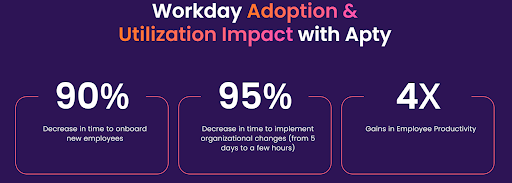
Empower your Workday HCM users with Apty’s intelligent, in-the-moment support, offering contextual guidance, streamlined communication, and responsive assistance. With customizable workflows, in-app guidance, and data-driven insights, Apty reduces errors, accelerates adoption, and minimizes post-implementation costs.
The result? Increased efficiency, improved security, and a more substantial ROI from your Workday investment.
Book a demo to see why 12 million users rely on Apty for seamless digital adoption and productivity.
FAQs
What is the life cycle of Workday implementation?
The Workday implementation life cycle follows a structured approach, typically consisting of these key phases:
- Planning: Defining project scope, objectives, timelines, and assembling the implementation team.
- Design: Configuring Workday to align with business processes and requirements.
- Build and Testing: Setting up Workday modules, running system integrations, and conducting user acceptance testing.
- Deployment: Migrating data, training users, and going live with the system.
- Post-Go-Live Support: Monitoring performance, resolving issues, and optimizing workflows.
How long is the average Workday implementation?
The average Workday implementation timeline varies based on the organization’s size, complexity, and required modules. Small to mid-sized companies typically take 4 to 6 months, while large enterprises with multiple integrations and customizations may take 9 to 18 months.What are three major benefits of implementing Workday?These are the three major benefits of implementing Workday:
- Unified System: Combines HR, payroll, finance, and analytics in one platform, improving data accuracy and efficiency.
- Scalability and Flexibility: Adapts to evolving business needs, allowing seamless updates and configurations.
- Advanced Analytics and Reporting: Provides real-time insights to support data-driven decision-making.
Is Workday implementation hard?
Workday implementation can be complex, but with the right strategy and experienced partners, the process becomes manageable. The challenges typically include data migration, user adoption, and system integrations. Proper planning, stakeholder involvement, and a structured rollout ensure a smoother implementation.