
Do you know that despite significant investments in new technologies, a startling 70% of digital transformation initiatives fail to deliver expected outcomes. The missing link? Effective strategies for addressing critical change management challenges.
This disconnect between technology implementation and successful adoption represents one of the most costly and frustrating challenges facing modern enterprises. While executives focus on selecting the right software and systems, they often underestimate the human element of change—the very factor that determines whether their investment will yield returns or become another statistic in why change management fails.
The Hidden Reasons Change Initiatives Fail
Change resistance isn’t simply a result of organizational dysfunction or employee stubbornness—it’s rooted in fundamental aspects of human psychology and neurobiology. Overcoming resistance to change requires understanding these underlying mechanisms.
The Brain’s Response to Change
When confronted with significant changes to established routines, our brains activate a threat response system. The amygdala—our brain’s alarm system—triggers the fight-or-flight response, increasing cortisol levels and reducing cognitive function. This neurological response explains why even positive changes can trigger resistance. The brain perceives uncertainty as a potential threat, regardless of the rational benefits the change might bring.
Research shows that this response is hardwired into our neural pathways. As one neuroscience study explains, “Part of the brain—the amygdala—interprets change as a threat and releases the hormones for fear, fight, or flight. Your body is actually protecting you from change.” Managing change effectively in business means working with these biological realities, not against them.
The Emotional Journey of Change
Beyond the neurological response, individuals experiencing change typically progress through predictable emotional stages, as illustrated in the chart below:
This emotional journey shows how both productivity and morale typically dip during the resistance phase before gradually improving through exploration and eventually exceeding baseline levels once commitment is achieved. Understanding where individuals and teams are in this journey allows change leadership in enterprises to provide appropriate support at each stage.
Common Resistance Patterns in Digital Transformation
Digital transformation initiatives typically encounter several specific resistance patterns:
- Fear of Obsolescence: Employees worry that new technologies will make their skills irrelevant or eliminate their positions entirely.
- Competence Concerns: Even talented employees may resist changes that make them feel temporarily incompetent during the learning curve.
- Workload Anxiety: The perception that new systems will create additional work, especially during transition periods.
- Loss of Control: Digital systems often standardize processes, potentially reducing individual autonomy.
- Skepticism from Past Failures: In organizations with histories of unsuccessful technology implementations, employees develop “change fatigue” and cynicism.
Addressing these change management challenges requires a thoughtful, structured approach.
The Business Cost of Failed Change
The financial implications of poor change management are substantial and often underestimated. When organizations fail to address the human side of change, they face:
- Implementation costs without ROI
- Lost productivity during extended transition periods
- Increased support ticket volume and IT burden
- Data quality issues from improper system use
- Employee disengagement and turnover
Research consistently demonstrates the dramatic difference in outcomes between organizations that employ effective change management and those that don’t:
As this data shows, projects with effective change management are 2.5 times more likely to stay on or under budget, deliver results 67% more efficiently, and experience 34% higher ROI on transformation initiatives. Understanding why change management fails is the first step toward avoiding these costly outcomes.
What Successful Organizations Do Differently
Organizations that consistently succeed with change initiatives approach transformation differently. They implement successful change management strategies that have evolved significantly over the past decades:
- First Generation (1990s): Focused primarily on communication and training, with limited tools beyond spreadsheets and project plans.
- Second Generation (2000s-2010s): Introduced structured methodologies (ADKAR, Kotter, etc.) and basic change management tools.
- Third Generation (Current): Leverages data analytics, AI in change management, and digital adoption platforms to deliver personalized, adaptive change experiences at scale.
Navigating Organizational Change?
Discover how Apty can simplify your change journey with real-time, in-app guidance and ensure 100% adoption across your tools.
The 5-Step Change Management Framework
Ensuring organizational change success requires a structured approach that addresses both the technical and human elements:
- Strategic Planning: Aligning change initiatives with business objectives and identifying potential resistance points before implementation.
- Communication & Engagement: Creating transparent, two-way communication channels and involving employees in the change process.
- Training & Enablement: Providing personalized learning experiences that build confidence and competence with new systems.
- Reinforcement & Support: Offering ongoing assistance and celebrating early wins to maintain momentum.
- Measurement & Optimization: Tracking adoption metrics and business outcomes to continuously improve the change approach.
This framework represents one of the most effective digital transformation best practices when supported by critical success factors, including active executive sponsorship, dedicated change management resources, and engaged middle management.
The Digital Adoption Platform Advantage
Modern Digital Adoption Platforms (DAPs) have emerged as essential tools for bridging the gap between technology implementation and successful adoption. By providing contextual guidance, personalized support, and data-driven insights, DAPs help organizations overcome common change management challenges.
The role of AI in change management is particularly transformative, enabling:
- Personalization at Scale: Delivering customized guidance based on user role, behavior, and proficiency.
- Data-Driven Insights: Identifying adoption barriers and resistance patterns in real-time.
- Automation of Routine Aspects: Streamlining repetitive tasks to reduce cognitive load during transitions.
Organizations using DAPs are seeing a fundamental shift in how they measure change success—moving beyond basic activity metrics (like training completion rates) to business outcome metrics that directly connect to ROI. This represents a significant advancement in managing change effectively in business.
Introducing Apty: The AI-Powered Change Management Solution
Apty stands apart from traditional Digital Adoption Platforms by focusing on business outcomes rather than just software adoption. While other solutions stop at basic guidance, Apty delivers measurable business impact through its unique approach to addressing change management challenges.
Apty’s Unique Approach
Apty is a next-generation Digital Adoption Platform (DAP) designed to help organizations maximize the value of their software investments through real-time, context-aware user guidance and support. Here are some of its key features:
- Focus on Business Outcomes: Apty moves beyond adoption metrics to measure what actually matters—errors avoided, processes completed, and business performance accelerated.
- Cross-Application Workflow Support: Unlike solutions that work within single applications, Apty guides employees across your entire technology stack.
- Fast Implementation: While traditional DAPs take months to implement, Apty delivers results in weeks, not months.
- Real-Time, Contextual Guidance: Apty provides in-app, on-screen guidance at the precise moment users need it. This reduces errors, improves efficiency, and helps users navigate complex software applications more easily.
- AI-Powered Automation: The platform uses advanced machine learning and AI to predict user behavior and preemptively address challenges. This includes automated content creation, workflow guidance, and personalized task management.
- Cross-Application Support: Apty supports a seamless user experience across multiple applications, which is particularly useful for businesses with a diverse tech stack. It helps optimize workflows and ensure consistent process adherence across systems.
- Software Utilization Insights: Apty Pulse continuously monitors user behavior, tracking key metrics like software usage, engagement, and process completion. It also provides actionable insights to optimize software adoption and eliminate underutilized applications.
- Enhanced Content Creation and Analytics: Apty offers an intuitive, low-code/no-code platform for content creators to develop customized in-app guidance, including checklists, tooltips, and announcements. Additionally, it provides detailed analytics to track the performance of these content elements.
- Training and Onboarding: With Apty, organizations can streamline user onboarding with guided workflows and checklists. It also integrates with Learning Management Systems (LMS) to centralize knowledge sharing.
- Integration with Business Processes: Apty helps automate and optimize critical business processes by ensuring users follow standardized workflows, improving data quality, and ensuring compliance across applications.
- User Engagement and Feedback: The platform collects user feedback, tracks engagement levels, and measures task completion, providing a comprehensive view of the software adoption effectiveness.
These capabilities make Apty a cornerstone of successful change management strategies for forward-thinking organizations.
Measurable Results
Organizations implementing Apty consistently achieve remarkable results in employee adoption of new processes:
- 3.4x ROI in First Year: Demonstrating clear financial returns on your investment.
- 50% Faster Onboarding: Reducing time-to-productivity for new employees and system transitions.
- 30% Fewer Errors: Improving data quality and reducing costly mistakes.
- 45% Higher Process Completion Rates: Ensuring critical workflows are followed correctly.
Change Management Readiness Checklist
How prepared is your organization to tackle change management challenges? Use this quick assessment:
- Do you have active and visible executive sponsorship for change initiatives?
- Have you allocated dedicated change management resources?
- Is there a structured methodology in place for managing change?
- Are middle managers engaged and equipped to support their teams?
- Do you have transparent, two-way communication channels established?
- Are you measuring both adoption metrics and business outcomes?
- Do you have tools to provide personalized support at scale?
This checklist represents the foundation of change leadership in enterprises that consistently succeed with transformation initiatives.
The Cost of Inaction
Every day without effective change management is a day of wasted productivity and missed ROI. Organizations that delay implementing proper change management solutions face mounting costs. Understanding why change management fails helps illustrate what’s at stake:
- Continued resistance to new technologies
- Extended time-to-value for software investments
- Persistent data quality and process compliance issues
- Growing employee frustration and disengagement
Discover Apty’s Change Enablement Platform
Transform Your Change Management Strategy with Apty
Software should work for people, not the other way around. Apty ensures your software investments finally deliver the returns you deserve without the complexity, hidden costs, or guesswork of traditional solutions. By implementing digital transformation best practices, you can overcome the most persistent barriers to change.
With Apty, you can:
- Begin where it hurts most—helping your people use software without frustration
- Start seeing results in days, not months, without the complexity of traditional platforms
- Move beyond adoption metrics to business outcomes that matter
- Connect systems, optimize processes, and measure impact across your organization
Don’t let your next change initiative become another statistic in change management failures. Transform your approach to managing change effectively in business with Apty and unlock the full potential of your digital investments.
Discover how Apty can enhance your change management strategy and deliver tangible business results in ensuring organizational change success. Request a demo today.
Imagine this: It’s your new hire’s first week. They’ve just completed eight hours of online training, watched a dozen outdated videos, and still, when they log into the system to do actual work, they freeze.
They don’t remember the steps. They click around aimlessly. They ping support. They interrupt their peers. And they get stuck.
Now multiply that experience across departments, across geographies. The result? Sluggish onboarding. Frustrated employees. Skyrocketing support tickets. And a tech stack that no one really knows how to use.
This is the reality of traditional training methods—designed for a slower, more predictable world.
In today’s dynamic workplace, where software evolves weekly and speed-to-execution defines competitive advantage, enterprises need more than just “training.” They need real-time enablement. They need AI training solutions that cut through the noise, guide users in the flow of work, and reduce the time it takes for a new employee to become a productive one.
So, how does AI compare to traditional methods when it comes to time-to-productivity? And what’s the cost of sticking to outdated approaches?
Let’s break it down.
The Productivity Problem With Traditional Training
Traditional employee training methods—especially in the context of enterprise software—have long relied on:
- Scheduled instructor-led sessions
- Pre-built LMS modules
- Static training documentation or PDFs
- Occasional video tutorials
While these methods may work for foundational education, they fall short when applied to real-world software usage. The key drawbacks include:
1. Low Retention Rates
Studies show that learners forget up to 70% of what they learn within 24 hours, especially when training is disconnected from the task. This “forgetting curve” significantly delays an employee’s ability to apply what they learned during onboarding.
2. Time-Consuming Onboarding Cycles
New hires often spend weeks in orientation and training, only to hit roadblocks when they actually begin using tools like Salesforce, SAP, or Workday. The lag between training and application creates a bottleneck that hurts productivity.
3. One-Size-Fits-All Approach
Traditional training doesn’t adapt. Everyone gets the same modules, regardless of their role, existing knowledge, or day-to-day needs.
4. Support Overflow
Employees frequently forget how to perform tasks, especially those that are infrequent or complex. This leads to a flood of support tickets that drain IT and L&D resources.
In today’s fast-moving digital environment, these limitations aren’t just inconvenient—they’re costly.
Enter AI Training Solutions: Learning That Happens In the Flow of Work
AI-powered training solutions redefine how people learn at work. Instead of pulling employees away from tasks, these tools offer real-time, contextual help embedded directly into software applications.
What AI Training Looks Like:
- In-app walkthroughs that guide users step-by-step.
- Tooltips and checklists that appear contextually when a user needs help.
- AI-driven behavioral analysis to identify usage gaps and provide targeted guidance.
- GenAI-powered automation that helps content creators build training workflows quickly and at scale.
Solutions like Apty OneX lead this new wave by combining in-app guidance with powerful AI engines that personalize training, reduce errors, and optimize business processes across applications.
What Makes Apty OneX a Game-Changer in AI Training Solutions?
Apty OneX isn’t just another Digital Adoption Platform (DAP). It’s a next-gen AI-powered system designed to eliminate training delays, reduce user errors, and accelerate productivity, not just during onboarding, but every day after.
Here’s how:
1. Conversational AI for Day-to-Day Tasks
Apty OneX introduces an intuitive, chat-like interface that allows users to perform tasks by simply describing what they need. This natural language capability helps employees:
- Execute actions across software without needing to navigate manually.
- Autofill forms intelligently, reducing time and human error.
- Avoid switching between applications—Apty integrates seamlessly across the stack.
2. Real-Time, Context-Aware Guidance
Instead of relying on static instructions, Apty OneX provides:
- On-screen workflows and tooltips that guide users step-by-step through tasks.
- Dynamic branching workflows that adapt based on user behavior or inputs.
- Support that shows up exactly when and where it’s needed—no more searching or second-guessing.
3. AI-Powered Behavioral Analytics
Apty Pulse, integrated into Apty OneX, continuously monitors how users interact with software. It then:
- Identifies friction points or process deviations.
- Surface usage gaps and inefficiencies.
- Provides targeted prescriptions—specific guidance and interventions—to improve adoption and accuracy.
4. Predictive Assistance with Machine Learning
Apty OneX’s AI engine analyzes historical user behavior to:
- Predict common errors before they occur.
- Suggest next-best actions based on user role, task type, or stage in the workflow.
- Automate repetitive or error-prone steps, helping users move faster with fewer mistakes.
5. Automated Content Creation & Personalization
Thanks to GenAI capabilities:
- Admins and content creators can auto-generate workflows, tooltips, and help content using low-code/no-code tools.
- Content is tailored by role, location, and application, ensuring every user gets a personalized experience.
- Training modules can be updated instantly to reflect process or software changes, without re-recording or rebuilding.
6. Unified, Cross-Application Experience
Apty OneX doesn’t stop at guiding users inside one app. It:
- Connects the dots across your entire tech stack—CRM, ERP, HRMS, and more.
- Enables cross-application workflows, where a process might start in Salesforce and end in Workday.
- Offers a single, centralized dashboard for employees to manage tasks, track progress, and access help content.
Actionable Productivity & Compliance Metrics
With Apty OneX, you can finally measure what matters:
- Time-to-competency
- Process completion and compliance rates
- Error reduction and support ticket trends
- Employee engagement across key business processes
- ROI of your software investment, tracked in real-time
Traditional vs. AI Training: Time-to-Productivity Comparison
Let’s explore how AI training solutions stack up against traditional training methods in terms of key outcomes.
| Metric | Traditional Training | AI Training Solutions (e.g., Apty) |
|---|---|---|
| Time-to-Productivity | 4–6 weeks (or longer) | Reduced by 50% (often under 2 weeks) |
| Training Completion | 40–60% | Over 90% (due to real-time guidance) |
| Support Tickets | High volume from confused users | Reduced by up to 30% |
| Process Compliance | Inconsistent across teams | 45% higher completion rates |
| Error Rates | Frequent user mistakes | 30% fewer errors through contextual help |
| Training Scalability | Manual, hard to scale | AI-generated, role-based, and instant |
| Cost to Maintain | High (especially with frequent software updates) | Low (automated updates, no duplicate content creation) |
Why Time-to-Productivity Matters
Every day an employee spends “learning” instead of executing is a day of lost revenue, reduced efficiency, and missed opportunities. Speed matters—not just in onboarding, but in ongoing digital adoption.
AI in employee onboarding helps slash time-to-productivity by:
- Offering help exactly when and where it’s needed.
- Reducing the burden of memorization.
- Empowering users to complete real tasks from Day 1.
- Automatically surfacing guidance as users encounter friction.
With Apty, for example, companies see faster onboarding by 50%, a 3.4x ROI in the first year, and process efficiency boosts of over 25%. Traditional training simply can’t match that pace or impact.
The Behavioral Advantage of AI: Learn by Doing, Not Watching
AI training solutions adapt to user behavior. Apty Pulse, for instance, analyzes software usage across your tech stack, identifies where users are stuck, and prescribes targeted interventions. This leads to:
- Personalized training at scale
- Rapid adoption of new features or processes
- Real-time measurement of learning effectiveness
- Faster compliance with Standard Operating Procedures (SOPs)
By learning in the context of their work, employees no longer need to reference external guides, wait for training sessions, or interrupt colleagues for help. This self-reliance builds confidence and speeds up execution.
The Problem With One-Off Training Investments
Enterprises often spend millions on software, but forget the most critical piece: adoption.
Traditional training is usually a one-time investment made during onboarding or software rollout. But digital transformation is continuous. As systems evolve, processes change, and employees churn, one-time training becomes obsolete.
AI-powered training approaches recognize this. They enable continuous enablement, adjusting as the software, teams, and processes change.
Think of it this way:
Traditional training is a user manual, and AI training is a co-pilot sitting next to you.
The Modern Training Approach: Build Once, Scale Forever
One of the most powerful benefits of AI training solutions like Apty is that they enable content creators to scale without bottlenecks. Features like:
- Low-code/no-code workflow builders
- Content recording tools
- Smart rule engines for conditional guidance
- Multi-language support
SCORM-compliant LMS integration (including support for SCORM 1.2 vs 2004 standards)…allow teams to rapidly create, iterate, and deploy training content without waiting for IT or learning teams to update legacy systems. Plus, advanced analytics show exactly which content is working and which workflows need fixing.
This means:
- Faster onboarding of new hires
- Easier rollout of software updates
- Reduced IT dependency
- Continuous optimization
So, Which One Wins?
If you’re still comparing traditional vs AI training, the answer is clear: AI training solutions aren’t just more modern—they’re measurably more effective.
They:
- Reduce time-to-productivity dramatically
- Improve employee experience and satisfaction
- Lower operational and training costs
- Scale with your organization
- Deliver tangible business outcomes, not just adoption rates
In an era of rapid software change, real-time AI-powered onboarding isn’t just nice to have—it’s non-negotiable.
Final Thoughts: A Smarter Way to Train, A Faster Path to Results
Training doesn’t have to be slow, generic, or disconnected. AI training solutions like Apty empower your teams to learn while doing, leading to better outcomes, happier employees, and a stronger ROI on every software investment.
The next time your organization rolls out a new application or hires a new team, ask yourself:
Do we want to wait weeks for them to get up to speed? Or do we want productivity from Day 1?
If it’s the latter, then it’s time to stop relying on outdated training methods and start investing in AI-driven, in-app learning experiences that scale with your business.
Contact us or schedule a demo to learn more about Apty’s capabilities.
When it comes to improving software adoption and driving faster results, Apty and WalkMe are two of the biggest names in the Digital Adoption Platform (DAP) space.
Both aim to boost user adoption, but they go about it in different ways.
The key question is: Which one gets you results faster?
This post compares Apty and WalkMe on the critical factors that influence speed-to-value, including implementation time, personalization, and AI-powered support.
Let’s break down what each platform offers and which one could be the better fit for your business to accelerate software success.
What Does “Faster Results” Really Mean?
When we discuss achieving faster results with a DAP, it’s not as simple as just flipping a switch. The real speed comes from accelerating the value realization across multiple stages. Here’s how it breaks down:
- Getting Started (Implementation): How quickly can you set up and run the DAP with minimal disruption to your team’s workflow?
- Building Help (Content Creation): How fast can your team create and customize content, like guides, tooltips, and walkthroughs, to ensure users are getting the help they need right away?
- Users Getting It (Time-to-Proficiency): How soon can employees become proficient with the software, using it efficiently with the DAP’s help?
- Seeing the Payoff (Time-to-Value or TtV): How quickly can you see measurable business benefits and ROI after implementing the platform?
Why does speed matter? The faster you reach Time-to-Value (TtV), the sooner you stop wasting money on underutilized software. It means your employees feel more confident and less frustrated sooner, and it also means you hit your business goals more quickly.
Here’s the thing: The ‘fastest’ DAP isn’t necessarily the one that gets you started the quickest—it’s the one that helps you realize value by addressing your major bottlenecks.
The right DAP will address your specific challenges, speeding up the time it takes to see a real return on your investment.
Apty vs WalkMe: Which DAP Gets You Faster Results?
When you invest in software, you’re looking for real results.
The question is: which platform, Apty or WalkMe, will get you there faster?
Both platforms promise to solve adoption challenges, but they approach speed-to-value in different ways. Let’s take a closer look at how each one compares.
1. Implementation Time
Apty: Apty is engineered for speed. Its no-code, intuitive setup means you can go live in days or weeks. Whether your workflows are simple or highly complex, you can start onboarding users, collecting data, and seeing measurable ROI almost immediately without any technical complexities.
| See What People Are Telling | ||
| “Apty takes less than 2 months to implement while WalkMe takes more than 4 months.” — G2 user |
“The training offered by Apty is seamless and comprehensive, allowing a quick and easy adoption of new and changing platforms.” — Jacey L, G2 |
“Apty’s implementation was quick, and the support team was very responsive.” — Sandeep K, G2 |
WalkMe:
WalkMe’s implementation process is more involved and can take several months to complete. Its setup often requires technical resources and extended configuration, which delays time-to-value, especially for organizations eager to get started quickly.
| See What People Are Telling! | |
| “WalkMe is a robust platform with a lot of features, but it does take time to set up and requires more technical resources.” — Verified WalkMe user, G2 |
“The implementation process is lengthy but worth it for the level of customization and control you get.” — WalkMe user, TrustRadius |
2. Content Creation & Learning Curve
Apty: Apty stands out for its simplicity and ease of use.
The platform’s intuitive, no-code interface allows your team to create guides, walkthroughs, and workflows without any technical expertise. Even for admins, the learning curve is minimal, and most users can start building effective content almost immediately. This means your team spends less time learning the tool and more time delivering value.
As one user puts it,
I like the interface for content creators, which helps new users quickly get used to building despite not having a technical background. A simplified technical setup regarding the two browser extensions is also a plus
The step-by-step instructions make it easy to understand different software. If you do end up getting stuck, the chat box is ready to assist you and get you back on track. The training offered by Apty is seamless and comprehensive, allowing a quick and easy adoption of new and changing platforms, which makes onboarding new employees much more effective
Apty has a user-friendly design so you can quickly customize content and respond to changing business needs without waiting for developer support.
WalkMe: It is a powerful platform known for its flexibility and depth, but this comes with a steeper learning curve.
While it offers a wide range of features for creating detailed guidance and workflows, mastering these tools often requires technical resources and more time to become proficient. For non-technical users, this can mean a longer ramp-up period before they can independently build and manage content.
As reviewers note,
WalkMe offers a high level of customization, but there is a steep learning curve and a fair amount of technical knowledge required to build user guides the way they should be.
For organizations with technical teams, this complexity might not be a barrier, but for others, it can slow down content creation and agility.
The Bottom Line:
If you want a platform that’s easy to learn and allows your team to start creating content right away, regardless of technical skill, Apty’s simple, no-code approach is a significant advantage. WalkMe provides more flexibility for advanced use cases, but expect a longer learning curve and greater reliance on technical expertise before you can fully leverage its capabilities.
3. Time-to-Value
Apty: Apty is designed for organizations that want to see results fast. With its rapid, no-code deployment and easy content creation, you can experience a 50% faster onboarding process and often realize ROI within the first year.
Apty delivers a 3.4x ROI, enabling your employees to become proficient quickly and letting your business start benefiting almost immediately.
As one user puts it,
Apty delivers 3.4x ROI, 50% faster onboarding, and zero-code setup in just 2–4 weeks.
This short time-to-value means you don’t have to wait long to see measurable improvements in productivity and software adoption.
WalkMe: WalkMe focuses on delivering long-term, scalable impact, especially for large enterprises with complex needs. While WalkMe’s setup and ramp-up period can be longer, independent studies show it delivers substantial ROI over time, with Forrester reporting up to 368% ROI and a payback period of less than 3 months for some organizations.
WalkMe’s greatest strength is in driving transformative results at scale, with benefits that continue to grow as the platform is further integrated across systems and teams.
The Bottom Line:
If you want faster results and immediate impact, Apty is the better choice. Although WalkMe can also offer a greater ROI, it does so only after a specific period.
4. Customization and Flexibility
Apty: Apty offers easy customization, with no-code options that allow you to quickly adjust workflows and build personalized guides. It’s designed for simplicity and flexibility, letting you tweak the platform as needed without relying on technical teams.
| See What People Are Telling! | |
| “I like the interface for content creators, which helps new users quickly get used to building despite not having a technical background.” — Apty User |
“Apty’s flexibility empowers teams to manage and customize digital adoption at scale, without waiting for technical support.” — Apty User |
WalkMe: WalkMe is highly customizable, making it an ideal solution for organizations that require in-depth customization. Whether it’s integrating with other systems or building complex workflows, WalkMe offers the flexibility to tailor the platform precisely to your needs. However, this level of customization can be time-consuming and often requires technical expertise.
WalkMe is a robust platform with a lot of features, but it does take time to set up and requires more technical resources.
The Bottom Line:
Apty gives you the flexibility you need with minimal effort, ideal for those who need to move fast. WalkMe’s customization options are more advanced, but they come with a higher technical demand and longer setup time.
So, Which DAP Gets You Faster Results?
In short, Apty is perfect if you need speed. With its quick implementation, easy content creation, and faster ROI, Apty is built for businesses that need results without delay. It’s a strong choice if you’re looking to achieve quick, measurable success with minimal setup time.
WalkMe is better suited for larger, complex organizations. While it takes longer to set up and see results, WalkMe offers powerful customization and a transformative impact over time.
Quick Comparison: Apty vs WalkMe
Here’s a quick summary:
| Feature | Apty | WalkMe | Who wins? |
|---|---|---|---|
| Implementation | Faster initial setup | Faster complex deployment post-setup | Apty (Initial), WalkMe (Complex) |
| Content Creation | Easier, lower learning curve | Steeper curve, powerful but complex | Apty |
| Admin Learning | Moderate initial curve possible | Steep, requires investment/technical skill | Apty |
| Initial Time to Value | Likely faster for basic needs | Strong ROI, but the initial setup may delay | Apty |
| Time to Value at Scale | Good for core use cases | Built for complexity, faster long-term | Apty and WalkMe |
Conclusion: Which DAP is Best for You?
When it comes to choosing between Apty and WalkMe for faster results, the evidence is clear: Apty is the best choice for organizations that want both speed and capability, without compromise.
Apty delivers the fastest ROI in the market, with most users seeing value within weeks. Its no-code setup, intuitive interface, and rapid content creation mean your team can start building impactful guides and workflows almost immediately, regardless of technical skill.
Don’t believe us? See what users are saying:
The tool is one that anyone without any technical knowledge can get started, and you can have your first few workflows implemented in a matter of a few minutes.
Unlike other platforms, Apty doesn’t just excel at speed; it matches and often exceeds WalkMe in flexibility, analytics, and enterprise readiness.
Even for complex workflows, Apty’s platform adapts quickly, helping your organization overcome adoption hurdles without the wait. And this is what even Apty users consistently highlight:
It is difficult for users to find their way around Clarity-PPM, so we used Apty to overcome that hurdle… Apty helps our users at each step of their adoption.
What truly sets Apty apart is its customer support. Time and again, users praise the responsiveness and expertise of the Apty team:
Apty is an easy-to-use software with an excellent Customer Success team and rapid support. They also provide best practices and recommendations based on use cases and problems that we want to solve, which helps the ideation, and I don’t feel like I have to figure everythin
The customer support of Apty is great… the helpdesk support call decreased by a margin of more than 55%.
If your goal is to get a DAP running quickly, empower non-technical teams, and see measurable business impact without delays, Apty is the clear winner.
It’s not just about getting started fast; it’s about sustaining success with a platform that grows with you and a support team that’s always there when you need them.
Ready to see how Apty can transform your software adoption journey and drive business outcomes? Book a personalized demo and get a hands-on look at how Apty helps your team get up to speed faster, reduces support needs, and makes even your most complex workflows easy to follow, all without any technical hassle.
You know that you get the actual value of software from Digital Adoption Platforms (DAPs). They promise to drive adoption, boost productivity, and help you get every dollar’s worth out of your tech stack.
But which DAP will actually deliver on these promises for your business?
WalkMe? It’s packed with features. But is it more complex and overwhelming to use? Does it address your organization’s immediate needs?
Whatfix? Amazing for onboarding, but is that enough when you need long-term support?
And then there is Apty. It promises AI-driven insights and automation, but do they really solve your problems or just add to the complexity?
This guide will help you cut through the noise and find the right fit for your business. We’ll dive into the specifics and help you get clear on which platform can actually deliver results for you, fast.
Here’s what we’ll cover:
- What makes each platform unique? We’ll break down their core strengths.
- Which platform fits your needs best? We’ll compare features like AI, user experience, and what actually makes a difference in day-to-day operations.
- How quickly can they deliver results? We’ll examine how quickly you can expect to see measurable improvements.
- What’s the real cost vs. value? We’ll help you weigh the long-term ROI.
We know you’ve got a lot on your plate, and your time is valuable.
There’s a lot to consider when choosing the right DAP, but don’t worry, we’ve cut out all the fluff. Every detail in this guide is designed to give you the best, most relevant insights to make an informed decision.
Take the time to read through each feature, understand how it will impact your business in the long run, and get the clarity you need to make the right decision today. Let’s get started.
Apty vs. WalkMe vs. Whatfix: High-Level Comparison
When choosing between Apty, WalkMe, and Whatfix, it’s essential to understand how each platform addresses key business needs. So, let’s look at their unique capabilities.
| Feature | Apty | WalkMe | Whatfix |
|---|---|---|---|
| Main Focus | Optimizing processes & ensuring compliance | Helping employees adopt software & providing insights | Employee training & onboarding |
| Key Strength | Advanced analytics, AI, process validation | Strong user engagement and broad usage across teams | Easy to use, focused on training and onboarding |
| Analytics | Very detailed (real-time & predictive) | High (can be complex) | Medium-High (focuses more on training data) |
| AI Integration | High (proactive AI that predicts needs and offers help) | Medium-High (recognizes what users need and suggests help) | Medium (basic analytics and suggestions) |
| Compliance | Very strong (helps ensure procedures are followed and tracks them) | High (tracks usage but less focused on compliance) | Medium-High (ensures some compliance but not as deep as Apty) |
| Maintenance | Lower (AI-driven support with minimal effort needed) | Potentially higher (more complex setup and maintenance) | Medium (requires some upkeep) |
| Best for | Complex businesses & regulated industries | Large companies with many employees needing guidance and adoption help | Companies looking to quickly onboard employees |
Apty: Simple. Comprehensive. Outcome-Driven.
Apty isn’t just another tool to get users to click through software. It’s built to make your business work smarter by focusing on what really matters: optimizing processes, ensuring compliance, and using data to make real improvements. So, what makes Apty stand out?
It’s powerful analytics.
“Apty comes with an Analytics tool, which makes it one of the most powerful onboarding applications in the market. As it is a feature-rich product, we thought it would be complex to use, but thanks to their customer success team, we were able to use it in no time and started to reap rewards out of it.”
With Apty PULSE, Activity Tracker, and Goals Tracker, you get clear, real-time insights into:
- How users are engaging with your software
- How well they follow processes
- And how does all of this impact your business
Rather than tracking clicks, Apty provides a clear picture of why certain steps are critical and how they add value to your business.
But Apty doesn’t stop there. Its AI doesn’t just respond to user actions, but it also predicts what users will need and automates repetitive tasks. This means your team can get more done, with fewer mistakes and faster results.
For businesses with strict compliance requirements, Apty’s validation features and audit trails are a big win. They offer everything you need to prove compliance at every step.
And with Apty’s Dynamic Element Selection (DES), the content you create won’t require constant updates as your software changes. This keeps your content working smoothly even as you upgrade or change applications, saving you from costly rebuilds and time-consuming updates.
In short, Apty helps you optimize processes, stay compliant, and use data to make smarter business decisions. It’s simple, comprehensive, and built to grow with your business.
WalkMe: Powerful. But Complex.
WalkMe has been around since the early days of DAPs, and it’s packed with features that have made it a go-to choice for many enterprises.
It’s built to work across a wide range of software environments, making it a solid choice for businesses with large application portfolios and complex tech stacks.
WalkMe’s DeepUI technology helps it recognize software elements and integrates seamlessly with multiple systems.
But here’s the catch: all these features come with a learning curve. For some teams, it means more complexity and higher maintenance to keep things running smoothly.
“WalkMe requires a significant onboarding/learning process. Knowledge of coding is necessary to take full advantage of the software. Otherwise, you need to lean on their technical team. The team is great, but you have to pay for the support hours, and they can go quickly if you have a complicated build.”1
While WalkMe has strong analytics, it requires more technical expertise to use effectively compared to Apty. WalkMe’s AI is good at recognizing elements and offering suggestions, but it doesn’t have predictive, proactive AI.
If you need wide functionality and can handle the complexity, WalkMe is a solid choice. But if you’re looking for something easier to implement and simpler to manage, you might want to think twice.
Whatfix: Simple, Training-Focused.
Whatfix is all about making employee onboarding and training as easy as possible.
It’s designed to simplify the creation and deployment of training content, making it perfect for organizations focused on quickly getting employees up to speed and reducing training costs.
With its no-code editor, businesses can create guidance content without needing technical expertise. But if your workflows get more complex, you might still need some tech know-how.
“We’ve found a few buggy issues with Whatfix that I think stem from the complex way we segment clients. I’m not a programmer, so the directions on how to implement the application weren’t always clear to me.”
While Whatfix does offer analytics, it focuses more on basic adoption metrics. This means you won’t get the deep process insights or predictive AI features.
For companies primarily concerned with getting training content out fast, Whatfix is a simple and effective solution. However, if your needs involve complex compliance or advanced AI capabilities, you might find its feature set more limited.
You’ve already learned about the main focus and strengths of Apty, WalkMe, and Whatfix. But understanding these high-level points is just the first step.
To make the best choice, it’s important to look deeper into how these platforms work in key areas that will impact your business.
In the next section, we’ll explore specific features like analytics, AI, and compliance. By understanding how each platform works in these areas, you’ll see which one can really help your business improve and get results.
Let’s look at how analytics can help you track user behavior, improve processes, and prove that your software is actually driving success.
Comparing Analytics Feature: What More Can You Get?
Basic adoption metrics (like completion rates or time spent) only tell part of the story. To drive meaningful business outcomes, organizations need:
- Process-level visibility to identify bottlenecks and optimization opportunities
- Real-time data to address issues as they occur, not days or weeks later
- Predictive insights to anticipate challenges before they impact productivity
- Business outcome correlation to demonstrate tangible ROI from software investments
- Segmented analysis to understand how different user groups interact with applications
Let’s examine how Apty, WalkMe, and Whatfix approach analytics and insights, with particular attention to depth, actionability, and business impact.
| Feature | Apty | WalkMe | Whatfix |
|---|---|---|---|
| Real-time Data Processing | ✔ (Immediate) | ⚠️ (Some delay) | ⚠️ (Some delay) |
| Process Mining/Journey Mapping | ✔✔ (Advanced) | ✔ | ⚠️ |
| Goal Tracking & Prediction | ✔✔ (Predictive) | ✔ | ⚠️ |
| AI-Driven Insights | ✔✔ (Proactive) | ✔ | ⚠️ |
| Customizable Dashboards | ✔✔ (Extensive) | ✔✔ | ✔ |
| User Segmentation for Analysis | ✔✔ (Advanced) | ✔ | ⚠️ |
| Business KPI Correlation | ✔✔ (Direct) | ✔ | ⚠️ |
| Executive-Level Reporting | ✔✔ (Built-in) | ✔ | ⚠️ |
Apty: Real-Time Analytics for Real Results
Apty gives businesses detailed, real-time data to help them improve processes and see the real impact of their software. Apty’s main tools are:
- Apty PULSE: This is like a dashboard that shows you how well your software is being used. It helps you see if people are following the right steps and how this affects your business.
- Activity Tracker: This tool looks at how users are completing tasks in the software. It shows you exactly where they get stuck or where they skip steps, so you can fix those areas and make things smoother.
- Goals Tracker: This tool helps set goals and measure progress. It helps you see if your digital adoption efforts are on track and makes it easy to spot any issues early.
Apty’s AI also helps by predicting what users need and automating repetitive tasks, so your team can work faster and more efficiently.
WalkMe: Detailed Analytics but More Complex
WalkMe also offers strong analytics with its WalkMe Insights. It tracks user actions and adoption metrics, helping you understand how your team is using the software.
However, WalkMe’s analytics tools can be a bit more complex. To really make the most of them, you might need more technical knowledge. Some users have said that it takes time to learn how to use the data effectively.
WalkMe’s AI can suggest help to users, but doesn’t have the same predictive abilities as Apty. So, while it gives you good data, it requires more effort to get the most out of it.
Whatfix: Simple Analytics for Training
Whatfix is easy to use and is great for organizations that want to focus on employee training. It provides basic analytics like how many people completed training and how engaged they were.
But Whatfix doesn’t give you the deep insights that Apty or WalkMe do.
“Whatfix is quite lacking in the analytics department – both in comparison to direct competitors like WalkMe as well as other onboarding solutions like Userpilot, Appcues, or Pendo. If detailed user data matters to you, you’ll want to consider alternatives.” 1
It focuses mostly on measuring how effective the training was, not on improving business processes or predicting future issues.
If your main goal is just to train people quickly, Whatfix is a good choice. But if you need something more advanced to help optimize processes or track compliance, it might not have all the features you need.
Discover Which DAP Analytics Solution Actually Moves Your Business Forward
Answer these questions to reveal which platform’s analytics will truly drive value for your organization.
1. How deep do you need the insights?
- A: I need analytics that do more than count clicks- I want to identify bottlenecks, optimize workflows, and drive measurable business outcomes.
- B: I’m okay with simple metrics like task completions and user engagement.
- C: I’m not sure, but I want the flexibility to grow into deeper analytics if needed.
2. How quickly do you need actionable insights to make decisions?
- A: I need immediate data so I can make decisions quickly and address issues as they arise.
- B: Delayed or periodic reporting is fine for my needs.
- C: I want the option for real-time, but it’s not a must-have.
3. How much technical expertise do you want to rely on for analytics?
- A: I want advanced analytics that are intuitive and easy to use.
- B: I prefer simple dashboards that anyone can use, even if they’re limited.
- C: I’d like the option for both, but I value ease of use.
4. Are you looking to measure business impact or just training effectiveness?
- A: I need to connect adoption to ROI, efficiency, and business performance, just training stats.
- B: I’m mostly interested in training and onboarding metrics.
- C: Both are important, but business impact is a priority.
Results: Based on Your Answers
Mostly A’s: Apty
Apty’s advanced analytics gives you real-time insights into user behavior, process optimization, and business impact. Its AI-driven insights and predictive features help you stay ahead of issues, making it perfect for organizations looking to measure business outcomes and optimize complex processes. Apty is also intuitive, meaning you don’t need extensive technical skills to get the most out of it.
Mostly B’s: Whatfix
Whatfix is easy to use and perfect for organizations focused on simple adoption metrics like training effectiveness and user engagement. If your main goal is getting employees onboarded and up to speed quickly, Whatfix’s basic analytics will give you the insights you need without the complexity.
Mostly Cs: WalkMe
WalkMe offers basic and customizable analytics. It’s a flexible option if you’re unsure of your analytics needs, but be aware that advanced insights may require more technical setup and expertise as your requirements grow.
Understanding how each platform handles analytics will help you pick the one that best fits your business needs. In the next section, we’ll look at other important features like AI
Comparing AI Features: Which DAP is Smarter?
Here’s how AI makes Digital Adoption Platforms (DAPs) much smarter:
- The AI predicts they’ll need help at a tricky part of the form.
- It shows helpful tips right before the user gets stuck.
- It automates the next few steps because it knows they’re simple and don’t need user input.
- It checks the data the user enters to make sure it’s correct.
- It automatically adjusts the help if the software changes slightly.
Now, let’s see how Apty, WalkMe, and Whatfix use AI in their platforms.
| Feature | Apty | WalkMe | Whatfix |
|---|---|---|---|
| Generative AI Interface | ✔ (Apty OneX) | ⚠️ (Limited/Conversational) | ❌ (Not Available) |
| Predictive Guidance / Recommendations | ✔✔ (Proactive) | ✔ (Suggestions) | ⚠️ (Basic) |
| Automated Task Completion (Autopilot) | ✔✔ (Built-in) | ⚠️ (Limited/Requires Config) | ❌ (Not Available) |
| AI-Powered Content Maintenance | ✔✔ (DES) | ✔ (DeepUI) | ⚠️ (Limited) |
| Advanced / Contextual Rule Engine | ✔✔ (AI-Enhanced) | ✔ (Available) | ✔ (Available) |
| AI-Driven Analytics Insights | ✔✔ (Integrated) | ✔ (Available) | ✔ (Focus Area) |
Apty: Smart AI that Helps Before You Even Ask
Apty uses AI to make the experience much easier for users. Some of its key AI features include:
- Apty OneX: This AI interface is like a smart assistant. It understands what the user needs and provides help across different software (like CRM, HR systems, etc.).
- Predictive AI: Apty doesn’t just look at past behavior—it predicts what users will need next and offers help before they get stuck.
- Auto-pilot: Apty can even do repetitive tasks for users, like filling out forms or clicking through steps, so they don’t have to.
- Advanced Rule Engine: Apty’s AI can handle complex rules to make sure users get exactly the right guidance based on what they’re doing.
This means Apty’s AI can automate tasks and predict when a user might need help, so they can work faster and make fewer mistakes.
WalkMe: AI for Recognizing and Suggesting
WalkMe uses AI mainly for recognizing elements in software and giving suggestions:
- DeepUI Technology: WalkMe’s AI understands the software’s layout and can still offer help even if the design changes a little.
- AI-Driven Suggestions: WalkMe suggests relevant help when the user needs it, but it doesn’t predict problems or automate tasks like Apty.
While WalkMe’s AI is helpful, it’s not as proactive. It doesn’t predict what users might need or automate tasks for them.
Whatfix: AI for Simple Insights and Content Creation
Whatfix uses AI mainly to improve its training content and analytics:
- AI-Powered Analytics: Whatfix’s AI looks at user behavior and helps improve training content based on that.
- Content Suggestions: It also suggests ways to make training guides better based on where users struggle.
Whatfix’s AI is focused on making training better, but it doesn’t offer the advanced predictive features or task automation that Apty does.
Key Questions to Ask When Evaluating AI Capabilities
When choosing the DAP with AI, think about these questions:
- Proactiveness: Does the AI anticipate your needs or just react when you ask for help?
- Automation: Can the AI do tasks for you (like filling out forms), or just guide you?
- Predictive Power: Does the AI predict where users might struggle and help before it happens?
- Maintenance Reduction: How does the AI help reduce manual updates to guidance content?
How About Content Creation & Long-Term Maintenance? Let’s Compare.
Now, let’s dive into another crucial aspect: content creation and long-term maintenance.
When you use a Digital Adoption Platform (DAP) to help employees learn software, creating good guidance is just the first step. Keeping that guidance up to date as the software changes is just as important.
If your DAP content breaks every time the software updates or changes, your team will end up wasting time fixing it instead of using the software effectively. So, we need to make sure that the platform is easy to set up and also strong enough to handle software changes without needing constant fixes.
Here’s a simple comparison to show how Apty, WalkMe, and Whatfix handle content creation and maintenance:
| Feature | Apty | WalkMe | Whatfix |
|---|---|---|---|
| Ease of Initial Creation | Very easy – No-code focus | Medium – Learning curve | Very easy – No-code focus |
| Element Selection Technology | DES – AI Resilience | DeepUI – Resilience Varies | Standard Selectors |
| Estimated Maintenance Effort | Low – Very minimal | Potentially high | Medium |
| Customization Flexibility | High – Easy to customize | Very High – Requires skill | Medium |
| Content Management Features | Robust – Versioning, Bundles | Robust | Available |
Apty: Designed for Resilience and Ease
Apty is built to make both creating and maintaining guidance content easy. Here’s how it works:
- Dynamic Element Selection (DES): Apty uses AI to keep your content resilient. This means that even when the software changes, Apty automatically adjusts the guidance, so you don’t have to fix it yourself. This saves your team a lot of time and effort.
- No-Code/Low-Code Editor: Apty lets you create guidance content without any coding. This means non-technical people can easily set things up and start using it right away.
- Robust Content Management: Apty allows you to easily organize, update, and manage your content. It even lets you version control (keep track of changes) and group content based on roles or processes, making it easy for large teams to keep everything in order.
Apty focuses on reducing the need for maintenance by automatically adjusting when software changes, meaning you spend less time fixing content and more time creating valuable guidance.
WalkMe: Powerful but Potentially Complex
WalkMe is another tool that helps create guidance content, but it can be a little more complex to use:
- Learning Curve: Some users say it takes longer to learn how to use WalkMe’s editor, and you might need help from your IT team for advanced features.
- Element Selection: WalkMe also helps keep content working when software changes, but users sometimes report that it’s not as resilient as Apty. Some content might still break after updates, and you’ll need to make fixes.
- Technical Expertise: WalkMe is more powerful in some ways but may require technical skills (like JavaScript or CSS) to get the most out of it, which could create delays if you don’t have those resources.
While WalkMe is very powerful, it can require more time to learn and maintain.
Whatfix: Simple but With Some Limitations
Whatfix is designed to be easy to use, especially for quick training and onboarding:
- No-Code Editor: It’s simple to create basic guidance content with no coding skills needed.
- Maintenance: While it’s easy to use, some users report that content can break after application updates. This means you might need to spend more time fixing it.
- Customization: Whatfix is good for basic needs, but may not offer as many options for customizing content to fit your business needs compared to Apty.
Whatfix is great for basic training content, but it might not be as resilient when it comes to keeping things updated over time.
Now that we’ve looked at content creation and maintenance, let’s move on to another important topic: validation, compliance, and security. These are non-negotiable requirements for many companies, especially those in regulated industries like finance and healthcare. In the next section, we’ll explore how Apty, WalkMe, and Whatfix handle these crucial features.
Now, Let’s Compare How Well these Platforms Handle Compliance and Security.
A Digital Adoption Platform (DAP) works directly with your company’s software and sensitive data. This means it has to be secure and make sure everything follows the rules. Let’s see how Apty, WalkMe, and Whatfix handle important security and compliance requirements.
Apty: Built for Compliance and Data Integrity
Apty was made with compliance-heavy businesses in mind. It has great tools to keep your data accurate and processes in check:
- Real-time Data Validation Rules: This is a standout feature of Apty. It lets you set rules that check the data users enter before it’s submitted to your system. For example, if a user types in the wrong format for a phone number, Apty stops them and shows how to correct it right away.
- Comprehensive Audit Trails: Apty keeps detailed logs of everything users do with the platform. This is essential for audits, as it shows that users followed the right steps and that data was entered correctly.
- Process Compliance Enforcement: Apty ensures users complete all mandatory steps in a process. This keeps the company from missing important steps that could lead to compliance issues.
- Enterprise-Grade Security & Privacy: Apty follows strict security standards like SOC 2 and ISO 27001 and meets privacy laws like GDPR and CCPA. It also supports Single Sign-On (SSO) for secure user logins.
“Apty’s validation rules have been crucial for our financial reporting. We’ve reduced data entry errors by 80%, and the audit trail helps our compliance team feel confident.” Finance Systems Manager, Publicly Traded Company
WalkMe: Enterprise Security Focus
WalkMe also focuses on security and compliance, but with some differences:
- Validation Features: WalkMe offers some tools to check user data, but they’re not as advanced as Apty’s real-time checks.
- Security & Privacy: WalkMe also follows major security standards like SOC 2 and ISO 27001, and complies with privacy laws like GDPR and CCPA.
- Audit Logs: WalkMe provides basic logs of user actions but may not offer the same detailed tracking that Apty does.
WalkMe provides good security but lacks some of the proactive features Apty offers to ensure data accuracy and process compliance at the point of entry.
Whatfix: Standard Compliance Features
Whatfix covers the basics when it comes to security and compliance:
- Validation Features: It can guide users on data formats (like making sure phone numbers are in the right format), but it doesn’t do real-time checks like Apty.
- Security & Privacy: Whatfix follows standard security certifications and complies with privacy regulations like GDPR and CCPA.
- Audit Logs: It offers basic logging of user interactions, but it’s not as comprehensive as Apty’s audit trail system.
Whatfix meets the basic security and compliance needs but doesn’t have the advanced tools for proactive data validation or detailed auditing that Apty provides.
| Feature | Apty | WalkMe | Whatfix |
|---|---|---|---|
| Real-time Data Validation Rules (Pre-Submission) | ✓✓ (Advanced) |
✓ (Available) |
✓ (Basic) |
| Comprehensive Audit Logs (Compliance Focus) | ✓✓ (Detailed) |
✓ (Available) |
✓ (Standard) |
| Process Compliance Enforcement (Mandatory Steps) | ✓✓ (Built-in) |
✓ (Configurable) |
✓ (Configurable) |
| Granular Role-Based Access Control (RBAC) | ✓✓ (Extensive) |
✓✓ (Extensive) |
✓ (Available) |
| Security Certifications (SOC 2, ISO 27001) | ✓✓ | ✓✓ | ✓✓ |
| Data Privacy Compliance (GDPR, CCPA) | ✓✓ | ✓✓ | ✓✓ |
| Single Sign-On (SSO) Integration | ✓✓ | ✓✓ | ✓✓ |
The Importance of Proactive Validation
Being able to validate data before it enters your core systems is essential. When this is done well, it helps avoid costly data cleanup later, improves the accuracy of your reports, and lowers the risk of compliance issues due to incorrect information.
When choosing a Digital Adoption Platform (DAP) for businesses that need to stay compliant and ensure data accuracy, consider:
- How easy it is to configure validation rules.
- How real-time the validation feedback is for users.
- How detailed and accessible the audit logs are.
For organizations that require precision in data entry and strict adherence to processes, a DAP with strong proactive validation and comprehensive audit capabilities can really help keep things running smoothly and reduce manual work. This feature can make a significant difference in maintaining both compliance and operational efficiency over time.
Now that we’ve explored compliance and security, let’s take a look at how these platforms integrate with other systems. In the next section, we’ll dive into Integrations & Extensibility, which are key to ensuring that your DAP can connect seamlessly with your existing software and business tools.
Comparing Integration Approaches…
A Digital Adoption Platform (DAP) doesn’t work on its own—it needs to connect with other important business systems to work effectively. The better a DAP can integrate with your other tools, the more useful it becomes.
Here’s a side-by-side comparison to see how Apty, WalkMe, and Whatfix handle integrations:
| Integration Area | Apty | WalkMe | Whatfix |
|---|---|---|---|
| Analytics Platforms (e.g., Mixpanel) | ✔ (Built-in) | ✔ (Available) | ⚠ (Limited/GA Focus) |
| LMS (SCORM) | ✔ (Built-in) | ✔ (Available) | ✔ (Available) |
| Knowledge Bases (e.g., Confluence) | ✔ (Built-in) | ✔ (Available) | ✔ (Available) |
| Survey Tools (e.g., Qualtrics) | ✔ (Built-in) | ✔ (Available) | ⚠ (Limited) |
| Major SaaS (Salesforce, Workday) | ✔ (Via API/Config) | ✔ (Extensive Built-in) | ✔ (Focus on CRM/HR) |
| API Availability | ✔✔ (Comprehensive) | ✔✔ (Comprehensive) | ✔ (Available) |
| Custom App Integration Ease | ✔✔ (Designed for) | ✔ (Possible) | ✔ (Possible) |
Apty: Targeted Integrations for Enterprise Processes
Apty is great at connecting with enterprise systems that are essential for businesses. Here’s how it supports key tasks:
- Analytics Platforms: Apty connects directly with tools like Mixpanel and Amplitude, giving a full view of user behavior.
- Learning Management Systems (LMS): Apty works with SCORM integration, making it easy to track training progress along with in-app guidance.
- Content & Knowledge Management: It connects to platforms like Zendesk and Confluence, so you can integrate existing help articles directly into Apty’s guidance.
- Survey Tools: Apty can easily integrate with tools like SurveyMonkey or Qualtrics, so you can collect feedback from users within workflows.
- Extensibility: Apty’s APIs allow businesses to connect Apty to other systems they use, offering flexibility.
Apty focuses on integrating with core business functions like analytics, training, and feedback, and makes sure these integrations are simple and reliable.
WalkMe: Broad Ecosystem Connectivity
WalkMe also connects to a wide range of enterprise systems, making it useful for larger businesses with lots of software. Here’s how WalkMe supports integrations:
- Major Platforms: WalkMe integrates with big platforms like Salesforce, Workday, and ServiceNow, covering a lot of the popular business tools.
- Analytics & BI: It connects to business intelligence and analytics tools, but it may need additional setup.
- API Access: WalkMe provides APIs for custom integrations, allowing you to expand its functionality.
WalkMe is great for businesses with a diverse software portfolio, but its integrations can be complex, which means it might take more time and effort to set up.
Whatfix: Focus on HR and CRM Integrations
Whatfix’s integrations tend to focus more on training and onboarding. Here’s how it fits into your business ecosystem:
- CRM & HR Systems: Whatfix integrates well with tools like Salesforce and ServiceNow, which are useful for customer management and employee onboarding.
- Content Repositories: It connects to knowledge bases and content systems, allowing you to easily integrate existing support content.
- Analytics: Whatfix connects with Google Analytics to track user behavior, but its focus is more on training than broader analytics.
Whatfix is simple to use, especially for HR and CRM-focused businesses, but it may not be as robust for connecting to more complex enterprise systems compared to Apty or WalkMe.
Key Considerations for Evaluation
When looking at integrations, think about:
- Your Core Systems: Does the DAP connect easily with your important tools (like CRM, ERP, LMS)?
- Data Exchange Needs: What data needs to flow between the DAP and other systems?
- API Robustness: How easy is it to use the DAP’s APIs for custom integrations?
- Ease of Configuration: Is it easy to set up and maintain these connections?
- Future Needs: Does the platform’s integration roadmap fit with your technology plans?
Final Verdict:
- Apty: Apty stands out with its targeted integrations for enterprise functions and its easy-to-use APIs, making it ideal for companies needing strong analytics and training integrations.
- WalkMe: WalkMe excels at connecting with a wide range of popular enterprise platforms, but its complexity might require extra time to configure.
- Whatfix: Whatfix is a great choice for HR and CRM-focused businesses looking for simple, straightforward integrations, but may not offer as many advanced integrations as Apty or WalkMe.
Comparing User Experience, Implementation & Support: The Human Element
When choosing a Digital Adoption Platform (DAP), the user experience, implementation process, and ongoing support are just as important as the technical features. A platform might have great features, but if it’s difficult for users to interact with or takes too long to set up, it can cause frustration and delay the benefits.
Let’s break this down:
The End-User Guidance Experience: Helpful or Distracting?
The main goal of a DAP is to make it easy for users to navigate software and get their work done efficiently. Here’s how the three platforms handle user guidance:
- Apty: Apty gives users contextual, AI-driven guidance. This means the help appears at the right time and isn’t intrusive. It proactively offers help when users might need it, and its elements (like tooltips or step-by-step guides) are seamlessly integrated into the workflow.
- WalkMe: WalkMe offers lots of customizable guidance options, but sometimes the setup can lead to an intrusive experience with too many pop-ups or overlays. This can slow down the software or overwhelm users.
- Whatfix: Whatfix focuses on clear, straightforward guidance, making it good for training. However, its customization options are a little more limited, meaning it might not fit every user’s needs as perfectly as Apty or WalkMe.
Cross-Application Guidance: Supporting the Whole Workflow
Most businesses use more than one application in their day-to-day work. The ability to offer consistent guidance across different software tools is crucial:
Apty offers seamless guidance across different tools and applications, helping users as they move from one system to another.
WalkMe and Whatfix also provide cross-application support, but the setup and user experience can vary, and it may not feel as smooth.
Multi-Language Support: Global Accessibility
If you’re working in multiple regions or with international teams, multilingual support is essential. All three platforms (Apty, WalkMe, and Whatfix) support multiple languages, which is important for businesses that operate globally.
Implementation Journey & Onboarding: Time-to-Value Matters
How long does it take to set up and start working with the platform? The easier and faster the setup and onboarding process, the quicker you can start seeing benefits.
Apty: Apty is known for its easy setup and quick onboarding. Users love how quickly they start seeing results, even without needing technical skills. This makes it a fast and efficient choice for businesses looking to deploy quickly.
“Implementation with Apty was surprisingly smooth. We started seeing value in weeks, not months.” — IT Project Manager, Manufacturing Firm
WalkMe: WalkMe is powerful, but it has a steeper learning curve. It often takes more time and technical resources to set up, which can delay the benefits.
“Getting WalkMe set up was a major project. We needed a lot of help from WalkMe’s support team.” — G2 Review
Whatfix: Whatfix is generally easier to implement than WalkMe, especially for simple scenarios. However, it can get more complex when you need to customize workflows or deal with specific needs.
Customer Support & Partnership: More Than Just Technology
The right support can make all the difference when using a DAP. You need responsive, knowledgeable support that’s always there when issues arise.
Apty: Apty gets great reviews for its support. Customers often mention how responsive and helpful the support team is, offering proactive help whenever needed.
“Apty support is phenomenal. They feel like an extension of our team.” — Director of L&D, Software Company.
WalkMe: WalkMe’s support gets mixed reviews. Some users report positive experiences, while others mention delays or needing to escalate issues to get the right help.
“WalkMe support can be hit or miss. Sometimes it takes days to resolve technical problems.” — Capterra Review.
Whatfix: Whatfix generally has good support and is known for being helpful during onboarding and setup.
Customization & Branding: Making It Yours
Your DAP should fit your company’s style and the look of your software. Customization allows you to adjust the colors, fonts, and even logos to match your brand.
All three platforms (Apty, WalkMe, and Whatfix) allow for customization, but the ease of doing this without needing technical knowledge varies:
Apty is very user-friendly, with customization options that are easy to use, even for people without coding skills. WalkMe and Whatfix allow for more detailed customization but may require CSS or coding knowledge for fine-tuning.
Evaluating the Overall Experience
When looking at user experience, implementation, and support, think about the whole experience:
- How easy is it for users to get the guidance they need?
- How quickly can administrators set up and manage content?
- How responsive and effective is customer support?
Overall, Apty stands out for its ease of use, quick setup, and excellent support, making it a great choice for businesses that want to get up and running quickly without a steep learning curve.
Now that we’ve looked at the user experience and implementation, let’s dive into pricing and total cost of ownership. It’s important to understand the full financial picture, including not just the license cost, but also the hidden costs like implementation, maintenance, and support. In the next section, we’ll break this down for you.
Pricing Models & Total Cost of Ownership (TCO): Understanding the True Investment
DAPs don’t have one fixed price. The cost changes based on things like:
- Monthly Active Users (MAUs): The number of people using the platform.
- Number of Applications: How many software tools will the DAP work with?
- Feature Tiers: More advanced features (like AI or detailed analytics) may cost more.
- Support Level: If you want extra support or a dedicated manager, it could cost more.
- Contract Length: The longer the contract, the lower the yearly cost might be.
Since every company’s needs are different, it’s important to get a custom quote from each vendor. Relying on old or general pricing info can be misleading.
What’s Inside the Total Cost of Ownership (TCO)?
When you look at TCO, you’re considering all costs involved in using the platform:
- License Costs: What you pay for the platform itself.
- Implementation Costs: The time and resources needed to set up the platform.
- Training Costs: How much time is needed to train your team?
- Content Creation Costs: The time needed to build workflows and guides.
- Content Maintenance Costs: Ongoing work is needed to keep the guidance up to date with software changes. This is important, and Apty can help lower these costs.
- Support Costs: Internal resources or extra fees for premium support.
Not counting the TCO, especially maintenance costs, can lead to unexpected budget issues.
Pricing & TCO Comparison: Apty vs. WalkMe vs. Whatfix
Here’s a quick look at how each platform compares in terms of pricing and TCO:
Apty focuses on lower long-term costs. It’s built to reduce maintenance efforts with features like AI-driven resilience (so you don’t need to fix content all the time). This helps lower the total cost over time and saves your team from constant rework.
WalkMe offers many features, but it can be more complex to set up and maintain. This means it might cost more in the long run, especially if you need extra training or support.
Whatfix offers simpler pricing, with options like Standard, Premium, and Enterprise. It’s good for basic use but might become costly over time if you need more advanced features or if maintenance becomes a bigger task.
Evaluation Tip: Focus on Value and Long-Term Costs
When comparing pricing, think about more than just the annual license fee. Ask vendors about:
- Implementation time and what resources are needed.
- Training time for your team.
- The maintenance effort after software updates.
- The support level and extra costs for premium options.
Tip: Test how easy it is to update content when there’s a small software change. This will help you see which platform requires the least effort to maintain over time.
How to Choose the Best DAP? The Mini Guide
When choosing a platform, it’s important to think about what matters most for your business. Here are some things to consider:
- What are your main goals? Do you want to improve processes, ensure compliance, or focus on training?
- What skills do you have? Do you have a team with the technical skills to set up and maintain the platform, or do you need something easier to manage?
- How complex is your software setup? Is your current software simple, or does it involve many systems that need to work together?
- Are there specific compliance rules you need to follow? Does your business need to meet certain laws or regulations?
- How do you see your needs changing in the future? Think about how your business and technology will grow over time.
Remember, choosing a platform is just the first step. You’ll need to keep adjusting and refining as your needs change. The right platform should not only provide the tools you need but also offer guidance and support as you grow.
To make the best decision:
- Use the evaluation framework to help guide your decision.
- Ask vendors for a demo of how their platform works.
- Test the platform to see how well it meets your needs.
By taking a clear and careful approach, you can pick the platform that will provide the most value for your business and help you reach your goals.
In today’s world, a good Digital Adoption Platform isn’t just a tool for training; it’s a key part of improving how your business operates and helps you stay ahead of the competition.
When you think about enterprise software training, you might imagine a slew of welcome emails, clunky learning management system (LMS) modules, and an overwhelmed new hire. Unfortunately, this scenario is all too common. Despite companies investing millions in enterprise training software and LMS, new employees often feel lost, unprepared, and frustrated.
Did you know that nearly 70% of enterprises fail when it comes to successfully training employees on new software? It’s a staggeringly high number that reflects the growing challenges businesses face when trying to adopt new technologies. As software systems become more complex and integral to daily operations, effective software training has never been more important. However, traditional methods fall short, leading to poor adoption, costly mistakes, and frustrated employees.
Traditional training methods rely heavily on static content that doesn’t adapt to the dynamic nature of modern software environments. Apps update monthly, processes change quarterly, and organizational priorities shift constantly. This disjointed approach leads to information overload, poor timing of learning, and a lack of contextual support. Consequently, new hires find it challenging to get up to speed, which can significantly impact their productivity and morale.
In this blog, we’ll dive into the common reasons why software training fails and discuss how modern solutions like Digital Adoption Platforms (DAPs) are transforming how organizations can bridge the gap between software implementation and employee success.
Understanding performance factors is just the beginning—empowering your teams with the right support makes the real difference. Discover how Apty can drive measurable improvements in productivity, engagement, and process efficiency.
Common Pitfalls in Traditional Training Methods
Traditional training methods often fall short due to several common pitfalls:
- Lack of Personalization: One-size-fits-all training approaches leave employees struggling to engage with content that’s not tailored to their specific needs.
- Training Fatigue: Long, tedious training sessions that don’t connect to daily work tasks often result in disengagement.
- Poor Employee Engagement: Employees fail to stay engaged with outdated, static training materials, leading to lower adoption rates.
- Resistance to Change: Lack of motivation and an unwillingness to embrace new software tools hinder smooth transitions.
- Information Overload: New hires are bombarded with vast amounts of information in a short period, leading to cognitive overload and poor retention.
- Poor Timing: Training sessions are often scheduled without considering the optimal time for learning, resulting in employees forgetting crucial information when they actually need it.
- Lack of Contextual Support: Most training programs fail to provide real-time, in-the-moment assistance, forcing employees to memorize processes and procedures rather than understand them.
- No Real Measurement of Success: Traditional training programs often lack metrics to measure effectiveness beyond basic completion rates.
These issues contribute directly to IT adoption challenges, which directly affect employee productivity and the overall success of digital transformation efforts.
The High Cost of Ineffective Training and Onboarding
Ineffective training and onboarding don’t just affect new hires; it has far-reaching consequences for the entire organization. Here are some of the significant costs associated with poor onboarding:
- Slower Time to Productivity: It can take 8-12 months for a new hire to reach full productivity in traditional onboarding models. This delay increases operational costs and hampers business growth.
- Higher Employee Turnover: Poor onboarding is directly linked to employee attrition. According to Gallup, only 12% of employees strongly agree that their organization does a great job onboarding new employees.
- Increased Errors and Compliance Risks: When employees don’t fully understand processes, they make mistakes. In regulated industries, this can lead to heavy fines and reputational damage.
- Soaring Support Costs: Confused employees generate more IT tickets and HR inquiries, burdening internal support teams and escalating costs.
Digital Transformation Failure: Poor onboarding undermines broader digital initiatives. McKinsey reports that 70% of digital transformation projects fail to meet their goals, with a lack of user adoption being a top reason.
Want to See These Principles in Action?
Read how effective onboarding plays a key role in employee performance.
How AI is Revolutionizing Software Training
So, how can businesses overcome these barriers and ensure successful software adoption? The answer lies in AI-based Digital Adoption Platforms (DAPs). These platforms are designed to:
- Hyper-Personalization: AI adapts onboarding experiences to each employee’s role, past behavior, and performance gaps. No two employees have the same journey—they get what they need when they need it.
- Contextual In-the-Moment Assistance: DAPs provide real-time guidance and in-app support, guiding users at the exact moment they are performing a task, which leads to a reduction in errors and boosts confidence.
- Real-Time Skill Gap Detection: DAPs continuously monitor how employees interact with systems and identify areas where they struggle, prescribing targeted content or guidance to close gaps instantly.
- Continuous, Adaptive Training: With DAPs, training doesn’t stop after day one. As software updates roll out, the platform automatically adjusts content to reflect new features or processes.
- Automated Content Creation: Generative AI capabilities speed up the creation of onboarding content—like checklists, walkthroughs, and tooltips—dramatically reducing time and cost for L&D and IT teams.
- Predictive Insights: By analyzing user behavior and engagement trends, AI can predict who might need additional support, allowing proactive intervention before productivity or morale suffers.
Furthermore, using predictive analytics within a DAP, organizations can track employee progress and offer targeted interventions to avoid common roadblocks.
The Role of Apty in Fixing Software Training Issues
Apty is a leading Digital Adoption Platform (DAP) that empowers organizations to overcome common software training challenges. Here’s how Apty can help:
1. Personalized Onboarding and Role-Specific Learning
Apty adapts to each employee’s needs, creating role-specific learning paths that help them succeed from day one. This personalization ensures that employees receive the right content tailored to their unique responsibilities and challenges. Whether it’s for a sales team using CRM or finance employees working in ERP, Apty provides dynamic training paths that evolve with employees as they grow.
2. In-Flow Guidance
Instead of relying on external training modules, Apty provides real-time, in-app guidance while employees are working in the software. This means that learning is contextual and relevant to the task at hand. As employees navigate the software, Apty guides them step-by-step, ensuring they understand how to use the system without having to leave their workflow.
3. Data-Driven Insights for Continuous Improvement
Apty’s advanced analytics give managers real-time visibility into how employees interact with software. This allows organizations to track engagement, identify pain points, and measure the effectiveness of their training programs. Apty’s predictive insights also help organizations understand where employees may struggle in the future and offer proactive support to prevent issues before they escalate.
4. Measurable Results and Improved ROI
Apty’s approach leads to faster onboarding, increased software adoption, and fewer errors, all of which contribute to improved employee satisfaction and drive positive ROI. By reducing training time, improving employee productivity, and minimizing support costs, businesses see tangible results in their bottom line.
5. Seamless Integration with Existing Software
Apty integrates effortlessly with your existing enterprise software stack, including CRMs, ERPs, HRMS, and other essential tools. This ensures that employees receive consistent, high-quality training across all the applications they use, leading to a more unified and efficient workflow.
6. Continuous Learning and Adaptation
Training doesn’t stop at onboarding. With Apty, businesses can provide continuous learning experiences as software tools evolve. Whether it’s through automated content updates or in-app notifications, employees stay engaged and keep their skills up to date, ensuring they never fall behind as software changes.
With Apty’s AI-enabled DAP you can achieve:
- 50% faster employee onboarding
- 30% fewer IT support tickets
- 25-40% higher process compliance
- 3.4x ROI in the first year of implementation
Success Story
Apty Successfully Streamlined Training and Onboarding For A Multinational Conglomerate
Results:
- Efficient training for 350,000+ employees
- Reduced carbon footprint by eliminating printed manuals
- Boosted digital adoption across subsidiaries
- Significant time and cost savings with centralized processes
Next Steps – Build A DAP Adoption Strategy For Your Training and Onboarding Success
Successfully implementing a Digital Adoption Platform (DAP) like Apty requires more than just purchasing the tool—it’s about developing a strategic approach that ensures adoption is seamless, scalable, and sustainable across your organization. Here’s how you can build a robust DAP adoption strategy to drive lasting success in your training and onboarding programs.
1. Define Clear Objectives for DAP Implementation
The first step in any successful DAP adoption strategy is setting clear goals. These objectives should be directly aligned with your business needs and training requirements. Ask yourself:
- What specific challenges do we want to solve with a DAP?
- What metrics will we track to measure success?
- How will we ensure the DAP is integrated into our existing workflows?
Whether it’s improving software adoption, accelerating time-to-competency, or reducing training costs, define the goals that will guide your implementation process.
2. Map Out Key Stakeholders and Get Buy-in
DAP adoption is a company-wide initiative, and securing support from key stakeholders is crucial for its success. Involve leaders from HR, IT, L&D, and other departments early on in the planning process. Ensure they understand the benefits of DAP, such as:
- Reduced training time and costs
- Improved employee engagement and retention
- Streamlined onboarding processes
By gaining buy-in from decision-makers across the organization, you ensure that your DAP adoption is supported at every level, facilitating smoother implementation and ongoing use.
3. Customize the DAP to Fit Your Organization’s Needs
Once you’ve secured the necessary support, the next step is to customize the DAP for your organization’s specific needs. Apty allows for role-based personalization, which means you can tailor the learning journey for each employee based on their specific job function, skills, and performance. Focus on:
- Personalized Onboarding: Customize learning paths for different departments, from sales to IT to HR, ensuring employees get relevant, targeted training.
- Software Integration: Ensure the DAP is fully integrated with your existing enterprise tools (CRM, ERP, HCM systems) to provide seamless, in-app guidance.
By tailoring the DAP to meet your organization’s unique needs, you’ll create an environment where employees can succeed with the tools that matter most to their roles.
4. Train Internal Champions
Your internal team plays a vital role in driving DAP adoption. Appoint Digital Adoption Champions within various departments who will serve as advocates for the platform. These champions should be well-versed in using the DAP and equipped to provide support and training to their teams. Key responsibilities of these champions include:
- Leading small, departmental DAP training sessions
- Monitoring employee engagement with the DAP and offering feedback
- Troubleshooting any issues employees may encounter
Training these internal champions ensures that your team members have a go-to person for help, reducing reliance on external support and increasing overall adoption.
5. Launch DAP in Phases
Rather than launching the DAP across the entire organization at once, start with a pilot phase. Select one department or a small group of employees to test the system. This allows you to:
- Evaluate how employees interact with the DAP and identify potential pain points
- Collect feedback to refine the platform and make necessary adjustments before the full rollout
- Measure the effectiveness of the DAP with a small group to calculate ROI before scaling
A phased approach provides a controlled environment for the initial adoption, ensuring you can resolve any issues early on without affecting the broader workforce.
6. Focus on Continuous Improvement
A key feature of a Digital Adoption Platform is its ability to evolve and improve over time. Track metrics such as:
- Employee time-to-competency
- Software adoption rates
- Engagement with in-app content
- User feedback on training resources
Regularly review these metrics to identify areas where the DAP can be improved or optimized. This ensures that the platform continues to meet employee needs and evolves alongside your software tools.
7. Foster a Culture of Continuous Learning
To ensure long-term success, build a culture of continuous learning around the DAP. Encourage employees to engage with the platform beyond initial onboarding and training:
- Offer ongoing development: Use the DAP to provide continuous training that evolves with employees’ roles and responsibilities.
- Incorporate real-time updates: Keep learning paths relevant by offering in-the-moment support and updates as software tools change or employees take on new tasks.
- Gamification: Use the DAP’s gamified features to incentivize learning and make training an engaging, rewarding experience.
Fostering this culture will make DAP a long-term resource for employee growth and software mastery.
8. Measure, Adapt, and Scale
Finally, to ensure sustained success, you must continually measure the effectiveness of the DAP strategy. Use analytics and feedback loops to monitor progress and adapt accordingly. Some key performance indicators (KPIs) to track include:
- Employee engagement rates with training content
- Reduction in onboarding time
- Increase in software adoption and proficiency
- Decrease in support tickets and training costs
Once the DAP is proven effective, scale its use across other departments, roles, and even geographies, adjusting the learning paths and content based on the specific needs of each group.
Conclusion
Software training failure rates, especially in large enterprises, are alarmingly high, but the solution is clear. Traditional training methods no longer suffice in today’s dynamic digital landscape. Digital Adoption Platforms (DAPs) like Apty can transform the way organizations train their employees, ensuring higher engagement, better adoption rates, and a significant return on investment.
The future of software training is dynamic, personalized, and continuous. By embracing DAPs today, your organization can solve IT adoption issues and employee learning barriers while fostering a workforce that is both highly skilled and confident with the tools they use every day.
If you’re ready to optimize your software training process and drive true software adoption, Apty is here to help. Discover how Apty can revolutionize your training programs and help your team reach its full potential.
Contact our experts to book a free demo today!
The world of work is undergoing significant changes, with hybrid models and technological advancements posing new challenges for organizations in managing HR, finance, and planning. Workday leads the way, offering a unified cloud platform that enables businesses to adapt quickly.
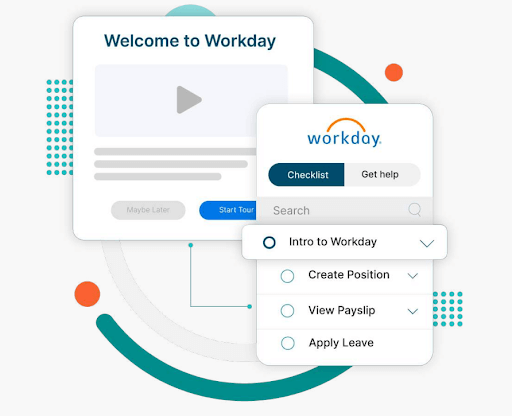
Workday has evolved beyond human capital management (HCM) to include enterprise resource planning (ERP) capabilities, offering modules like global compliance, talent management, payroll, and analytics.
Implementations typically take 6-14 months, averaging 8.2 months, with costs ranging from $300K to $800K and annual memberships up to $40-$160 PEPM (per employee per month).
Faster implementation and adoption lead to quicker return on investment (ROI), higher employee engagement, and lower turnover.
However, a smooth implementation isn’t always guaranteed. Organizations often encounter obstacles that can delay timelines, increase costs, and impact user adoption.
In this Apty video, we talk about how long it takes to implement Workday and how Apty can help you accelerate the process.
Now, let’s explore common Workday implementation challenges and how a digital adoption platform (DAP) can drive seamless adoption.
10 Workday Implementation Challenges
Implementing Workday can drive business transformation, but it comes with significant challenges.
A recent Reddit discussion highlights two key obstacles:
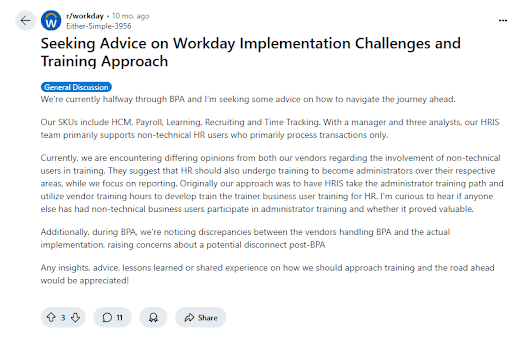
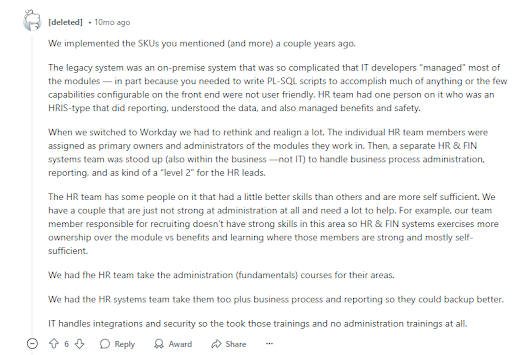
If you’re in the research phase, using an AI reddit search tool can help you quickly surface more of these real-world accounts from the r/workday community without manually scrolling through hundreds of threads. From data migration hurdles to user adoption struggles, organizations struggle with many challenges to ensure a smooth rollout, maximize ROI, and accelerate digital transformation.
Addressing these challenges with a structured strategy is crucial for successful Workday deployment.
Apty’s Workday Adoption Guide explores the top Workday implementation issues that organizations face.
Challenge #1: What Happens When Your Workday Project Has a Poorly Defined Scope?
A poorly defined project scope often leads organizations to underestimate the extent of changes required for a successful Workday adoption. Without a clear scope from the outset, businesses risk clinging to outdated workflows, preventing them from fully optimizing the Workday platform.
Moreover, when projects are loosely defined, confusion arises during execution, leading to misaligned expectations, rework, and timeline disruptions. This lack of clarity results in inefficiencies, higher costs, and delayed implementation.
Here are key factors that influence the definition of project scope:
| Factor | Description | Potential Impact |
|---|---|---|
| Software Updates | Continuous updates with weekly service changes and biannual major releases occurring mid-implementation | Unplanned adjustments, disrupted workflows, and challenges in managing new feature rollouts during the project |
| Unclear Roadmap | Lack of clearly defined project objectives and a comprehensive plan, often due to insufficient stakeholder involvement | Project delays, difficulty in prioritizing tasks, and misaligned project direction |
| Defining Business Requirements | Difficulty in gathering and translating the diverse needs of all stakeholders into clear, approved requirements | Ambiguities in project deliverables, extended decision-making processes, and potential rework if requirements change or are misinterpreted |
| Cost Overruns | Additional costs arising from scope creep and change requests during implementation | Budget overruns, increased risk of change orders, and potential financial strain on the project |
| Organizational Changes | Adjustments in employee roles, reporting structures, and workflows as new Workday functionalities are implemented | Resistance to change, training challenges, disruption in daily operations, and potential inefficiencies if changes are not managed proactively |
| Delayed Timelines | New requirements or tasks identified later in the project that were not accounted for during initial planning | Extended project duration, resource allocation challenges, and difficulty in meeting deadlines |
| Reduced Quality | Implementation that fails to meet defined requirements or quality benchmarks due to rushed work or mismanagement of tasks and resources | Lower overall project quality, suboptimal performance of the Workday solution, and potential long-term issues with user adoption and system reliability |
Mitigation Strategy
- Align expectations and set clear boundaries to prevent misalignment and scope creep. Establish a detailed implementation plan to ensure smooth execution.
- Use a DAP like Apty, which offers in-app announcements and alerts to keep your team informed, guaranteeing smooth adaptation to new features without disrupting the overall timeline.
- Develop a comprehensive change management plan that includes training, clear communication about the benefits, and support structure.
- Set up checkpoints to validate deliverables, test workflows, and resolve issues early. Adopting agile project management allows for flexibility, while ongoing quality control measures help maintain high implementation standards.
Challenge #2: How Can Limited Collaboration and Communication Impact Your Workday Rollout?
A Workday implementation can struggle when organizations focus solely on core teams like HR, finance, and IT. Overlooking other critical functional groups can lead to gaps in adoption and efficiency. This can result in the system not being tailored to meet the full range of operational and analytical needs, limiting platform effectiveness.
Mitigation Strategy
- Involve mid-level managers, end-users, and downstream data users to meet operational and analytical needs.
- Assign clear roles to ensure availability and accountability. Establish the level of involvement for each participant to avoid delays and ensure smooth execution.
| Project Roles | Description |
|---|---|
| Project Sponsor | A senior executive who provides overall direction, secures funding, and resolves high-level issues |
| Project Manager | Responsible for day-to-day project management, including planning, scheduling, and coordinating tasks. Ensures the project stays on track and within budget |
| HR and Finance Leads | Subject matter experts from HR and finance departments who provide insights into business processes and requirements |
| IT Lead | Oversees technical aspects, including system integration, data migration, and infrastructure readiness |
| Change Management Lead | Manages organizational change, communication, and training to ensure smooth user adoption |
| Workday Consultant | Assists with Workday configuration, customization, and best practices; often an external expert with deep knowledge |
- Prevent communication gaps with consultants and service partners by involving them early and maintaining transparent communication.
Challenge #3: What Risks Come From Lacking a Defined Process and Prioritization in Workday Implementation?
Implementation of any new software requires business process compliance. Workday implementation projects with vaguely defined processes and a lack of prioritization can fail easily.

For example, a leading healthcare organization, ChenMed, implemented Workday, and Apty helped them establish standards and consistent processes for managing new hire onboarding and employee engagement. This streamlined the onboarding experience, ensuring that employees had the necessary guidance and resources to quickly adapt and excel in their roles
| Factor | Description | Potential Impact |
|---|---|---|
| Undefined Problem | Omitting a thorough analysis of the specific problem Workday is solving, including symptoms and root causes | Leads to vague goals, creating a misaligned implementation that does not address the organization’s needs effectively |
| Lack of Process Ownership | Not assigning a dedicated process owner at each implementation stage | Creates a lack of accountability, leading to confusion, delays, and poor communication between teams |
| Misaligned Business Processes | Failing to update business processes to align with Workday’s capabilities and the organization’s transformation goals | Results in inefficiencies, the system not being fully optimized, and failure to meet long-term goals |
| Unaccounted Third-Party Integrations | Overlooking third-party applications to integrate with Workday before implementation | Causes integration issues, unexpected costs, and operational disruptions later in the project |
| Inadequate Training Strategy | Lacking a comprehensive training plan that includes in-app guidance, self-help features, and in-person sessions | Leads to onboarding difficulties, low user adoption, and underutilization of Workday features |
| No Regular Scope and Feedback Reviews | Skipping scheduling regular scope reviews, feedback loops, quality checkpoints, and reassessments throughout the project | Causes project scope creep, misalignment with business goals, and the need for costly rework |
| Unrealistic Timeline | Setting a timeline that is too short without factoring in resources, costs, and potential roadblocks | Results in budget overruns, rushed execution, and potential for missed deadlines or low-quality outcomes |
| Inflexibility in Execution | Failing to allot time to address unforeseen issues and changes | Leads to delayed resolutions of problems and increases the risk of project disruption |
| Lack of Beta Testing | Neglecting beta tests with a select group of users before a full rollout | Results in last-minute issues, lower user confidence, and a rough system launch |
| Failure to Monitor Post-Launch | Disregarding follow-up monitoring after the launch | Makes it difficult to measure ROI, identify areas for improvement, and track long-term digital adoption |
Mitigation Strategy
- Revisit and align existing processes with Workday features and enterprise requirements to ensure system optimization.
- Designate a process owner for each implementation stage to ensure accountability, consistency, and smooth execution.
- List all third-party applications that need to integrate with Workday to facilitate a smooth transition.
- Incorporate a DAP to provide in-app guidance and real-time support, maintaining business process compliance and helping users adapt to the system without disruption.
Challenge #4: Why Is Choosing the Right Workday Implementation Partner So Critical?
Many organizations find it challenging to manage the complex nature of Workday implementation and allocate the necessary internal resources for a successful transformation.Workday works with a carefully selected group of partners who are equipped to handle the entire implementation journey for businesses. These four types of Workday partners are crucial in helping businesses get the most out of the platform:
| Partner Type | Description |
|---|---|
| Advisory Partners | Provide strategic guidance and support to align Workday solutions with business goals |
| Global Payroll Partners | Assist with payroll management and ensure smooth integration across multiple regions |
| Services Partners | Offer expertise in configuration, customization, and system optimization to ensure successful implementation |
| Software Partners | Deliver third-party applications and tools that complement and enhance Workday’s capabilities |
Mitigation Strategy
- List the features and services you need from a Workday partner. Determine if they offer valuable consulting or just basic services. Then, narrow down options based on who can meet your requirements.
- Compare the pricing models. Most Workday partners charge either monthly or annually. Make sure their pricing fits your budget.
- Check out each partner’s credentials and talk to businesses that have worked with them before to learn about their experience.
- Look for unbiased reviews on third-party sites or forums to better understand the partner’s reputation and how they handle issues.
- Ask your shortlisted partners for a proposal. Don’t forget to request a demo to see how well they handle Workday.
Challenge #5: What Problems Arise If You Don’t Prioritize Regular Tests and Quality Checks in Workday?
Workday’s platform is pre-built and tested by engineers, but system configurations must be adapted to meet your company’s evolving needs. Relying solely on manual testing can lead to human error and inefficiencies.Automated testing, however, ensures compatibility, prevents issues, and facilitates seamless integrations with internal and third-party systems.Here are some key testing and quality checks that need to be considered:
| Standard Tests | Description |
|---|---|
| Security Testing | Ensures data security and alignment of role-based/user permissions with company needs |
| Integration Testing | Validates the compatibility and data exchange between Workday and third-party systems |
| User Acceptance Testing (UAT) | Allows end users to validate that the system meets business requirements and works correctly |
| Payroll Parallel Testing | Tests integration and compatibility between Workday Payroll and legacy systems |
| Continuous Testing | Ensures processes remain optimized throughout the employee lifecycle through ongoing testing |
Mitigation Strategy
- Prioritize testing to ensure smooth functionality, improving employee engagement, performance, and productivity.
- Always create test scripts when new features are added to ensure optimal performance and alignment with business needs.
- Implement regular testing to simplify the integration of updates and new releases, keeping your system and processes competitive and seamless over time.
Looking to accelerate your Workday adoption? Book a free demo with Apty to see how you can improve ROI, streamline onboarding, and reduce errors.
Challenge #6: How Can Poor Documentation Sabotage Your Workday Implementation?
General Workday documentation often lacks the specificity needed to address the unique aspects of your legacy systems, company culture, and departmental goals. It might require additional integrations to function effectively within your organization’s processes.A common issue for large organizations is the failure to log changes during the execution phase. A decision log is crucial for tracking decisions, their rationale, and the individuals involved. It helps identify the root cause of problems, making it easier to resolve issues by addressing their source rather than just the symptoms. Another key barrier to effective documentation is ensuring its accessibility.All of these can lead to poor business process compliance.
Mitigation Strategy
- Develop accurate and concise logs to meet the needs of end-users, developers, and admins.
- Ensure logs provide accountability, clarity, and transparency in the process.
- Conduct regular reviews of documentation and procedures to ensure they are up to date.
- Track user interactions with documentation with Apty to offer real-time guidance and identify areas for improvement.
- Leverage Apty’s knowledge base feature to access a continuously updated repository of critical information directly within your Workday dashboard. It provides easy access to helpful resources without disrupting users’ current workflows, enhancing the overall adoption experience.
Challenge #7: What Happens When Budget and Time Constraints Undermine Workday Implementation?
On average, IT projects, regardless of size—exceeded their budgets by 75% and overrun their schedules by 46%. With large budgets come high expectations, especially during economic downturns, mergers, or budget reviews.CIOs and leaders often feel pressure to minimize Workday implementation costs and timelines to demonstrate ROI. However, budgets and schedules are sometimes based on sales discussions rather than the organization’s unique needs. And sales teams may lack insight into internal processes, leading to unrealistic expectations.
Mitigation Strategy
- Plan resources and goals accurately to prevent underestimating scope, time, or budget.
- Engage internal and external experts early to assess fluctuating costs during pre-implementation planning.
- Involve project management consultants to ensure the plan is feasible and aligns with business needs.
- Streamline onboarding, reduce extra costs, and improve user adoption efficiency with a digital adoption platform.
Challenge #8: Why Is Data Migration One of the Biggest Challenges in Workday Implementation?
The biggest challenge for any enterprise is data migration and report management. Though organizations usually prioritize digital implementation, the problem arises when migrating your current data to the new application. Using reliable tools like pay stub generator can simplify pay documentation and reduce errors during system transitions.
| Data Migration Issues | Potential Impact |
|---|---|
| Data Quality | Inaccurate or incomplete migration can cause data integrity issues, leading to errors and inefficiencies. |
| Data Mapping | Differences between legacy and Workday data structures may cause errors, requiring extensive corrections. |
| Data Volume | Large-scale migrations become time-consuming and require significant resources. |
| Data Redundancy | Excessive duplication leads to storage inefficiencies but may help detect and correct data corruption. |
| Mismatch of Data | Inconsistent data representation can result in incorrect conclusions and poor decision-making. |
| Loss of Data Points | Missing data leads to biased results, system errors, and compliance risks. |
| Data Format Issues | Upload errors, such as file incompatibility or missing records, disrupt migration and delay business processes. |
Mitigation Strategy
- Conduct thorough data validation, cleansing, and deduplication before migration to prevent data integrity issues and mismatches.
- Work with Workday implementation partners to align legacy system data structures, standardize formats, and test mapping before migration.
- Use phased migration, prioritize critical data, and leverage automation tools to streamline processing.
- Implement backup plans and validation checks to protect against data loss and ensure system reliability.
- Pre-test data uploads, use Workday-supported formats, and ensure correct file structures before migration.
Challenge #9: How Does Poor Training Hurt Workday Adoption?
A Reddit thread mentions Workday as a platform that one can’t casually explore—it’s a closed ecosystem with no trial access. Employees struggle to navigate its complex features without structured training, leading to inefficiencies and poor adoption.The cost of training employees on Workday can vary depending on the size and complexity of your organization. And, the time to learn Workday depends on your training program. With the assistance of free tutorials, you can learn the Workday basics in two to three days, but additional training is required to understand the core concepts.Workday implementation is only considered complete when the end-user appropriately adopts it. Additionally, quantitative and qualitative metrics must be established to prove ROI and successful implementation.So why do training programs fail? Here are a few key reasons:
| Key Factors | Potential Impact |
|---|---|
| Limited User Involvement | Misalignment with user needs, which reduces system adoption and effectiveness. |
| Insufficient Training Time | Employees may struggle to use Workday effectively, leading to inefficiencies and errors. |
| Inadequate Training Materials | Poorly designed or outdated materials hinder learning and proper system utilization. |
| One-size-fits-all Approach | Ignoring different learning styles makes training ineffective for some users. |
| Siloed Approach | Limits cross-functional understanding, resulting in inefficiencies across departments. |
| Scarce Resources | Budget constraints reduce training effectiveness and limit access to essential tools. |
| Shortage of Skilled Trainers | Training may not be tailored to business needs, reducing effectiveness. |
| Low Motivation | Employees may disengage, leading to poor adoption of Workday features. |
| Unclear Objectives | Training programs may be unfocused, failing to address key business needs. |
| Lack of Feedback | Reduces continuous improvement and refinement of training effectiveness. |
Mitigation Strategy
Apty makes it easy for organizations to accelerate their Workday adoption rate and increase software ROI in record time. It can:
- Notify employees of updates or changes via in-app announcements, videos, and guided walkthroughs.
- Deliver role-specific learning content through customized walkthroughs to save time and enhance learning efficiency.
- Create customized task lists and walkthroughs for seamless onboarding and task completion.
- Offer detailed user and application analytics to make informed decisions, track engagement, and optimize processes.
Challenge #10: What Issues Arise When You Lack On-Demand Support During Workday Implementation?
On-demand support is a significant challenge during Workday implementation. Factors contributing to this include inadequate support staff training, insufficient support resources, and underestimation of the volume of user queries.Timely support is critical as employees and stakeholders learn to navigate the new system. User issues may go unresolved without readily available, knowledgeable support teams, leading to frustration, delays, and decreased productivity during the transition to Workday.
Mitigation Strategy
- Set up a dedicated support team for Workday issues. Creating a tiered support system, allowing basic issues to be resolved quickly while complex problems escalate to experts, can save time and resources.
- Provide continuous training for users and support staff to ensure they can address issues quickly.
- Implement in-app guidance, FAQs, and knowledge bases for users to resolve common issues independently.
- Use analytics to track support requests and identify recurring issues, optimizing resources for better response times.
Maximize Your Workday ROI by Driving End-User Adoption with Apty
Workday implementation challenges can be overwhelming, but integrating a cloud-based DAP like Apty streamlines the transition. It tracks employee behavior throughout the application and identifies roadblocks, ensuring a smooth transition and higher productivity.
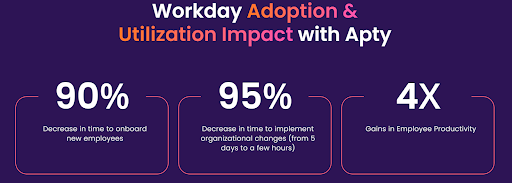
Empower your Workday HCM users with Apty’s intelligent, in-the-moment support, offering contextual guidance, streamlined communication, and responsive assistance. With customizable workflows, in-app guidance, and data-driven insights, Apty reduces errors, accelerates adoption, and minimizes post-implementation costs.
The result? Increased efficiency, improved security, and a more substantial ROI from your Workday investment.
Book a demo to see why 12 million users rely on Apty for seamless digital adoption and productivity.
FAQs
What is the life cycle of Workday implementation?
The Workday implementation life cycle follows a structured approach, typically consisting of these key phases:
- Planning: Defining project scope, objectives, timelines, and assembling the implementation team.
- Design: Configuring Workday to align with business processes and requirements.
- Build and Testing: Setting up Workday modules, running system integrations, and conducting user acceptance testing.
- Deployment: Migrating data, training users, and going live with the system.
- Post-Go-Live Support: Monitoring performance, resolving issues, and optimizing workflows.
How long is the average Workday implementation?
The average Workday implementation timeline varies based on the organization’s size, complexity, and required modules. Small to mid-sized companies typically take 4 to 6 months, while large enterprises with multiple integrations and customizations may take 9 to 18 months.What are three major benefits of implementing Workday?These are the three major benefits of implementing Workday:
- Unified System: Combines HR, payroll, finance, and analytics in one platform, improving data accuracy and efficiency.
- Scalability and Flexibility: Adapts to evolving business needs, allowing seamless updates and configurations.
- Advanced Analytics and Reporting: Provides real-time insights to support data-driven decision-making.
Is Workday implementation hard?
Workday implementation can be complex, but with the right strategy and experienced partners, the process becomes manageable. The challenges typically include data migration, user adoption, and system integrations. Proper planning, stakeholder involvement, and a structured rollout ensure a smoother implementation.
Orangetheory Fitness, a global fitness franchise, grappled with the complexities of multi-location financial consolidation and manual inefficiencies. Seeking a unified system, they sought out NetSuite implementation to streamline multi-location management, improve financial visibility, and reduce manual errors.
Many businesses encounter similar challenges that NetSuite can address.
NetSuite provides a scalable solution that adjusts to business requirements while automating repetitive tasks and promoting team collaboration. In fact, a report states that 85.5% of organizations reported that enterprise resource planning (ERP) systems have improved their operational productivity and efficiency.
From planning to execution, successful NetSuite ERP implementation demands a strategic approach. In this blog post, we will outline the key steps and best practices to make Netsuite implementation a success in your organization.
What Is NetSuite Implementation?
Oracle NetSuite is a cloud-based ERP tool. NetSuite implementation refers to the process of setting up, configuring, and customizing NetSuite to meet specific business needs.
The primary objective of implementing NetSuite is to refine business operations through the unification of multiple systems, offering greater customer courting control, making inventory tracking more efficient, and streamlining supply chain management.
For growing businesses, NetSuite implementation is significant as it supports scalability, improves operational efficiency, and provides real-time insights, helping businesses grow more effectively.
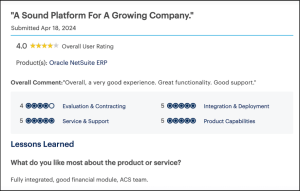
NetSuite Implementation Options
When it comes to NetSuite implementation, businesses have three main choices, each with its own advantages and challenges. The choice ultimately depends on factors like company size, budget, operational complexity, and goals.
Self Implementation
Unless your team has significant experience designing, setting up, and deploying complex business applications, self-implementing NetSuite can be challenging. It requires a dedicated in-house team to manage the process end-to-end, demanding considerable resources that may interfere with managing everyday business operations.
Pros
- Complete Control: Your team manages every aspect, allowing for tailored configurations.
- Cost Savings: Avoids expenses associated with external consultants or partners.
Cons
- High Risk of Failure: Between 50% to 75% of ERP implementations fail to meet their objectives due to cost overruns, time delays, or misalignment with business needs.
- Resource Drain: Hiring a dedicated team can strain budgets and require significant time for training.
NetSuite Direct Implementation
NetSuite provides an internal implementation service called NetSuite Direct. This approach will allow you to purchase and implement NetSuite directly from the company. An internal team will help with setup and troubleshooting. It can be suitable for companies that require basic functionality and cookie-cutter solutions without customization.
Pros
- Expertise: More than half of organizations in a recent study stayed within their expected budget, with a median project cost of $450,000. A structured approach like NetSuite Direct can help businesses manage costs effectively.
- Standardization: Ideal for businesses with straightforward requirements, reducing implementation complexity.
Cons
-
- Lack of Flexibility: NetSuite’s team focuses on standard implementations, which may not be suitable for complex business needs.
- Limited Customization: NetSuite Direct may not be suitable for companies that require a high degree of customization.
Partner Implementation
NetSuite implementation partners are third-party contractors who typically offer a deeper level of expertise on the software’s uses. They enable tailored solutions for smooth deployment.
For instance, Apty can ensure employees use NetSuite efficiently, reducing errors, improving data accuracy, and maximizing ERP implementation ROI (return on investment).
Pros
- Customization: Partners tailor the system to meet industry-specific requirements while catering to your needs.
- Ongoing Support: They provide post-implementation assistance, ensuring the system evolves with your business.
Cons
- Increased Cost: Working with a partner might incur higher costs compared to other alternatives.
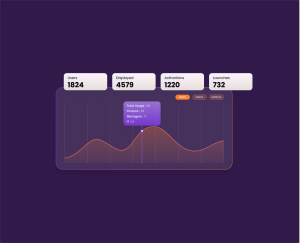
How Long Does NetSuite ERP Implementation Take?
Oracle NetSuite ERP implementation time can vary depending on your company’s size, complexity, and customization. Below, we outline approximate timelines you can expect:
Small to Medium Organizations
ERP implementations for midsize businesses earning between $100 million and $250 million can require six and a half months on average. The cloud-based nature of NetSuite enables faster deployment by removing the need for comprehensive IT infrastructure establishment.
Medium to Large Organizations
Companies with a revenue between $250 million to $750 million may require 9-12 months for a NetSuite ERP rollout. The level of customization and third-party integrations often dictate the timeline.
Enterprises
For large enterprises with revenues exceeding $25 billion, ERP implementations are more complex, typically taking 12.4 months or longer. Factors such as multi-location rollouts, compliance requirements, and large-scale data migrations extend the timeline.
Factors Affecting NetSuite Implementation
Implementing NetSuite can transform business operations, but several factors influence its success. Understanding these elements is crucial for a smooth transition.
Business Size and Complexity
An organization’s size and complexity directly impact NetSuite implementation. Smaller businesses often deploy faster, while larger enterprises with more applications and integrations may take more time.
A structured approach is essential to prevent inefficiencies and ensure smooth implementation.
Level of Customization Required
NetSuite offers strong out-of-the-box features, but companies that need customization can witness higher costs and delayed implementation.
Balancing standard functions with essential customizations is key. Digital adoption platforms (DAPs) like Apty assist in optimizing workflows without overcomplicating the system, ensuring efficient use of NetSuite’s capabilities.
Quality of Data Migration and Integration
Even the most well-planned NetSuite implementation can derail without clean data and effective integration.
27.5% of ERP projects exceed budgets, with the common reason being the unexpected need for additional technology. Seamless integration with CRM, payroll, and third-party apps demands a structured approach.
Tools that provide real-time data validation and automated process guidance, such as Apty, help minimize errors during this phase.
Expertise of the Implementation Partner
Your choice of an implementation partner can significantly impact project success. Experienced partners bring industry knowledge and technical expertise, managing timelines and minimizing risks effectively.
Leveraging Apty further streamlines user onboarding and system adoption, enhancing post-implementation efficiency.
Budget Allocation and Resource Availability
Underestimating costs or lacking skilled resources can cause project delays.
Industry reports find that 56.1% of project delays are due to resource constraints, making it the number one reason. Implementing a DAP like Apty can enhance user efficiency and reduce the need for extensive support, thereby helping businesses maximize their ROI.
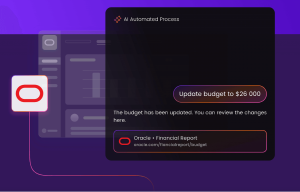
Cost of NetSuite Implementation
Implementing NetSuite involves several cost components that businesses should consider for effective budgeting. There is no ‘one-size-fits-all’ solution. However, based on user guidance, costs can be estimated as outlined below:
Licensing Fees
NetSuite requires a license that can be purchased on a subscription basis. The base license costs about $999 per month, with an extra per-user price. These may vary depending on your company’s unique requirements and size.
Data Migration Expenses
Transferring information from legacy systems to NetSuite is a crucial undertaking.
The costs associated with this data transfer can range from nothing to over $10,000, influenced by elements such as the amount of data, its condition, and the complexity of the migration process.
Implementation Partner Charges
Working alongside an implementation partner guarantees a customized deployment to align with your operational workflows. The costs for implementation can vary between $10,000 and $250,000 depending on your needs.
Customization and Integration Costs
Business requirements often make customization and system integration crucial for compatibility and functionality.
The typical pricing structure for these offerings functions on an hourly rate, with fees varying between $150 and $300 each hour. The total expenses fluctuate based on the extent of customization and integration efforts required.
Training and Support Costs
Effective user training and support expenses can cost up to $15,000. It is often included in the implementation partner’s charges but can also be billed separately. Investing in comprehensive training ensures that your team can utilize NetSuite’s capabilities fully.
Pro Tip: Use the ERP implementation calculator from NetSuite to get an approximate cost for implementation.
7 Steps To Successful NetSuite Implementation
A carefully planned NetSuite implementation entails seven essential steps to help companies achieve successful deployment. Let’s go through these.
Step 1: Evaluate Business Needs and Objectives
Defining clean objectives before implementation helps corporations align NetSuite with their unique desires. To do this, you must:
- Identify core business challenges NetSuite should address (e.g., financial automation, inventory tracking).
- List must-have vs. optional features to prevent unnecessary customizations.
- Determine scalability requirements for future growth.
Step 2: Select an Implementation Partner
Choosing the right partner ensures a smoother deployment with minimal disruptions. Here are some things to keep in mind while making a decision:
- Look for partners with NetSuite expertise and a strong track record in your industry.
- Evaluate their approach to project management and post-implementation support.
- Consider partners who offer training and change management support.
Step 3: Develop a Project Plan and Timeline
A well-defined timeline prevents unexpected delays and ensures a structured rollout. To create one, consider:
- Setting realistic milestones for different phases of the implementation process (e.g., planning, configuration, testing).
- Allocate resources, including IT teams and key stakeholders.
- Include risk management strategies for handling unforeseen challenges.
Step 4: Configure and Customize NetSuite
Balancing configuration and customization ensures NetSuite aligns with business needs without overcomplicating the system. Ideally, you should:
- Start with NetSuite’s out-of-the-box features to avoid excessive modifications.
- Customize only where necessary, ensuring changes enhance efficiency.
- Avoid over-customization, which often leads to higher costs and maintenance challenges.
Step 5: Data Migration and Integration
Ensuring data accuracy before migration prevents system issues post-implementation. It’s important to:
- Audit existing data to remove duplicates and outdated records.
- Plan integrations with existing tools (e.g., HR system or payment platforms via a dedicated NetSuite integration).
- Conduct thorough testing to ensure your data transfers seamlessly.
Step 6: User Training and Onboarding
Effective training plays a key role in gaining employee buy-in and ensuring long-term success.
Provide role-specific training tailored to the unique needs of your users. Apty’s in-app assistance offers step-by-step guidance right when it’s needed most. Additionally, promote continuous learning by using contextual tooltips to reinforce knowledge over time.
Step 7: Go Live and Provide Post-Implementation Support
Launching NetSuite is just the beginning—ongoing support ensures continued success. For continued success, you must:
- Monitor system performance and gather user feedback with analytics from Apty.
- Use Apty’s feedback collection features to identify and resolve adoption challenges.
- Provide ongoing training and documentation for new and existing users. Setting up self-service resources is also essential.
Also Read: 7 ERP Implementation Examples Every Enterprise Should Look Into
Challenges With NetSuite Implementation
NetSuite is a strong ERP system, but its deployment presents a few issues. Addressing these concerns early on facilitates a smoother transition and increases ROI.
Low User Adoption
Unfamiliar workflows and a lack of clear guidance make employees resistant to change.
When N&N Moving Supplies expanded across multiple states, they faced resistance to adopting NetSuite due to employee unfamiliarity. They introduced personalized ERP dashboards on iPads at each location to help employees learn the workflows.
Apty helps here by identifying friction points and providing personalized in-app guidance, making it easier for teams to adapt to NetSuite.
Complex Workflows and Processes
Navigating NetSuite’s modules and custom workflows can overwhelm users. Without intuitive guidance, errors increase, and efficiency drops.
Real-time in-app guidance and contextual tooltips ensure employees receive support exactly when needed, helping them complete tasks with confidence while reducing dependency on external training.
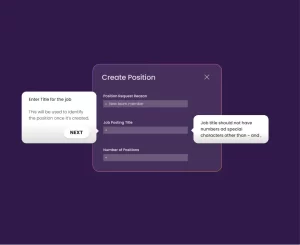
Data Migration Errors
Migrating data into NetSuite can lead to errors, affecting accuracy and compliance. Real-time validation and automated error detection help prevent issues. DAP solutions such as Apty streamline the process by automating data entry with auto-fill forms, ensuring a reliable transition.
Inefficient Training and Onboarding
Many businesses underestimate the learning curve with NetSuite.
For instance, Green Rabbit, once a candy wholesale business, struggled with training as it transitioned to a logistics provider. NetSuite team streamlined onboarding, improving real-time data visibility across warehouses and reducing manual errors.
Implementing such comprehensive training programs enhances user proficiency and streamlines onboarding processes.
Customization Overload
Over-customizing NetSuite increases complexity, costs, and delays. To mitigate such risks, prioritize essential customizations and leverage NetSuite’s standard functionalities wherever possible.
Inadequate Change Management
Resistance to change is one of the leading reasons why ERP implementations fail. If employees are not kept informed about system updates and process changes, engagement drops, and confusion increases.
In-app change announcements ensure employees receive relevant updates directly within NetSuite, keeping teams aligned without relying on emails or other external communications.
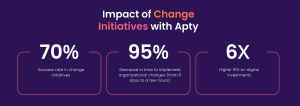
Turn resistance into adoption. Book a Demo today!
Post-Implementation Support
After NetSuite goes live, employees often need ongoing support. Without it, productivity drops, and IT dependency increases.
AI recommendations and real-time guidance within NetSuite ensure continuous assistance, helping teams resolve issues efficiently and stay productive without relying heavily on IT support.
How Apty Can Simplify NetSuite Implementation
For businesses, NetSuite isn’t a simple software upgrade. It is the foundation for sustainable growth. While setup is critical, the real challenge lies in user adoption. Success isn’t just going live but integrating NetSuite into daily operations seamlessly.
A well-executed NetSuite implementation requires clean data, structured processes, and continuous user training. Many companies rush the implementation process, but adoption remains the real differentiator.
This is where Apty ensures businesses thrive. With real-time guidance, workflow automation, and in-app support, Apty ensures teams adapt quickly, minimize errors, and maximize NetSuite’s potential without disrupting daily operations.
Want to see how Apty helps businesses get more from NetSuite? Book a demo today.
FAQs
What is a NetSuite implementation?
NetSuite implementation is the process of setting up, configuring, and customizing Oracle NetSuite, a cloud-based ERP system, to align with a business’s unique requirements. It helps in streamlining operations, improving efficiency, and providing real-time insights. Many businesses also work with NetSuite consulting partners to ensure a smoother and more efficient setup.
What are the 5 stages of ERP implementation?
ERP implementation follows a structured seven-step process:
- Evaluate Business Needs: Define objectives and key challenges.
- Select an Implementation Partner: Choose between self-implementation, NetSuite Direct, or a partner.
- Develop a Project Plan: Set milestones, allocate resources, and manage risks.
- Configure and Customize NetSuite: Tailor the system to business needs.
- Data Migration and Integration: Ensure seamless data transfer and system compatibility.
- User Training and Onboarding: Educate employees for smooth adoption.
- Go Live and Post-Implementation Support: Monitor performance and provide ongoing support.
How long does NetSuite take to implement?
The timeline depends on company size and complexity:
- Small to Medium Businesses: Around 6.5 months
- Medium to Large Businesses: 9 to 12 months
- Enterprises: 12+ months, depending on integrations and data migration
How hard is it to implement NetSuite?
NetSuite implementation can be complex due to data migration, workflow setup, and user adoption challenges. Success depends on a well-planned approach, the right implementation method, and proper training to ensure smooth transition and minimal disruptions.
Employees want tools that boost productivity, yet 69% report frustration with workplace technology. Despite this, Gartner found that only 14% of planning organizations have a digital adoption rate above 75%.
What’s holding teams back?
Poor onboarding, over-reliance on IT, and resistance to change are just a few challenges that slow digital transformation.
This creates ripple effects across organizations—CIOs and IT leaders see wasted budgets. HR struggles with disengaged employees, software admins fight user resistance, and project managers deal with workflow bottlenecks as employees fall back on old habits.
So, why does digital adoption fail? And more importantly—how can you fix it?
We’ve identified the top seven digital adoption challenges and actionable solutions to tackle them. Whether you’re rolling out a new system or optimizing an existing one, these insights will help you maximize software return on investment (ROI).
What Is Digital Adoption?
Digital adoption is the effective use of digital tools to achieve business goals. It happens when users maximize the value of all tools in their tech stack.
This means that users set up the software and understand and use all relevant features, both basic and advanced, with ease.
When done well, digital adoption leads to several key benefits:
- Improved Employee Productivity: Employees work more efficiently when they understand how to use digital tools effectively. This reduces time spent on manual tasks, minimizes errors, and helps teams focus on higher-value work.
- Faster Software ROI: The quicker employees adopt new tools, the sooner businesses see tangible benefits, such as reduced process bottlenecks.
- Reduced IT Support Costs: When users are comfortable with a tool, they need less help, reducing IT support tickets. Self-service resources make it easier to solve issues on their own.
- Enhanced Customer Experience: Efficient employees serve customers faster and more effectively, improving satisfaction scores.
Let’s compare basic software usage with full digital adoption to see how they differ in training, support, IT dependency, and overall business value.
| Factor | Software Usage | Digital Adoption |
|---|---|---|
| Usage | Uses only basic functions | Leverages all relevant features |
| Training and Support | One-time training, quickly forgotten | Ongoing, in-app guidance and support |
| Change Management | Employees resist switching from legacy tools, fearing disruption | Smooth transition with guided learning and minimal resistance |
| IT Dependency | Frequent IT support requests | Employees troubleshoot independently using on-demand self-service |
| Business Value | Underutilized software, wasted costs | Maximized investment, faster ROI |
7 Common Digital Adoption Challenges and Solutions
While digital adoption increases productivity and ROI, implementing it is easier said than done. Organizations often face hurdles that slow progress and hinder success.
Here are seven common digital adoption challenges and how to overcome them.
1. Employees Are Resistant to Change
Change is unsettling for everyone, and employees are no different. The fear of complexity, poor communication, and job security concerns fuel hesitation. Research shows that:
- 37% of employees resist change, citing mistrust in leadership (41%), lack of awareness (39%), and fear of the unknown (38%).
- 22% of US employees worry AI and automation will make their roles obsolete.
- 66% believe technology will boost productivity in the next three years, proving the right approach can drive adoption.
- 55% of employees say negative technology experiences impact their mood and morale. This supports the claim that poor adoption leads to disengagement.
How do you overcome this challenge?
- Involve employees from the start. Seek their input, address concerns, and make them active participants in the transition.
- Explain why the change is happening and how it benefits employees.
- Avoid overwhelming employees with a sudden overhaul. Roll out new software in phases, focusing on high-impact features first to create early momentum.
- Use a digital adoption platform (DAP) like Apty to provide in-app walkthroughs, tooltips, and self-paced training so employees can learn as they work.
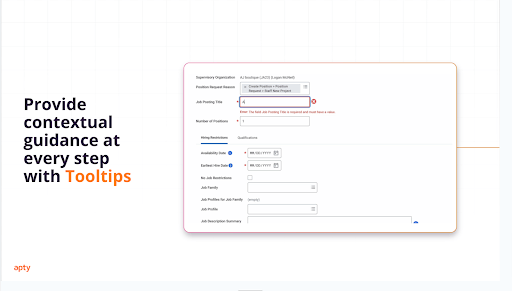
- Identify and empower internal advocates who can promote the new system, provide peer support, and help employees navigate challenges.
- Demonstrate early successes to build trust, boost confidence, and show immediate value.
This challenge is best solved with solutions that support change managementat scale through proactive engagement and learning reinforcement. Apty enables just that—with in-app nudges and contextual walkthroughs that reduce resistance and improve adoption outcomes.
2. Lack of Contextual Onboarding and Training
Another challenge companies face is a lack of contextual onboarding and learning.
A one-size-fits-all approach doesn’t work because employees have different roles, responsibilities, and learning speeds. Training thousands of employees across multiple departments is resource-intensive, and generic onboarding doesn’t address the unique needs of each job function.
Additionally, traditional training methods can’t keep up with evolving software features, leaving employees with outdated knowledge and limiting their ability to use tools effectively.
Companies relying on outdated training models miss out on the benefits of modern onboarding software and employee training systems. Apty solves this with product-led onboarding that tailors learning journeys to each employee’s context—turning training into productivity.
How To overcome this challenge?
- Use Apty to provide real-time, in-app, and contextual guidance, helping employees learn as they work.
- Allow employees to follow step-by-step walkthroughs at their own pace to reduce overwhelm and improve retention.
- Personalize employee training based on job roles, ensuring each department gets relevant, customized onboarding.
- Reinforce learning with interactive help and continuous training nudges beyond initial onboarding.
- Encourage self-learning with on-demand videos, knowledge bases, and interactive resources.
- Boost engagement with gamification, using badges, leaderboards, and rewards to keep employees motivated.
3. Training for Enterprise Systems at Scale is Difficult
Traditional methods—such as one-time workshops or lengthy manuals—often fail to equip employees with the skills they need to use complex platforms like customer relationship management (CRM), human capital management (HCM), enterprise resource planning (ERP), and information technology service management (ITSM) systems effectively.
Many enterprise applications, such as Microsoft Dynamics 365 or SharePoint, require weeks of hands-on experience to master—not just a day or two of training. Without continuous learning opportunities and real-time guidance, employees struggle to retain knowledge, leading to underutilization of software and increased IT support requests.
Apty solves this with automated, role-based training and custom onboarding flows that provide real-time, in-app guidance.
Step-by-step instructions help users learn as they work, eliminating the need for lengthy training sessions or manuals. This personalized approach accelerates learning, reduces IT dependency, and ensures employees use the software effectively. Many companies are turning to digital adoption platforms that offer personalized, cross-system learning paths. These tools guide users not just within a single app, but across entire workflows—accelerating adoption of complex enterprise platforms like Workday, Salesforce, and ServiceNow.
Apty enables organizations to deliver interactive training at scale with AI-driven rules and automated onboarding tailored to each user’s context. Apty’s automated onboarding and contextual walkthroughs make enterprise learning scalable across complex platforms—including custom ServiceNow training for ITSM teams. As an interactive learning platform, Apty ensures that knowledge sticks, workflows get followed, and employees stay productive.
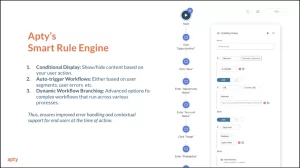
You should also:
- Offer regular training sessions, such as lunch-and-learns and refresher courses, to keep employees updated on new features and best practices.
- Break training into smaller sessions to make learning more manageable and prevent information overload.
- Encourage peer support and mentorship so employees can learn from each other’s experiences.
Also Read: Barriers to Change and How to Overcome Them
4. Measuring User Adoption is Difficult
Without clear visibility into how employees interact with your tools, how can you effectively measure and monitor user adoption? You’d struggle to access adoption success and the why behind employee resistance.
You also lose insight into what drives adoption.
Which features do employees use most?
Where do they face roadblocks?
Without this data, decisions are based on guesswork, increasing the risk of failed adoption.
Yet, fewer than 50% of IT teams track critical digital employee experience (DEX) metrics, such as user adoption, device analytics, and speed of issue resolution.
Apty gives IT teams real-time insights into user adoption, engagement levels, and software interactions, making it easier to identify what’s working and what’s not.
With this data, organizations can address adoption barriers, improve DEX, and ensure technology investments are fully utilized. Apty helps turn adoption metrics into actionable improvements, leading to better software usage and fewer inefficiencies.
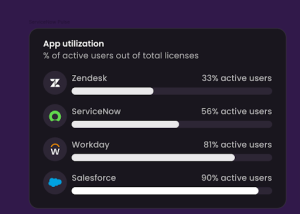
Here are some additional tips to counter this challenge:
- Use adoption heatmaps to identify features employees struggle with, allowing for targeted training interventions.
- Compare adoption rates across teams, departments, and locations to refine digital adoption strategies.
- Set clear metrics, such as active user count, feature engagement, and task completion rates, to measure adoption success.
- Regularly review analytics to monitor trends, spot roadblocks, and provide additional support where needed.
- Gather user feedback through surveys, interviews, and focus groups to uncover challenges and training gaps.
5. Lack of End-User Performance Support
A lack of end-user support leads to slow digital adoption because there’s no way to get help without reaching out to the IT team. In fact, 72% of office workers prefer resolving IT issues on their own rather than reaching out to the IT help desk.
Apty removes these barriers with instant, contextual assistance through tooltips, walkthroughs, and self-service knowledge bases. Employees get the help they need without disrupting their workflow, making it easier to adopt new tools.
Real-time alerts and automated prompts prevent mistakes before they happen, reinforcing best practices and keeping processes running smoothly.
6. Poor Software Utilization and Data Silos Across Departments
Suppose your enterprise implements a new CRM to sort through customer interactions, streamline workflows, and enhance collaboration between sales and support teams.
The sales team fully leverages the CRM by using automation, customer tracking, ad tracking, and detailed reporting to optimize performance and boost lead conversion. However, the customer support team only logs support tickets, overlooking valuable tools like customer history, chat integrations, and the knowledge base missing key insights that could enhance customer engagement and conversion opportunities.
So, how does this lead to inefficiencies? Let’s see here:
- A long-time customer contacts support about a billing discrepancy.
- The support agent is unaware that the sales team recently updated the customer’s pricing plan, which explains the change.
- Instead of checking the CRM for existing records, the agent asks the customer for details they already provided, leading to frustration and longer resolution times.
- Meanwhile, the sales team loses an upsell opportunity because support doesn’t share common customer concerns with them.
Poor software utilization often stems from data silos, where critical information gets stuck within teams or systems. Without full access to relevant data, employees struggle to make informed decisions.
This challenge is so widespread that 81% of IT leaders say data silos slow down digital transformation efforts.
To bridge these gaps, use Apty to monitor CRM feature usage, identifying gaps in adoption and ensuring every team fully leverages the software.
With clear insights into how employees interact with the CRM, businesses can identify areas where teams underuse key features and provide targeted guidance to improve adoption.
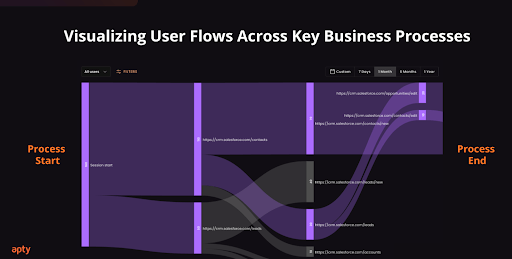
Beyond monitoring, setting company-wide best practices ensures alignment across departments.
When teams follow standardized workflows and share critical insights, data silos disappear, collaboration improves, and employees make more informed decisions—leading to better customer experiences and stronger business outcomes.
7. Lack of Cross-Application Workflow Support
Many enterprise processes span multiple platforms—onboarding, procurement, or sales operations often involve tools like Salesforce, Oracle Cloud, Workday, and custom apps.
When support exists only within a single system, employees hit friction points when switching between apps. This breaks momentum and leads to errors or delays.
To solve this:
- Support user journeys that span multiple systems
- Offer step-by-step workflows across tools, not just inside them
- Guide users even when context shifts between applications
Apty’s cross-application guidance solves this by linking process steps across tools like Workday, Salesforce, and ServiceNow—ensuring users stay productive even when moving between platforms.
Many enterprise processes span multiple platforms—onboarding, procurement, or sales operations often involve tools like Salesforce, Oracle Cloud, Workday, and custom apps.
When support exists only within a single system, employees hit friction points when switching between apps. This breaks momentum and leads to errors or delays.
To solve this:
- Support user journeys that span multiple systems
- Offer step-by-step workflows across tools, not just inside them
- Guide users even when context shifts between applications
Apty’s cross-application guidance solves this by linking process steps across tools like Workday, Salesforce, and ServiceNow—ensuring users stay productive even when moving between platforms.
8. High Dependency on IT Support
When employees lack access to self-service support, they rely heavily on IT for basic troubleshooting, leading to overwhelmed IT representatives, slower response times, and stalled productivity. Without alternative help resources, support tickets surge, consuming IT bandwidth that could be better spent on critical initiatives.
To overcome this challenge:
- Apty’s self-serve help menu provides on-demand access to FAQs, troubleshooting steps, and interactive guides, allowing users to find solutions in real time without submitting a ticket.
- The DAP also proactively detects user actions and offers real-time assistance, helping employees navigate tasks correctly without IT intervention.
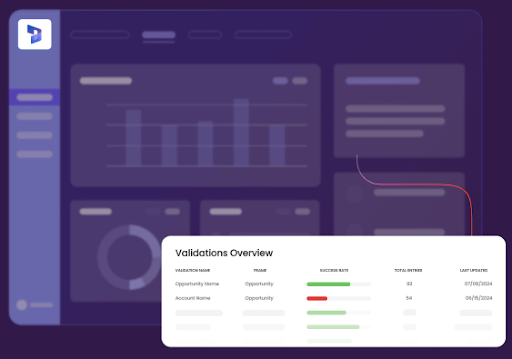
Overcome Digital Adoption Challenges With Apty
Are you tired of struggling with low software adoption, resistance to change, and endless IT support requests? Apty makes digital transformation seamless by helping enterprises maximize their technology investments.
With Apty, you can:
- Guide users in real-time with in-app walkthroughs, tooltips, and self-paced training.
- Track adoption metrics to identify bottlenecks and optimize training.
- Ensure process compliance with automated workflows and proactive alerts.
- Simplify onboarding with role-based learning and contextual support.
Say goodbye to software underutilization and hello to faster adoption, higher efficiency, and lower IT burden.
Book a demo today to see Apty in action!
FAQs
What are the 5 factors that affect technology adoption?
The five factors that affect technology adoption include:
- Ease of Use and User Experience: Users resist adoption if a tool is complex. A simple, intuitive interface improves usability.
- Perceived Value and Benefits: Employees adopt technology when they see clear advantages, such as increased productivity and cost savings.
- Training and Support: Ongoing, contextual training ensures seamless integration into workflows.
- Organizational Culture: String leadership and change management drive adoption.
- Cost and Return on Investment: Businesses must assess if the investment justifies long-term value.
What are the barriers to Industry 4.0 adoption?
Industry 4.0 refers to the digital transformation of manufacturing and industrial processes through automation, artificial intelligence (AI), Internet of Things (IoT), and data analytics. However, several challenges hinder its adoption:
- High Implementation Costs: The high costs of IoT, AI, and automation make adoption difficult for small and mid-sized businesses.
- Lack of Skilled Workforce: Expertise in AI, robotics, and cybersecurity is scarce, hindering adoption.
- Cybersecurity Risks: Increased connectivity raises concerns about data breaches.
- Resistance to Change: Employees fear job displacement and struggle with new technologies.
- Integration Challenges: Legacy systems often aren’t compatible with modern Industry 4.0 solutions.
How does Apty support large-scale digital transformation initiatives like Industry 4.0?
Apty accelerates digital transformation by simplifying adoption of complex enterprise systems such as CRM, ERP, and HCM platforms. With AI-powered, cross-application guidance, businesses can onboard and support employees across tools while reducing friction, improving compliance, and driving faster ROI—critical for Industry 4.0 success.
What makes Apty’s digital adoption platform unique?
Apty stands out by offering a comprehensive digital adoption solution that combines real-time analytics, AI-driven insights, and personalized user guidance. This integrated approach not only accelerates user onboarding but also continuously optimizes software utilization, leading to improved productivity and a higher return on investment.
After months of planning, your company finally launched a digital transformation initiative. Excitement was at an all-time high.
But as weeks pass, that excitement fades. Productivity dips, teams revert to old habits, and frustration builds. Instead of driving efficiency, the new system creates confusion and resistance.
Then it hits you: successful transformation must go beyond rolling out new technology. It’s important to ensure change management strategies are in place to drive adoption, minimize resistance, and create lasting impact.
Without a structured approach, even the best-planned changes can fail. Employees struggle when they aren’t adequately prepared, supported, or motivated to embrace new ways of working. Effective change management ensures smooth transitions, keeps teams aligned, and helps organizations fully integrate innovations into daily operations.
In this blog post, we’ll break down what makes change management successful, its types, common pitfalls to avoid, and how to implement a strategy that sticks.
What Is a Change Management Strategy?
A change management strategy is a structured plan organizations use to implement changes effectively while ensuring limited disruption to ongoing operations and processes. It also involves fostering engagement with these new initiatives.
These strategies serve as roadmaps that feature key elements such as detailed planning, strategic resource allocation, clear stakeholder communication, and continual progress monitoring.
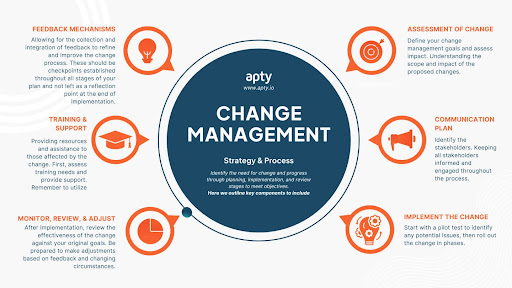
Essentially, a change management strategy is created to close the gap between where an organization is presently and the ideal version of itself in the future. A good strategy combines both the technical and human aspects of change.
The technical aspects of change include the structural and process-based parts such as implementing new systems or tools, and redesigning processes. The human aspects are related to communication, transparency, leadership support and employee mindset shifts.
A transformation can be just the new systems or processes, but a successful transformation has to make sure people understand, accept, and are actively involved in the change journey.
Why Organizational Change Management Strategies are Important
Let’s explore the importance and benefits change management strategies bring to an organization.
Minimized Resistance
A well-structured change management strategy helps combat employee resistance to change with proper communication. It addresses concerns proactively, provides clear communication channels, and shows the leadership’s commitment to employee support.
If employees understand the reasons behind the changes and see how they benefit the organization and themselves individually, they will respond better. This allows them to be active participants in the change rather than just observers or, even worse, resistors.
Reduced Operational Disruptions
Operational disruptions make transformation painful, but an effective change strategy considers potential disruptions and proactively aims to minimize them. This allows critical business functions to flow uninterrupted while new processes are implemented, tested, and refined in the background.
Enhanced Employee Engagement
When organizations prioritize employee involvement in change management strategies, they create opportunities for active participation throughout the transformation process. This engagement leads to higher buy-in, better adoption rates, and greater long-term sustainability of the change. Employees who feel heard and have their concerns addressed become key contributors, helping to champion the change and drive adoption across the organization.
Improved ROI on New Technologies
With effective change management strategies, organizations will be able to extract maximum value from new systems and technologies. Higher adoption, training, and support for employees will reduce the time needed to realize the value of their investments.
Better Competitive Advantage
Organizations with effective change management strategies have a clear edge over their competitors. The ability to quickly and efficiently adapt to shifts in the market, customer demands, or new technology gives them a competitive advantage. These strategies help businesses stay agile and responsive, making it easier to pivot when needed.
More importantly, they drive innovation, enabling organizations to lead change rather than just keep up with it.
Types of Change Management Strategies
When it comes to navigating change, there’s no one-size-fits-all approach. Different strategies work better for different organizations depending on their goals and challenges.
Let’s explore various types of change management strategies.
Developmental Change
This directly focuses on improving an organization’s processes and methods. Its remit is to take what works and make improvements to boost performance and efficiency.
Some examples include:
- Upgrading existing software systems to newer versions
- Improving employee onboarding to reduce strain on senior staff
- Updating help center articles to target common customer requests
Transitional Change
It involves moving a system from its current state to a newer, clearly defined future state. With developmental change, there is a focus on gradual improvements to existing processes. Transitional changes, on the other hand, involve replacing an old system with a new one. This requires a more structured and measured approach.
Some examples include:
- Introducing new products or services
- Shifting to remote work
- Using a new marketing strategy
Transformational Change
This marks a fundamental shift in how an organization operates, involving significant strategic, core value, operational, and often cultural updates. It is a disruptive shift that aims to take the organization in a completely new direction or to a new level of performance.
Some examples include:
- Business model pivots. e.g. non-profit to for-profit
- Mergers or acquisitions
- Overhauling operations to focus on new core values, like sustainability
9 Key Change Management Strategies
Change can be tough, but the right change management strategies make all the difference. Here are nine key strategies that can help organizations navigate change management trends and transitions smoothly.
1. Strategically Assess Organizational Readiness
Before implementing any change strategy, organizations have to honestly and thoroughly evaluate their readiness for transformation. This comprises comprehensive assessments to identify potential resistance points, the organization’s capacity, and areas requiring additional support.
Digital adoption platforms such as Apty offer a readiness assessment dashboard that provides valuable insights into key user behavior and system usage patterns. The data helps organizations make data-driven decisions.
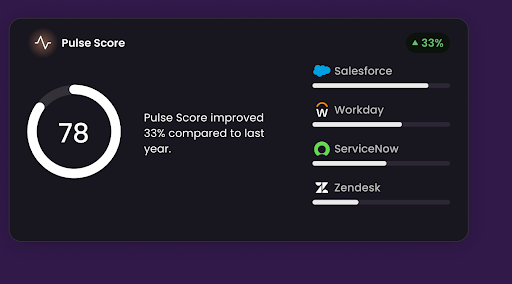
2. Establish a Clear Vision and Well-Defined Goals
“I want to succeed and make a positive impact” is something many people say, but it’s often unclear what that actually looks like. Leaders must communicate a vision that shows how the change aligns with organizational objectives and how it benefits the company and its employees. This vision must come with specific and measurable goals that provide clear directions and allow for progress tracking toward achieving them. Tools like an AI business plan generator can also support leaders by structuring strategies, setting milestones, and aligning business goals with organizational change efforts.
For example, instead of saying, “We’re switching CRM systems to boost our sales process”, a well communicated version would be: “We’re working with a new CRM system that will automate repetitive tasks, provide customer insights and streamline communication. We expect this to allow our sales team to close deals 30% faster and improve customer satisfaction.”
For a vision to ensure alignment, a leader must:
- Make it relatable: Show the connection between the vision and employees’ daily work. Show how it simplifies tasks or creates new opportunities.
- Define measurable goals: Establish clear KPIs such as “increase customer retention by 20% in 6 months.”
- Use storytelling tactics: Share success stories or even a moving “before-and-after” picture.
A vision is more than a statement for people to read, it is a north star to direct people consistently. Leaders have to put it front and center when possible. Company meetings, internal communications, and performance reviews all have to be aligned with the vision to boost momentum.
3. Develop a Phased and Structured Change Roadmap
Break the transformation journey into simple phases like a roadmap. Each phase should have clear milestones and success metrics to help organizations track their progress. A phased approach allows employees to prepare and adjust accordingly through the change stages.
Change management action items for this strategy include:
- Detailed timelines for each phase
- Specific deliverables and outcomes
- Clear responsibilities and accountability
- Measurable KPIs for progress tracking
For example, a change management roadmap could look like:
Phase 1: Planning and Alignment
- Define change objectives and expected impact
- Identify key stakeholders and sponsors
- Develop a communication and training plan
Phase 2: Implementation and Execution
- Begin pilot programs and initial rollouts
- Collect employee feedback and adjust strategy
- Provide in-depth training and support
Phase 3: Optimization and Reinforcement
- Monitor adoption rates and identify bottlenecks
- Adjust processes based on data-driven insights
- Embed changes into company culture
4. Leverage Key Stakeholders and Change Champions
A “change champion” is a team member selected to help facilitate change. These individuals serve as advocates and facilitators to help change move smoothly.
They drive adoption within their teams, provide feedback on implementation challenges, support their teammates through the transition process, and help showcase benefits of the new systems.
To leverage change champions:
- Identify these influential employees within different teams
- Provide them with training and resources to effectively guide colleagues
- Recognize and reward these change champions to reinforce their importance
Stakeholders are just as important for effective change management strategies. Keeping them in the loop to actively support and reinforce the reasons and benefits of the changes is vital.
Using Apty’s insights and analytics, leaders can accurately assess resource needs, track usage, and adjust strategies, ensuring resources are optimally allocated and stakeholders are engaged with relevant, data-driven feedback throughout the change process.
5. Implement a Scalable Employee Training Strategy
It is not enough to just show the new system or processes in place.
Create effective training programs to ensure employees properly adapt and embrace these new systems and processes. Using platforms with innovative solutions to boost employee training, support, and adoption is a great way to handle this.
Apty’s in-app guidance and self-help support features extensively provide this functionality. It integrates with any software application, and the conversational UI enables AI-powered guidance. An integrated knowledge base makes searching across applications easier and boosts change management adoption.
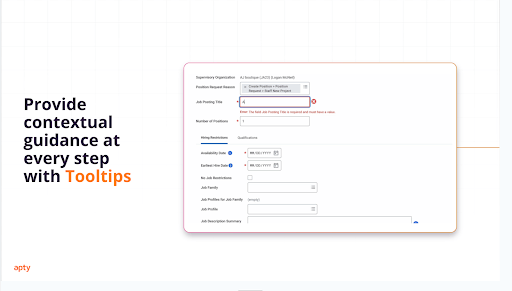
6. Build a Transparent and Effective Communication Plan
Clear, consistent communication is vital for the change process.
Organizations should develop multi-channel communication strategies for regular progress updates and to address concerns and questions quickly and effectively. These communication strategies should also celebrate project milestones and successes.
More importantly, there should be a two-way dialogue between leadership and employees to facilitate effective communication of issues and concerns.
7. Adopt a Pilot-First Approach for Change Validation
A pilot-first approach is a test run of the new system or process. A small-scale implementation assesses the feasibility of the project before a complete rollout. Testing the changes with a smaller group also helps identify and address potential issues early.
Additionally, this approach helps:
- Gather valuable user feedback
- Refine processes and workflows for maximum value
- Validate new approaches
- Build confidence and raise anticipation for complete change rollout
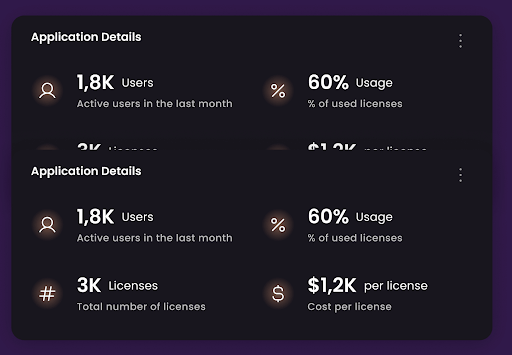
8. Continuously Monitor, Analyze, and Optimize Adoption
After the changes are successfully implemented, review their effectiveness against your original goals. Analytics are important to track progress and identify any areas needing additional support or further improvements. Adoption rates, user engagement, and system usage trends are chief among the metrics to track at this stage.
Be prepared to make adjustments based on feedback and changing circumstances. Continuous improvement should be a key component of your strategy. It is best to use a data collecting platform such as Apty’s analytics to identify and resolve adoption roadblocks and help you optimize your changes as best as you can.
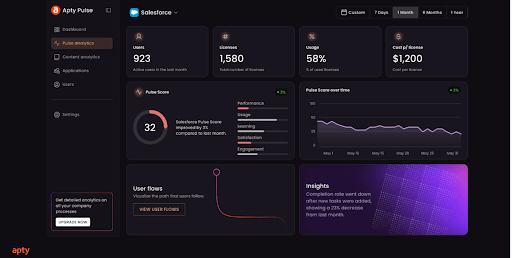
9. Ensure Long-Term Success With Ongoing Support and Feedback
Another key part of strategies for change management is ensuring long-term success with regular support and feedback loops.
Implementing continuous training to improve the systems, help desks for anyone with questions and real-time user support all work to improve the chances of long-term change success. This needs to be an ongoing process to ensure that change strategies stay as effective as possible.
With Apty’s Advanced Change Insights, you get a deep understanding of user challenges, engagement metrics and more. These help leadership make informed decisions, optimize software adoption, and improve change management efforts.
Why Do Change Management Strategies Fail?
Change management strategies are essential, but they don’t always succeed. Let’s take a closer look at why these strategies fail.
Lack of Leadership Support
Change strategies often fail because there is a lack of visible and active leadership support. Ineffective leadership derails success, and a failure from the management to champion and lead the change will definitely crash the project’s success rate.
Leadership has to be at the head of any change strategy, making sure concerns are addressed swiftly, and necessary resources are allocated. They must ensure feedback is addressed and employees understand the importance of the change, showing their commitment through actions, not just words.
Poor Communication Organization-wide
Communication is the backbone of any project. Some communication can be ineffective, including inconsistent messaging, lack of two-way dialogue, and failure to address concerns openly.
Fixing these common communication issues will increase chances of success exponentially.
For instance, a leading bank faced significant challenges during a global acquisition due to ineffective communication strategies. Leveraging Apty’s platform streamlined their communication processes, ensuring consistent messaging across all departments. This approach not only minimized resistance but also facilitated a smoother transition during the acquisition, saving them $1 million.
Insufficient Employee Training
Resistance is another key factor that negatively impacts the success of change strategies. Organizations have to make sure training is accessible and role-specific to extract maximum value.
Support resources have to be readily available to reduce frustration and increase adoption rates. Lack of adequate training means employees will struggle with the new processes or systems in place. Structured training will make the transition as smooth as possible.
A prominent airline company encountered difficulties with software adoption among its staff, leading to operational inefficiencies. Implementing Apty’s digital adoption solutions helped them develop structured training programs with in-app guidance and self-service support. This initiative resulted in improved employee proficiency and a more seamless transition.
Strategic Misalignment and Weak Planning
Planning involves leveraging the team’s strengths and working to alleviate its weaknesses. If there is poor planning and no correlation between the business objectives and the changes implemented, the transition is doomed from the start.
Avoiding key issues such as unclear objectives and success metrics, unrealistic timelines, and lack of coordination between departments will make the transition a world of good.
Absence of a Clear and Shared Vision
it’s essential for leaders to clearly articulate and share the ultimate vision and outcomes expected from the change. Employees need to clearly see and understand the future the change aims to create. Without a compelling vision, their motivation to embrace and apply the change in their daily work may fade.
A clear, shared vision acts as a north star, guiding and motivating everyone involved toward successful adaptation and implementation.
Also Read: Top 6 Change Management Best Practices
Seamlessly Execute Your Change Management Strategy With Apty
To make change less scary and easier, partner with Apty to execute your change management strategy.
Apty is an AI-powered digital adoption platform, you can use it to identify bottlenecks and provide targeted solutions. This reduces content creation time and accelerates user proficiency.
Tools like in-app guidance, real-time analytics, contextual help, self-service support, and automated change communication help optimize transition efficiency. Boasting a 70% success rate, Apty drives change forward, delivering a 6X return on digital investments and reducing time to implement organizational changes by 95%.
Ready to see how it works? Book a demo today.
FAQs
1. What is a change management strategy?
A change management strategy is a structured plan that helps organizations implement changes smoothly with minimal disruption. It ensures employees understand, accept, and adopt new processes, technologies, or systems while staying engaged and productive.
2. What are the five components of a change management strategy?
The five key components of a change management strategy are:
- Clear Vision and Goals: Defining the purpose and expected outcomes of the change
- Leadership and Stakeholder Support: Involving key decision-makers and change champions
- Effective Communication: Keeping employees informed and addressing concerns
- Employee Training and Support: Providing resources to help teams adapt
- Monitoring and Continuous Improvement: Tracking progress and making necessary adjustments
3. What are common steps of the change management process?
The typical steps in the change management process include:
- Assess Readiness: Evaluate the organization’s ability to handle change
- Define Objectives and Create a Plan: Set clear goals and develop a structured roadmap
- Communicate the Change: Inform stakeholders and employees about the upcoming changes
- Train and Support Employees: Provide the necessary tools, training, and guidance
- Implement the Change: Roll out changes in phases and monitor the transition
- Track Progress and Adjust: Collect feedback, analyze adoption, and refine strategies as needed
- Reinforce and Sustain Change: Ensure long-term success through ongoing support and optimization
As enterprises grow, so do their operations. Enterprise resource planning (ERP) becomes critical for organizations prioritizing responsiveness, relevance, and consistency. While ERP systems streamline operations, implementation can present unexpected hurdles.
In 2024, the Birmingham City Council had to shell out an additional £1 million on emergency manual bookkeeping after their £38 million accounting system failed.

This case is an example of how poor ERP implementation can cost months or years of effort and money. Without a clear strategy, businesses risk costly disruptions and operational inefficiencies.
Investing in structured implementation and leveraging digital adoption platforms (DAPs) can significantly improve success. This article breaks down the key steps and best practices to ensure your ERP software implementation delivers real value.
What is ERP Implementation?
ERP implementation is the process of unifying and managing core business functions like finance, HR, supply chain, and sales to ensure cohesive functioning. It replaces fragmented systems and silos with a single integrated platform
What are the Benefits of ERP implementation?
- Centralization of business processes
- Automation to reduce errors and improve speed
- Real-time data for better decision-making
Read more on: 7 ERP Implementation Examples Every Enterprise Should Look Into
Why ERP Implementation Matters
ERP system implementation improves data visibility, reduces errors, and facilitates better decision-making. ERP offers a roadmap to smoother, more efficient operations.
Here’s why it matters for your business:
Improving Operational Efficiency
ERP systems streamline routine operations by simplifying processes and eliminating staff errors. This can boost overall productivity.
For example, after deploying an ERP system, 74% of companies boosted productivity and efficiency.
Enhancing Data Visibility and Accuracy
Poor quality data can have unmistakable consequences in business. Gartner found that businesses lose an average of $15 million per year because of poor data.
ERP systems prevent the use of stale data by providing real-time insights from centralized networks. They improve decision making regarding optimal resource allocation, sales forecasts, and cycle times, among others.
Supporting Scalability and Growth
ERP systems scale with your business needs, integrating various functions into a unified platform to streamline operations, enhance efficiency, and adapt to changing market demands.
For instance, when fast-casual restaurant chain Sweetgreen faced challenges with scalability due to rapid growth, it implemented Oracle’s Cloud ERP and Coupa. The ERP system led to a 67% decrease in data load times, a 5-minute reduction in journal entry completion time, and a 30% reduction in manual IT controls.
Strengthening Compliance and Risk Management
ERP tools improve regulatory compliance with built-in monitoring and reporting capabilities. They enhance data security in a closed environment, making it easier for organizations to protect key company information from potential threats.
Boosting Collaboration and Communication
ERP systems encourage different departments to interact, resulting in improved team collaboration. It combines various functions into one interface to facilitate smooth communication.
In fact, Panorama Consulting Group has found that breaking silos is among the top three benefits of ERP system implementation.
Organizational Benefits of ERP Implementation
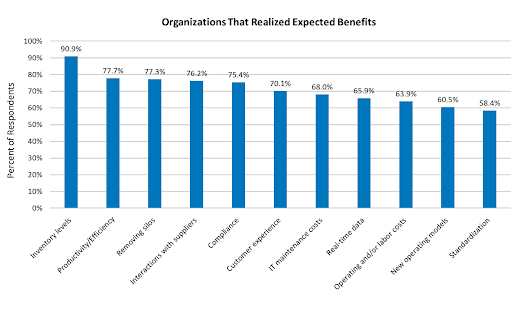 Source
What is the ERP System Implementation Process?
ERP software implementation is a multi-stage process that requires careful planning, collaboration, and execution. To achieve this, companies must follow a structured ERP implementation process that ensures seamless integration, system testing, and user adoption.
The process entails the following steps:
Step #1: Assess Business Needs
Before selecting an ERP system, organizations must evaluate their current workflows, identify inefficiencies, and define clear objectives. This involves:
- Mapping existing processes to uncover inefficiencies
- Identifying pain points such as manual data entry errors or siloed information
- Aligning ERP capabilities with business goals (e.g., better financial reporting)
This ensures that the ERP implementation plan is built around actual business needs rather than just software capabilities.
Step #2: Select the Right ERP Solution
Choosing the right ERP system depends on scalability, industry-specific features, and integration capabilities. Key factors to consider include:
- Cloud vs. On-premise ERP: Cloud solutions offer flexibility, while on-premise ERP provides greater control.
- Customization vs. Out-of-the-Box Features: Too many customizations can slow down enterprise resource planning implementation and increase costs.
- Integration: Compatibility with existing tools like current CRM, HR, or finance software. With the right integrations and software, you can create documents from ERP data, such as catalogs, price lists, or technical sheets.
A well-chosen system minimizes friction and accelerates business transformation.
Step #3: Build an ERP Implementation Team
A successful ERP implementation requires a cross-functional team that brings together technical expertise, human resources, and business insights. A successful ERP rollout requires:
- IT specialists to ensure technical feasibility and system integration.
- Department heads to represent user needs and process improvements.
- Project managers to ERP implementation timelines and resource allocation.
Leveraging a DAP like Apty can ensure that employees receive structured guidance, reducing resistance, accelerating adoption, and improving productivity by up to 20%.
Step #4: Develop a Comprehensive Implementation Plan
A well-structured enterprise resource planning ensures timely execution and efficient resource allocation. This includes:
- Project timeline with realistic milestones
- Budget estimation to avoid cost overruns
- Risk mitigation strategies to handle unforeseen issues
Without a detailed ERP implementation checklist, the process often faces delays, scope creep, and resistance from employees unprepared for the transition.
Step #5: Migrate Data and Integrate Systems
One of the main challenges of ERP implementation is moving data from legacy systems without errors during the transition. Key steps include:
- Data Cleansing: Removing duplicate or outdated records
- Data Mapping: Aligning fields between old and new systems
- Integration Testing: Ensuring the ERP software syncs with other business tools
Failure to do so can result in operational disruptions and poor decision-making due to inconsistent or missing data.
Step #6: Customize and Configure the ERP System
While ERP customization may be necessary, excessive modifications can lead to higher costs and complexity. Organizations should:
- Prioritize standard features over custom development.
- Ensure user-friendly configurations for ease of adoption.
- Test configurations in a sandbox environment before deployment.
Leveraging smart tools ensures efficiency without overcomplicating workflows.
Step #7: Develop a User Onboarding and Training Strategy
User adoption is critical for ERP implementation success. A structured training program should include:
- Workshops and webinars for hands-on learning and development
- Role-based training tailored to different departments
- In-app guidance to assist users in real time
Traditional methods like manual sessions are often ineffective, which is why many organizations turn to DAPs. Apty’s in-app guidance can help employees learn on the go, reducing IT support queries by up to 15%.
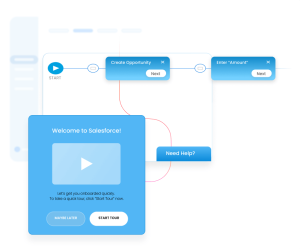
Step #8: Pilot Test and Collect Feedback
A phased rollout allows businesses to identify issues before full-scale ERP implementation. This involves:
- Testing with a small group of users
- Collecting real-time feedback
- Refining workflows based on user insights
DAPs like Apty can improve adoption with contextual tooltips to help organizations track how employees interact with the ERP system.
Step #9: Deploy the ERP System and Manage Change
The final rollout requires:
- Company-wide implementation of the ERP system
- Change management strategies to minimize resistance
- Ongoing support and system monitoring
Apty assists with change management by offering contextual guidance, in-product support, and analytics to smooth the transition.
Step #10: Monitor Adoption and Measure Success
To maximize ERP implementation ROI, businesses must track key adoption metrics, including:
- User engagement rates
- Time taken to complete critical workflows
- Reduction in errors and manual rework
Advanced data monitoring features like those provided by Apty offer real-time insights into user engagement and compliance, helping businesses optimize adoption.
Step #11: Create an End-User Support Strategy
Even after deployment, ongoing end-user training and support is crucial. Organizations should:
- Establish help desks for troubleshooting
- Create knowledge bases with FAQs and guides
- Implement real-time assistance tools
Here, Apty’s self-help support feature enables employees to find answers quickly without needing IT intervention.
Step #12: Evaluate, Optimize, and Scale
ERP systems require continuous improvement to adapt to evolving business requirements. Best practices include:
- Regular system audits to identify inefficiencies
- User feedback loops for process improvements
- Expansion of ERP functionalities as the company grows
Apty PULSE, with its centralized dashboard and real-time analytics, lets organizations visualize user journeys, identify bottlenecks, and implement targeted optimizations to refine ERP implementation processes.
Read more on: 8 Tips to Maximizing ROI of ERP Implementation: Strategies for Reducing Operating Costs
Challenges With ERP Implementation
Several challenges lead to failed ERP implementation. Addressing these challenges effectively is key to maximizing the value of an ERP system:
Low User Adoption
Unfamiliarity with ERP implementation and insufficient guidance cause employees to oppose software implementation. Employees struggle to use the system effectively when onboarding is not provided properly.
Providing step-by-step walkthroughs and real-time assistance with the help of tools like Apty can significantly improve adoption.
Complex ERP Workflows
The complexity of ERP software workflows often results in inefficiencies and user errors. Navigating between different functions without clear direction can slow down processes and create bottlenecks.
Businesses that introduce automation and contextual prompts within their ERP system reduce friction and improve usability.
Data Migration Errors
Transferring data from legacy systems is one of the biggest hurdles in ERP implementation. Data inconsistencies and missing records can cause disruptions, leading to financial and operational risks.
Organizations using real-time validation tools during data migration ensure accuracy and prevent delays.
Insufficient Training
Traditional training methods rarely align with how employees use an ERP system. Many businesses now embed role-based training and real-time support within the ERP interface, ensuring users get help precisely when they need it.
Mary Kay, a global direct-selling beauty brand, used Apty for personalized digital onboarding and training in 15 languages across 24 countries.
Also Read: How to Overcome Employee Pushback
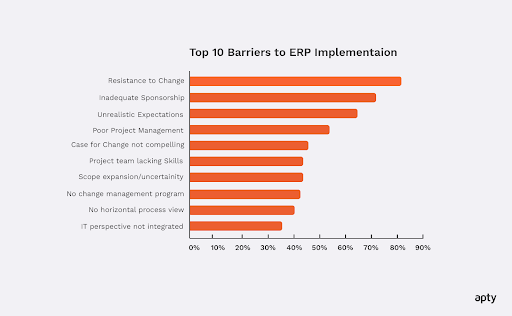 Source
Best Practices for ERP Implementation
While these challenges are common, businesses can overcome them with the right approach. Following these proven best practices helps ensure a smooth ERP implementation:
Define Clear Business Goals
Without well-defined objectives, the ERP implementation process can lose direction, resulting in delays and inefficiencies. Reports show that up to 75% of all ERP projects fail to meet their objectives.
To avoid this, businesses must start by mapping out key pain points such as improving inventory accuracy or reducing manual data entry. This will ensure the system aligns with their actual needs.
Invest in Training and Onboarding
ERP adoption often struggles due to inefficient employee training and onboarding.
Traditional onboarding methods rarely provide hands-on learning. Organizations that integrate in-app guidance, interactive walkthroughs, contextual support, and role-based training see faster adoption and fewer support requests.
Ensure Data Accuracy and Standardization
When data quality deteriorates it leads to incorrect reports as well as system violations and problems with important choices. Organizations can employ real-time validation technologies for the pre-validation of data to detect errors before operational damage occurs.
Practice Phased Implementation
Rolling out an ERP system all at once increases the risk of disruptions, user confusion, and operational slowdowns. A phased approach, where the system is introduced department by department or in specific functional areas, allows for gradual adaptation and better issue resolution.
ERP Implementation Case Study
To see how these best practices come to life, let’s review a case study of an ERP implementation.
Mattel, a global toy company, faced challenges with Workday HCM implementation, including inconsistent processes and a surge in support tickets. Employees struggled with navigating the system, impacting onboarding and HR tasks.
To address this, Mattel integrated interactive in-app guides and real-time support within Workday, helping employees complete tasks independently. This approach led to 90% system utilization within 60 days, reduced support tickets, and improved process efficiency.
Optimizing 30+ business processes in multiple languages helped Mattel boost global adoption and ensure seamless onboarding.
As shown by Mattel’s success, integrating the right tools is crucial for maximizing an ERP system’s benefits.
Drive Successful ERP Implementation With Apty
Even the best ERP platforms fall short without user adoption. Apty accelerates onboarding, supports change management, and provides real-time insights.
With Apty, you get:
- Contextual in-app guidance
- Behavior analytics
- Faster time-to-value