
Cloud-based information technology service management (ITSM) platforms like ServiceNow help businesses automate IT processes, simplify workflows, and reduce operational costs.
One hiccup with ServiceNow, particularly, is how hush-hush their pricing information is. It often leads to confusing bills before and after commitment. This is similar to dining at some restaurants—while the initial cost may seem straightforward, fees such as VAT, service charges, and tips often add up.
Similarly, the real cost of implementing ServiceNow goes beyond licensing and includes training, consultants, scope creep, staffing, customizations, and unforeseen challenges. But the benefits are worth it. Based on ScienceSoft’s experience with ITSM automation projects, companies can cut IT service delivery costs by up to 80%, reduce IT staff effort per incident by 66% through intelligent routing, and boost overall productivity by around 20% using self-service portals and virtual agents.
An example is how The British Telecom (BT) Group consolidated 56 legacy systems using ServiceNow, with a projected savings of £25 million by 2027.
So, what’s the implementation cost to get you started?
This blog post breaks down ServiceNow implementation costs, from aligning business goals to post-launch support, helping you avoid surprises and maximize value.
What is ServiceNow?
ServiceNow is a cloud-based system designed to automate workflows and manage processes. It goes beyond managing and automating IT processes and services like ticketing, service delivery (ITSM), asset management (ITAM), and application portfolio management.
Its comprehensive suite of features include:
Core Platform Capabilities
- Workflow Automation: Automates workflows with visual designers, flow triggers, and approval systems.
- Workflow Data Fabric: Connects and organizes data across diverse systems, enabling businesses to act on insights and streamline processes more effectively.
- Low-Code/No-Code Development (Now Platform): Simplifies app creation using tools like App Engine Studio and Integration Hub.
- Integration Hub: Connects ServiceNow to external systems with pre-built spokes and custom integrations.
- AI Agents: Automates repetitive tasks, content creation, classification, and summarization with custom AI agents.
- Performance Analytics and Reporting: Provides real-time visibility into metrics via dashboards and customizable reports.
- Mobile App Access: Enables users to interact with the platform through iOS and Android native apps.
Human Resources Service Delivery (HRSD)
- Employee Center: Provides a unified portal to access HR services and information.
- HR Case Management: Manages employee inquiries and requests.
ITSM
- Predictive Intelligence: Uses machine learning to predict incident categories, prioritize issues, and suggest resolutions.
- Virtual Agent: Uses AI to enable self-service and automate support .
- ITOM Visibility: Provides a comprehensive view of IT infrastructure and services.
- ITOM Optimization: Optimizes cloud resources and costs.
ITOM
- AIOps: Applies AI to IT operations to automate event management, detect anomalies, and predict outages.
- Service Mapping: Automatically discovers and maps the relationships between IT services and underlying infrastructure.
IT Asset Management (ITAM)
- Hardware Asset Management: Manages hardware lifecycles, from procurement to disposal.
- Software Asset Management: Optimizes software licensing and compliance.
Security Operations (SecOps)
- Security Incident Response: Automates security incident triage, investigation, and remediation.
- Vulnerability Response: Prioritizes and remediates vulnerabilities based on risk.
- Threat Intelligence: Integrates with threat intelligence feeds to identify and respond to threats.
Customer Service Management (CSM)
- Customer Service Management Pro: Adds advanced features like case routing, knowledge management, and field service management.
- Predictive Intelligence for CSM: Uses AI to predict customer issues and recommend solutions.
Business Applications
- Project Portfolio Management (PPM): Oversees projects, resources, and budgets.
- Governance, Risk, and Compliance (GRC): Manages risks, compliance, and audits.
Breakdown of ServiceNow Pricing
Truthfully, we can’t know everything about ServiceNow pricing because every client and use case is different. Additional costs may also vary.
Common costs associated with ServiceNow are categorized into three phases: pre-implementation, go-live, and post-implementation costs. Total cost of ownership is one of the main reasons buyers benchmark ServiceNow against other ITSM tools before signing a contract.
Let’s break these down.
Pre-Implementation Costs
Pre-implementation costs are the expenses incurred before deploying ServiceNow. These may include:
- Project Scoping and Requirement Gathering: Involves initial consultations with experts and internal teams to define the project scope and gather business requirements
- Business Process Analysis: Evaluates existing workflows and processes to identify areas for improvement
- Data Migration: Transfers existing data into the new ServiceNow environment. Costs vary based on data volume, complexity, and the tools used
- Consultation and Setup Costs: Covers professional services from ServiceNow or third-party consultants for configuration, customization, and integration
Depending on the complexity of the implementation, these fees can range from $30 to $80 per hour, $400 to $600 per day, or an annual fee between $30,000 and $70,000.
Consultants usually charge on-time consultation fees or full-scale ServiceNow implementation. Full-scale would be part of your go-live costs.
Go-Live Costs
Go-live costs are incurred during the actual implementation of ServiceNow. This phase typically includes:
- Setup and installation fees for configuring the tool across the organization + technical support
- Customization and integration costs to connect ServiceNow with existing IT systems. Add-ons such as advanced AI features or additional modules can add substantially to the total cost; sometimes ranging from 50% to 60% of the original license fee
- Testing fees to ensure smooth operation before full deployment
- Initial and ongoing training costs for users and managers of the new system
Go-live costs range from $10,000 to $100,000.
Post-Implementation Costs
Post-implementation costs involve ongoing expenses after ServiceNow has been deployed. Key components include:
- Subscription Fees: Organizations must pay for ongoing access to ServiceNow’s services, typically charged per user. For example, ITSM licenses may start at around $90/month per user, with advanced modules like ITOM costing between $150 and $200 per user per month.
- Annual Maintenance Fees: Besides subscription fees, there is usually an annual maintenance fee starting from around $200. This fee covers software upgrades and ongoing support services.
- Additional Features: As time passes, organizations may decide to add more users or expand ServiceNow to other departments, leading to increased costs.
ServiceNow Total Cost of Ownership (TCO)
The TCO for ServiceNow includes multiple cost components that organizations must consider. For a detailed phase-by-phase analysis covering module-specific pricing across ITSM, ITOM, HRSD, and CSM, this ServiceNow implementation cost guide breaks down expenses from initial scoping through hypercare support. Below is an improved breakdown of these components:
Consultation and Setup Costs
Organizations incur consultation fees before ServiceNow implementation, which vary based on business complexity and customization needs:
- Small to Medium Businesses: $20,000-$50,000
- Larger Enterprises: $100,000-$500,000
Additional customizations may add $10,000 or more to the ServiceNow price.
Service Costs
ServiceNow operates on a subscription model or perpetual licensing (cost primarily depends on the company), with costs depending on the number of users and selected features.
Here are the prices:
- Base Package: $100/month per user
- Enterprise-Level Solutions: $50 to $75/month per user
Advanced features can cost up to $200 per month.
Integration and Migration Costs
Data migration and third-party integrations can significantly impact costs:
- Migration Costs: These range from a few thousand dollars to over $100,000 for complex migrations. Tools like Precision Bridge cost $4,950 for basic instance connections. Ensure you partner with a experienced service provider when handling a ServiceNow migration.
- Integration Costs: Integration Hub licenses start at $100/month for the Standard Edition.
Many organizations also need to connect ServiceNow with custom-built tools and internal portals. If your business requires a tailored solution, working with a specialized app development team can help build custom applications that integrate seamlessly with your ServiceNow environment.
Training Costs
Training expenses start from $500 for on-demand courses, and instructor-led training goes up to $2,700. Certifications vary from $300 to $15,000 for advanced programs.
Maintenance Costs
Ongoing maintenance is critical for platform functionality and security. Annual maintenance fees start at $200/year but can increase based on the required support levels and implementation complexity.
Key Factors Influencing ServiceNow Pricing
As you’ve seen, ServiceNow’s pricing model is complex. Four key factors significantly influence this complexity. These include:
Company Size and Revenue
The size of an organization plays a crucial role in determining ServiceNow costs. Larger companies typically require more licenses and modules to accommodate their complex operational needs, which can lead to higher overall expenses.
Let’s take a closer look:
- License Requirements: Larger enterprises may need to purchase licenses for hundreds or thousands of users, which can cost up to $100/month per user depending on the specific services required and the number of users.
- Volume Discounts: Bigger organizations often have the leverage to negotiate volume discounts, potentially reducing costs by 40-50% for core modules like ITSM.
Industry and Geographical Region
ServiceNow tailors its pricing based on industry-specific requirements and regional considerations. Different industries, such as healthcare, finance, or manufacturing, may require specialized features that can influence pricing.
For example, security, e-commerce, government, and healthcare organizations might need additional compliance-related functionalities, which can increase costs. There are also regional variations.
Pricing may also vary based on geographical location due to differences in market demand and local regulations. Organizations in regions with higher operational costs may face increased pricing structures.
Business Goals and User Needs
Customization based on organizational goals and user needs is a significant factor in ServiceNow pricing.
ServiceNow offers Out-of-the-Box (OOB) solutions for different automation workflows, such as incident management. These solutions are more affordable and more straightforward for companies to deploy and manage; they only require updating some data for lookup, user information, and CMDB.
Although the OOB solutions are solid, it’s hard not to configure them to meet your specific features, integrations, and configurations. Customization runs up costs because you need specialists and consultants to execute them.
Product and Licensing Model
The choice of product and licensing model directly affects the cost structure”
- Bundled vs. Standalone Packages: Bundled packages may provide cost savings, but they can also require paying for unnecessary functionalities. Conversely, standalone modules allow for more tailored solutions but may result in higher cumulative costs.
- Subscription vs. Perpetual Licensing: You can choose between subscription-based pricing (monthly or annually) or perpetual licensing (one-time fee plus annual maintenance). Subscription models offer more flexibility but can accumulate higher long-term costs if not managed properly. There are also different types of licensing depending on the role.
| License Type | User Role | Cost |
|---|---|---|
| Requester | Submit incident reports and requests | Free |
| Fulfiller | Basic request management | Paid |
| Business Stakeholder | Advanced request management and analytics | Paid |
| Unrestricted | No limitations (counted as the number of active users) | Paid |
Reduce ServiceNow Implementation Costs and Boost ROI with Apty
Let’s assume you’ve spent $$$ implementing ServiceNow, yet nothing has changed. Your workflow and processes are still experiencing the same issues.
It’s going to hit both you and your company’s wallet.
But there’s a solution: Apty. An AI-powered digital adoption platform (DAP) that helps reduce software costs and increase software utilization and adoption return on investment (ROI).
Apty provides contextual, in-app guidance and real-time assistance during ServiceNow user onboarding. It helps reduce the learning curve and improves time to value. It can also identify unnecessary steps in workflows, improving the quality of your automation and understanding of the ServiceNow platform.
See how Apty can transform your ServiceNow experience. Book a demo today to explore its features and benefits firsthand!
FAQs
- How long does a ServiceNow implementation take?
Typically, ServiceNow implementation takes 4-6 weeks for basic configurations to 6-12 months for complex, multi-module enterprise deployments. Organizational size, customization needs, and module complexity significantly influence implementation timelines.
- What is ServiceNow’s time to value?
ServiceNow accelerates business value through pre-configured solutions, AI-powered recommendations, and workflow automation. Organizations can realize initial benefits within 3-6 months, with continuous optimization enabling ongoing efficiency improvements and strategic transformations.
ServiceNow is a powerful artificial intelligence (AI) and cloud-based automation platform for enterprise businesses. It unifies processes and improves efficiency across industries such as IT, HR, legal, customer service, supply chain, telecommunications, and more.
The platform provides powerful enterprise AI automation capabilities with Workflow Data Fabric to integrate enterprise data and a Vault to secure it, along with RaptorDB, an intelligent and scalable database system, and more.
ServiceNow’s comprehensive features and use cases make it complex to implement. It requires thoughtful planning, from identifying the right resources to deciding which services to deploy first. But the benefits are exciting.
Take Standard Chartered Bank’s success as a case study. They saved 104,000 annual productive hours, achieved 85% case deflection, and ensured rapid live chat responses.
Read this guide to ensure successful ServiceNow implementation. Let’s get started!
What Is ServiceNow Implementation?
ServiceNow implementation involves planning, configuring, deploying, and monitoring the platform to automate business processes. You can deploy it to automate processes across industries, including but not limited to IT service and business management, HR service delivery, security operations, governance, risk, and compliance.
It’s also convenient to build custom applications and integrate external and internal apps using zero-copy connectors.
The implementation process typically includes defining business requirements, choosing the right service, configuring the platform, data migration, and integrations, generative AI testing, rigorous testing, and end-user training and support.
A successful implementation drives efficiency, reduces costs, boosts productivity, and enhances service delivery.
However, the process is complex, demanding careful planning, platform expertise, and adherence to best practices. Therefore, partnering with experienced experts is crucial for guidance and support throughout the ServiceNow platform implementation lifecycle, maximizing the platform’s benefits and ensuring a successful outcome.
7 Steps to Implement ServiceNow
Implementing ServiceNow requires a structured approach to ensure effective setup and alignment with your organization’s needs. It’s important to follow a clear process to navigate the complexities of the platform.
Here are seven steps to implement ServiceNow, ensuring a smooth and successful outcome.
Step #1: Define Goals and Requirements
Before diving into the technical setup of ServiceNow, it’s essential to establish clear goals and requirements. This foundational step ensures that the platform addresses your organization’s most pressing needs and aligns with your strategic objectives.
To define these, thoroughly analyze your current processes and workflow, preferably in one pressing area: IT, security, or customer support. Then, collaborate with stakeholders to identify pain points and gather requirements and feedback.
Once the necessary information has been collected, set Specific, Measurable, Achievable, Relevant, Time-bound (SMART) goals. For example:
- Reduce incident resolution time by 30% within six months
- Increase employee use of self-service HR portals by 50% over the next quarter
- Decrease the average response time to security alerts from X to Y within three months
Finally, map ServiceNow’s capabilities to your business needs. For instance, use the Configuration Management Database (CMDB) to gain visibility into IT Infrastructure, the IT Service Management (ITSM) Suite for streamlined IT service management, and so on.
Step #2: Plan the ServiceNow Implementation Roadmap
After goal setting, create a plan for achieving them
Divide the implementation into structured phases: planning, design, development, testing, and deployment; each with defined milestones and timelines.
Start with high-impact areas that will deliver immediate value, such as IT service management or HR workflows. Prioritize these processes to build momentum and gain early successes.
As you move through the design and development phases, focus on scalability. Plan for future needs, even if certain features won’t be used initially.
Take into account available resources and potential risks to create realistic timelines that keep the project moving forward. This approach will help ensure that your ServiceNow implementation roadmap delivers both immediate benefits and a solid foundation for future growth.
Step #3: Build a Skilled Team
To execute your roadmap, assemble a skilled team aligned with your objectives and goals. Review the functions required for each phase of implementation and identify the expertise needed. For example, during the design phase, you’ll need system configuration and integration experts, while the testing phase requires quality assurance specialists.
According to ServiceNow, here are some key roles during implementation:
- Executive Sponsor: Provides strategic vision and secures the necessary resources
- Platform Owner: Oversees the platform and ensures alignment with business goals
- Project Manager/Scrum Master: Manages project execution and timelines
- Organizational Change Management (OCM) Lead: Handles change management, training, and communication across the organization
- Business Analyst: Captures business requirements
- Platform Administrator: Maintains platform stability and manages user access
- Platform Architect: Ensures technical alignment and creates the platform design
- Infrastructure Security/Security Administrator: Supervises security and data protection
- QA Lead: Validates platform functionality by conducting thorough testing to confirm it meets requirements
- Developer: Customizes the platform to align with your workflows and processes
As the platform matures and usage expands, organizations should consider adding roles to the core team. For example, a demand manager to handle service requests, a data insights and analytics owner to oversee reporting and KPIs, data manager for accuracy and governance, and an expert to manage platform integrations.
The extended platform team provides crucial business support and typically comprises roles that would exist even without ServiceNow. These include:
- Process/Service Owners
- Process Managers
- Subject Matter Experts
- Enterprise Architect
- IT Risk & Compliance Lead
- User Experience Engineer/Architect
- Program Manager
- Resource Manager
- Training Program Owner
- Release Manager
- Reporting/Analytics Developer
In a Reddit thread about what people wish they knew before starting their ServiceNow implementation, a user mentioned that having someone on the team who oversees the entire process from start to finish is crucial. They added:
“Unless your consultants are also providing your long-term support, someone internal needs to work with them every step before it gets loaded. Our implementation consisted of higher-ups telling the consultants how they wanted things to work, and the consultants loading it into our instances. The result is we had a lot of modules configured in multiple different ways, and nobody really understood what was done without digging through each and every line to be able to support it. 5 years later, I still find updates/scripts/settings that I can’t understand why anybody would do it the way it was done. If I had been part of the implementation, I could have asked and had how it works be explained to me, and I could support it. I spend as much time figuring out how they built things as I do actually fixing them.”
Step #4: Data Migration and Integration
Next, evaluate your existing data types, volume, and dependencies, and ask:
- What data needs to be migrated?
- What is the quality of the existing data?
- Are there any data dependencies or relationships to consider?
- What is the volume of data to be migrated?
- What transformations might be needed?
After you’ve assessed what to move and how to move it, clean the data to remove inaccuracies, redundancies, and outdated information. Then, map and transform your data from previous and legacy systems using ServiceNow’s data structures and requirements.
It’s a best practice to migrate data in batches and test the process to identify and resolve potential issues before full-scale migration. Consider executing the migration during a planned downtime to minimize business disruption. More importantly, monitor the process in real time to address any issues promptly.
Step #5: Customization and Configuration
Post-data migration, configure ServiceNow’s out-of-the-box (OOTB) settings to meet your requirements without altering the underlying code. This includes modifying workflows, forms, and user interfaces through built-in tools.
After configuring the platform to meet your business requirements, limit customization to only what’s necessary. Customization offers flexibility but complicates system upgrades and maintenance. It often requires additional testing to ensure compatibility with future updates and can make troubleshooting more difficult.
Striking a balance by relying on out-of-the-box features whenever possible keeps the system manageable and ensures smoother long-term operations.
Step #6: Testing and Feedback
Once you’re done configuring and customizing, test, test, and test to gauge how it’s working in production and the issues you may face. This involves:
- Different Testing Types: Unit testing (individual components), integration testing (module interaction), User Acceptance Testing (UAT; real-world scenarios by end-users), performance testing (system responsiveness under load), and security testing (vulnerability identification).
- Using Testing Best Practices: Develop comprehensive test plans, create detailed test cases, try automated testing tools (like ServiceNow’s ATF), conduct manual testing when necessary, engage end-users early, and document/track defects.
- Collecting Feedback: Usability testing (observing user interaction), surveys/questionnaires (structured feedback), focus groups (in-depth discussions), and feedback forms (in-system submissions).
- Improving Continuously: Adopt iterative testing cycles to refine the platform and monitor post-deployment performance and user feedback. Track KPIs like adoption rates, usage, and support tickets to identify areas for improvement.
Step #7: Deployment and Training
The final step is to deploy your ServiceNow service, train users, and ensure user adoption. How? Let’s see:
- Create a deployment strategy that comprises phased rollout of high-impact processes, pilot/beta testing, and comprehensive change management.
- Apply different training methods to empower users. Role-based training using diverse methods (workshops, online courses, simulations) and comprehensive materials (manuals, guides, tutorials). Also, invest in an AI-powered Digital Adoption Platform (DAP) to provide in-app assistance.
- Offer user support in the form of a dedicated help desk and knowledge base for self-service issue resolution.
5 Common Challenges in ServiceNow Implementation?
Although the rewards of implementing ServiceNow can be transformative, some challenges may hinder success.
We’ve listed five common hurdles organizations face during ServiceNow implementation and how to address them using Apty, an AI-powered DAP.
1. Low User Adoption
Companies experience low user adoption rates for several reasons, including insufficient stakeholder engagement, fear of change, poor change management, or inadequate training.
However, even with adequate training, research on the forgetting curve shows that humans forget 50% of all new information within a day and 90% of all the latest information within a week.
Well, enter Apty.
This platform provides in-app guidance, step-by-step walkthroughs, contextual onboarding, and tooltips to ensure users quickly understand and adopt ServiceNow functionalities.
Apty helps reinforce key concepts and processes at the moment of need, improving retention and encouraging consistent usage. With Apty’s support, users can stay on track and effectively apply what they’ve learned, driving better adoption and overall success.
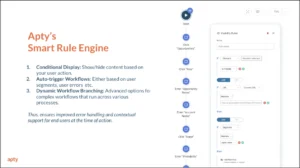
2. Complex Workflows and Processes
This is a case where a benefit starts to cause issues. ServiceNow is applauded for its unified and comprehensive services, but this can also become problematic.
ServiceNow’s robust capabilities often result in challenging workflows to configure and navigate. This complexity can lead to inefficiencies, errors, and frustration among users.
Apty’s solution?
Simplified workflow navigation with process guidance and automation of repetitive tasks, ensuring smooth execution and reduced errors.
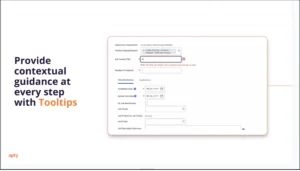
3. Insufficient Training and Onboarding
As we’ve already seen with the forgetting curve, traditional training methods like one-time sessions or static documentation require ongoing support from training. Employees tend to forget what they’ve learned before having the opportunity to apply it.
This leaves them unprepared to fully adopt the platform, minimizing your return on investment (ROI).
In this case, Apty offers on-demand training with personalized learning paths so employees can learn ServiceNow functionalities at their own pace directly within the platform.
4. Lack of Data Accuracy and Standardization
During implementation, data accuracy and standardization issues may occur due to several reasons:
- Manual data entry leads to typos, formatting issues, and inconsistencies, degrading ServiceNow data quality.
- Inconsistent data entry practices create discrepancies and hinder effective data management.
- Poorly planned ServiceNow integrations lead to inaccuracies and inconsistencies in migrated data.
- Excessive ServiceNow customization complicates data structures, jeopardizing data accuracy and consistency.
With real-time data validation, Apty ensures users enter accurate and standardized data, minimizing errors during data migration or input. This proactive approach significantly enhances data quality, supports smoother migration, and reduces the risk of errors impacting overall performance.
5. Resistance to Change
Understandably, employees fear change because it’s human nature to question new things. When the new workflow differs from existing processes, employees will likely feel overwhelmed or uncertain about how the platform benefits them.
To effectively manage change, it’s essential to not only educate employees on how the change benefits them but also understand their resistance to it.
Apty supports change management by providing ongoing support and communication through tailored notifications, ensuring employees stay informed and engaged throughout the transition.
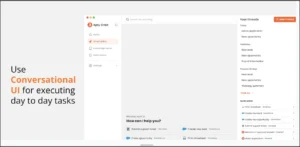
Apty OneX also provides a conversational UI that helps employees in their day-to-day tasks to streamline the transition.
Best Practices for ServiceNow Implementation
Here are some key best practices that can guide your ServiceNow implementation plan toward long-term success.
Select the Right Solution
Based on the workflows you want to automate and your business needs, choose the right ServiceNow modules and functions that align with your identified needs, whether ITSM, field service management, HR service delivery, or customer service management.
Also, check for compatibility with your existing IT infrastructure. Ensure it can scale as your business grows.
Train and Onboard Users
Equip your team with comprehensive training and in-app guidance for seamless adoption. This may comprise:
- Offering training users tailored to their different user roles for better outcome
- Providing ongoing support such as on-demand tutorials, FAQs, and in-app guidance
- Applying different methods like online tutorials, webinars, and in-person sessions.
- Investing in a DAP like Apty for contextual in-app guidance and process compliance
Start Small, Scale Gradually
Implement ServiceNow in phases to minimize risks, allow incremental improvements, and manage change effectively.
Begin with a pilot implementation across a single department to test the process. Then, gradually roll out to other departments, keeping in mind learnings from earlier rollouts.
Monitor and Adapt
Assess performance continuously, adjust configurations based on feedback and evolving needs, and stay current with ServiceNow updates. When needed, utilize resources like ServiceNow community forums, documentation, and customer support.
Simplify ServiceNow Implementation Using Apty
Implementing ServiceNow can feel overwhelming with its long list of features and components. It’s important to collaborate with product experts to deploy, test, and train staff.
But even with thorough training, employees often forget key details just days later.
Your best bet is leveraging an AI-powered DAP like Apty.
Apty is a predictive DAP application that simplifies user adoption through contextual and in-app guidance, such as walkthroughs, smart rules, field checks, checklists, and tooltips. It also tracks user flows and behavior, reduces friction during software usage, and ensures task completion.
Case in point: Mattel partnered with Apty during its Workday HCM transition to provide tailored, interactive guides. Within 60 days, 90% of the users adopted the guides, which reduced support tickets and improved task efficiency globally.
FAQs
How can we improve ServiceNow adoption?
You can enhance user adoption through role-based training, in-app guidance (through DAPs), robust change management, and continuous support via help desks and self-service knowledge bases.
How to analyze ServiceNow usage rate?
To analyze usage rates, set the right KPIs (login frequency, module usage, completion rates), gather user feedback, and apply analytics tools to understand user behavior and system utilization.
Navigating the relentless pace of change in information technology (IT) can feel like trying to hit an elusive target. ServiceNow, a frontrunner in IT service management (ITSM), provides a powerful change management solution that turns change into an opportunity for growth.
Powered by ITSM tools, ServiceNow helps with a plethora of business activities such as automating workflows, customer support, cybersecurity, and enhancing collaboration, to ensure every change aligns with overarching business objectives seamlessly. Organizations have already saved $25 million in IT costs and 1.1 million work hours and gained $50 million in value using its tools.
But even the best platforms need a strategy for effective implementation.
Pairing ServiceNow with a digital adoption platform (DAP) helps tackle resistance, personalize onboarding, and ensure a smooth rollout. This guide breaks down everything you need to know about ServiceNow change management, its processes, types, and best practices to help your organization thrive.
What is Change Management in ServiceNow?
ServiceNow is a cloud-based ITSM platform that automates and optimizes business processes in IT and other departments. Its change management module provides a disciplined method to regulate the lifetime of changes, resulting in little interruption to services while maximizing benefits.
Organizations can use ServiceNow change management to successfully manage changes with automated workflows, risk assessments, and tracking tools. The platform encourages stakeholder cooperation while ensuring compliance with existing rules.
Benefits of ServiceNow Change Management
ServiceNow simplifies change management by offering tools that streamline workflows, enhance communication, and ensure compliance.
With the digital transformation industry expected to grow to $2,639.4 billion by 2034, using platforms such as ServiceNow has become critical for firms seeking to remain competitive.
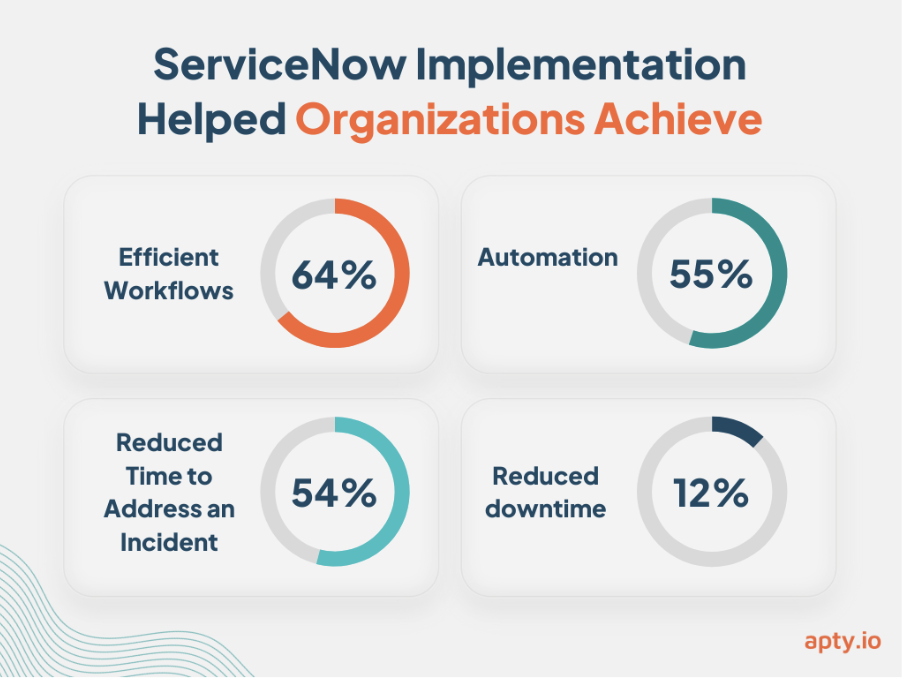
Here are key benefits of using ServiceNow change management explained:
Risk Reduction
ServiceNow’s risk intelligence tools use machine learning to predict and assess potential risks. Identifying high-risk changes early on helps companies:
- Recognize and prioritize critical changes that impact operations
- Develop mitigation strategies to minimize disruptions to services
ServiceNow’s integrated approach addresses risk management needs for areas including operations, policy and compliance, audit, business continuity, regulatory change, privacy and monitoring for NIST RMF, ensuring up to 40% quicker recovery time objective and up to 235% return on investment (ROI).
Improved Efficiency
Automation underpins ServiceNow’s functionality, reducing manual intervention and simplifying approval cycles. With ServiceNow, organizations can:
- Standardize procedures with multimodal change templates, accelerating the change management process.
- Focus on strategic initiatives by reducing time spent on routine tasks.
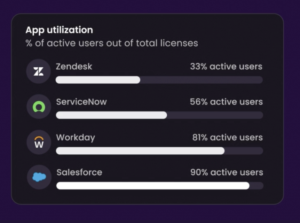
When combined with Apty’s DAP, organizations achieve up to 60% utilization.
Enhanced Communication
Transparent communication is essential for successful change management. 29% of employees report that change is not communicated clearly in their workplace. ServiceNow ensures stakeholders stay informed by:
- Providing a single platform to track projects
- Offering a centralized system for information sharing across departments
- Enabling seamless collaboration through dynamic change approval policies and automated notifications
For enterprises running ServiceNow alongside other ITSM or project management platforms, communication gaps between systems can undermine even the most structured change process. Dedicated integration solutions like exalate ensure change data moves seamlessly between ServiceNow and tools like Jira or Azure DevOps, keeping distributed teams aligned without requiring manual updates or duplicate record-keeping
Regulatory Compliance
ServiceNow simplifies adherence to industry regulations through detailed tracking and reporting features. Its dedicated, real-time reporting dashboard offers visibility into key compliance metrics. ServiceNow helps organizations:
- Maintain detailed audit trails through role-based accountability to meet stringent requirements.
- Build trust with stakeholders through reliable record-keeping supported by a single system of record.
For instance, ServiceNow helped Nomura Americas quickly build and launch a custom compliance exception application in three months instead of 12. The company used a configurable, iterative approach rather than custom coding.
Improved User Experience
Reducing downtime and streamlining processes allows ServiceNow to ensure a positive experience for end-users. This helps:
- Cut downtime through workflows and guided setup that deploys change management in days.
- Minimize disruptions to operations during the implementation of changes.
Combined with Apty’s rapid adoption processes, ServiceNow’s full potential can significantly improve user experience, recording up to 80% increase in customer satisfaction scores.
ServiceNow Change Management Process
Nearly two-thirds of employees report more workplace changes in the past year compared to the previous 12 months, with one-third experiencing four or more significant shifts. Managing this level of change requires structure and clarity.
Start with these 15 change management questions and then proceed to this six-step workflow for change management process in ServiceNow:
Step 1: Create a Change Request
The process begins with creating a formal change request, detailing the reason for the change, its potential impact, and required resources. ServiceNow centralizes this information, ensuring changes are documented and tracked.
Step 2: Review Change
Once submitted, the request is assessed to determine its need, practicality, and fit with the organization’s aims. ServiceNow simplifies collaborative review processes, allowing decision-makers to acquire insights.
Step 3: Change Evaluation
This process involves stakeholders evaluating the possible risks, rewards, and overall effects of the change. ServiceNow’s built-in risk assessment tools give thorough insights, allowing teams to identify high-risk areas and build mitigation strategies before implementation begins.
Step 4: Change Approvals
Approval is an important stage; it’s when leadership and key stakeholders give the go-ahead. ServiceNow automates the approval process with notifications and role-based access, reducing delays and ensuring accountability at all levels.
Step 5: Implementation
Once approved, the change is implemented according to the planned timeline. ServiceNow’s workflow automation ensures that teams execute each task efficiently while monitoring progress in real-time. This reduces the likelihood of errors and keeps the implementation on track.
Pro Tip: Learn how to overcome employee pushback and resistance to change to ensure your change process is smooth.
Step 6: Validation
The final step involves verifying whether the change has been implemented successfully. ServiceNow enables teams to conduct comprehensive testing and validation, ensuring all systems function as intended and there are no disruptions to ongoing operations.
These six steps can ensure efficient, well-documented change processes that align with business goals.
For organizations managing high volumes of IT service requests, aligning change workflows with Apty’s automated change management workflows ensures seamless adoption and lower operational risk.
Types of Changes Within ServiceNow
Not all changes within an IT environment carry the same level of risk or urgency.
ServiceNow categorizes changes into four types to ensure that organizations can manage varying levels of urgency and risk effectively. Let’s take a look.
1. Standard Change
Standard changes are low-risk, pre-approved changes that follow a defined, repeatable process. They follow predefined procedures and templates, making them repeatable and efficient.
These changes require no Change Advisory Board (CAB) approval due to minimal operational impact. ServiceNow streamlines standard changes by using change management plan templates, ensuring these tasks are completed quickly.
Example: Routine updates, like applying a pre-tested patch or adding a user to a system.
2. Normal Change
Normal changes are more complex and impactful. They follow the full change management lifecycle, including evaluation, multi-level approvals, and implementation during planned maintenance windows.
These changes are carefully assessed for risks, benefits, and potential impacts on IT workflows and business operations. ServiceNow supports normal changes by facilitating collaboration among stakeholders and automating approval workflows, ensuring alignment with goals.
Example: Upgrading a major IT system or deploying new software across departments.
3. Emergency Change
Emergency changes are urgent and time-critical, implemented to address high-priority issues like system outages or security breaches. These changes prioritize execution over authorization, with records often created after the implementation.
While speed is critical, ServiceNow ensures emergency changes are documented and managed systematically to maintain accountability and enable review for future improvements.
Example: Resolving a security breach or fixing a system outage.
4. Latent Change (Expedited Change)
Latent changes address high-priority tasks but are not as immediate as emergency changes. Authorization processes for latent changes vary depending on the associated risk.
ServiceNow streamlines expedited changes with automated approval workflows, enabling quick tracking and approvals.
Example: Missed CAB deadlines, sudden vendor requirements, or urgent customer demands.
Challenges in ServiceNow Change Management
ServiceNow’s powerful change management capabilities can transform organizational workflows, but its implementation comes with a few challenges that need careful attention. Challenges include:
Resistance to Change
Employees frequently resist adopting processes, fearing disruptions to their routines or lacking confidence in unfamiliar systems.
According to research, 37% of employees are resistant to change. Tools like Apty can support gradual adoption by offering in-app guidance and proactive notifications to make transitions smoother.
Inadequate Training
Without sufficient training, users may struggle to leverage ServiceNow’s robust features, leading to inefficiencies and errors.
Studies show that nearly 70% of employees feel they lack the skills needed to adopt new technology. While ServiceNow offers training resources, organizations can complement these with Apty’s on-demand guidance, which allows employees to learn as they work without interrupting day-to-day operations.
Lack of Process Standardization
Inconsistent change management processes often lead to errors and miscommunication across teams.
Guiding users through predefined workflows, enforcing best practices, and minimizing deviations ensures standardization, improves collaboration, and reduces the risks associated with misaligned processes.
Complex Workflows
ServiceNow’s extensive functionality can result in complex workflows potentially leading to errors.
Although its automation features reduce manual intervention, using change management tools like Apty simplifies even the most complex workflows with step-by-step guidance where needed. This ensures users can navigate tasks accurately and efficiently, reducing the risk of errors.
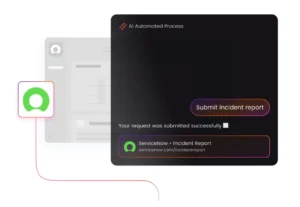
User Adoption Issues
The breadth of ServiceNow’s functionality can overwhelm users, leading to low adoption rates. Employees may struggle to see the platform’s full value or find its features intimidating.
Personalized onboarding paired with Apty’s content analytics feature drives adoption by ensuring employees feel supported and confident in navigating the platform.
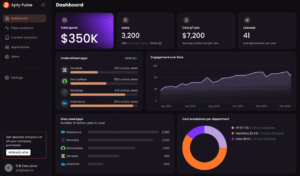
Digital adoption platforms like Apty simplify complex ServiceNow rollouts by combining change management tools and intelligent analytics into one AI-powered solution. This empowers IT teams to improve adoption rates, reduce errors, and track change management KPIs effectively.
Measuring Success
A common challenge in change management is assessing and measuring its success. Firms can fine-tune their strategies and accomplish their objectives with a combination of analytics that analyze user engagement, process adherence, and overall performance.
ServiceNow Change Management Best Practices
To maximize the benefits of ServiceNow, organizations need to implement structured best practices. Here are three essential best practices to follow:
-
Develop a Strong Service Strategy
ServiceNow is a powerful tool, but its success depends on a clear strategy. So analyze your current service processes to identify inefficiencies and gaps. Once these are identified, define objectives that align with organizational goals.
Create workflows tailored to your unique business needs before deploying ServiceNow. This approach ensures that the ServiceNow implementation addresses specific business challenges.
-
Align People and Processes
Successful ServiceNow deployment goes beyond technology. It is also about people.
Begin by engaging leaders and aligning them with the initiative’s objectives. With 39% of employees opposing change owing to a lack of information, communicating benefits and addressing workflow problems is critical to ensuring ServiceNow’s effective adoption.
-
Ensure User Adoption
User adoption is critical to the success of any ServiceNow initiative. Training efforts should begin early, with a focus on addressing user-specific challenges.
Instead of relying solely on traditional methods, organizations can benefit from DAPs like Apty. This strategy increases productivity and ensures the system’s future success.
Drive Seamless ServiceNow Change Management with Apty
Even with systems like ServiceNow, change management success is dependent on how well staff adapts to new procedures. Without sufficient advice and assistance, systems designed to increase productivity can become reasons for resentment and inefficiency.
Leveraging Apty for ServiceNow adoption can help your organization realize its full potential.
Apty enhances the ServiceNow experience by providing on-demand support, in-app guidance, and real-time validations to streamline workflows and boost user engagement. It also provides step-by-step guidance and individualized onboarding to help workers easily traverse complicated operations.
Don’t let user resistance or workflow complexity hold your organization back. Book a demo today to see how Apty can help you experience ServiceNow at its best.
FAQs
- What is the Change Management Lifecycle in ServiceNow?
ServiceNow’s Change Management Lifecycle is a systematic procedure for managing changes to IT systems. It includes submitting and analyzing change requests, evaluating risks, gaining permissions, executing changes, and validating outcomes. This lifecycle minimizes interruptions, improves cooperation, and aligns with business goals, all while ensuring compliance and operational efficiency.
- What are the stages of change management in ServiceNow?
The change management process in ServiceNow involves the following stages:
- Request for Change: Create a formal request with objectives and details
- Review: Assess feasibility and necessity
- Evaluation: Analyse risks and benefits
- Approval: Obtain stakeholder sign-off
- Implementation: Execute the approved change management plan
- Validation: Test and verify successful implementation
ServiceNow is a powerful enterprise software that is helping close to 14,000 top listed companies as of 2020 like Allianz, Accenture, Ashley, and Aegis to save their time and money.
Organizations with ServiceNow can see an ROI of 195%* in a span of 3 years. When an enterprise application promises as many benefits as ServiceNow does, it is paramount to adopt it quickly and effectively to make the most of it.
However, there are a few ServiceNow onboarding challenges that have to be addressed upfront to reap maximum benefit out of it. Before we find a solution to the challenges, let’s understand what ServiceNow is and its impact on any business.
What is ServiceNow?
ServiceNow is a dynamic cloud platform that empowers the IT operations, HR, and Finance departments to simplify process. Initially, it started as an application for ITSM (Information Technology Service Management) but today, they deploy solutions pertaining to HR service delivery, Customer service, IT, Security, and Business application.
With ServiceNow, you can create an entire employee lifecycle on a single platform by using workflows and automation that eliminates the need for manual intervention and spreadsheets.
Even though ServiceNow reduces a lot of manual effort and automates several mundane tasks, the biggest challenge is getting onboarded with ServiceNow itself.
Role of a Digital Adoption Platform in ServiceNow Employee Onboarding?
A Digital Adoption Platform makes ServiceNow onboarding easy as an employee can learn it by executing tasks within the application in real-time. It is better than the other forms of training which are almost always time-consuming.
There are multiple ways like certification, third-party training, and online training to learn ServiceNow and overcome the onboarding hurdles. But all these methods are long-term solutions. For immediate results, on-demand and a Microlearning platform like Digital Adoption Platform is useful.
Digital Adoption Platform helps your employees to adopt any enterprise-level application like ServiceNow from Day 1.
Here is how a Digital Adoption Platform like Apty makes ServiceNow onboarding Simpler:
a. Guides Employees at Each Stage to Ensure Better ROI
The main objective behind ServiceNow’s investment is to reduce manual efforts, speed up the onboarding process, and enhance the efficiency of the employees. While it can achieve all that, it is necessary to understand that onboarding on ServiceNow is not easy – All said and done, it is a complex application with numerous features.
You need to prove the ROI on your ServiceNow investments and it can only be achieved if the platform is adopted quickly.
The best solution is to utilize a Digital Adoption Platform like Apty which can guide your employees on the job by taking them from one step to the other. This way, they accomplish their tasks and also learn by taking action in real time.
In this method, when a new user is onboarded, they can be notified with a welcome message. From there, they are guided with the most relevant walkthroughs that hand-hold them all the way.
This reduces their dependency on the support team and also on their colleagues, which eventually helps them to save time and money.
b. In-app assistance for Rapid Onboarding
The biggest problem with the traditional form of training is the forgetting curve. Even if the learning curve is designed in line with the organization’s goals and user needs, the forgetting curve could destroy your efforts. It is important, therefore, to rely on on-demand learning methods that can be accessed by your employees as and when they want guidance.
The In-app guidance feature of the Digital Adoption Platform empowers your employees to access all the essential documentation and videos within the ServiceNow application. It acts as a mini-knowledge base with all the relevant documents your employee might need.
They need not skim through the support pages or time-consuming, generic documentation to overcome the roadblock that they face while onboarding ServiceNow.
In-app guidance can be customized for each job role, region, and department to provide a better employee onboarding experience and reduce the confusion that a new hire might have.
It is divided into two tabs. The first tab is Help and the second one is Onboarding.
New hires must complete all the onboarding flows listed in the onboarding tab to get a basic idea of the application. Usually, it takes a few hours to a couple of days to be familiarized with the application once all the onboarding flows are completed.
The Help tab enables employees to strengthen their knowledge and get beyond what they have learned during the onboarding. Here you can embed the essential videos, supplement documents, and workflows that could enhance your employees’ knowledge.
c. Powerful Insights to Reduce Turnover Rate
40% of the employees leave the job within the first year, according to INC. One major reason for this is inefficient employee training and onboarding.
It is very important to understand your employees and how they utilize the ServiceNow application before designing any training and onboarding program.
You can achieve it via Apty analytics tools that help you to understand how the employees are using the application, where they drop off, what steps they leave, and how much time they spend on the platform, etc.
When you understand data-driven user pain points, you can design the onboarding flows and training curriculum for your employees that create an impact. You will be able to provide them with a personalized experience.
Once the employees are trained, you can utilize Apty’s analytics tool once again to identify how your employees are performing within the application post training. If there are still some issues, you can create better workflows for them to help them accomplish their goals.
Onboarding on ServiceNow is not easy, but once achieved you can create numerous workflows, automate multiple repetitive tasks, and can improve cross-department performance. All you have to do is utilize the right tools like Apty to make the ServiceNow onboarding simpler and complete.
What is ServiceNow?
ServiceNow makes work simpler by using a workflow engine powered by AI. It provides solutions through workflows for IT, Employees, and Customers. On top of that, with the Now Platform, you can build own enterprise workflows that you need. However, implementing ServiceNow can be challenging, particularly for organizations new to the platform or needing more IT expertise.
One of the biggest challenges of ServiceNow implementation is ensuring that the platform is configured to meet the organization’s specific needs. This involves understanding the organization’s business processes and workflows and customizing ServiceNow to automate and optimize these processes. This can be a time-consuming and complex process, particularly for organizations with complex IT environments or legacy systems that need to be integrated with ServiceNow.
Another challenge of ServiceNow implementation is ensuring the platform is properly integrated with the organization’s IT systems and applications. This involves identifying and resolving compatibility issues and ensuring data is transferred seamlessly between systems. This can be particularly challenging for organizations with large and diverse IT infrastructures, as they may have to integrate ServiceNow with multiple systems and applications.
Overall, implementing ServiceNow can be challenging and requires careful planning, expertise, and resources. However, with the right approach and support, organizations can successfully implement ServiceNow and realize the benefits of streamlined IT operations and enhanced service delivery.
In recent years, there has been a significant increase in demand for ServiceNow implementation across various industries. According to a study by Future Market Insights, the global ServiceNow market size is expected to grow from $4.4 billion in 2020 to $13.2 billion by 2025 at a Compound Annual Growth Rate (CAGR) of 24.8% during the forecast period.
This growth can be attributed to ServiceNow’s numerous benefits, such as improved efficiency, streamlined workflows, and enhanced collaboration. As more organizations recognize the value of ServiceNow, the demand for its implementation is expected to continue to rise.
Let’s examine some of the most common ServiceNow challenges while implementing and fully adopting ServiceNow as an IT service management (ITSM) solution.
Here are the nine common challenges faced during ServiceNow Implementation:
Let’s discuss some of the most common ServiceNow implementation and adoption strategies used by digital centers of excellence (DCoE) to overcome common pitfalls when rolling out an IT service management (ITSM) solution. Knowing these missed steps allows organizations to better prepare and plan for a successful ServiceNow implementation. Here are the nine common challenges faced during ServiceNow implementation:
- Internal Requests
- Over Customization
- Complicated Workflows and Outdated Processes
- Lack of Expertise
- Generic Training
- Resistance to Change
- Implementation costs
- Limited Integration Options
- Periodic Maintenance
1. Internal Requests:
When you implement ServiceNow for one of the modules in a department, other departments raise requests for the implementation. Creating customized solutions for each department will delay your implementation. The whole purpose of using ServiceNow is to maintain a seamless flow of information across the teams.
If organizations start entertaining these requests and go off the track with their vision, it creates chaos and affects the whole implementation process.
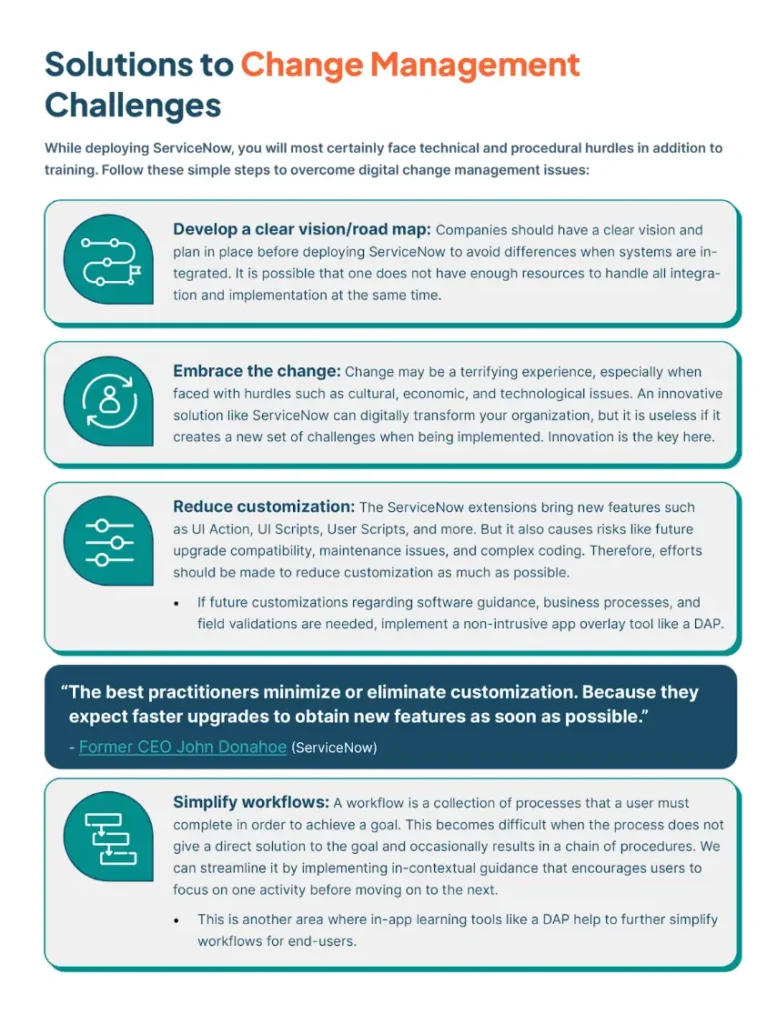
Solution: Maintain a seamless flow of information across the teams and look into overlay low-code software to speed up software change management.
2. Over Customization:
Excessive customization can make your ServiceNow installation difficult and expensive to maintain. Customizations can make expanding ServiceNow to new departments or organizational units challenging. It also makes updates to your system more time and labor-intensive as you have to ensure your custom code will work with the new version. 42% of consumers are annoyed when content isn’t personalized.
Solution: Prioritize features that meet business OKRs and digital transformation goals that affect revenue and business-critical processes.
3. Complicated Workflows & Outdated Processes:
The more complicated your workflows, the harder time you’ll have to adopt an ITSM solution like ServiceNow. Users need help to complete and understand complicated workflows; mapping them out in your software system is just as challenging. ServiceNow is designed to streamline your processes, but you can only reap the benefits if you create simple workflows. You’ll also need to update and integrate your processes with all relevant data points.
Without proper integration, the data flow across the teams could be affected. If one of the system is not integrated with the other, we might lose some valuable insights due to data silos. 94% of corporate company executives would prefer to utilize a unified platform to integrate their apps and implement process automation than rely on several platforms.
Solution: Do not build ServiceNow to accommodate current outdated processes. Use it to improve and transform, even if that means changing business processes. Monitor and track processes post-implementation for data-informed process optimization solutions.
4. Lack of Expertise:
ServiceNow has a vast range of featured solutions for each IT, Employee, and Customer workflow. Having the right knowledge and skills to accommodate those features might lead to better execution. An organization’s resources may be limited due to the constraints on its activities. While investing in the platform, companies should allocate the resources for training or outside consultants to ensure a smooth implementation without affecting ongoing projects.
Solution: Allocate resources for training to ensure smooth implementation.
5. Generic Training:
Generic ServiceNow training might not be tailored to your business and processes. Companies often make the mistake of training people on the software, but it is more appropriate to prepare the relevant team on how they can leverage the software to their advantage. Make sure your training fits how they’ll use the platform. According to 92% of employees, well-planned employee training programs have a favorable impact on their level of engagement.
Solution: Prepare teams on how to use the software to their advantage with personalized in-person and in-app training tailored to their job role and business use cases. Decrease digital friction with helpful self-paced guidance.
6. Resistance to Change:
ServiceNow revolutionizes businesses, but users may resist change because they’re tied to old processes that they feel more comfortable using. While ServiceNow can bring many benefits to an organization, getting employees to adopt the new platform is often challenging. This resistance to change can be due to several factors.
First, employees may be comfortable with their existing system and may feel that ServiceNow is an unnecessary disruption to their established routine. Additionally, employees may be concerned about their ability to use the new platform effectively and may resist learning new processes or systems.
The implementation revamps the way a business operates.
- The transformation it brings to the IT experience,
- The automation it provides to the HR, and
- The acceleration to the security,
But the users are reluctant to change. Most of us can’t handle that much change in a shorter interval. In a survey of 3,000 executives, McKinsey and Company found that 70% of all organizational transformations fail, and 70% of those failures can be attributed to the inertia of culture and mindsets.
Solution: Create a digital adoption center of excellence (CoE) to include all stakeholders before implementation to evaluate and address company culture. A change management CoE can also offer assistance hereafter implementation.
7. Implementation costs:
One of the significant challenges of ServiceNow is its implementation cost. ServiceNow is a complex platform that requires significant resources, time, and money investment. Organizations need highly skilled professionals to implement this platform successfully. Therefore, the implementation cost of ServiceNow can be a significant challenge for many organizations.
Solution: Purchase through a partner that includes consulting and implementing software add-ons that are known for their positive ROI and proven payback cycles.
8. Limited Integration Options:
Another challenge organizations may face with ServiceNow is the limited integration options. ServiceNow offers integration with other tools and platforms but may only integrate with some of the tools and platforms an organization uses. This can disadvantage organizations that rely heavily on other tools and platforms.
Solution: Take full advantage of all the software features and functionality by looking for cloud-based application overlays that don’t require immersive integrations to aid in your digital transformation goals.
9. Periodic Maintenance:
ServiceNow is a highly customizable platform that requires regular maintenance. Organizations must keep their ServiceNow instance up-to-date and ensure the platform runs smoothly. This can challenge organizations that need more resources or expertise to maintain the platform regularly.
Solution: Look for software admin experts within your organization and externally to maintain the software effectively. This is where a CoE comes into play.
ServiceNow is a powerful platform that can help organizations streamline their ITSM and business processes. However, it comes with its own set of challenges, such as implementation costs, limited integration options, and regular maintenance requirements. Organizations need to weigh the benefits and challenges of ServiceNow before implementing it in their operations.
Importance of overcoming ServiceNow adoption challenges:
To fully reap the benefits of the powerful ServiceNow platform, organizations must address the challenges that may arise during implementation. Implementation can lead to low adoption rates, employee frustration, and wasted resources. However, organizations can increase their chances of success by planning carefully, avoiding unnecessary customizations, and partnering with experienced ServiceNow providers.
To further enhance adoption rates and overall productivity, organizations can leverage digital adoption platforms like Apty. With Apty, employees can receive personalized guidance and support while navigating through ServiceNow. This not only reduces employee dissatisfaction but also increases efficiency and ROI.
Successfully implementing ServiceNow can improve efficiency, cost reduction, and better decision-making, giving organizations a competitive edge in meeting customer needs quickly and effectively. With careful planning, collaboration, and the use of effective digital tools like Apty, organizations can maximize the potential of ServiceNow, resulting in better business outcomes.
Overcoming ServiceNow Challenges to Adoption with Apty:
Investing in the latest technology can be tempting for organizations looking to streamline their processes and improve productivity. However, simply purchasing a new platform like ServiceNow doesn’t guarantee success. Implementing and adopting the technology effectively is essential to see any real benefits.
One of the most significant challenges to successful technology adoption is employee resistance. Employees may be hesitant to learn a new system or process, especially if they are comfortable with the existing way of doing things. This can lead to low adoption rates, ultimately hurting productivity and ROI.
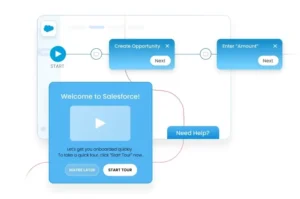
Apty offers a range of features that can help organizations increase adoption rates and improve overall productivity when using ServiceNow. One such feature is the ability to create interactive guides that provide step-by-step instructions for employees navigating the platform. These guides can be customized to meet different teams and departments’ unique needs, reduce employee dissatisfaction, & increase confidence in using the new system.
Apty also allows organizations to track user activity within ServiceNow, which can help identify areas where additional support or training may be needed. This data can then be used to create targeted training programs and improve the overall user experience. Apty can help address this issue by providing customized training and support materials tailored to an organization’s specific use of ServiceNow.
Furthermore, Apty’s analytics dashboard provides real-time insights into how employees use ServiceNow, allowing organizations to quickly identify and address any issues. This helps ensure that the platform is used to its full potential and that organizations achieve their desired outcomes.
In summary, implementing and adopting new technology like ServiceNow can be challenging, but it is essential to realize the full benefits of the platform. Apty DAP can help organizations overcome these challenges by providing real-time guidance and support, customized training, support materials, and many features to increase adoption, improved productivity, & business outcomes.