
The world of work is undergoing significant changes, with hybrid models and technological advancements posing new challenges for organizations in managing HR, finance, and planning. Workday leads the way, offering a unified cloud platform that enables businesses to adapt quickly.
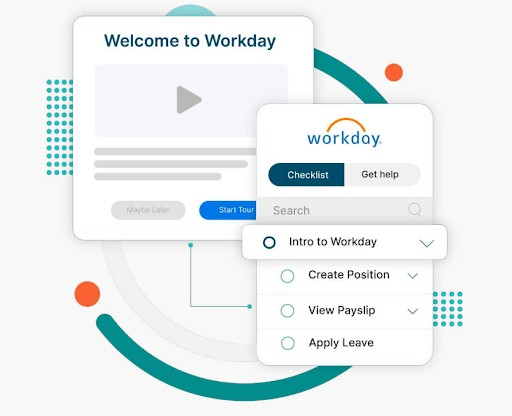
Workday has evolved beyond human capital management (HCM) to include enterprise resource planning (ERP) capabilities, offering modules like global compliance, talent management, payroll, and analytics.
Implementations typically take 6-14 months, averaging 8.2 months, with costs ranging from $300K to $800K and annual memberships up to $40-$160 PEPM (per employee per month).
Faster implementation and adoption lead to quicker return on investment (ROI), higher employee engagement, and lower turnover.
However, a smooth implementation isn’t always guaranteed. Organizations often encounter obstacles that can delay timelines, increase costs, and impact user adoption.
In this Apty video, we talk about how long it takes to implement Workday and how Apty can help you accelerate the process.
Now, let’s explore common Workday implementation challenges and how a digital adoption platform (DAP) can drive seamless adoption.
10 Workday Implementation Challenges
Implementing Workday can drive business transformation, but it comes with significant challenges.
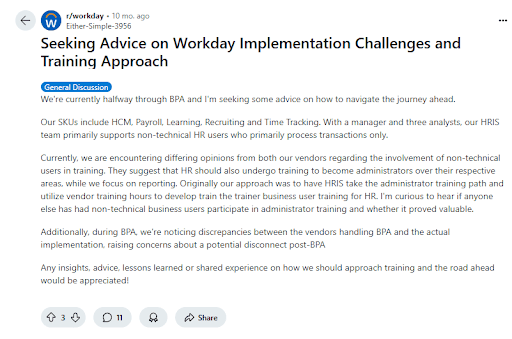
A recent Reddit discussion highlights two key obstacles:
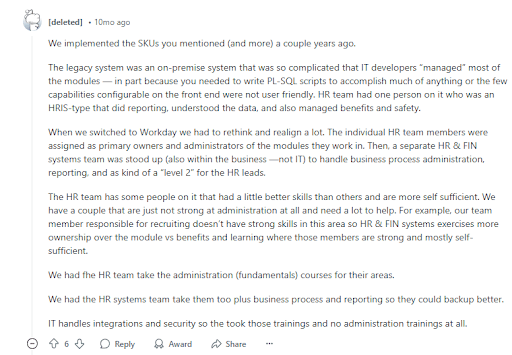
If you’re in the research phase, using an AI reddit search tool can help you quickly surface more of these real-world accounts from the r/workday community without manually scrolling through hundreds of threads. From data migration hurdles to user adoption struggles, organizations struggle with many challenges to ensure a smooth rollout, maximize ROI, and accelerate digital transformation.
Addressing these challenges with a structured strategy is crucial for successful Workday deployment.
Apty’s Workday Adoption Guide explores the top Workday implementation issues that organizations face.
Challenge #1: What Happens When Your Workday Project Has a Poorly Defined Scope?
A poorly defined project scope often leads organizations to underestimate the extent of changes required for a successful Workday adoption. Without a clear scope from the outset, businesses risk clinging to outdated workflows, preventing them from fully optimizing the Workday platform.
Moreover, when projects are loosely defined, confusion arises during execution, leading to misaligned expectations, rework, and timeline disruptions. This lack of clarity results in inefficiencies, higher costs, and delayed implementation.
Here are key factors that influence the definition of project scope:
| Factor | Description | Potential Impact |
|---|---|---|
| Software Updates | Continuous updates with weekly service changes and biannual major releases occurring mid-implementation | Unplanned adjustments, disrupted workflows, and challenges in managing new feature rollouts during the project |
| Unclear Roadmap | Lack of clearly defined project objectives and a comprehensive plan, often due to insufficient stakeholder involvement | Project delays, difficulty in prioritizing tasks, and misaligned project direction |
| Defining Business Requirements | Difficulty in gathering and translating the diverse needs of all stakeholders into clear, approved requirements | Ambiguities in project deliverables, extended decision-making processes, and potential rework if requirements change or are misinterpreted |
| Cost Overruns | Additional costs arising from scope creep and change requests during implementation | Budget overruns, increased risk of change orders, and potential financial strain on the project |
| Organizational Changes | Adjustments in employee roles, reporting structures, and workflows as new Workday functionalities are implemented | Resistance to change, training challenges, disruption in daily operations, and potential inefficiencies if changes are not managed proactively |
| Delayed Timelines | New requirements or tasks identified later in the project that were not accounted for during initial planning | Extended project duration, resource allocation challenges, and difficulty in meeting deadlines |
| Reduced Quality | Implementation that fails to meet defined requirements or quality benchmarks due to rushed work or mismanagement of tasks and resources | Lower overall project quality, suboptimal performance of the Workday solution, and potential long-term issues with user adoption and system reliability |
Mitigation Strategy
- Align expectations and set clear boundaries to prevent misalignment and scope creep. Establish a detailed implementation plan to ensure smooth execution.
- Use a DAP like Apty, which offers in-app announcements and alerts to keep your team informed, guaranteeing smooth adaptation to new features without disrupting the overall timeline.
- Develop a comprehensive change management plan that includes training, clear communication about the benefits, and support structure.
- Set up checkpoints to validate deliverables, test workflows, and resolve issues early. Adopting agile project management allows for flexibility, while ongoing quality control measures help maintain high implementation standards.
Challenge #2: How Can Limited Collaboration and Communication Impact Your Workday Rollout?
A Workday implementation can struggle when organizations focus solely on core teams like HR, finance, and IT. Overlooking other critical functional groups can lead to gaps in adoption and efficiency. This can result in the system not being tailored to meet the full range of operational and analytical needs, limiting platform effectiveness.
Mitigation Strategy
- Involve mid-level managers, end-users, and downstream data users to meet operational and analytical needs.
- Assign clear roles to ensure availability and accountability. Establish the level of involvement for each participant to avoid delays and ensure smooth execution.
| Project Roles | Description |
|---|---|
| Project Sponsor | A senior executive who provides overall direction, secures funding, and resolves high-level issues |
| Project Manager | Responsible for day-to-day project management, including planning, scheduling, and coordinating tasks. Ensures the project stays on track and within budget |
| HR and Finance Leads | Subject matter experts from HR and finance departments who provide insights into business processes and requirements |
| IT Lead | Oversees technical aspects, including system integration, data migration, and infrastructure readiness |
| Change Management Lead | Manages organizational change, communication, and training to ensure smooth user adoption |
| Workday Consultant | Assists with Workday configuration, customization, and best practices; often an external expert with deep knowledge |
- Prevent communication gaps with consultants and service partners by involving them early and maintaining transparent communication.
Challenge #3: What Risks Come From Lacking a Defined Process and Prioritization in Workday Implementation?
Implementation of any new software requires business process compliance. Workday implementation projects with vaguely defined processes and a lack of prioritization can fail easily.
For example, a leading healthcare organization, ChenMed, implemented Workday, and Apty helped them establish standards and consistent processes for managing new hire onboarding and employee engagement. This streamlined the onboarding experience, ensuring that employees had the necessary guidance and resources to quickly adapt and excel in their roles
| Factor | Description | Potential Impact |
|---|---|---|
| Undefined Problem | Omitting a thorough analysis of the specific problem Workday is solving, including symptoms and root causes | Leads to vague goals, creating a misaligned implementation that does not address the organization’s needs effectively |
| Lack of Process Ownership | Not assigning a dedicated process owner at each implementation stage | Creates a lack of accountability, leading to confusion, delays, and poor communication between teams |
| Misaligned Business Processes | Failing to update business processes to align with Workday’s capabilities and the organization’s transformation goals | Results in inefficiencies, the system not being fully optimized, and failure to meet long-term goals |
| Unaccounted Third-Party Integrations | Overlooking third-party applications to integrate with Workday before implementation | Causes integration issues, unexpected costs, and operational disruptions later in the project |
| Inadequate Training Strategy | Lacking a comprehensive training plan that includes in-app guidance, self-help features, and in-person sessions | Leads to onboarding difficulties, low user adoption, and underutilization of Workday features |
| No Regular Scope and Feedback Reviews | Skipping scheduling regular scope reviews, feedback loops, quality checkpoints, and reassessments throughout the project | Causes project scope creep, misalignment with business goals, and the need for costly rework |
| Unrealistic Timeline | Setting a timeline that is too short without factoring in resources, costs, and potential roadblocks | Results in budget overruns, rushed execution, and potential for missed deadlines or low-quality outcomes |
| Inflexibility in Execution | Failing to allot time to address unforeseen issues and changes | Leads to delayed resolutions of problems and increases the risk of project disruption |
| Lack of Beta Testing | Neglecting beta tests with a select group of users before a full rollout | Results in last-minute issues, lower user confidence, and a rough system launch |
| Failure to Monitor Post-Launch | Disregarding follow-up monitoring after the launch | Makes it difficult to measure ROI, identify areas for improvement, and track long-term digital adoption |
Mitigation Strategy
- Revisit and align existing processes with Workday features and enterprise requirements to ensure system optimization.
- Designate a process owner for each implementation stage to ensure accountability, consistency, and smooth execution.
- List all third-party applications that need to integrate with Workday to facilitate a smooth transition.
- Incorporate a DAP to provide in-app guidance and real-time support, maintaining business process compliance and helping users adapt to the system without disruption.
Challenge #4: Why Is Choosing the Right Workday Implementation Partner So Critical?
Many organizations find it challenging to manage the complex nature of Workday implementation and allocate the necessary internal resources for a successful transformation.Workday works with a carefully selected group of partners who are equipped to handle the entire implementation journey for businesses. These four types of Workday partners are crucial in helping businesses get the most out of the platform:
| Partner Type | Description |
|---|---|
| Advisory Partners | Provide strategic guidance and support to align Workday solutions with business goals |
| Global Payroll Partners | Assist with payroll management and ensure smooth integration across multiple regions |
| Services Partners | Offer expertise in configuration, customization, and system optimization to ensure successful implementation |
| Software Partners | Deliver third-party applications and tools that complement and enhance Workday’s capabilities |
Mitigation Strategy
- List the features and services you need from a Workday partner. Determine if they offer valuable consulting or just basic services. Then, narrow down options based on who can meet your requirements.
- Compare the pricing models. Most Workday partners charge either monthly or annually. Make sure their pricing fits your budget.
- Check out each partner’s credentials and talk to businesses that have worked with them before to learn about their experience.
- Look for unbiased reviews on third-party sites or forums to better understand the partner’s reputation and how they handle issues.
- Ask your shortlisted partners for a proposal. Don’t forget to request a demo to see how well they handle Workday.
Challenge #5: What Problems Arise If You Don’t Prioritize Regular Tests and Quality Checks in Workday?
Workday’s platform is pre-built and tested by engineers, but system configurations must be adapted to meet your company’s evolving needs. Relying solely on manual testing can lead to human error and inefficiencies.Automated testing, however, ensures compatibility, prevents issues, and facilitates seamless integrations with internal and third-party systems.Here are some key testing and quality checks that need to be considered:
| Standard Tests | Description |
|---|---|
| Security Testing | Ensures data security and alignment of role-based/user permissions with company needs |
| Integration Testing | Validates the compatibility and data exchange between Workday and third-party systems |
| User Acceptance Testing (UAT) | Allows end users to validate that the system meets business requirements and works correctly |
| Payroll Parallel Testing | Tests integration and compatibility between Workday Payroll and legacy systems |
| Continuous Testing | Ensures processes remain optimized throughout the employee lifecycle through ongoing testing |
Mitigation Strategy
- Prioritize testing to ensure smooth functionality, improving employee engagement, performance, and productivity.
- Always create test scripts when new features are added to ensure optimal performance and alignment with business needs.
- Implement regular testing to simplify the integration of updates and new releases, keeping your system and processes competitive and seamless over time.
Looking to accelerate your Workday adoption? Book a free demo with Apty to see how you can improve ROI, streamline onboarding, and reduce errors.
Challenge #6: How Can Poor Documentation Sabotage Your Workday Implementation?
General Workday documentation often lacks the specificity needed to address the unique aspects of your legacy systems, company culture, and departmental goals. It might require additional integrations to function effectively within your organization’s processes.A common issue for large organizations is the failure to log changes during the execution phase. A decision log is crucial for tracking decisions, their rationale, and the individuals involved. It helps identify the root cause of problems, making it easier to resolve issues by addressing their source rather than just the symptoms. Another key barrier to effective documentation is ensuring its accessibility.All of these can lead to poor business process compliance.
Mitigation Strategy
- Develop accurate and concise logs to meet the needs of end-users, developers, and admins.
- Ensure logs provide accountability, clarity, and transparency in the process.
- Conduct regular reviews of documentation and procedures to ensure they are up to date.
- Track user interactions with documentation with Apty to offer real-time guidance and identify areas for improvement.
- Leverage Apty’s knowledge base feature to access a continuously updated repository of critical information directly within your Workday dashboard. It provides easy access to helpful resources without disrupting users’ current workflows, enhancing the overall adoption experience.
Challenge #7: What Happens When Budget and Time Constraints Undermine Workday Implementation?
On average, IT projects, regardless of size—exceeded their budgets by 75% and overrun their schedules by 46%. With large budgets come high expectations, especially during economic downturns, mergers, or budget reviews.CIOs and leaders often feel pressure to minimize Workday implementation costs and timelines to demonstrate ROI. However, budgets and schedules are sometimes based on sales discussions rather than the organization’s unique needs. And sales teams may lack insight into internal processes, leading to unrealistic expectations.
Mitigation Strategy
- Plan resources and goals accurately to prevent underestimating scope, time, or budget.
- Engage internal and external experts early to assess fluctuating costs during pre-implementation planning.
- Involve project management consultants to ensure the plan is feasible and aligns with business needs.
- Streamline onboarding, reduce extra costs, and improve user adoption efficiency with a digital adoption platform.
Challenge #8: Why Is Data Migration One of the Biggest Challenges in Workday Implementation?
The biggest challenge for any enterprise is data migration and report management. Though organizations usually prioritize digital implementation, the problem arises when migrating your current data to the new application. Using reliable tools like pay stub generator can simplify pay documentation and reduce errors during system transitions.
| Data Migration Issues | Potential Impact |
|---|---|
| Data Quality | Inaccurate or incomplete migration can cause data integrity issues, leading to errors and inefficiencies. |
| Data Mapping | Differences between legacy and Workday data structures may cause errors, requiring extensive corrections. |
| Data Volume | Large-scale migrations become time-consuming and require significant resources. |
| Data Redundancy | Excessive duplication leads to storage inefficiencies but may help detect and correct data corruption. |
| Mismatch of Data | Inconsistent data representation can result in incorrect conclusions and poor decision-making. |
| Loss of Data Points | Missing data leads to biased results, system errors, and compliance risks. |
| Data Format Issues | Upload errors, such as file incompatibility or missing records, disrupt migration and delay business processes. |
Mitigation Strategy
- Conduct thorough data validation, cleansing, and deduplication before migration to prevent data integrity issues and mismatches.
- Work with Workday implementation partners to align legacy system data structures, standardize formats, and test mapping before migration.
- Use phased migration, prioritize critical data, and leverage automation tools to streamline processing.
- Implement backup plans and validation checks to protect against data loss and ensure system reliability.
- Pre-test data uploads, use Workday-supported formats, and ensure correct file structures before migration.
Challenge #9: How Does Poor Training Hurt Workday Adoption?
A Reddit thread mentions Workday as a platform that one can’t casually explore—it’s a closed ecosystem with no trial access. Employees struggle to navigate its complex features without structured training, leading to inefficiencies and poor adoption.The cost of training employees on Workday can vary depending on the size and complexity of your organization. And, the time to learn Workday depends on your training program. With the assistance of free tutorials, you can learn the Workday basics in two to three days, but additional training is required to understand the core concepts.Workday implementation is only considered complete when the end-user appropriately adopts it. Additionally, quantitative and qualitative metrics must be established to prove ROI and successful implementation.So why do training programs fail? Here are a few key reasons:
| Key Factors | Potential Impact |
|---|---|
| Limited User Involvement | Misalignment with user needs, which reduces system adoption and effectiveness. |
| Insufficient Training Time | Employees may struggle to use Workday effectively, leading to inefficiencies and errors. |
| Inadequate Training Materials | Poorly designed or outdated materials hinder learning and proper system utilization. |
| One-size-fits-all Approach | Ignoring different learning styles makes training ineffective for some users. |
| Siloed Approach | Limits cross-functional understanding, resulting in inefficiencies across departments. |
| Scarce Resources | Budget constraints reduce training effectiveness and limit access to essential tools. |
| Shortage of Skilled Trainers | Training may not be tailored to business needs, reducing effectiveness. |
| Low Motivation | Employees may disengage, leading to poor adoption of Workday features. |
| Unclear Objectives | Training programs may be unfocused, failing to address key business needs. |
| Lack of Feedback | Reduces continuous improvement and refinement of training effectiveness. |
Mitigation Strategy
Apty makes it easy for organizations to accelerate their Workday adoption rate and increase software ROI in record time. It can:
- Notify employees of updates or changes via in-app announcements, videos, and guided walkthroughs.
- Deliver role-specific learning content through customized walkthroughs to save time and enhance learning efficiency.
- Create customized task lists and walkthroughs for seamless onboarding and task completion.
- Offer detailed user and application analytics to make informed decisions, track engagement, and optimize processes.
Challenge #10: What Issues Arise When You Lack On-Demand Support During Workday Implementation?
On-demand support is a significant challenge during Workday implementation. Factors contributing to this include inadequate support staff training, insufficient support resources, and underestimation of the volume of user queries.Timely support is critical as employees and stakeholders learn to navigate the new system. User issues may go unresolved without readily available, knowledgeable support teams, leading to frustration, delays, and decreased productivity during the transition to Workday.
Mitigation Strategy
- Set up a dedicated support team for Workday issues. Creating a tiered support system, allowing basic issues to be resolved quickly while complex problems escalate to experts, can save time and resources.
- Provide continuous training for users and support staff to ensure they can address issues quickly.
- Implement in-app guidance, FAQs, and knowledge bases for users to resolve common issues independently.
- Use analytics to track support requests and identify recurring issues, optimizing resources for better response times.
Maximize Your Workday ROI by Driving End-User Adoption with Apty
Workday implementation challenges can be overwhelming, but integrating a cloud-based DAP like Apty streamlines the transition. It tracks employee behavior throughout the application and identifies roadblocks, ensuring a smooth transition and higher productivity.
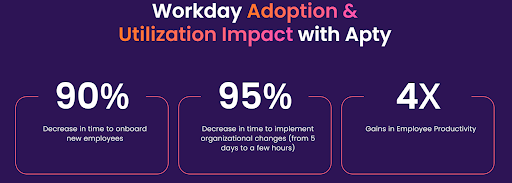
Empower your Workday HCM users with Apty’s intelligent, in-the-moment support, offering contextual guidance, streamlined communication, and responsive assistance. With customizable workflows, in-app guidance, and data-driven insights, Apty reduces errors, accelerates adoption, and minimizes post-implementation costs.
The result? Increased efficiency, improved security, and a more substantial ROI from your Workday investment.
Book a demo to see why 12 million users rely on Apty for seamless digital adoption and productivity.
FAQs
What is the life cycle of Workday implementation?
The Workday implementation life cycle follows a structured approach, typically consisting of these key phases:
- Planning: Defining project scope, objectives, timelines, and assembling the implementation team.
- Design: Configuring Workday to align with business processes and requirements.
- Build and Testing: Setting up Workday modules, running system integrations, and conducting user acceptance testing.
- Deployment: Migrating data, training users, and going live with the system.
- Post-Go-Live Support: Monitoring performance, resolving issues, and optimizing workflows.
How long is the average Workday implementation?
The average Workday implementation timeline varies based on the organization’s size, complexity, and required modules. Small to mid-sized companies typically take 4 to 6 months, while large enterprises with multiple integrations and customizations may take 9 to 18 months.What are three major benefits of implementing Workday?These are the three major benefits of implementing Workday:
- Unified System: Combines HR, payroll, finance, and analytics in one platform, improving data accuracy and efficiency.
- Scalability and Flexibility: Adapts to evolving business needs, allowing seamless updates and configurations.
- Advanced Analytics and Reporting: Provides real-time insights to support data-driven decision-making.
Is Workday implementation hard?
Workday implementation can be complex, but with the right strategy and experienced partners, the process becomes manageable. The challenges typically include data migration, user adoption, and system integrations. Proper planning, stakeholder involvement, and a structured rollout ensure a smoother implementation.
Onboarding new employees to Workday can end in one of two ways: improved user adoption or a flood of support tickets. The stakes are even higher at scale, where every delay or misstep drives up costs and wastes time.
Workday offers significant benefits, such as the Rehabilitation Hospital of The Pacific achieving 25% faster new hire onboarding. However, its complex interface and advanced features create challenges like low user adoption and difficult navigation.
A strong onboarding plan turns this around.
Take Mattel, for example. The company improved its onboarding strategy and achieved 90% Workday utilization within 60 days. How? A solid plan and a digital adoption platform (DAP).
This guide covers everything you need to get it right the first time, from Workday onboarding phases to checklists, best practices, challenges, and DAP solutions. Let’s dig in!
Why Workday Onboarding Matters
Onboarding new hires to Workday matters because it is complex software with over 1,000 features and 850 business processes. Thorough guidance is required to avoid underutilization or abandonment.
Proper onboarding to Workday also directly influences employee satisfaction, productivity, engagement, and retention, key factors driving organizational success.
After interviewing 1,000 employees across the U.S., U.K., and Australia, the Enboarders created the 2024 State of Employee Onboarding Report. According to this report, a well-executed onboarding experience delivers measurable benefits to employees:
- 46% are more satisfied with their job
- 34% were motivated to stay longer at the company
- 40% reported higher productivity
- 45% said onboarding made it easier to perform their job successfully
- 42% felt more engaged
- 38% developed a positive perception of company culture
- 40% felt a greater sense of belonging
- 34% became brand advocates
Whereas with bad onboarding experiences:
- 33% regret accepting their role and start job hunting early
- 35% struggle with job performance
- 34% feel disengaged, negatively impacting performance and retention
- 25% share negative experiences, damaging the company’s reputation
Workday Onboarding Phases
Onboarding Workday follows a clear, structured methodology called phases. These phases act as a step-by-step guide for smooth onboarding.
Here are the five phases for better new hire onboarding and increased software usage:
Phase 1: Plan
The planning phase is the first step towards success. Here, you research, speak with stakeholders, set clear objectives, and create a roadmap.
You also:
- Review Project Scope: Understand the full extent of the project and what needs to be achieved.
- Develop Project Plan and Project Charter: Create a detailed plan and charter outlining objectives, timelines, and deliverables.
- Define Roles and Responsibilities: Assign specific roles and responsibilities to team members for accountability and task ownership.
- Project Kick-off: Begin with an initial prototype (PO) to kick off the project and provide a tangible starting point.
Phase 2: Architect
After planning, the architect phase involves designing the system to meet the organization’s needs you identified before. This includes:
- Current Business Practice Discovery: Conduct discovery sessions to understand business practices and prepare a design databook.
- Conceptual Design Sessions: Hold sessions to conceptualize the system design.
- Detailed Business Process Design: Organize further design sessions to detail business processes and prepare a comprehensive design databook.
- Solution/Gap Analysis: Identify gaps between current practices and the new system and analyze solutions.
- Update Project Charter and Plan: Adjust the project charter and plan based on new insights and decisions.
- Document Design Decisions: Record all design decisions thoroughly for future reference.
For example, during this phase, a retail chain may need to define custom workflows for different roles (e.g., store associates vs. corporate staff).
Phase 3: Configuration Prototype
This phase focuses on building and refining the system based on the design created in the previous phase.
Here’s what it entails:
- Configuration Prototype (P1): Develop the first configuration prototype.
- Develop Reports & Integrations: Create and integrate necessary reports with other systems.
- Communicate Tenant Strategy: Ensure all stakeholders understand the tenant strategy.
- Develop Testing and Training Strategy: Plan how the system will be tested and how users will be trained.
Phase 4: Test
Testing your Workday systems ensures they function as intended before going live. These are some tests to run:
-
- End-to-end Testing: Conduct thorough end-to-end testing to verify all functionalities.
- Prototype 3 (P3): Develop and test the third prototype.
- User Acceptance Testing (UAT): Perform UAT to ensure the system meets user needs. This includes playback sessions to show clients the test scripts and results.
- Resolve Issues: Address any bugs or usability issues identified during testing.
- Phased Rollouts: Start with a small segment of users, subsequently increasing the number of users and features before a company-wide rollout.
Phase 5: Deploy/Go Live
The final phase is deploying the system and ensuring it is fully operational:
- Training and Roll-out: Train users and roll out the system.
- Gold Tenant: Ensure it’s ready for production.
- Production Data Conversion and Configuration: Complete the final data conversion and configuration for production.
- Go-Live Checklist: Follow a detailed checklist to ensure nothing is missed.
- Transition to Production Services: Provide hypercare support to address immediate post-go-live issues.
- Project Conclusion: Officially conclude the project and transition to ongoing support.
Note: The Gold Tenant is like a starter pack for Workday. It comes with settings and rules that Workday thinks work best for companies. It helps businesses set up Workday the right way from the beginning!
Workday Onboarding Checklist
Onboarding a new hire to Workday involves completing administrative tasks and creating an engaging process that makes employees feel welcome.
This checklist outlines every important step required to onboard new hires successfully:
Stage 1: Before Onboarding (Pre-boarding)
Pre-boarding sets the tone for a positive employee experience even before their first day. You must:
- Send offer letters and collect signed agreements, including employment contracts and NDAs.
- Share pre-employment paperwork such as tax forms (e.g., W-4 or W-9).
- Provide access to Workday’s self-service portal for document submission.
- Request government-issued ID copies for I-9 verification (if applicable).
- Set up the new hire’s Workday profile with personal and job-related details.
- Send Workday login credentials and verify access to features like benefits enrollment and training modules.
- Introduce new hires to their managers and team via email or virtual meetings.
- Share a detailed agenda for their first week, including training sessions and orientation events.
- Coordinate with the IT team to prepare equipment (e.g., laptop, phone) and set up necessary software tools.
- Confirm system access from the new hire.
- Upload onboarding materials such as a company handbook and policies to Workday Learning.
- Create a Workday training program covering company culture, goals, training methodology, and a first-week training schedule.
- Share benefits information and enable access to benefits selection in Workday.
- Initiate and complete any required background checks.
Stage 2: First 30-60 Days
After pre-boarding, the next step is the onboarding phase, where the employees receive role-based training, learn how to use Workday, and familiarize themselves with the relevant features. If your onboarding process includes international hires, reviewing an EOR pricing explained guide can help estimate employment costs and plan global hiring budgets more effectively. During this period:
- Complete onboarding tasks, such as verifying personal information, enrolling in benefits, and completing compliance training in Workday.
- Send a welcome email to introduce the new hire to the team and share their background and role in the company.
- Assign a mentor or buddy to guide new hires through their initial weeks and provide support.
- Create a schedule outlining when new hires should complete assigned tasks and when they’ll be available for team collaboration or projects.
- Attend orientation sessions to learn about company policies, tools, and organizational values.
- Schedule a one-on-one meeting with their manager to discuss role expectations, team structure, and short-term goals.
- Provide access to role-specific training materials via Workday Learning to develop skills required for their position.
- Organize regular check-ins between managers and new employees to discuss progress, address questions, and offer support.
- Set clear performance expectations and goals for the first 30-60 days to help new hires understand their priorities.
- Gather feedback on the onboarding experience through surveys or one-on-one meetings to improve future processes.
- Creating a clear meeting summary after each session helps capture key insights, decisions, and next steps, ensuring that feedback is documented and actionable for continuous improvement.
Stage 3: Ongoing Engagement
Onboarding doesn’t end after 60 days. It’s an ongoing process that ensures long-term success:
- Conduct regular reviews to assess progress toward goals.
- Offer continuous learning opportunities through Workday Learning modules.
- Recognize achievements publicly (e.g., during team meetings).
- Encourage collaboration and participation in company events or social activities.
- Solicit feedback regularly to improve future onboarding programs.
- Invest in a DAP like Apty to provide ongoing guidance and contextual support.
Common Challenges in Workday Onboarding
Despite all its advantages, Workday onboarding comes with several challenges. These include:
1. Difficulty Navigating Workday’s Interface
Workday offers hundreds of solutions for automating business processes across HR, finance, and IT, so there’s much to navigate.
As with other HCMs like Rippling, the Workday interface can be overwhelming for first-time users. Complex features and unfamiliar layouts can confuse new hires, causing delays in task completion, particularly for new hires with limited technical experience.
The solution? Apty provides step-by-step guidance, interactive walkthroughs, and contextual tooltips directly within Workday. This ensures that new hires are guided through tasks in real time, reducing errors and boosting confidence in navigating the system.
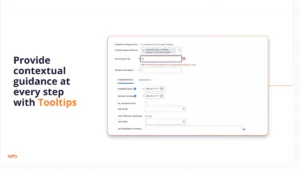
2. Ensuring Consistent Onboarding Across Teams
Large organizations struggle to maintain consistency in their onboarding processes across departments or locations. Different teams may interpret onboarding policies differently, leading to gaps in the employee experience.
Multilingual workforces also face challenges with onboarding without tailored solutions.
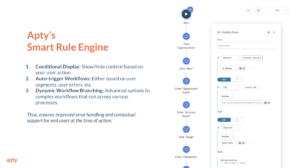
Apty’s solution allows you to create custom workflows using smart rules that ensure every department follows a uniform onboarding process, reducing inconsistencies.
You can also provide in-app guidance and multilingual support for better comprehension.
3. Low User Adoption of Workday Features
Due to inconsistency in onboarding, features, and interface complexities, new hires may struggle to realize Workday’s full potential. This leads to underutilization and diminished return on investment (ROI) for the platform.
Other factors contributing to this issue include:
- Using only traditional onboarding methods, like in-person training
- Failing to communicate the software’s impact on their role properly
Apty accelerates feature adoption by offering role-specific training usage analytics that identify areas where users need additional support.
New hires also have access to Apty OneX, a feature that uses artificial intelligence (AI) to answer users’ questions about the platform, as we’ll see next.
4. Lack of Real-Time Support for New Hires
New hires often have questions about completing tasks in Workday but may hesitate to ask HR teams directly to avoid looking incompetent. This causes increased frustration and lowers new-time-to-hire productivity.
Support managers and Workday consultants may also become overwhelmed by answering multiple tickets daily, draining both time and company resources.
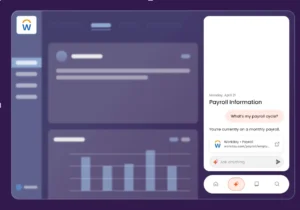
Apty helps build a centralized help center with OneX, a robust platform that connects users with all enterprise software in one place. It enables users to leverage generative AI to streamline task execution and provide on-demand assistance.
New hires can also use OneX to perform tasks on Workday, such as summarizing content.
5. Measuring Onboarding Success
Organizations often struggle to evaluate onboarding success, relying on subjective feedback, such as surveys, that don’t effectively capture how new hires are adapting.
Identifying bottlenecks, tracking progress, and making data-driven improvements becomes challenging without concrete data on Workday engagement.
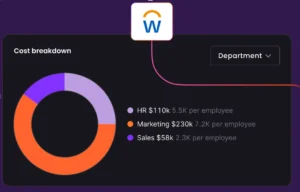
Apty PULSE offers real-time insights into onboarding performance and tracking metrics like task completion rates, time-to-productivity, user satisfaction, cost breakdown, and process obstructions. These analytics help organizations identify inefficiencies and improve workflows with data-driven adjustments.
Elevate Your Workday Onboarding Experience With Apty
Remember Mattel’s use case at the beginning? They faced challenges driving digital adoption with the Workday HCM platform, so they turned to Apty’s DAP to improve their Workday onboarding strategy.
Here’s how Apty helped Mattel:
- Interactive Guides: Provided step-by-step guides to simplify complex processes, boosting employee confidence in using Workday. Consider using an AI Humanizer to ensure your guides sound natural, approachable, and easy for new hires to understand.
- Customized Solutions: Identified 30 key processes and tailored them for Mattel’s global workforce across six languages.
- Scalable Implementation: Supported 9,000+ employees with in-app guidance, tooltips, and role-specific training for improved efficiency.
These are the results:
- 90% of Mattel employees adopted Workday within two months
- Support requests dropped significantly
- Employees completed tasks accurately and efficiently
- Senior leaders gained confidence in the system’s reliability for key processes.
Mattel still uses Apty to streamline processes, manage announcements, and provide ongoing support for new hires and long-term employees.
Need an effective way to onboard new hires to Workday? Schedule a demo with Apty today!
FAQ
- What is the onboarding process in Workday?
Workday’s onboarding process automates new hire tasks, ensuring a smooth transition. It includes pre-boarding (welcome messages, paperwork), first-day activities (team introductions, IT setup), training and integration (role-specific learning, feedback), and continuous engagement (goal setting, surveys).
Why Do Enterprises Use Workday?
Workday is a cloud-based software company that generated more than five billion U.S. dollars in revenue in the company’s 2022 fiscal year. It specializes in providing Human Capital Management, Financial Management, and payroll solutions for businesses. The application, used by companies worldwide, shows a real-time view of an organization’s financial performance and workforce.
Workday is a complete system that includes a wide range of modules. Globally, Workday’s customers include small businesses to large enterprises, governments, and educational institutions that require financial management, human capital management (HCM), or performance analytics reporting.
View Workday’s best practices, support, & infographics by needs: finance, human resource management, payroll, and adaptive planning.
In every organization, there are several departments with various functions and operations. Businesses have the choice of selecting an appropriate tool based on their organization type and their business requirements. The Workday platform can help plan and implement these organizational goals and initiatives, but what if your Workday implementation seems to need fixing? Why are employees not using the software correctly or not at all? How do you know if processes are being followed?
First, let’s ensure that the Workday platform meets your company’s needs and that you are executing Workday’s best practices for initial implementation.
Workday has become one of the most famous enterprise resource planning (ERP) software applications in recent years and for a good reason. Developed to put people first, Workday is designed to make business easier for everyone.
Here are the 5 benefits of using Workday for businesses:
Workday Human Capital Management (HCM) is designed to manage all aspects of an organization’s workforce. It offers a comprehensive suite of modules that streamline HR processes, improve efficiency, and provide valuable insights into the workforce. Here’s an overview of the key modules in Workday HCM:
1. Improved productivity:
Workday helps employees to be more productive by providing a central platform to access all their necessary tools and information for benefits, payroll, and time tracking. This also allows management to have more comprehensive visibility.
It is specifically designed to improve the performance of larger companies like enterprises that need help connecting employees worldwide. It monitors tasks in real-time, provides a platform to make and share those notes, and offers a streamlined expense reporting system.
International enterprises require platforms that offer immediate communications and reliable payroll tracking as hundreds to thousands of employees turn over a year. Ex – Twitter.
2. Better communication:
Providing a centralized communication platform through Workday can improve workplace communication. Workday provides an interface that allows for easy visibility of general workgroup information, eliminating the need for email, spreadsheets, and other tools.
For example, there can be a way for all employees in a company to have a private communication interface that is completely secure using Workday, taking all facets of communication into account. Complementing this with business-grade email hosting ensures professional, reliable, and secure correspondence both inside and outside the organization.
3. Improved collaboration:
Workday helps improve workplace collaboration by providing a central platform for the organization. It enables real-time communication, identification, and response to shared needs and ensures seamless collaboration. Effective collaboration is a key aspect of an organization, and it is simple to share ideas through Workday.
4. Streamlined processes:
Workday can help to streamline processes by providing all the tools and information needed. This can tackle some of today’s most pressing issues, including multi-location, sharing business data, and managing a budget. This allows for collaboration, professional development, and tracking of different processes. As a result, productivity increases, customer acquisition improves, retention rates boost, and the bottom line strengthens. Workday is easy to use and allows users to focus on their core competencies.
5. Reduced costs:
Workday reduces costs by providing a central Human Resource and Payroll Management Platform. Usually, HR processes and payrolls are managed by two different entities, but now this software has integrated many business functions and can automate them with process functions.
7 Tips to Ensure Effective Implementation of Daily Workday Employee Tasks
50% of Fortune 500 companies utilize Workday Inc’s services, with 90% of those Fortune 500 customers living in production.
Workday has a robust suite of software designed to help enterprises manage their workforce. But for the products to be effective, employees must use them correctly. There are many ways that employees can use Workday correctly to get the most out of it. The following are just a few of the most important:
1. Relevant Data:
Employees should ensure that they have correctly entered all relevant data and information.
This includes personal information, job duties, time worked, hours worked, projects worked, and compensation data.
2. Review Data:
Employees should review their data regularly to ensure that it is accurate and up to date.
Employees should use Workday to track their progress and performance over time. This will help them to identify areas of improvement.
3. Manage Time:
Employees should use Workday to manage their time and attendance.
This includes clocking in and out, requesting time off, and tracking vacation and sick time.
4. Benefits and Expenses:
Employees should use Workday to manage their benefits and expenses.
This includes enrolling in and managing health insurance, or retirement plans, submitting expense reports, and tracking business-related expenses.
5. Stay Up to Date:
Employees should use Workday to stay updated on company news and announcements by sending notifications about new posts in the company news feed.
Employees can also set up their news feeds to follow the topics that interest them. In addition, Workday offers a mobile app that allows employees to access their news feeds on the go.
6. Manage Work:
Employees should use Workday to manage their performance. They should use it to manage their workload effectively. This includes creating tasks, setting goals, tracking progress, and deadlines.
Workday ensures that they are met and requests feedback from supervisors for better understanding.
7. Communication:
Employees should use Workday to stay connected with their team. Open communication, like sending and receiving messages with team members and managers, is crucial for maintaining a productive work environment.
This also includes alerts, updates, sharing files, and participating in group discussions.
7 Tips to Effectively Implement Workday Business Processes for Employees
Want more information on process compliance? https://apty.ai/blog/business-process-compliance
A. In-App Training:
All digital adoption platforms (DAPs) include essential features that can help guide employees through Workday software. You can enable your team to use the new software with more than just in-person coaching and training collateral. Utilize easy-to-use DAPs with low-code requirements and no interference with a cloud-based overlay.
Enterprise DAPs offer more than tooltip guides with user-led in-app tours, automated processes, linked videos, and cross-app training. Making sure employees get training immediately and when needed–while using Workday and following in-app processes–helps your team better retain instructions, enforce business process compliance, and accelerate digital adoption.
Employees also have the autonomy to choose the amount of guidance they want, and management can implement business process notifications and guides toward specific user segments.
B. Management Visibility:
Allow your leadership to see user behavior, business process completion rates, and process bottlenecks in real-time. With certain enterprise DAPs like Apty, you can set user-specific goals for teams to meet and proactively see if they will reach software adoption deadlines.
If the goal-tracking analytics shows that a group won’t meet a deadline, admins can direct instructions, notifications, and guides to those delayed users to help them achieve that target. You can see if these in-app management notifications will speed up digital adoption in real-time.
By having management oversight, you can make corrective changes in real-time, become proactive with monitoring and goal tracking, improve platform user experience, and ultimately increase digital adoption faster.
C. Analyze & Monitor:
As stated in bullet #2, analytics play an influential role in enabling users to effectively use Workday, enforce business processes efficiently, and address adoption and process issues ahead of time. If you don’t have analytics after Workday implementation, you cannot have oversight, which can lead to inflated IT budgets due to failed Workday implementation projects.
Real-time analytics helps leadership make data-informed decisions that can reduce IT budgets and improve process compliance.
D. Give Management Autonomy:
Try reducing management’s reliance on IT. Having low-to-no-code, cloud-based support platforms that overlay Workday–without requiring legacy stack integrations or disruptions–allows leadership autonomy to make real-time changes without requiring IT oversight.
DAPs provide admin dashboards that do not need coding training or experience to create Workday business process compliance or in-app training workflows for employees.
This decreases IT support tickets for Workday business process updates and frees up IT resources to work on other digital transformation initiatives.
E. Improve Data Quality:
When updating processes or onboarding employees with Workday, you should implement analytics that helps improve business compliance and monitor digital adoption.
If you know your employees are using Workday correctly and completing business processes efficiently and effectively, you can rely on Workday reports to be accurate to make informed business decisions.
If they are not completing business processes appropriately, based on the user behavior data you’ve collected, you can implement validations, automated processes, tooltips, and other guided features to enforce business processes to be completed accurately.
F. Use Data to Improve Processes:
Once you have user behavior data, goal-tracking information, and monitoring in place, make sure you use this information to your advantage. If monitoring has proven that digital adoption has indeed taken place, but you’re still not seeing the intended Workday results, then you can make informed changes in your Workday business processes and test them in real-time.
Interpreting and applying the acquired data leads to effective and informed strategies and business process changes that assist in employee experience, buy-in, and software adoption.
G. Include Specialist:
Just like you hire the right employees to tackle internal business objectives, hiring Workday or software admin professionals to advise you and audit your Workday implementation helps you achieve digital transformation initiatives effectively and efficiently.
Their one-on-one guidance pinpoints Workday implementation and employee digital adoption issues specific to your organization instead of generic support. This allows for faster customer onboarding, business process compliance, successful Workday implementation, and digital adoption.
Apty offers a best practices methodology–Aptymize–that offers holistic customer lifecycle management support to implement effective digital adoption strategies across an organization for business-critical platforms.
If you’ve implemented everything above but still need to see the intended results from Workday, what do you check next?
The next step is to look at business strategies and potential implementation failures.
a. Employee Errors: reference the section above for examples
Although you’ve implemented a system meant to transform your business with simpler processes and centralized communications, your employees may lack the training, understanding, or patience to adopt the business-critical software.
When implementing something new, human error is more likely to occur: mistyping, selecting the wrong dropdown, or skipping steps altogether. By implementing a digital adoption platform (DAP) that lays on top of Workday, management, and app admins can introduce guided software workflows, validations, tooltips, and more to reduce mistakes and enforce proper business processes.
b. Employee Mindset:
If employees are unwilling to adopt new software, they will revert to the old ways of performing their tasks, deeming your expensive digital transformation initiative useless and budget wasted.
Keeping employees informed of digital transformation goals through digital adoption and explaining how it will help them make the initiative more valuable and relatable to their daily tasks and job roles. Help them understand how they play an integral role in moving the company forward to create digital adoption buy-in and a desire to adopt the software successfully.
c. Revisit Your Business Process Framework:
Are the proper people, applications, and services connected and utilized through the right software business processes? Are the employees following these processes correctly? If you don’t have the tracking analytics tracking to monitor digital adoption success, then this critical question will go unanswered.
You may not have the time or additional resources to build custom changes to test what processes are or are not working. This is another instance where a DAP could help. Without touching any source code or breaking legacy stack sources, a DAP overlays the software to help create guided business processes throughout the platform.
The processes can then be measured and analyzed to ensure process completion and accuracy, ensuring data hygiene and quality and accelerating digital adoption.
After the initial implementation of a DAP, your operations or admin managers have the autonomy to create and enforce business processes across Workday.
d. Poor Scope Definition:
If your scope is too broad or too nearsighted, you may not address your intended employee, business process, or software functionality needs for your digital or business transformation goal.
Do not rush your Workday implementation for the sake of a nearing deadline. Accuracy, goals, and initiatives missed can result in failed digital adoption. Without an open feedback loop and communication with company stakeholders and thought leaders early on, ensuring proper operational functionalities is overlooked.
e. Improper Integration:
According to a LinkedIn article published in 2022, IT departments may struggle to integrate multiple cloud-based software securely and efficiently with the Workday Finance module and HCM in a “timely, cost-effective, and functional manner.”
With all the different digital options, API configurations, and security considerations, the multi-phase implementation lifecycle can be compromised at any point, creating a cascade of issues. Approaching these issues with the right methodology and scalable approach is crucial to successful Workday implementation.
f. Inconsistent Quality Testing:
It is rare for organizations to have a specialized and dedicated quality assurance (QA) team for Workday or other specific software. Companies look outward for help and may become dependent on those lifelines, losing their autonomy and increasing implementation turnaround times for customized projects due to back-and-forth communications and delays. But this doesn’t mean you should forsake proper, thorough, and detailed QA.
Automating quality testing processes can help meet deadlines and reduce errors. DAPs can help with automated business process QA after Workday implementation, and other support software can help with automated workflows before and during the implementation process. Proper QA and catching issues earlier in the project help mitigate operational failures ahead of time and decrease the likelihood of hidden bugs leading to a cascade of problems.
g. Relaxed Support Processes:
Waiting for an overburdened IT support team or external consultant to address Workday platform or process issues can cause delays, missed deadlines, and inflated costs. Business operations or app admin requests may fall to the bottom of an internal IT specialist’s list when the organization has multiple digital transformation initiatives underway.
DAPs allow any admin to immediately correct and implement changing business processes without any coding experience. By allowing other employees to address such needs easily, immediately, and effectively, you can reduce IT support tickets and empower department leaders to improve efficiencies and increase employee productivity.
h. Forgetting About Change Management:
Employee roles evolve, tasks change, business processes update, and employees get promoted, retire, or move on to another career opportunity.
Lack of communication or transfer of knowledge and IT dependency can degrade change management and reduce employee productivity. Having a well-thought-out training–and retraining–strategy set in place will ease tensions and help change implementation.
DAPs take the dependency off IT and create autonomy for department leaders to take control of software workflow updates and edits to better ensure process compliance–fulfilling team needs in real time.
Not only can DAPs help with Workday implementation and change management, but Apty has also adopted a new methodology called Aptymize.
With the complexity of software implementations, integrations, business process changes, and enterprise client needs, Apty’s customer success team developed a best practice methodology to guide and empower customers to implement a vision and proven strategy for the digital adoption of their most impactful software.
Any delay in Workday implementation will affect ROI. These days organizations don’t want to invest in any software they don’t use. It is important to avoid delays by carefully planning to adopt software that makes it easier to see the value of your application. 70% of system integration projects don’t go as planned. Enterprises face multiple Workday implementation challenges.
Organizations today strive to meet business requirements to remain competitive. Planning and delivering requirements is one of the organizations’ most critical tasks. Companies rely on tools and packages that help improve and develop the business to achieve employee, digital transformation, and company-wide needs and goals.
These tools help to enhance the deliverables. Platforms that deliver value to organizations to achieve these goals have become more widely used. Workday software is one of the most effective platforms for enhancing business processes and performing processes efficiently.
A digital adoption platform (DAP) for Workday can give businesses an edge over competitors. DAPs are a universal answer for any enterprise to utilize Workday more effectively. A DAP makes using data, customizing the on-boarding process, ensuring business process compliance, and overcoming opposition resistance possible.
A DAP like Apty ensures faster on-boarding, training, and effortless Workday adoption. Apty improves the user experience on your Workday deployment and provides insights into adoption metrics. It keeps the organization at the forefront of Workday change initiatives but also aids in managing digital transformation efforts.
The number of businesses wishing to install new Human Capital Management (HCM) systems and shift existing on-premises HR systems to the Cloud has significantly increased over the last several years.
Determining the cost of Cloud HCM solutions is a necessary step in the procurement process, but frequently, this approach can constrain the purchasing decision, which may have a negative impact; companies must ensure they are adequately resourced for the realities of owning these solutions.
A firm understanding of the cost of Cloud HCM is necessary to make smarter purchasing decisions for long-term benefit. According to the Capterra report, the greatest internal barrier for an organization is investing in software. The report shows a trend where businesses are worried about the outrageous expenditure cost of acquiring software that can go over the set budget.
The risk of going over budget is quite serious unless you know the exact cost of owning the software. It could also impact the financial planning and business roadmap of the organization.
Most organizations have unrealistic expectations of how much their HR systems cost. Making smarter purchasing decisions and ensuring that organizations are adequately resourced for the reality of longer-term ownership of these solutions depend on having a thorough grasp of the cost of Cloud HCM.
The business must have a strong hold on the cost of cloud HCM to make smarter purchasing decisions and invest in necessary resources. This is where TCO (Total cost of ownership) comes into play.
What is TCO?
The total cost of ownership (TCO) estimates how much it will cost to buy, deploy, use, and retire a product or piece of equipment. Here is how to calculate TCO:
TCO = Operation cost (O) + Initial cost (I) + Maintenance cost (M) + Downtime cost (D) + Production cost (P) – remaining value (R)
The importance of TCO is such that with a precise understanding of it, developing a business case and accurately evaluating the costs and benefits of a system from a business perspective is meaningful.
True TCO involves many years and phases of implementation. According to a Fosway study, TCO should be calculated over a 5-year period (instead of a 3-year term) and consider not just the expenses of licensing and implementing the solution but also those associated with discovering, acquiring, using, and innovating it throughout that time.
Typically, a license costs around 35% of the overall cost of ownership over time. For an enterprise organization, deployment expenditures typically account for 20% of overall costs, while expenses for continuing maintenance and support account for 30% of total costs. About 7% of overall costs go toward innovation, although this cost is typically either not tracked at all or covered up by new initiatives. 5% of the cost goes towards Discovering suitable software and 3% towards acquiring its services.
Understanding Key Aspects of Pricing HCM model:
Organizations with HR systems often need to pay more attention to the cost of HR systems as they do not account for the cost of operating the system. Most of them turn a blind eye to the actual cost of owning and running HR systems and solely focus on how much the license of that HR system would cost. According to the Fosway study, a license costs only 1/3rd of the actual HCM solution over a contracted period of time.
The following phases of expenses should all be included in the total TCO calculation:
- Explore
- Attain
- License
- Implementation
- Administration
- Innovation
1. Explore:
Based on the issues in your organization, you need to understand the needs and do market research options accordingly before even considering acquiring the solution’s service from a particular vendor.
2. Attain:
The cost of engaging with the market to find a correct solution for your organization includes the Request for Proposal (RFP) suggestions for improvement.
After implementing feedback, the final request for proposal is issued; and selecting the right solution.
3. License:
The pricing of licenses, the phasing of license payments for modules, or full upfront charges, regardless of module adoption, must be discussed while negotiating and contracting the solution. Most of the license choices are evaluated using Software-as-a-Service (SaaS) subscriptions.
4. Implementation:
Vendors may charge a one-time fee when you make your purchase to integrate the software and get it running at your company. Costs associated with implementation may also go toward requirements like:
- Migrate and Import data
- Customizing the software
- Configure options
- Set up IT
- Integrate into other systems
Vendors could waive this fee if you can install the program on your own.
5. Administration:
Evaluating how much it will cost to run a software solution over a period of time, this process includes –
- Aiding and Assisting users
- Manage users
- Manage HR requirements
- Oversee and Monitor developments
6. Innovation:
This step involves all the things post-live update, such as – how much it will cost to adopt and leverage new opportunities, updates, features, support, functions, and procedures.
Workday Training cost:
For Workday training Vendors may also impose a separate, elective price for further training, even though a software licensing cost normally includes access to assistance files and discussion boards. This training might be a reasonable investment so your employees can quickly become familiar with the platform, depending on your selected software’s complexity and how essential it is to your organization.
Although some vendors provide web-based solutions as part of the deal, you, as the customer, must pay extra for in-person training, End-user training, video/self, group, department, and training of veteran users may be included in the price.
Workday offers a variety of learning delivery options ranging from independent, self-paced offerings to traditional in-class training. Let us have a detailed look at training offers from them:
A. Learn In-Person:
Learners are prepared to meet their employment needs through this conventional instructor-led in-classroom training. It blends lectures with group discussions, product demonstrations, and practical exercises.
B. Learn Remote:
Online instructor-led training is available through Learn Remote. The same real-time collaboration, teacher engagement, and learning benefits are provided for both groups by combining in-person and online students into a single session. You can save time and money by not having to travel.
C. Learn Virtual:
The benefits of having live instructors are available in our online classroom without the cost or travel time. Students join the training environment remotely, participate in practical exercises, and communicate with teachers and other students.
D. Learn Independent:
Learn Independent from Workday gives consumers training freedom. With a blend of videos, interactive games, job aids, and quizzes, Learners can study from anywhere, at any time, and at their speed. Students may start when it is most convenient for them, and if their Learning Center accounts are active, they will always have access to the course materials.
E. Learn On-Demand:
With Learn On-Demand, students finish quick videos and job aids on certain topics on their own time. Students get direct access to course information through this training, which complements instructor-led sessions. This material frequently acts as a review of certain subjects covered in instructor-led courses.
F. Workday Pro:
The highest level of client accreditation is Workday Pro. It is intended for people who wish to become deeply knowledgeable about Workday. This type of training prepares Workday Pros to provide value on par with that of an outside Workday-certified consultant.
There are several tracks in this accreditation program, each having pertinent courses and an online test. Accredited Workday Pros have free access to the Workday Touchpoints Kit, participate in the exclusive Community group, and update training with every new Workday release.
G. Adoption Kit:
An effective Workday rollout is made possible by the Adoption Kit’s ability to hasten the creation of end-user training materials and the utilization of self-service features and functionality. Along with graphic assets, facilitation manuals, and marketing materials, it also contains a combination of videos and job aids for typical employee and manager self-service activities.
These resources may be used by training teams as-is, or content can be modified to match specific organizational needs.
H. Workday Touchpoints Kit:
The Workday Touchpoints Kit is a set of flowcharts, heat maps, and organizational details that show the connections between all the Workday suite’s product categories. Both clients and consultants can utilize these capabilities with the ultimate objective of optimizing the Workday application.
The approach you choose for your business will largely determine the cost of Workday and depends on factors such as:
- End-user training
- Group training
- Video -training
- Train the trainer
The following are the estimates to calculate the cost of training for workday training:
- 1-2 Sessions: $500
- 3-4 Sessions: $1,500
- 5-7 Sessions: $2,500
- 8-10 Sessions: $5,000
Workday Service cost:
Price limitations for HR software are often based on the number of employees. The cost of HR software typically varies between $5 – $15 & $16 – $25 per person each month; for most of the software, these costs are also determined by how strong the package that is selected is in terms of features, and they may not include set up or training costs.
In the case of Workday, it follows primarily two common pricing models – Perpetual License and Subscription (Software-As-A-Service) License.
A. Perpetual License:
The conventional way of buying software is referred to as a perpetual license; you pay for the license upfront and have unlimited access to the product. You could also be permitted to obtain software updates and receive technical assistance under the terms of a perpetual licensing agreement. However, frequently, these rights are only granted for a certain period, after which you’ll need to pay.
However, it’s feasible that updates and support will always be available without cost.
B. Subscription (Software-As-A-Service) License:
The system is accessible online rather than being deployed on-premises under this pricing model. Either a per-user fee or a subscription fee is charged for the service. Customers should be compelled to pay a recurring monthly price to use the product for a set amount of time. Software-as-a-Service (SaaS) programs increasingly frequently use the subscription price model.
Due to the lack of flexibility with SaaS solutions in this area, upfront costs for modification and integration are lower than those for perpetual licenses. Customers must pay a subscription fee on a monthly basis; thus, the recurring cost is higher. Customers who need premium support services must also pay an additional cost.
Workday charges businesses on an annual subscription basis. Workday is the most premium product available in the market. Even for bigger businesses, Workday annual memberships may cost up to $40-160 PEPM (Per Employee Per Month) and normally start at approximately $300K-$800k.
Following negotiations, customers stated that they are paying $48 per user/year at a cap of 500 users. The initial price was $72 for each user per year. With the exception of the eLearning module, another customer reported $800k per year for 5000 users, which works out to $160 per user per year for the entire suite.
Why Apty DAP is a must-have when implementing Workday:
Because Workday implementation significantly reduces the organization’s total budget, you should utilize a Digital Adoption Platform like Apty to make the most of your HR application investments.
Your Workday adoption rate will rise thanks to Apty’s user-friendly, interactive onboarding, real-time contextual assistance, and in-app tutorials; these help you with efficient Workday implementation and training. Apty assists organizations in obtaining ROI from their Workday. Self-service is made possible within the application, which acts as a support tool and is there to help around the clock.
The in-app tutorials and real-time contextual guidance complement the conventional form of training and, in some cases, reduce the dependency on it.
To determine whether activities are being abandoned, Apty analyses employee activity on Workday. It identifies the area of process friction and suggests improvements that can be made with workflows.
Apty is not at all complex; it sits on top of the Workday application without any issues with the application. Capabilities of Apty are not just limited to analytics and In-app tutorials if required; you can use it as a repository to store all your important documents and videos that your employee might require.
You can get immediate insights on customer service and business operations using Apty. These insights are useful to improve strategies that can immediately help you to optimize the employee experience, enhance the business performance and boost the ROI of your organization.
Why you need a Digital Adoption Platform for Workday
Are you considering implementing Workday in your enterprise? With over 55 million users and serving some of the world’s largest organizations, Workday is a transformative HCM and ERP platform. Yet, with memberships costing $40–160 per employee per month and implementations starting at $300K–$800K, maximizing ROI is vital. That’s where leveraging a digital adoption platform for Workday becomes essential. Let’s explore why adopting Workday faster—and smarter—is your competitive advantage.
Let’s dive in!
What is a Digital Adoption Platform (DAP) for Workday?
Workday is one of the most powerful systems on the market, but it can be more complex to implement. Workday implementation typically takes 6 to 14 months, and further customizations–and business process changes–add to its complexity. A digital adoption platform (DAP) for Workday speeds up implementation, onboarding, and training life cycles.
According to Fujitsu, the key drivers of digital transformation in retail include greater competitiveness, with 70% rating high or very high significance, 69% better efficiency and cost savings, 69% stronger customer interactions, and 67% increased revenue.
Digital Adoption Platform One practical option for Workday is the all-in-one answer to getting your employees to utilize it to their maximum potential and achieve full workday digital adoption in your enterprise.
Digital Adoption Platform One practical option for Workday is the all-in-one answer to getting your employees to utilize it to their maximum potential and achieve full workday digital adoption in your enterprise.
Decreasing your time to value by speeding up your Workday implementation time and software adoption helps you prove ROI and software value and achieve digital transformation. Adding further safeguards to accelerate digital adoption buy-in increases employee engagement and positive experiences and lowers turnover. Consider best practice methodologies and strategies to prevent delayed Workday implementation. Let’s look at Workday implementation challenges and how a DAP can help you achieve successful Workday adoption.
Workday Implementation Challenges:
The top Workday implementation challenges include the following:
- Lack of Collaboration and Communication
- Data Migration and Reporting Issues
- Lack of Proper Documentation
1. Lack of Collaboration and Communication:
According to a study by Queen’s University of charlotte – About 75% of employers value teamwork highly. Often, mid-level managers and non-HR/IT users are overlooked, slowing adoption. Inclusive stakeholder engagement ensures smoother Workday rollout.
To prevent future disagreements, consult every team the Workday deployment will impact. This will guarantee that everyone in the company accepts the change and supports workday digital adoption.
Let’s have a look at a real-world example of how inefficient communication costs organizations:
Tesla recalled nearly 363,000 vehicles equipped with ‘Full Self-Driving’ due to safety risks. While Tesla CEO Elon Musk has not yet commented on the nature or scope of the problem, he tweeted that “the word “recall” for an over-the-air software update is anachronistic and just flat wrong!”
But NHTSA said in a statement, “Manufacturers must initiate a recall for any repair, including a software update, that remedies an unreasonable risk to safety.” The federal agency said it will “continue to monitor the recall remedies for effectiveness.”
This may have been avoided if they had better internal communication throughout their processes, QA checkpoints, and with project stakeholders. Also, creating transparency and notifying customer service teams sooner would have helped. Instead of Tweeting updates to the public, they could have updated their entire staff instantly with the information, links to solutions and assistance for customers, and instant live updates to the team to help field calls and answer customers.
2. Data Migration and Reporting Issues:
With any enterprise software, converting and migrating data is a challenging task. The issue with Workday is that your current data format may be different from the application’s data format. Numerous problems could cause project delays to come to light throughout this process:
- Data redundancy
- Mismatch of data and information
- Unknown or unrecognizable data points
Around 41% of companies report inconsistent data across systems. Define data flows, clean workflows, and build a Center of Excellence (CoE) with SMEs and stakeholders to prevent errors.
3. Lack of Proper Documentation:
Critical for customizing Employee Self-Service dashboards, reports, workflows, and integrations. Documentation ensures clarity and accuracy in Workday configurations.
How Can a DAP Enhance Workday Adoption?
The Workday digital adoption platform can serve diverse purposes and cater to various departmental needs within an organization. The platform’s flexibility allows for multiple use cases, each tailored to the unique requirements of the respective department.
Here are a few ways Workday is used differently by different departments and job roles within a specific department:
- Customizing the Employee Self-Service (ESS) portal: Many organizations want to customize the look and feel of the ESS portal and the functionality available to employees. For example, they may want to add a custom dashboard, change the color scheme, or add a new section for employee recognition. This customization requires detailed documentation to ensure that the design and functionality are clearly defined and can be easily implemented by the Workday team.
- Creating custom reports:
Custom reports are a famous use case for Workday and are often used to gain a deeper understanding of HR data and business metrics. Organizations must clearly define the requirements to create a custom report, including the data elements, filters, and sorting options. This information should be documented and shared with the Workday team to generate the report accurately and efficiently. - Configuring workflows and approvals: Workday allows organizations to create custom workflows and support for HR processes, such as new hire onboarding or performance review processes. To ensure that these processes are configured correctly, organizations should provide the following: Detailed documentation on the steps involved, the roles and responsibilities of each participant, and any specific approval rules.
- Integrating with external systems: Many organizations use Workday with other systems, such as payroll or time and attendance systems. To ensure these systems integrate seamlessly, organizations must provide detailed documentation on the integration requirements, including the data elements to be exchanged and any specific rules or constraints.
- Human Resources: HR uses Workday for employee onboarding, performance management, benefits administration, and payroll management. HR, payroll, and managers use Workday’s time and attendance functionality to track employee hours, approve time off requests, and manage schedules.
- Finance: Finance departments use Workday for financial planning and analysis, procurement, accounts payable and receivable, and expense management. Payroll departments use Workday for processing payroll, managing employee tax information, and handling employee compensation.
- IT: Departments use Workday to manage IT assets, track software licenses, and manage IT projects.
- Recruiting: Recruiting departments use Workday for applicant tracking, resume management, and job posting.
- Management: Managers use Workday for performance management, succession planning, and talent development.
Maximizing the potential of Workday requires effective Workday adoption across various departments and roles. From HR and finance to IT and recruiting, each department can leverage Workday’s diverse functionalities to streamline operations and improve productivity. However, to fully realize these benefits, organizations must prioritize workday digital adoption across all levels of the organization. By providing comprehensive training and support, organizations can ensure seamless implementation and drive successful outcomes.
Ready to harness the power of Workday? Start with a solid digital adoption strategy today to optimize your workday digital adoption.
Validating data, personalizing the onboarding process, ensuring business process compliance, and overcoming change resistance are all made easier with a digital adoption platform for Workday adoption.
A. In-app Onboarding Creates Positive Employee Experiences:
After Workday implementation, software owners and L&D specialists may no longer need to implement retraining or further employee education on the platform. Some may feel other departments should own these initiatives since they pertain to change management, business processes, specific job roles, and potential digital transformation initiatives.
Studies suggest that humans forget approximately 50% of new information within an hour of learning it. That goes up to an average of 70% within 24 hours.
Including Workday and in-app training in your onboarding checklist can reduce recruitment and onboarding cycle times, decrease IT tickets, minimize training forgetfulness, give users autonomy in their learning journey, increase employee engagement, and decrease employee turnover. CareerBuilder reported that 93% of employers believe a good onboarding experience is critical in influencing a new employee’s decision whether to stay with a company.
An enterprise DAP offers in-app walkthroughs that seamlessly lead employees through their Workday business process. They can target specific announcements to user groups based on their job roles, minimizing disruptive tutorials for those who don’t need them. The cloud-based app can also launch automated processes and tutorials–in-app or cross-applications–at the touch of a button. This not only ensures faster completion of tasks but also helps you boost employee engagement and productivity.
B. Find & Fix Employee Bottlenecks Using Analytics:
Enterprise DAPs’ analytics assist in determining where users skip fields, get stuck, or abandon processes when using Workday. These DAPs address these user pain points by creating personalized support information through tooltips, announcements, and even supplies reference materials like videos, guides, and links if warranted.
Industries like hospitality, food & beverage, and retail have seasonal hirings and turnover that require fast change management protocols, including on-the-job training. These employees also deal with changing promotions and business process strategies to help customers better faster. Workday digital adoption platforms offer quick information feedback and turnaround for training, learning, and new process or promotion implementations.
Unlike other DAPs, Apty offers goal-based tracking that can tell you if users are on track to meet a new Workday process or feature goal. You can push notifications to specific user groups, not on track to meet these Workday adoption goals. An instant message can pop up in-app to alert users of the new process that they might not be taking advantage of with an automated tutorial on how and when to use it.
DAPs help gathers real-time insights into employee experiences and business operations. With the ability to instantly implement new business processes and improved strategies to fix bottlenecks, these insights help enhance employee productivity, customer service, and business performance.
Learn which aspects or features of Workday are used by employees and which aren’t. Recognize areas where employees are struggling and abandoning tasks. Leverage this information to train employees on those aspects or to notify them of underutilized functionalities.
C. Increased Productivity and ROI:
Employee training is made simple, easily referenceable and digestible, and effective with DAPs. Guided walkthroughs that can be launched by the user or prompted by the DAP admin assist your employees in navigating the Workday system and completing their tasks faster.
By enabling employees through a DAP, you can teach them how to use Workday faster with the ability to continue using the DAP in a self-learning environment to develop job-oriented objectives. As job roles change, business processes evolve, and workflows improve, DAPS can reinforce these updates in-app and instantaneously.
As employees move through new and old workflows, informative DAP content will engage the end-user in helping them understand processes rather than just moving through them, further ensuring employee engagement and a faster return on Workday adoption investment. On-demand assistance, data validations, and in-app announcements assure task and data accuracy leading to reliable report pulls and data-informed decisions.
A multinational global conglomerate with over 350,000 employees faced the challenge of using multiple types of training software across its various subsidiaries, time zones, and cultures. They needed a solution that could handle the complexity of their global structure while supporting their vision to create superior, original technology and products that contribute to society.
The company successfully overcame various challenges by leveraging Apty’s cutting-edge workday digital adoption platform (DAP). Apty’s platform centralized the digital adoption process, allowing for greater efficiency and providing actionable insights to improve performance.
A smart DAP like Apty was able to facilitate meaningful global change for this company by doing the following:
- Tackling the complexity of their global environment.
- Updating an unsustainable and outdated digital adoption process.
- Access to actionable performance insights.
Apty was able to help its client function as one unified company despite its high number of subsidiaries and employees. With Apty’s help, it centralized its Digital Adoption Process rather than relying on its manual and expensive status quo.
Forbes reports that digitally advanced businesses are 23% more profitable than their less advanced counterparts. Digital advancements, according to 56% of CEOs, have enhanced revenue. Investing in a digital adoption platform will accelerate these digital transformations’ adoption and ensure they are being used as envisioned to meet both digital and business transformation goals.
D. Ensure Business Process Compliance:
Adhering to internal and external business process policies to build Workday workflows helps create standardization, scalability, and data integrity assurances. In truth, your company’s entire software program should adhere to business process compliance set by leadership. As leadership objectives and business goals change, these Workday workflows must adapt to meet these expectations: change management. A DAP can notify and update processes instantly without IT dependency, decoupling business leadership from IT timelines and prioritizing their objectives: content creation autonomy. It’s crucial not to delay updates as it jeopardizes data integrity.
A robust Workday digital adoption platform (DAP) can be a game-changer for businesses using Workday, helping enforce business process compliance with ease. By providing structured data gathering and process transparency, a digitally mature enterprise DAP assists with compliance while increasing end-user adoption rates and decreasing training cycle time. With the ability to gain valuable insights into platform usage, businesses can identify areas for improvement and optimize their Workday experience.
Workday validation fields are used to enforce specific data rules or constraints on the data entered in a field. This helps to ensure the accuracy and consistency of data across the organization.
One example of using validation fields to improve data hygiene in Workday is managing employee information. For example, when entering an employee’s date of birth, a validation field can be set up to ensure that the date entered is valid and that the employee is over the minimum legal hiring age. If an invalid date is entered, the system will prompt the user with an error message and prevent them from saving the record until the correct information is entered.
Another example is in the management of company addresses. A validation field can be set up to ensure that the postal code entered is in the correct format for the country where the company is located. This helps to ensure you enter correct postal codes, which can result in timely or un-deliverable mail.
By using validation fields, organizations can improve the quality of their data and ensure that their data remains accurate and consistent over time. This helps to support informed decision-making, streamline processes, and reduce the risk of errors and inconsistencies.
An extreme real-world example to explain the importance of validations would be the recent case in Edinburg, which led to the termination of Human Resources Director Margarita Oyervides and Payroll Director Zelda Martinez. “A string of payroll mishaps around the beginning of the 2021-2022 school year resulted in the district accidentally overpaying employees by over $6.2 million. “Although this case argues malicious intent, enterprise DAPs that include validation for payment fields may have prevented “an over payment fiasco that followed the introduction of a new district payroll system in the summer of 2021” from ever happening. A validation field can include specific parameters that prevent the end user from moving forward if a miscalculation has been detected. In this instance, an over payment notification could have triggered a notification to the user, preventing them from proceeding through the payroll process without correcting the field.
Relevant read on data validation: https://apty.ai/use-cases/data-quality-improvement/
When investing in Workday and designing workflow processes, enterprises must consider every possibility of error because the chances of error scale up immensely when deployed to thousands of users nationally and internationally. A study suggests that automating business processes saves organizations an average of $51,000 annually.
E. Decreased Training Costs:
Traditional approaches for implementing Workday require extensive time commitments with training, support staff, collateral development, and hiring consultants. These techniques are costly and generally inefficient, particularly in remote work environments.
Workday Digital adoption platforms offer interactive in-app walkthroughs employees utilize when using Workday during onboarding and training. It’s digital on-the-job training: in-the-app learning. Employees may effectively execute what they’ve learned in training sessions at the point of need with additional accurate help. Without turning to a co-worker or superior, your employees get self-help as they move through the Workday.
74% of workers are willing to learn new skills or retrain in order to remain employable.
You can minimize retraining material development, in-person retraining, IT tickets, leadership meetings, and collateral development time and costs by giving employees access to in-app learning tools. With faster training and onboarding cycles, decreased retraining, and more accessible training content creation with an automated step-by-step process, exports, L&D, and department leads can focus on optimizing more business initiatives.
Use this helpful onboarding checklist provided by Apty to optimize the necessary job-related training for each employee. DAP announcements displayed on the screen once logged into Workday can be used to remind remote, hybrid, or in-office workers to complete their training.
F. Reduce Employee Churn:
According to a study from New Hire Momentum: Driving the Onboarding Experience, “poor onboarding stalls new hire momentum and threatens to disconnect eager individuals during their critical first weeks on the job.”
You can lose highly sought-after talent to Workday training challenges and poor software experiences before they can learn how to utilize the platform to their advantage. With successful workday digital adoption, these employees may find their daily tasks easier, more efficient, and time-wasting.
Organizations with poor onboarding processes are 2X as likely to experience employee turnover
A digital adoption platform minimizes employee turnover to preventable issues like software challenges. Implementing a DAP for Workday will alleviate onboarding training fatigue, delayed job starts, and poor software experiences to improve employee retention.
G. Reduce It & Support Team Dependency:
Workday’s enterprise software covers everything from organization planning and financial administration to human resources and human capital management.
If your employees need help with using it correctly, your support team is inundated with requests for assistance. Implementing a workday digital adoption platform for Workday helps minimize level 1 (L1) IT, admin, and support queries by enhancing the user experience (UX) and supporting a self-help learning environment within the app. Decoupling IT from business operations helps both teams focus on more extensive digital and business transformation objectives organization-wide. Business admins can quickly and easily update Workday processes, instructions, and training materials with enterprise DAPs without submitting an IT ticket.
Workday is a robust cloud-based HCM platform, but it is only as good as its users’ ability to employ it. Platform limitations, lacking user interfaces, and cumbersome use cases cause frustrations for employees, reducing productivity. DAPs streamline the user experience by leading users to task completion with on-screen guidance and can overcome these constraints.
Apty as Your Enterprise DAP
How Digital Adoption Platform like Apty Helps Boost Your Workday Performance:
Workday provides a comprehensive solution. Please do not risk your Workday investment with poor user experiences, unreliable data, and support dependencies that reduce productivity; start optimizing it with Apty.
Apty ensures faster onboarding, training, and effortless Workday adoption. As an enterprise DAP, it improves the user experience of your Workday deployment and provides insights into adoption metrics, user behavior, and goal-based adoption initiatives for business processes. It keeps the organization at the forefront of Workday digital adoption change initiatives but also aids in managing digital transformation efforts.
Apty’s primary purpose is to assist organizations in realizing the full potential of their Workday ecosystem. Apty can deliver Workday ROI up to 300% faster by designing customized in-app guided workflows targeting different user groups. By creating self-reliant employees, you eliminate the need for reoccurring Workday training. The field validation features reduce human error and help users accomplish their tasks faster and more accurately. With reliable data, fast DAP implementation, and effortless creation of training materials through the DAP, business admins and leaders gain valuable time back to their already busy schedules.
Start Driving Workday Success—Book a Demo
Ready to transform your Workday implementation into high adoption, low friction, and faster ROI? Book a Demo with Apty today and see how AI-powered guidance, analytics, and automation can make all the difference.
FAQs
8 Steps to Create an Ideal Workplace Training Plan Template
Today’s workforce expects modern and innovative training techniques. So, think outside the box when developing the training plan for your employees.
Your workplace training plan shouldn’t just be your new hire walking in and you drop all of the information on their desk. To ensure that your employee training yields the best results, there should be a clear understanding of what they need to know when they need to learn, and the time duration by which they need to consume the training material to effectively contribute to the company.
Training plans are essential for a strong onboarding process and to create a productive workforce, quicker. Providing effective training early on can boost employee productivity and help them develop their skills as they continue to work and be an asset to the company.
However, when these plans aren’t well defined and managed, goals are not met, details slip through the cracks, employees end up receiving contradictory information, and the process takes far longer than necessary.
What are the Must-Haves in Workplace Training Plan Template?
The 5 must-haves in your employee training plan template are:
- Define the goals in the employee training plan template and identify what has to be taught during training. A clear vision of the training program can give you a reference point for your program. A vital section in the training plan template is to find the goal of the training session.
- Create a space on the template to forecast essential needs to perform the training program. This field includes information such as location, necessary documents, and details about the trainers. Arrange sufficient resources to meet the requirements of all the employees registered for the program.
- On the training plan template, reserve a section to fill in the details about the assistance required from the management in conducting the employee training program. It gives you an idea of whether the provided sources are used optimally during the training session.
- Add the “feedback” column on your workplace plan template to get a better idea of how well the training session went. The data filled in this column helps you work on possible issues in future training sessions.
- Add the ”revise plan” field at the end of the template to understand the flaws in your program. It serves as a list of pros and cons that you can consider while making future training plan templates.
There’s no one size fits all solution to workplace training plans, every company and its processes will look different. Not sure how to create the ideal workplace training program?
Here are eight steps you can take to make the perfect workplace training plan for your organization.
- Write Down the Training Plan
- Assess Training Needs and Align Goals
- Identify Gaps in Your Training Programs
- Determine Training Frequency
- Determine Leadership Alignment
- Put Your Plan Into Action
- Invest in the Right Tools
- Evaluate & Revise Training
1. Write Down the Training Plan
This step is fairly self-explanatory. You’re laying out the process, in detail, leaving no room for misinterpretation.
The document should clarify who the training applies to, including step-by-step instructions, safety protocols if relevant, and other additional information. The goal is to make the training feel intuitive, clear, and simple.
This is the stage in which you start designing the training courses and learning routes that will assist your employees to gain the required knowledge and skills. If you’re having problems coming up with a workplace training plan, you might want to consider leveraging tools that can assist in training your workforce.
2. Assess Training Needs and Align Goals
Identifying and assessing needs (Training Needs Assessment) is the first stage in creating a workplace training program. It is used to determine performance requirements and the knowledge, abilities, and skills employees need to gain from the training initiative. You’ll need to examine which areas to focus on if you’re creating a training program from scratch.
A must-have when creating a training plan template is to have a section focused on setting goals and tracking the associated metrics and KPIs. This aspect of a training plan is important because it helps make training outcomes easier to quantify. The big picture is easier to understand when there are clearly defined goals and steps to get there.
You must align your employee training goals with your business goals when you are crafting your plan. This means, to first identify your organization’s needs and then to ensure that those are in line with training initiatives. All employees will want to know the purpose of what they are being trained for and knowing this will make it easier for them to be engaged in the training program.
3. Identify Gaps in Your Training Programs
Any gaps in your current training activities and employee skill sets will be identified through the training needs assessments (administrative, task, and individual). These gaps must be prioritized and translated into training goals for the organization.
The ultimate goal is to construct a training program that bridges the gap between the current and desired performance. At the employee level, training should be tailored to the areas needing improvement, which can be identified extensively through feedback and evaluations.
If there are any existing training programs or workshops, determine whether they should continue to be part of the program. For example, if your company already has a mentorship program that is working well for the company, it may not need to be included in the new plan.
If any new training practices need to be added, determine the best way to fill those needs with a new program. For example, if you have been receiving requests from employees for certain types of training, then it may make sense to add them into your workplace training plan after evaluation.
4. Determine Training Frequency
Gartner’s research says that almost 70% of workforces have not mastered the skills required to perform their jobs today. So, re-training must be conducted for employees lagging behind or struggling to complete daily tasks and to keep them proactive and engaged.
Identify how often employee training needs to be offered and what will be the best time to train your employees. For example, if you have several new employees each month, it may make sense to include monthly training in your workplace training plan.
Choose the training that will be most beneficial to your employees and your company’s goals. Ensure to include different types of training to provide all your employees with the choice of training method.
5. Determine Leadership Alignment
Leadership alignment begins with a clear understanding of business objectives and sharing the expected business outcomes that will result from the training. This should resonate through visible support from leadership. The best-laid training plans can collapse if they do not have alignment from the top.
Draw employees into learning when you are creating your training plan template. Craft a solid creative hook for your organization as this makes your training program more appealing. Overall, your workplace training plan template should have fun elements in order to be engaging for your learners.
Leaders must be open to feedback and must be flexible to change the plan, if necessary. Integrated feedback allows learners to give and receive feedback throughout the program. This approach boosts learner engagement, empowers employees, and can provide valuable insights to improve training.
6. Put Your Plan Into Action
The degree of training and the employee learning styles must be addressed while creating the program. Many organizations test run their training initiatives and obtain feedback before rolling out the program to the entire company.
This is the stage in which you put your employee training plan into action. You may need to make slight adjustments to the real implementation during training. Similarly, you may observe that some employees complete their training more quickly or more slowly than you anticipated. This means you should alter the training plan to meet their needs.
7. Invest in the Right Tools
Automating business processes can save a lot of time. It eliminates redundancy, helps avoid confusion, and allows L&D leaders to focus on the most significant parts of the workplace training program.
Having a template is important for your employee training program but to create a scalable and ideal workplace training plan, you need the right software. In large Enterprises, employee onboarding and training demands a lot of investment of time and money.
According to Training industry statistics, 93% of employees want easy-to-complete training and 91% want training to be personalized and relevant. Organizations often find that using a best ATS helps streamline candidate onboarding and aligns training readiness much more efficiently.
So, if you want to create effective workplace training with personalized content then use tools like Digital Adoption Platforms. An intelligent DAP like Apty provides help at the exact moment of need, improves user experience, and provides targeted assistance. You can customize the training content and deliver the training lessons without wasting your employees’ time.
8. Evaluate & Revise Training
Best practices change over time, and what works this year may not be the best solution next year. Reviewing your training ensures that it doesn’t end up being outdated down the road. The workplace training program should be constantly monitored. The program should also be assessed to see if it is helping your organization attain its goals.
Feedback must be obtained from all stakeholders to determine the effectiveness of the training program. Analyzing responses and reviewing employee performance will allow the organization to identify any weaknesses in the system. If targets or expectations are not fulfilled, the training program or action plan can be altered.
Furthermore, after the training, there should be a post-training assessment survey which should be included in your plan to help you establish the next training plan for your company. This could help your organization stay ahead of the market demands and gain more growth.
With a Digital Adoption Platform like Apty, you can assess employee performance and identify where they are getting stuck. Apty’s in-app walkthroughs can provide targeted assistance and make your workplace training smooth and effortless. Apty not only trains your employees but also increases their productivity and ensures seamless product adoption.
Workday has drastically improved its capabilities and features since its inception in March 2005. Today it serves more than 8000 customers and that number is growing at a rate of over 23%. More companies are realizing the importance of having Workday in their application stack.*
Workday change initiatives are not limited to the core HCM. It expands with time and as an HR Director, it is important to keep tabs on what new modules are being added.
There are different types of modules like global compliances, workplace planning, recruiting, talent management, learning, compensation, benefits, payroll management, time & absence, reporting, and analytics.
The difficulty of Workday change initiatives increases as the number of modules and stakeholders involved increases.
The pace at which technology changes is faster than the pace of peoples’ behavior. So, consider this while planning the adoption process.
In this guide, we will discuss in detail how to design, implement, and analyze a change management strategy for Workday.
Workday Change Management Strategy
Workday change management strategy is a way of managing changes made to Workday at your enterprise while achieving the desired objectives and outcomes. While designing it, Workday experts consider all the practical possibilities and design an action plan that will help the company to manage any HR and financial challenges effectively.
Planning your Workday change management initiatives can be done in consultation with a service partner or a Workday consultant, or with other stakeholders who will be impacted by its implementation.
HR directors and managers have to plan the sequence of actions that best suits the organization’s needs. They must also take into consideration that the organization’s environment can change during the whole Workday change management cycle.
Workday Change Management Plan
A Workday Change Management plan involves considering future changes that are going to be made to Workday and their impact on the organization. It is a future-oriented action that requires the HR director to set goals for each phase and create alternative courses of action.
Then, based on testing, research, and analysis, the HR director has to select the best action plan which will help the organization to achieve business goals.
Workday change management initiative is complex and as a result, sometimes, things don’t go as planned. Create a backup plan that acts as a safety net if things go wrong. Workday planning needs to be flexible to accommodate the number of people involved.
As a project owner, it is crucial to maximizing the potential of the workday change management initiative. It is only possible by proper digital transformation and adoption within the organization by minimizing risks.
To ensure successful Workday change management, an organization must capitalize on these three things:
- Agreeing on strategic vision upfront
- Plotting a path to realize the vision
- Measuring the key indicators to quantify the success
In this blog post, we will explore how to handle Workday change initiatives that define guiding principles of your initiative and how you can measure your outcomes.
1. Designing the change
With any Workday initiative, the employees would like to know how the implementation will affect their daily work and overall job efficiency. The key stakeholders would want to know how it will affect business outcomes.
Organizations usually define the project direction and communicate them to the employees which gives them an overview of the impact that a Workday implementation will have on their job.
To know and track success achieved on both the macro and micro levels, it is important to define important goals, objectives, and metrics.
Once that is done, the “project owner” has to ensure that the Workday change initiative stays on track and becomes successful
Understanding who is involved and what they will do in a particular stage will ensure stability. Regular analysis and measurement of key indicators will ensure success. For that, we should start by establishing leadership alignment, and creating a strategic map and governance model.
A. Leadership Alignment:
Most teams fail with Workday projects because of poor goal setting and lack of decision-making. There is no doubt that companies need efficient processes and consolidated systems but how will they achieve success?
It needs efficient leadership where the leaders of respective departments and teams have the decision-making power to address the problems. Usually, the bureaucracy of an organization creates resistance in the decision-making process. As a result, there is a delay in the execution of the Workday change initiative.
To overcome this challenge, it is important to have a Leadership Alignment Program that helps set the project’s vision and objectives and allows them to measure success.
These programs involve the Executive Sponsor, HR team, finance executives, department heads, and IT leaders.
In this stage, it is important to understand which internal and external stakeholders will get involved. Once that is clear, get things aligned by creating a strategy map and project governance model.
A Leadership Alignment Program requires the following:
- A Strategy Map where vision, objectives, and value are defined
- A Project Governance Model where decision-making levels, and authority for local, regional, and global teams are established. All this helps boost project responsiveness among teams by fostering collaboration and minimizing bottlenecks.
B. Strategy Map:
A strategy map defines the vision of the initiative with clear directions that give the project a line of sight and purpose.
The purpose of a strategic map is to align decisions to support the future state and commit to the purpose of the Workday change process. The team must collaborate with executives to decide on common goals and guiding principles.
Buy-in is critical. A corporate strategic vision could be aspirational but what does it mean to a common employee and their manager?
This stands true for other stakeholders as well like department heads, c-suite executives, and job candidates.
Each stakeholder should be considered to facilitate the adoption and ownership of the change. Outline the purpose of each persona and define how to measure their success.
You must quantify the efficiencies and targets that the organization needs to achieve.
To quantify outcomes and metrics, you must first view the current processing baselines, then measure the adoption and performance before and after -go-live at each quarter.
Your goals should be to change the behavior and transform how the organization conducts business operations. Based on this, identify improvements and trends, and take corrective action as needed.
C. Governance Model:
The governance model commits the organization to the vision and roadmap that is set in the Strategic map and provides a framework to achieve the vision.
It defines the process and provides a mechanism that promotes decision-making, ownership, and transparency. It also helps understand whether the organization has deployed the correct resources to make those decisions.
Another key component of the governance model is the communication model. You must relay important information to the stakeholders. Analyze closely the performance of the Workday project and inform the setbacks and successes to the management.
Lastly, the organization must be clear about each employee’s role and empower the decision-makers to make crucial calls at important junctures.
For workday HCM, finance, payroll, and student implementation, governance plays a crucial role.
It is foundational to both production and implementation. Governance is not merely procedural, as it guides transformation, decisions, people, and technology which are foundational elements.
However, misaligned governance can give rise to inconsistency, confusion, and conflicting priorities which may put the change initiative at risk.
If this happens, the time spent in creating the strategic map will go in vain and lose its significance.
On the other hand, a strong governance model ensures that change initiatives align with the vision statement (that is defined in the strategic map) and guides the Workday change in the right direction.
2. Defining the path
One of the most common questions that people ask when dealing with Workday is “where should we start?”
We have created templates that help you identify major points to achieve success within the parameters of the project timeframe.
Workday project execution can take different forms and is heavily dependent on the consultants, service partners, and the organization’s DNA. Some methods are prescriptive for big organizations while other growing organizations opt for accelerated deployment methodologies.
The accelerated deployment methodology ensures rapid Workday implementation and helps the business realize small victories during the implementation phase.
So, an organization goes with the method that best suits its requirements and ideology.
Change Leaders must learn about the organization in and out. Communication Leaders should be able to communicate the message to every level of the organization. These basic factors play a major role in expediting the deployment phase.
There are usually a lot of change management activities to be conducted but the key objectives are to:
- Discuss the plan with the team
- Get stakeholders engaged and involved in the process
- Target key influencers in the organization to become ambassadors to ensure successful change
This can help remove resistance and poor opinions or judgments.
It is important to document critical moves and create a visual plan that tells who needs to do what and when. This helps organize a team into their respective roles and create a clear path to a successful implementation process. Using design templates makes this process even easier by providing a structured visual framework that teams can quickly adapt. They help ensure consistency while saving time during planning and execution.
Moreover, future users and stakeholders are usually hesitant about the concept of a new process or change. To counter this problem, it is important to have a “clarity management plan”. It should be a proactive action plan that can prevent employee resistance and turn the uncertainty of employees into ambassadorship of the Workday change project.
Involve key stakeholders and provide clear change management guidance. Let them know about the backup plans and who to rely on in the case of failure. Assign a team to support them with answers to their queries, and make them understand the benefits of undergoing the whole Workday change process.
Script critical moves i.e., completing activities to make success achievable in a given timeframe. The major focus is to prioritize key activities that can help achieve desired results.
The creative below shows us the summarized view of Workday change initiatives.
Here you can see the:
- Key activities that an organization must prioritize,
- the change deliverables, and
- their objectives in the order of execution
This information can help any business document their change initiative well and get desired results.
#Step 1: Assess Stakeholders Group: The first step is to create a stakeholder matrix to document all key stakeholders and audiences across the organization. It also takes note of employees who are resistant to the change and helps you assess the benefits that the resistant employee group might enjoy if they accept the change.
#Step 2: Resistance plan: The resistance plan comes to the picture after the assessment phase. It is a set of actions designed to engage key stakeholders in the Workday project and help them realize its value by using various change instruments. Here, the feedback of employees, management, and key stakeholders are taken to get their perspective and analyze the underlying trend that might be future roadblocks.
#Step 3: Clarity Management: It helps overcome resistance through actions. The resistance plan is executed in this stage. Various tools and training methods get center stage in this plan which will help employees understand the power of Workday to understand it better. They witness the real-world benefits of Workday.
#Step 4: Change Champion: The stakeholder analysis is also used as an entry point for the creation of a network of change champions. It includes successfully engaged and influential stakeholders with in-depth knowledge of the project. They act as an extension of the Workday project team.
#Step 5: Training Analysis & Delivery: The change impacts and benefits are the core of any change program. A clear understanding of these benefits helps device training programs for audiences. The training can be done through a variety of methods.
#Step 6: Communication Analysis & Delivery: All the change needs and gaps cannot be covered by the training program alone. Communication also plays a crucial role in showcasing the value of change. So, a failsafe communication protocol is designed which includes emails, video conferencing, in-app notifications, and other relevant media.
In addition, the change impact per stakeholder group can be measured to incentivize the stakeholders as a part of the clarity management activity(#step 3).
The actual Workday change management activity can be more detailed than this but the above-mentioned activities can be a starting point to drive your initiative in the right direction.
Usually, the change plan helps reduce the complexity of change into manageable and easily understandable sets of actions. Each successful completion of each action also motivates the team and the positivity encourages them to speed up the change process.
All these elements contribute to a successful Workday change management deployment.
3. Measuring Success and Enabling Adoption
If we look back at the strategy map, it encourages self-efficiency to increase Workday adoption and self-service to reduce pressure on customer support. These are the key goals and the company must have a system in place to measure the impact of the change initiative.
Tools like Digital Adoption Platforms help measure and analyze whether the task is completed the way it is intended. It also helps the organization identify whether the objectives were completed within the set timeframe. So, it is key to measure success through these pre-defined adoption and usage indicators.
The organization should also look at the experience and satisfaction metrics to improve employee engagement rates. The company can understand the state of experience with the help of surveys & feedbacks. The change champion network should be active even after the post-go-live stage to learn how the employees feel about the Workday change.
Additionally, you can empower your employees with a tool that provides in-app assistance (walkthroughs) and an in-app help deck (repository of knowledge and onboarding content) within the Workday platform. This can be achieved through a powerful Digital Adoption Platform (DAP) like Apty.
Even after all this, how does an organization know if their Workday implementation is successful?
Find the answers to the following questions to understand if your implementation is successful:
- How frequently is Workday used by key stakeholders?
- What is the initiation vs completion rate of the software?
- Are the defined performance targets being met?
- How frequently and at what speed is the transaction being approved by HR Managers?
- Do the Managers know what to look for while approving transactions?
- Is every stakeholder segment adhering to the defined process?
- Are there any problems in the process, training, or employee efficiency?
There could be a number of reasons why any of these results are not as per your expectations. Factors like poor communication, ineffective training, or a lack of clarity about the process among frequent users can be the major reasons.
Workday usage metrics generated via DAP provide a greater overview of adoption and help you realize the application’s real-world functionality. It also helps understand the processing efficiency of the production tenants and training enhancements. This information can be compiled and shared with the respective project teams.
If you look closely at the strategy map created in phase zero, there were key goals such as “ensuring successful completion of the process” and “filing of clean data”.
If the Workday processes are not followed by a selective few in a particular group, ask the engagement managers to notify them through announcements in the Workday application. This team can then revisit the in-app onboarding flows or use the knowledge content that can instantly train them about the processes.
Key features like Data validation will help ensure clean data which will eventually be helpful to make crucial decisions without any speculation of it being tainted.
Apty helps enhance the user experience on your Workday deployment and gain insights on adoption metrics. It not only helps the company to be at the forefront of Workday change initiatives but it helps manage digital transformation efforts as well.
The main goal of Apty is to help an organization realize how its Workday ecosystem can be utilized at its fullest potential. Apty’s AI-powered analytics helps the organization measure the return on investments by tracking key indicators.
It helps the organization see where the employees are using self-guided workflows, how they are completing their objectives (like filling in expense details, time entry, attendance, and report creation). It also gives you a complete overview of how far the processes were followed, and the number of objectives completed.
Apty provides a clear understanding of your Workday training content. If a majority of your employees are failing to complete activities, either the training is inefficient or the processes are too complicated.
Irrespective of where you are in the Workday change management journey, a Digital Adoption Platform like Apty will help you strategize and monitor the change process to ensure success.
*Source: Workday’s Growth
The Biggest Missing Link In Your Workday HCM Training And How To Address It
Workday is the world’s leading Human Capital Management (HCM) application, now serving over 10,000 organizations across 175 countries, including over 50% of the Fortune 500 companies. In fiscal 2024, Workday HCM training has become pivotal for companies seeking to harness the full potential of this robust platform, which reported total revenues of $1.87 billion.
Workday‘s rapid growth reflects the world’s increasing recognition of the critical importance of efficient human resource management.
Despite its powerful capabilities in solving HR and finance problems, Workday’s complexity can make user adoption challenging. Numerous courses, training programs, and tutorials exist to help users master the platform, each with its own perks and shortcomings.
This blog will help you understand Workday HCM training, explore the best training methods, and uncover the major missing link in mainstream training programs. It will focus on how digital adoption platforms like Apty can bridge these gaps.
Why do employees need to be trained on Workday?
The Human Resource technology field is getting bigger and bigger. The problems associated with people, processes, and finance are immense. To address problems like these, growing organizations need a solution like Workday.
It helps streamline the HR and Payroll process. Workday is also relatively easy to integrate with third-party applications and use the data to make informed business decisions.
The top-level executives and managers can access information about their employees 24/7 from any device. It streamlines the HR and Payroll process seamlessly and provides a single hub for all HR-related data.
Workday is one of the few HR applications in the market that can bring together recruiting, onboarding, payroll, time management, attendance, talent, and HR management under one umbrella.
Workday is a comprehensive tool that empowers businesses to achieve their goals by providing a centralized platform for workforce data. So, it is always better to be trained on Workday and use it to its fullest for maximum impact.
Workday software training:
Workday implementation mainly varies from 6 months to 14 months, and on average, it takes 8.2 months to perform across any organization. When the implementation process gets delayed, it results in a negative ROI.
Organizations must implement Workday and get their employees onboarded quickly to ensure faster ROI. The Workday free training service offers the Overview of Workday essentials and some of the Workday modules. In order to reap the full benefits, organizations must provide additional Workday software training.
Read More: Why you need a Digital Adoption Platform for Workday
Workday training cost:
The cost of training employees on Workday will vary depending on the size and complexity of your organization. In general, the larger and more complex an organization is, the more it will cost to train. However, every organization is different, so it’s important to consult with a Workday implementation expert to get an accurate estimate for your specific situation.
The cost of Workday certification is determined by the module you select based on your needs. Here are a few Workday training courses along with their pricing:
| Courses | Pricing |
| HCM Services Core | $2800 |
| HCM Practical | $875 |
| Medium Enterprise HCM | $200 |
| PRISM Analytics Consulting Core | $525 |
Relevant Read: The Hidden Cost of Workday Implementation
How long will it take to learn Workday?
Workday implementations typically take between 9 and 18 months, depending on the size and complexity of the organization. Post-implementation, you need to train your employees on how to make the out of Workday. The time to learn Workday depends on your training program. With the assistance of free tutorials, you can learn the workday basics in 2-3 days, but additional training is required to understand Workday core concepts.
That’s where the Digital Adoption Platform (DAP) comes in. A DAP can help your employees learn Workday in real-time and ensures user adoption (More on this later!!)
What are the best Workday training methods?
For Workday training, companies usually prefer the following methods:
a. Classroom program: Some companies arrange special classroom-led training. Here, the instructor directly connects with the employees and tries to address their problems with the software. It takes a few weeks to a month to complete the course.
b. Live-Online sessions: Online training methods are catching up and companies prefer it over classroom programs as it is affordable and flexible. Employees get the opportunity to interact with their instructor and get a better perspective. They can attend it from any location of their choice and focus on learning.
c. On-demand Videos: Sometimes employees are busy and they may not have the time to attend the classroom or online training. For such employees, on-demand videos can be the perfect solution as they can access the course at any time or location. On-demand videos act as a great training tool that can complement online or classroom training methods.
d. Certification Program: If the company is a Workday partner, employees might have an opportunity to get Workday certified and understand the application in great detail. Workday HRMS is the most popular certification and provides in-depth knowledge to the learner.
After the training sessions are complete, employees must be able to refer to video snippets, knowledge base links, specific documents, contact support and have a collaborative session with peers.
Benefits of Using Workday HCM Training
How Workday HCM Training Delivers Value
Workday HCM training starts by significantly enhancing the onboarding process. Quickly integrating new hires ensures they become familiar with company policies, culture, and tools, reducing the time needed for productivity. This seamless transition is crucial for new team members to effectively contribute immediately and sets the foundation for their ongoing development.
Following onboarding, continuous learning and development play a pivotal role in Workday HCM training. The platform offers diverse training modules, enabling employees to upgrade their skills and stay current with industry trends. This culture of growth not only helps employees improve but also maintains the organization’s competitive edge. Supporting long-term career development ensures that employees are always prepared to meet new challenges.
Employee performance and talent management are further enhanced through Workday HCM training. Employees with the right tools and knowledge can perform their tasks more effectively. Managers can leverage real-time data and analytics to track progress, identify areas for improvement, and implement targeted training interventions. This comprehensive approach ensures that talent is efficiently managed from recruitment to succession planning, aligning individual growth with organizational goals.
Finally, Workday HCM training significantly boosts engagement and efficiency. Interactive and user-friendly learning experiences make employees feel valued and invested in their development, leading to higher job satisfaction and retention. The platform’s real-time support and adaptability ensure that training content remains relevant and aligned with organizational needs. This adaptability helps employees stay updated and quickly adjust to changes, enhancing overall performance and productivity.
Why Apty is the missing link in Workday Training Programs
Even after going through a variety of training, employees are unable to show immediate results through Workday. The major reason for this is that people tend to forget at an increasing rate because of the forgetting curve.
We, as human beings, have a habit of learning by doing things in real-time. Businesses are investing heavily in training and onboarding but they still incur heavy losses. According to Grovo, organizations lose $13.5 million per year per 1000 employees because of skill gaps and low employee engagement.
It is unfair to expect employees to straightaway understand and use the Workday application as it takes time. There should be a few solutions that can help overcome this problem.
The missing link in all these training programs is the unavailability of a solution that can address the immediate need of the employees and guide them at the point of need.
One such solution is a Digital Adoption Platform, like Apty, which can guide employees through Workday and help them accomplish their tasks. It can also guide employees to other third-party web applications smoothly and help them take relevant actions with no prior knowledge about that application.
DAPs make it easy for organizations to accelerate their Workday adoption rate and increase the software ROI in record time. A proactive DAP like Apty include capabilities like:
1. Announcement for better communications:
This is one of the most important aspects of a Digital Adoption Platform. It notifies employees about any change within the HR processes or Workday application. It is also possible to launch a guided Walkthrough through an announcement to show employees the changes or any new feature update.
This type of feature comes in handy when companies change HR policy, process, or undergoes a Workday update, which happens frequently.
You can embed videos, images, or just plain text in the announcement window and give employees the option to either see the knowledge doc, watch a video or launch a walkthrough. Such an option caters to both tech-savvy and non-tech-savvy audiences. You can also enhance your visuals by using design templates, ensuring consistency and professionalism across all your images. This not only saves time but also helps maintain a cohesive brand identity in every announcement.
2. In-app Learning for Effectiveness:
Learning should never be a task that employees dread but rather something fun that makes them confident about their job responsibilities. With Digital Adoption Platforms, companies can do just that.
They create walkthroughs for each functionality and let you customize workflows for specific job roles. It becomes easy for new users to consume this content as it is customized and segmented as per their profile.
This way, they learn what is required and spend less time learning the information they don’t need. It saves time and effort that they can invest in their actual job.
3. In-app Onboarding for Better Experience:
When employees use Workday for the first time, they may be overwhelmed with all its functionalities. To get them started, create a customized onboarding tasks list with your DAP and help them complete one task at a time. When they click it, a walkthrough is launched to guide them through the task seamlessly.
Once they complete one task, they can start the next, and like this, they get familiar with the application in no time. Even if they forget anything, they can access these walkthroughs or the same content in a format of their choice, for example, PDFs, PPTs, videos, or knowledge base links. This way, a user masters the application over time without even leaving their desk.
4. In-depth Analytics for Improved Decision Making:
Apty empowers businesses with application and user analytics which provides organizations insight to make important decisions. This insight involves aspects such as activity engagement rate, login/logoff time, avg time spent, objective completion rate, task completion rate, a task initiated vs abandoned, and more.
These analytics help companies identify gaps in their existing HR process and allow them to create better training content to overcome those gaps. It helps them create meaningful and contextual content for employees.
Get Your Training and Onboarding Right with Apty
Workday is proving to be a revolutionary change for organizations by providing them with a comprehensive tool to manage HR. Enterprise-level companies are gaining better visibility into their employees but for that to happen, it has to be fully adopted by HR employees.
This is where Digital Adoption Platforms (DAP) like Apty come into the picture. Be it employee guidance or gaining actionable insight with analytics, DAPs have got you covered. A good DAP can significantly boost your ROI as it lets you analyze the application usage, gain insights on who needs help and where it is needed, create personalize training content, and improve user adoption.
There is no denying the fact that a tool like Apty is the missing link in successful Workday training and implementation. Apty’s proactive approach to workday adoption covers all bases, even before it is deployed.
*Source: Workday Market Share
Workday HCM Training: The Complete Guide for Enterprises
Workday is one of the most widely used Enterprise HCM and Financial Management applications with over 42 million users across 5000 companies around the globe.
It a powerful yet complex application that is mostly used by big corporations or enterprises for a variety of functions within an organization such as payroll, finances, and human management.
This application is capable of helping various departments and teams across the organization to accomplish their tasks without any delay.
It is loaded with all the necessary features that a large organization could ask for which makes it a must-have solution, despite the complexities it comes with.
To overcome this challenge most of the organizations train their employee on Workday to bring them up to speed and harness its full capabilities.
In this blog post, we will discuss the different types of Workday training. Let’s get straight to it.
Types of Training
- Workday Certification Program for Complete Knowledge
- Online Training to Get Started
- On-demand Training to Reinforce the Learning
There are many options to choose from so far as Workday HCM training and onboarding techniques are concerned, ranging from the Workday certification program to an online program – This depends on the need of the company and that of your employees.
a. Workday Certification Program for Complete Knowledge
A Workday certification is worth its weight in gold as it gives a holistic understanding of the entire application to a new professional. The criterion to attend the Workday Certification Program is that one must either be a part of Workday or should be associated with one of its partners.
The certification program should be completed within a month but if you fail to get the certification in your first attempt then Workday allows you to re-do your training.
This Enterprise application undergoes numerous minor updates and 2-3 major updates in a year. Whenever a major update takes place the user has to go through the training again and get the certification. This is done by Workday so that all the users remain on the same page.
Once you finish the Core Workday HCM training you can go ahead and complete courses on payroll, compensation, and more.
Automating the administrative tasks and payroll transactions have helped the HCM function to grow drastically. It will propel the career, simplify your job, and help you save valuable man-hours.
b. Online Training to Get Started
If you are not an employee of Workday or any of its partner companies, it is impossible to gain a Workday certification.
However, you can still learn about Workday through online courses. You can either learn through recorded sessions or live one-on-one training. If you work for an organization where many people use the application, then you can also opt for corporate training.
Corporate training for Workday is generally divided into three categories that are self-paced, live-training, and face-to-face. It depends on the size of the organization to opt for the training method that helps them achieve their goals.
c. On-demand Training to Reinforce the Learning
Sometimes the employees do not have time to go through a full-fledged Workday training. In such a scenario, it is ideal to rely on training that can be consumed as per the convenience of the employees.
On-demand training helps them achieve that as they can access it as and when they want it. Depending on their requirement, time constraints and such, they can choose to consume an hour-long video or refer to a particular snippet from a document to accomplish their task.
Even if your employees are trained, it is not possible to remember everything and this is why on-demand training (or microlearning, as it is known) comes into plat as it ensures that the knowledge is reinforced.
You can enable it by using multiple mediums such as Learning Management System, Learning Experience Platform, and Digital Adoption Platform.
With a Learning Management System, you can design your curriculum and help your employees learn not only Workday but also all the applications that are integrated with it. The only drawback is that creating a course on an LMS can be time-consuming.
A Learning Experience System is the extension of an LMS in that it comes with a lot of other features. You can create a social channel within your organization and make external online courses available seamlessly unlike on an LMS.
This way you not only save time but also create a culture where employees share the best available course in the market with one another and could even discuss on the topic within the LXP.
A Digital Adoption Platform helps you to understand how your employees use the Workday application. Based on that you can create walkthroughs for them which will help them to be familiar with the platform and also makes them confident while using it as they are being guided on each step.
Why a Digital Adoption Platform is Important for Workday Training
When a powerful cloud-based HCM solution like Workday is implemented, it becomes difficult for the end user aka your employees to grasp the application completely.
Even after spending months on the application, they might constantly encounter new challenges and could forget certain features that are not used often.
To overcome this challenge, a Digital Adoption Platform is helpful as it first helps you to understand how the employees are using the application, where they are struggling, which processes they are finding difficult to complete and how much time they spend within the platform while completing a particular task.
{% video_player “embed_player” overrideable=False, type=’scriptV4′, hide_playlist=True, viral_sharing=False, embed_button=False, autoplay=False, hidden_controls=False, loop=False, muted=False, full_width=False, width=’1920′, height=’1080′, player_id=’37743068221′, style=” %}
These insights will help you to not only design the walkthroughs but also to align your curriculum in line with what your employees want to learn and what the organization might want to impart.
With a DAP, you can guide your employees from one step to another and could create practically any number of workflows to cover all the bases and ensure the efficiency of your employees.
The capabilities of the DAP are not only limited to walkthroughs and analytics. It also acts as a repository of all the relevant documents and videos that your employees might require.
Interestingly, all this is available within the Workday platform as the DAP sits on top of the application without even affecting the original application!
Implementing any new enterprise software is difficult, but especially one as robust as Workday. Software implementations typically run behind schedule and over budget.
Even after fulling implementing Workday, you could still be struggling with poor adoption and user errors. If you are trying to overcome these challenges, it might be time to deploy a Workday adoption survey.
A well-designed user survey can help you identify problems and correct them. In this guide, we’ll cover:
- The purpose of an adoption survey
- What types of question you should ask
- How you should use the survey
What is the Purpose of a Workday Adoption Survey?
The primary purpose of a Workday Adoption survey is to help you optimize your Workday implementation. A survey can help in two ways by identifying issues and measuring adoption.
First, the survey can help you identify employees’ needs and pain points to optimize your end-user experience and training. You can’t support your users if you don’t know where they’re struggling. A survey can help you focus on the most common hangups faced by your users.
Second, software adoption is sometimes difficult to measure. A survey can help you gauge how successfully you were in integrating enterprise software like Workday into your everyday business processes.
Use the survey to ask users if they’re aware of certain features or quiz them on how they complete specific tasks to see if they’re using Workday in the way you intended.
Workday Adoption Survey Sample Questions
Feel free to use these questions as a starting point in building your survey. You’ll want to customize them to the features and processes you utilize most in your organization.
Ease-of-use Questions
Use questions like these to determine how employees view using Workday and the quality of support you provide.
How comfortable are you with using Workday?
| 1
Not at all |
2 | 3 | 4 | 5
Extremely comfortable |
How well does Workday work for your job?
| 1
Not very well |
2 | 3 | 4 | 5
Extremely well |
How easy is Workday to use?
| 1
Not at all |
2 | 3 | 4 | 5
Extremely easy |
How helpful was the training you received on Workday?
| 1
Not at all |
2 | 3 | 4 | 5
Extremely helpful |
How satisfied are you with the support you receive for Workday?
| 1
Not at all |
2 | 3 | 4 | 5
Extremely satisfied |
Process and Task Related Questions
Use questions like these to measure the effectiveness of your Workday training and adoption.
Note: These are just examples of some tasks performed in Workday. You’ll want to use functions that are unique to your organization. The survey will also be more impactful if you customize it by role, so users are only asked about the tasks related to their job.
How often do you perform these tasks?
| Regularly
Once per week |
Frequently
Once a month |
Occasionally
Once every quarter |
Seldom
A few times a year |
Rarely
At least once per year |
Never | |
| Submit a timesheet | ||||||
| Submit a PTO request | ||||||
| Approve timesheets | ||||||
| Approve PTO requests | ||||||
| Post a position |
As with the previous question, you’ll want to customize the lists of tasks in this question by role, if possible.
How would you rate your skills on the following tasks in Workday?
| I don’t know how to do this task. | I can do this task without any assistance. | I have done this before but might need help. | I can do this task without any assistance. | I could train others on how to do this. | |
| Submit a timesheet | |||||
| Submit a PTO request | |||||
| Approve timesheets | |||||
| Approve PTO requests | |||||
| Post a position |
Open-Ended Questions
Depending on how many users you have, you may not have the time or resources to sort through a bunch of open-ended questions.
If you do want to include an option to get more details from your employees about the experience with Workday, consider asking:
- What do you like about Workday?
- What do you dislike?
- How can we improve the training and support you receive for Workday?
When And How Should You Distribute The Technology Adoption Survey?
Coming up with the questions for the survey is only the first part. Now you need to figure out how you’re going to distribute it to your team.
Consider following these best practices to ensure a better response rate.
a. Keep it short
Keep the survey simple. Aim for a length that would allow an employee to finish the questionnaire in 5 or 10 minutes at the most. If employees are falling behind due to technical issues, they don’t have time to fill out a lengthy survey.
b. Ask for Feedback Frequently
One way to ensure your surveys are brief is to ask for feedback regularly. This allows you to keep the number of questions low while also keeping employees engaged in the process. You’ll want to deploy an adoption questionnaire before, during, and after your initial implementation of Workday.
c. Focus Heavily On Multiple Choice Questions
Multiple choice questions are easy to fill out. Asking employees to leave a comment takes more time. Stick to multiple-choice questions when possible. It’s easier and less time-consuming for employees, meaning they’re more likely to complete the survey.
d. Make Sure Each Question Serves A Purpose
Often companies put redundant or irrelevant questions. Get rid of those. Check the questions that you’re asking on the survey, and make sure that they are needed. If they’re not, get rid of them. If two questions could be combined into one, do that. The survey needs to be short and concise. Get all of the information that you need in as few questions as possible.
Final Thoughts: How to Use Your Workday Adoption Questionnaire Responses
A Workday adoption survey helps you stay in contact with your employees, gauge their skill set, and help mitigate the risk and fallout of a failed HCM adoption.
You can judge how well your current system works and how happy your team is with it. Before you make any significant changes, you need to see how productive your team is with the current technology and support systems in place.
Once you have identified weaknesses, you’ll need to make a plan for addressing them. That’s where a Digital Adoption Platform, like Apty, can help.
Apty analyzes your Workday usage to help you understand where users are getting stuck and allows you to publish on-screen guidance to solve user’s adoption issues.
With Apty, you won’t waste time or money creating training users don’t need. Apty’s insights and your adoption survey should help identify precisely where your users need help.
New Employee Training Checklist: Enterprise Applications Onboarding
Extracting the best out of employees is the ultimate goal of an employee training and development program. It is important for both the professional and personal growth of employees. Employees are more likely to stay in companies that invest in their development and career growth opportunities.
An employee training program can be successfully implemented only when a proper checklist is in place. A training plan checklist will outline the objectives, needs, strategy, and curriculum to be addressed when training new users on the enterprise applications.
Moreover, the employee training plan checklist includes the format of the educational program, the list of topics to be covered, resources required, materials, time, execution, and proposed schedules. All this can help companies onboard their employees and make them use the enterprise applications to the fullest potential.
Why is new hire training important?
A successful employee onboarding and training is the one that engages new hires in the process of learning and reaps the desired upskilling results.
When your new hires are engaged, 87% of them are more likely to stay in your company. They are 5 times less likely to leave than those unengaged employees. This clearly shows the importance of employee engagement, which can be achieved via effective onboarding and training.
Now, let’s look at the employee training plan checklist that can help onboard the new hires effectively on your enterprise applications.
Your HR department probably provided you with a checklist for training new employees covering everything from benefits to using the phone system.
But does it include the systems they’ll use the most – your enterprise applications?
Ensuring employees are fully onboarded to the software they’ll use on a daily basis like Salesforce, Oracle, Netsuite, or Workday, improves employees’ productivity.
Unfortunately, out-of-the-box user guides and support sites are not adequate for getting new employees up-to-speed.
Utilize the following New Employee Training checklist to make sure you’re prepared to successfully train and onboard new hires.
The New Employee training checklist & template is divided into two segments:
- Before a New Hire Starts
- New Employee’s First Day and Beyond
New Employee Training checklist: Before a New Hire Starts
Onboarding new employees to your enterprise applications requires adequate preparation. Before your new employee’s first day, you’ll want to:
- Configure their login and user account settings.
- Create an onboarding agenda.
- Review and update your documentation.
For many people, documentation is a huge headache. One of the main challenges with applications like Oracle or Salesforce is the support documentation is not tailored to your processes so you create your own support content.
Unfortunately maintaining up-to-date documentation is time consuming and frequently not a top priority. Before a new hire training process starts is an excellent time to review your existing support documentation to see what needs to be updated. You can also convert PDF to JPG files when you need to share individual screenshots or visual instructions separately from the full document.
When you review your documentation ask:
- Have you updated or changed any processes since the last time the document was reviewed?
- Have you rolled out any updates to the system?
- Are your screenshots and navigational instructions still accurate?
PRO TIP:- Apty automates the process of updating your documentation. Instantly turn any guided workflow into a downloadable PDF with screenshots and instructions.
New Employee Training checklist: New Employee’s First Day and Beyond
After making sure everything is up-to-date, it’s time to welcome your employee. As a part of their first day, make sure you:
- Provide a training buddy.
- Show the employee how to access help documentation.
- Review support options including any adoption tools like Apty.
- Walk the employee through completing their most common tasks.
Many new employee onboarding programs make the mistake of having employees work in a learning environment working on fake tasks. Following the best practices for new employee training will help employees to learn better and retain more.
Appoint a training buddy to walk the employee through each of their most common tasks and make sure the employee knows how to get help if they need it.
The complete checklist for training new employee
Before an Employee Starts
- Configure their login and user account settings.
- Create an onboarding agenda.
- Review and update your training plan and documentation.
- Prepare and share an agenda for the first day, so that new hires will know what to expect
- Provide a print or digital copy of the employee handbook, so new hires can take a look and ask doubts.
- Have you updated or changed any processes since the last time the document was reviewed?
- Have you rolled out any updates to the system?
- Are your screenshots and navigational instructions still accurate?
After an Employee Starts
- Provide a training buddy.
- Show the employee how to access help documentation.
- Review support options including any adoption tools like Apty.
- Walk the employee through their most common tasks.
- Tell about your company mission & vision statement.
- Perform a training needs analysis on the employee.
- Show them your achievements and your plans.
- Provide detailed explanations of your organization‘s roles & structures.
- Define training goals for the employee
- Always be open and set time for the new hire to ask questions.
Sample New Employee Training Template
The following new hire training schedule ensures a successful start for your new hires.
New Employee Training Checklist: Before Employee Starts
- Make sure all HR paperwork is complete
- Contact employee to:
- Confirm start date and time
- Tell them where to report on their first day
- Let them know what documentation or identification to bring
- Assign a peer as a ‘buddy’ to help and answer questions for the new employee
- Create a welcome packet and onboarding agenda
- Prepare employee’s work station and logins
- Building Access (keys, badges, etc)
- Computer
- Phone
- Logins
- Arrange training sessions
New Employee Training Checklist: First Day
- Meet the employee at the front desk to welcome them
- Give a tour of the building and workspace
- Review welcome packet, agenda and job description
- Introduce peer “buddy”
- Confirm logins, building access, email and phone system are working
- Complete any HR paperwork that is pending
- Introduce co–workers and Managers
New Employee Training Checklist: First Week
- Check in to see how the first week went and to answer questions
- Review company policies
- Set onboarding goals
New Employee Training Checklist: 90 Days and Beyond
- Provide ongoing training and support
- Review and update onboarding goals
- Set performance-based long and short-term goals
How a New Employee Training Checklist Can Boost Business Performance
The onboarding stage of a new hire is crucial to shape their perception of the company. Their first impression of the company has a significant impact on their opinion about the company and its culture.
When the onboarding process is smooth and helpful, the employee starts on a good note and starts being productive earlier on.
On the other hand, when the process is full of obstacles and takes a long time, the employee is demotivated and disengaged, leading to low performance and productivity.
When you have an onboarding checklist in place, you make sure you cover everything that needs to be communicated or provided to the new employee. This makes the process smooth and you ensure that the employee has a great experience.